JAVA LAB PLEASE ANSWER: Environment Woman has a new task: replenishing the ocean with fish! She...
JAVA LAB PLEASE ANSWER:
Environment Woman has a new task: replenishing the ocean with fish! She plans to ask top scientists about the fish needed most in the ocean. When they respond, she’ll add that fish to the ocean. This is a large task – the ocean is gigantic with an incredible number of species! This program will be a beta version, and will only include five fish species. A future developer will add even more species!
Your program will have the following classes:
- An OceanManager class. This class will contain a main method.
It will query the user using a sentinel loop. Each time the loop
executes, the user will be presented with several options:
- If the user types 1: Display the possible fish species that can be added (cod, butterflyfish, blue marlin, goby, and tuna)
- If the user types 2: Add a fish. If the user chooses this
option, the program will ask the user for the following
information:
- The fish type
- The name of the fish
- The weight of the fish
- The age of the fish
- If the user types 3: Remove a fish. If the user chooses this option, the program will ask the user for the name of the fish
- If the user types 4: Display the fish added so far
- If the user types 5: Display the total number of fish added so far
- If the user types 0: Exit the program
- An Ocean class. This class will have, as an instance variable,
an ArrayList of fish (make sure to initialize this ArrayList to a
new ArrayList in the constructor). In addition, it will have the
following methods:
- addFish – this method will take in a fish type, fish name, weight, and age. If the input is invalid (inappropriate fish type), this method will throw an IllegalArgumentException (make sure this exception is handled in the OceanManager!)
- removeFish – this method will take in a fish name. It will determine if a fish with that name has been added (by using a for loop – to compare Strings, make sure to use the .equals method). If it has not, this method will throw an IllegalArgumentException (make sure to handle this exception in OceanManager). If the name has been added, this method will remove that fish
- displayAllFish – this method will iterate through all the fish added and call their printDescription methods to write their descriptions to the console
- getNumberOfFish – this method will return the number of fish added
- A Fish class. This will be an abstract class. It will have the
following instance variables: name, yearsOld, weight. It will have
the following methods (you determine whether they are abstract or
concrete):
- Getters for all the instance variables
- printDescription: this method will either print a description to the console or return a String representing the description – you decide. It will print a provided description of this fish type (indicated in the Fish subclasses), plus the name, weight, and age of the fish
- The following subclasses of Fish:
- Cod
- The maximum weight of cod is 96 kg – if the weight of the Cod when constructed is larger than that, throw an IllegalArgumentException
- The description for cod: Cod: A cold water, bony fish
- Butterflyfish
- The maximum age for a butterflyfish is 10 years. If the age of the Butterflyfish when constructed is larger than that, throw an IllegalArgumentException
- Description: Butterflyfish: A small, quick moving fish
- BlueMarlin
- Description: Blue Marlin: A large fish that can rapidly change color
- Goby
- The maximum weight of this fish is 2 kg. If the weight of the Goby when constructed is larger than that, throw an IllegalArgumentException
- Description: Goby: A medium-sized ray-finned fish
- Tuna
- Description: Tuna: Dark blue and gray sleek and streamlined fish
- Cod
Important note: for the sake of this assignment (and getting the Scanner to work), after every nextInt() call, make sure to have a nextLine() call. For example, suppose I was getting an integer from the user:
int userInteger = myScanner.nextInt();
After the above line (and every line with a nextInt() call), I would have a nextLine() call:
int userInteger = myScanner.nextInt();
myScanner.nextLine();
If you have problems with your Scanner, check that you’ve implemented these nextLine() calls.
Make sure that all exceptions are handled. In addition, make sure that you have appropriate indentation and class/variable names. Also, make sure to have ample comments that describe the operation of your program.
Further, create a UML class diagram that describes the classes created for this assignment.
Submit the .java files and the UML class diagram that you produce to satisfy the above requirements. Also, submit a screenshot of your program running in either Eclipse or NetBeans. Package all of your files together into a zip file.
Good luck - Environment Woman is counting on you!
Homework Answers
Fish.java
public abstract class Fish {
private String name;
private int yearsOld;
private int weight;
public Fish(String name, int yearsOld, int weight)
{
this.name = name;
this.yearsOld = yearsOld;
this.weight = weight;
}
public String getName() {
return name;
}
public int getYearsOld() {
return yearsOld;
}
public int getWeight() {
return weight;
}
public abstract void printDescription();
}
Cod.java
public class Cod extends Fish{
public Cod(String name, int yearsOld, int weight) {
super(name, yearsOld, weight);
if(super.getWeight() > 96)
throw new IllegalArgumentException("Weight of a Cod fish must not
exceed 96 kg!");
}
@Override
public void printDescription() {
System.out.println("Cod: A cold water, bony fish. " +
super.getName() + " is " + getYearsOld()
+ " years old and is " + getWeight() + " kg.");
}
}
Butterflyfish.java
public class Butterflyfish extends Fish{
public Butterflyfish(String name, int yearsOld, int weight)
{
super(name, yearsOld, weight);
if(super.getYearsOld() > 10)
throw new IllegalArgumentException("Age of a Butterfly fish must
not exceed 10 years!");
}
@Override
public void printDescription() {
System.out.println("Butterflyfish: A small, quick moving fish. " +
super.getName() + " is " + getYearsOld()
+ " years old and is " + getWeight() + " kg.");
}
}
BlueMarlin.java
public class BlueMarlin extends Fish{
public BlueMarlin(String name, int yearsOld, int weight) {
super(name, yearsOld, weight);
}
@Override
public void printDescription() {
System.out.println("BlueMarlin: A large fish that can rapidly
change color. " + super.getName() + " is "
+ getYearsOld() + " years old and is " + getWeight() + "
kg.");
}
}
Goby.java
public class Goby extends Fish{
public Goby(String name, int yearsOld, int weight) {
super(name, yearsOld, weight);
if(super.getWeight() > 2)
throw new IllegalArgumentException("Weight of a Goby fish must not
exceed 2 kg!");
}
@Override
public void printDescription() {
System.out.println("Goby: A medium-sized ray-finned fish. " +
super.getName() + " is " + getYearsOld()
+ " years old and is " + getWeight() + " kg.");
}
}
Tuna.java
public class Tuna extends Fish{
public Tuna(String name, int yearsOld, int weight) {
super(name, yearsOld, weight);
}
@Override
public void printDescription() {
System.out.println("Tuna: Dark blue and gray sleek and streamlined
fish. " + super.getName() + " is "
+ getYearsOld() + " years old and is " + getWeight() + "
kg.");
}
}
Ocean.java
import java.util.ArrayList;
import java.util.Scanner;
public class Ocean {
private ArrayList<Fish> fishes;
public Ocean()
{
this.fishes = new ArrayList<>();
}
public void addFish()
{
Scanner sc = new Scanner(System.in);
System.out.print("Enter the fish
type(Cod/Butterflyfish/BlueMarlin/Goby/Tuna): ");
String type = sc.nextLine().toLowerCase().trim();
if(!type.equalsIgnoreCase("Cod") &&
!type.equalsIgnoreCase("Butterflyfish") &&
!type.equalsIgnoreCase("BlueMarlin") &&
!type.equalsIgnoreCase("Goby")
&& !type.equalsIgnoreCase("Tuna"))
throw new IllegalArgumentException("Invlaid fish type!");
System.out.print("Enter this " + type + "'s name: ");
String name = sc.nextLine().trim();
System.out.print("Enter this " + type + "'s weight: ");
int weight = Integer.parseInt(sc.nextLine().trim());
System.out.print("Enter this " + type + "'s age: ");
int age = Integer.parseInt(sc.nextLine().trim());
Fish fish = null;
switch(type)
{
case "cod":
fish = new Cod(name, age, weight);
break;
case "butterflyfish":
fish = new Butterflyfish(name, age, weight);
break;
case "bluemarlin":
fish = new BlueMarlin(name, age, weight);
break;
case "goby":
fish = new Goby(name, age, weight);
break;
case "tuna":
fish = new Tuna(name, age, weight);
break;
}
this.fishes.add(fish);
if(fish != null)
System.out.println(fish.getName() + ", a " + type + ", is
successfully added to the list.");
}
public void removeFish()
{
Scanner sc = new Scanner(System.in);
System.out.print("Enter the fish name to remove: ");
String name = sc.nextLine().trim();
boolean found = false;
int index = -1;
for(int i = 0; i < this.fishes.size(); i++)
{
if(this.fishes.get(i).getName().equalsIgnoreCase(name))
{
found = true;
index = i;
break;
}
}
if(!found)
System.out.println("No fish with name " + name + " were
found!");
else
{
String nameTemp = this.fishes.get(index).getName();
this.fishes.remove(index);
System.out.println(nameTemp + " was successfully removed from the
list.");
}
}
public void displayAllFishes()
{
System.out.println("ALL FISHES IN THE
LIST:\n-----------------------");
int i = 0;
for(Fish fish : this.fishes)
{
if(fish != null)
{
System.out.print(++i + ". ");
fish.printDescription();
}
}
System.out.println();
}
public int getNumberOfFish()
{
return this.fishes.size();
}
}
OceanManager.java (Main class)
import java.util.Scanner;
public class OceanManager {
public static void main(String[] args) throws Exception
{
Scanner sc = new Scanner(System.in);
Ocean ocean = new Ocean();
int choice;
do
{
displayMenu();
choice = Integer.parseInt(sc.nextLine().trim());
switch(choice)
{
case 1:
{
System.out.println();
displayAllPossibleFishSpecies();
System.out.println();
break;
}
case 2:
{
System.out.println();
ocean.addFish();
System.out.println();
break;
}
case 3:
{
System.out.println();
ocean.removeFish();
System.out.println();
break;
}
case 4:
{
System.out.println();
ocean.displayAllFishes();
System.out.println();
break;
}
case 5:
{
System.out.println("\nTotal number of fishes added so far = "
+ ocean.getNumberOfFish() + ".\n");
break;
}
case 0:
{
System.out.println("\nThank you for visiting
us.\nGoodbye!\n");
System.exit(0);
}
default:
System.out.println("\nInvalid choice!\n");
}
}while(choice != 0);
}
private static void displayMenu()
{
System.out.print("Welcome to the Ocean Manager System. Choose your
actions from the following:\n"
+ "1. Possible fish species that can be added\n"
+ "2. Add a fish\n"
+ "3. Remove a fish\n"
+ "4. Display all fishes\n"
+ "5. Display total number of fish added so far\n"
+ "0. Exit the program\n"
+ "Your selection >> ");
}
private static void displayAllPossibleFishSpecies()
{
System.out.println("POSSIBLE FISH
SPECIES:\n----------------------\n"
+ "1. Cod\n2. Butterfly fish\n3. Blue Marlin\n4. Goby\n5.
Tuna");
}
}
******************************************************************* SCREENSHOT ********************************************************
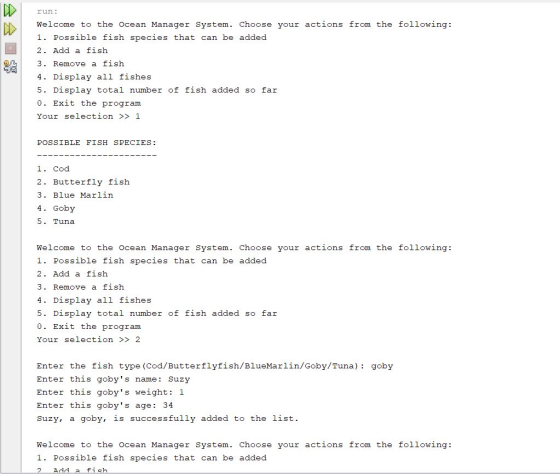
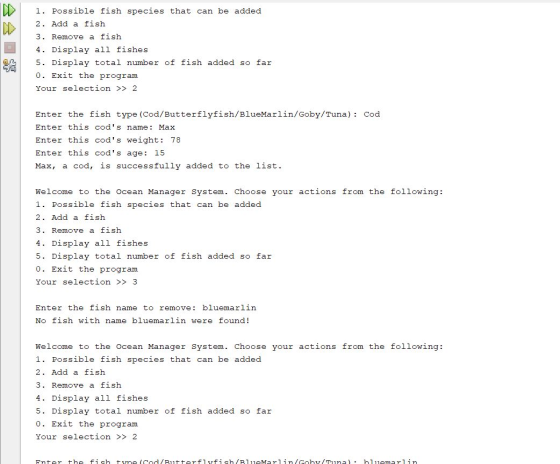
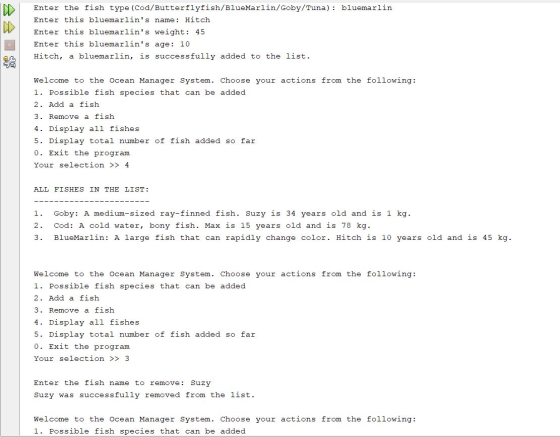
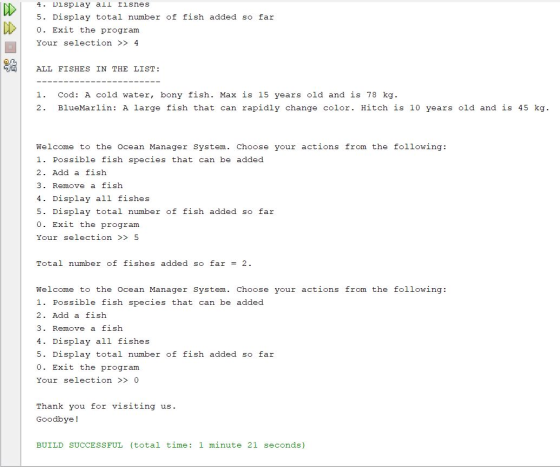
Add Answer to:
JAVA LAB PLEASE ANSWER:
Environment Woman has a new task: replenishing the ocean with
fish! She...
I need the following written in Java please, thank you ' We want you to implement...
 I need the following written in Java please, thank you
'
We want you to implement a java class that will show details on users and throw exceptions where needed. The following requirements specify what fields you are expected to implement in your User class: - A private String firstName that specifies the first name of the user - A private String lastName that specifies the last name of the user - A private int age that specifies user's age...
I need the following written in Java please, thank you
'
We want you to implement a java class that will show details on users and throw exceptions where needed. The following requirements specify what fields you are expected to implement in your User class: - A private String firstName that specifies the first name of the user - A private String lastName that specifies the last name of the user - A private int age that specifies user's age...
Java Programming The following is about creating a class Fish and testing it. In every part,...
Java Programming The following is about creating a class Fish and testing it. In every part, correct any syntax errors indicated by NetBeans until no such error messages. (i) Create a class Fish with the attributes name and price. The attributes are used to store the name and the price of the fish respectively. Choose suitable types for them. You can copy the class Counter on p.17 of the unit and modify the content. Copy the content of the file...
create a new Java application called "WeightedAvgDataAnalyzer" (without the quotation marks), that modifies the DataAnalyzer.java in...
create a new Java application called "WeightedAvgDataAnalyzer" (without the quotation marks), that modifies the DataAnalyzer.java in Horstmann Section 7.5, pp. 350-351 according to the specifications below. The input file should be called 'data.txt' and should be created according to the highlighted instructions below. Note that even though you know the name of the input file, you should not hard-code this name into your program. Instead, prompt the user for the name of the input file. The input file should contain...
create a new Java application called "CheckString" (without the quotation marks) according to the following guidelines....
create a new Java application called "CheckString" (without the quotation marks) according to the following guidelines. ** Each method below, including main, should handle (catch) any Exceptions that are thrown. ** ** If an Exception is thrown and caught, print the Exception's message to the command line. ** Write a complete Java method called checkWord that takes a String parameter called word, returns nothing, and is declared to throw an Exception of type Exception. In the method, check if the...
USE JAVA PLEASE And answer all questions Question 5.1 1. Write a program that reads in...
USE JAVA PLEASE And answer all questions Question 5.1 1. Write a program that reads in a number n and then reads n strings. it then reads a string s from the user and gives you the word that was typed in after s. Example input: 4 Joe Steve John Mike Steve Example output: John Example input: 7 Up Down Left Right North South East Right Example output: North 2. Remember to call your class Program Question 5.2 1. Write...
!!!!!!!Java!!!!! When you are confident that your methods work properly and that you can generate random...
!!!!!!!Java!!!!! When you are confident that your methods work properly and that you can generate random text with my generateText method, you can move on to the second step. Create a third class called Generator within the cs1410 package. Make class. This class should have a main method that provides a user interface for random text generation. Your interface should work as follows: Main should bring up an input dialog with which the user can enter the desired analysis level...
Java Description You are given the task of reading a student’s name, semester letter grades, and...
Java Description You are given the task of reading a student’s name, semester letter grades, and semester hours attempted from one file; calculating the semester GPA; and writing the student’s name and semester GPA to another file. GPA Calculation GPA = Total Quality Points / Hours Attempted Quality Points for each class = Grade Conversion Points * Hours Attempted The letter grades with corresponding point conversions is based upon the following table: Letter Grade Conversion Points A 4 points B...
The purpose of this is to use inheritance, polymorphism, object comparison, sorting, reading binary files, and...
 The purpose of this is to use inheritance, polymorphism, object
comparison, sorting, reading binary files, and writing binary
files. In this application you will modify a previous project. The
previous project created a hierarchy of classes modeling a company
that produces and sells parts. Some of the parts were purchased and
resold. These were modeled by the PurchasedPart class. Some of the
parts were manufactured and sold. These were modeled by the
ManufacturedPart class. In this you will add a...
The purpose of this is to use inheritance, polymorphism, object
comparison, sorting, reading binary files, and writing binary
files. In this application you will modify a previous project. The
previous project created a hierarchy of classes modeling a company
that produces and sells parts. Some of the parts were purchased and
resold. These were modeled by the PurchasedPart class. Some of the
parts were manufactured and sold. These were modeled by the
ManufacturedPart class. In this you will add a...
Create java code Make sure it runs Part 1: Your little sister has decided that she...
Create java code Make sure it runs Part 1: Your little sister has decided that she wants a pet. You love animals and want to further engender her love of animals, but, well, her last pet, goldie the goldfish, didn’t fare too well. So you went on the hunt for a different kind of pet that will fit the bill. Much to your joy, you have found the perfect pet for her… a Bee farm! They are easy to take...
Program Overview This brief exercise is designed for you to consider how reference variables behave when...
 Program Overview This brief exercise is designed for you to consider how reference variables behave when you are passing them as arguments by-value. Instructions Name your class References.java. 1. Implement the following methods. 1.1 Method name: readStudentNames Purpose: This method accepts an array of strings as a parameter. It loops through the array and asks the user to input names. It populates the array of strings with the names. Parameters: an array of Strings, stringArray Return type: void In the...
 I need the following written in Java please, thank you
'
We want you to implement a java class that will show details on users and throw exceptions where needed. The following requirements specify what fields you are expected to implement in your User class: - A private String firstName that specifies the first name of the user - A private String lastName that specifies the last name of the user - A private int age that specifies user's age...
I need the following written in Java please, thank you
'
We want you to implement a java class that will show details on users and throw exceptions where needed. The following requirements specify what fields you are expected to implement in your User class: - A private String firstName that specifies the first name of the user - A private String lastName that specifies the last name of the user - A private int age that specifies user's age...
 The purpose of this is to use inheritance, polymorphism, object
comparison, sorting, reading binary files, and writing binary
files. In this application you will modify a previous project. The
previous project created a hierarchy of classes modeling a company
that produces and sells parts. Some of the parts were purchased and
resold. These were modeled by the PurchasedPart class. Some of the
parts were manufactured and sold. These were modeled by the
ManufacturedPart class. In this you will add a...
The purpose of this is to use inheritance, polymorphism, object
comparison, sorting, reading binary files, and writing binary
files. In this application you will modify a previous project. The
previous project created a hierarchy of classes modeling a company
that produces and sells parts. Some of the parts were purchased and
resold. These were modeled by the PurchasedPart class. Some of the
parts were manufactured and sold. These were modeled by the
ManufacturedPart class. In this you will add a...
 Program Overview This brief exercise is designed for you to consider how reference variables behave when you are passing them as arguments by-value. Instructions Name your class References.java. 1. Implement the following methods. 1.1 Method name: readStudentNames Purpose: This method accepts an array of strings as a parameter. It loops through the array and asks the user to input names. It populates the array of strings with the names. Parameters: an array of Strings, stringArray Return type: void In the...
Most questions answered within 3 hours.
-
Where is the error in this code sequence?
String s1 = "Hello";
String s2 = "ello";...
asked 10 months ago -
Financial data for Joel de Paris, Inc., for last year
follow:
Joel de Paris, Inc.
Balance...
asked 10 months ago -
Consider this reaction:
Al2(SO4)3 (aq)+ BaCl3
(aq) Al2Cl6 (aq)- +
3BaSO4(s) . What is the...
asked 10 months ago -
Suppose that Savneet is considering increasing her
recent random sample from 20 car rentals to 40...
asked 10 months ago -
Trucks arrive at an unloading terminal at an average rate of 120
per hour.
Trucks arrive...
asked 10 months ago -
Why are methanol and ethanol completely soluble in water while
octanol is not very little soluble....
asked 10 months ago -
A facilities manager at a university reads in a research report
that the mean amount of...
asked 10 months ago -
When the CuSO4 is rehydrated by adding water to the anhydrous
compound, is this an endothermic...
asked 10 months ago -
A ray of sunlight is passing from diamond into crown glass; the
angle of incidence is...
asked 10 months ago -
A block of mass 0.249 kg is placed on top of a light, vertical
spring of...
asked 10 months ago -
how do the kidneys compensate in the presences of acidosis
a) trigger hyperventilate
b) reserve acid...
asked 10 months ago -
Question 501 pts
The rental rate of capital to the firm increases. Which of the
following...
asked 10 months ago