Invoice Total Calculator Enter the values below and click "Calculate". Customer Type: Invoice Subtotal: Discount Percent:...
Invoice Total Calculator
Enter the values below and click "Calculate".
Customer Type:
Invoice Subtotal:
Discount Percent: %
Discount Amount:
Invoice Total:
Homework Answers
Here is code in C#:
InvoiceCalculator.cs:
using System;
using System.Windows.Forms;
namespace WindowsFormsApp
{
public partial class InvoiceCalculator : Form
{
public InvoiceCalculator()
{
InitializeComponent();
}
private void btnCalculate_Click(object sender, EventArgs
e)
{
double invSub = double.Parse(txtInvSub.Text);
double perc = double.Parse(txtPerc.Text);
double discount = invSub * (perc / 100);
txtDisAmount.Text = discount.ToString();
txtInvTotal.Text = (invSub - discount).ToString();
}
}
}
InvoiceCalculator.Designer.cs:
namespace WindowsFormsApp
{
partial class InvoiceCalculator
{
/// <summary>
/// Required designer variable.
/// </summary>
private System.ComponentModel.IContainer components = null;
/// <summary>
/// Clean up any resources being used.
/// </summary>
/// <param name="disposing">true if managed resources should
be disposed; otherwise, false.</param>
protected override void Dispose(bool disposing)
{
if (disposing && (components != null))
{
components.Dispose();
}
base.Dispose(disposing);
}
#region Windows Form Designer generated code
/// <summary>
/// Required method for Designer support - do not modify
/// the contents of this method with the code editor.
/// </summary>
private void InitializeComponent()
{
this.label1 = new System.Windows.Forms.Label();
this.txtCusType = new System.Windows.Forms.TextBox();
this.btnCalculate = new System.Windows.Forms.Button();
this.txtInvSub = new System.Windows.Forms.TextBox();
this.label2 = new System.Windows.Forms.Label();
this.txtPerc = new System.Windows.Forms.TextBox();
this.label3 = new System.Windows.Forms.Label();
this.txtDisAmount = new System.Windows.Forms.TextBox();
this.label4 = new System.Windows.Forms.Label();
this.txtInvTotal = new System.Windows.Forms.TextBox();
this.label5 = new System.Windows.Forms.Label();
this.SuspendLayout();
//
// label1
//
this.label1.AutoSize = true;
this.label1.Location = new System.Drawing.Point(23, 19);
this.label1.Name = "label1";
this.label1.Size = new System.Drawing.Size(78, 13);
this.label1.TabIndex = 0;
this.label1.Text = "Customer Type";
//
// txtCusType
//
this.txtCusType.Location = new System.Drawing.Point(129, 16);
this.txtCusType.Name = "txtCusType";
this.txtCusType.Size = new System.Drawing.Size(100, 20);
this.txtCusType.TabIndex = 1;
//
// btnCalculate
//
this.btnCalculate.Location = new System.Drawing.Point(90,
168);
this.btnCalculate.Name = "btnCalculate";
this.btnCalculate.Size = new System.Drawing.Size(75, 23);
this.btnCalculate.TabIndex = 2;
this.btnCalculate.Text = "Calculate";
this.btnCalculate.UseVisualStyleBackColor = true;
this.btnCalculate.Click += new
System.EventHandler(this.btnCalculate_Click);
//
// txtInvSub
//
this.txtInvSub.Location = new System.Drawing.Point(130, 46);
this.txtInvSub.Name = "txtInvSub";
this.txtInvSub.Size = new System.Drawing.Size(100, 20);
this.txtInvSub.TabIndex = 4;
//
// label2
//
this.label2.AutoSize = true;
this.label2.Location = new System.Drawing.Point(23, 49);
this.label2.Name = "label2";
this.label2.Size = new System.Drawing.Size(84, 13);
this.label2.TabIndex = 3;
this.label2.Text = "Invoice Subtotal";
//
// txtPerc
//
this.txtPerc.Location = new System.Drawing.Point(129, 72);
this.txtPerc.Name = "txtPerc";
this.txtPerc.Size = new System.Drawing.Size(100, 20);
this.txtPerc.TabIndex = 6;
//
// label3
//
this.label3.AutoSize = true;
this.label3.Location = new System.Drawing.Point(23, 75);
this.label3.Name = "label3";
this.label3.Size = new System.Drawing.Size(89, 13);
this.label3.TabIndex = 5;
this.label3.Text = "Discount Percent";
//
// txtDisAmount
//
this.txtDisAmount.Location = new System.Drawing.Point(129,
98);
this.txtDisAmount.Name = "txtDisAmount";
this.txtDisAmount.ReadOnly = true;
this.txtDisAmount.Size = new System.Drawing.Size(100, 20);
this.txtDisAmount.TabIndex = 8;
//
// label4
//
this.label4.AutoSize = true;
this.label4.Location = new System.Drawing.Point(22, 98);
this.label4.Name = "label4";
this.label4.Size = new System.Drawing.Size(88, 13);
this.label4.TabIndex = 7;
this.label4.Text = "Discount Amount";
//
// txtInvTotal
//
this.txtInvTotal.Location = new System.Drawing.Point(130,
123);
this.txtInvTotal.Name = "txtInvTotal";
this.txtInvTotal.ReadOnly = true;
this.txtInvTotal.Size = new System.Drawing.Size(100, 20);
this.txtInvTotal.TabIndex = 10;
//
// label5
//
this.label5.AutoSize = true;
this.label5.Location = new System.Drawing.Point(23, 126);
this.label5.Name = "label5";
this.label5.Size = new System.Drawing.Size(69, 13);
this.label5.TabIndex = 9;
this.label5.Text = "Invoice Total";
//
// InvoiceCalculator
//
this.AutoScaleDimensions = new System.Drawing.SizeF(6F, 13F);
this.AutoScaleMode = System.Windows.Forms.AutoScaleMode.Font;
this.ClientSize = new System.Drawing.Size(267, 219);
this.Controls.Add(this.txtInvTotal);
this.Controls.Add(this.label5);
this.Controls.Add(this.txtDisAmount);
this.Controls.Add(this.label4);
this.Controls.Add(this.txtPerc);
this.Controls.Add(this.label3);
this.Controls.Add(this.txtInvSub);
this.Controls.Add(this.label2);
this.Controls.Add(this.btnCalculate);
this.Controls.Add(this.txtCusType);
this.Controls.Add(this.label1);
this.Name = "InvoiceCalculator";
this.Text = "InvoiceCalculator";
this.ResumeLayout(false);
this.PerformLayout();
}
#endregion
private System.Windows.Forms.Label label1;
private System.Windows.Forms.TextBox txtCusType;
private System.Windows.Forms.Button btnCalculate;
private System.Windows.Forms.TextBox txtInvSub;
private System.Windows.Forms.Label label2;
private System.Windows.Forms.TextBox txtPerc;
private System.Windows.Forms.Label label3;
private System.Windows.Forms.TextBox txtDisAmount;
private System.Windows.Forms.Label label4;
private System.Windows.Forms.TextBox txtInvTotal;
private System.Windows.Forms.Label label5;
}
}
Output:
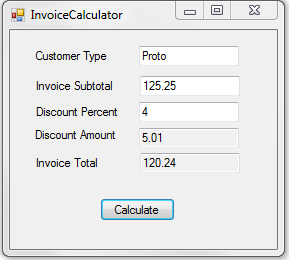
Add Answer to:
Invoice Total Calculator
Enter the values below and click "Calculate".
Customer Type:
Invoice Subtotal:
Discount Percent:...
6-1 Test and debug the Invoice Application i need help with this please.. all help is...
 6-1 Test and debug the Invoice Application
i need help with this please.. all help is appreciated
Source code Java:
import java.util.Scanner;
import java.text.NumberFormat;
public class InvoiceApp {
public static void main(String[] args) {
Scanner sc = new Scanner(System.in);
String choice = "y";
while (!choice.equalsIgnoreCase("n")) {
// get the input from the user
System.out.print("Enter customer type (r/c): ");
String customerType = sc.next();
System.out.print("Enter subtotal: ");
double subtotal = sc.nextDouble();
// get the discount percent
double discountPercent = 0.0;
switch(customerType) {...
6-1 Test and debug the Invoice Application
i need help with this please.. all help is appreciated
Source code Java:
import java.util.Scanner;
import java.text.NumberFormat;
public class InvoiceApp {
public static void main(String[] args) {
Scanner sc = new Scanner(System.in);
String choice = "y";
while (!choice.equalsIgnoreCase("n")) {
// get the input from the user
System.out.print("Enter customer type (r/c): ");
String customerType = sc.next();
System.out.print("Enter subtotal: ");
double subtotal = sc.nextDouble();
// get the discount percent
double discountPercent = 0.0;
switch(customerType) {...
Calculate the total amount each customer must pay based on the following invoice terms and payment...
 Calculate the total amount each customer must pay
based on the following invoice terms and payment
dates.
Invoice Date. Invoice Amount Credit
terms.
January 1.
$74,500.
2/10,net 30
March. 15.
$8,750.
1/15,net 30
July
1.
$52,000.
12 percent APR
Payment Date
January 10
April 2
December 31
the total amount each customer must pay ceramente Date A d Terme 210, met nero AM 152.000 model to preparan ng sch Calculate toals and Total wed
Calculate the total amount each customer must pay
based on the following invoice terms and payment
dates.
Invoice Date. Invoice Amount Credit
terms.
January 1.
$74,500.
2/10,net 30
March. 15.
$8,750.
1/15,net 30
July
1.
$52,000.
12 percent APR
Payment Date
January 10
April 2
December 31
the total amount each customer must pay ceramente Date A d Terme 210, met nero AM 152.000 model to preparan ng sch Calculate toals and Total wed
The Murach's Visual Basic 2015 Book And Visual Studio Exercise 7-2 Enhance the Invoice Total application...
The Murach's Visual Basic 2015 Book And Visual Studio Exercise 7-2 Enhance the Invoice Total application If you did exercise 6-1 in the last chapter, this exercise asks you to add data validation and exception handling to it. 1. Copy the Invoice Total application from your C:\VB 2015\Chapter 06 directory to your Chapter 07 directory. This should be your solution to exercise 6-1 of the last chapter. 2. If your application has both a Sub procedure and a Function procedure...
Write a C++ program that will calculate the total amount of money for book sales at...
Write a C++ program that will calculate the total amount of money for book sales at an online store. For each sale, your program should ask the number of books sold and then the price for each book and the shipping method (‘S’ for standard shipping and ‘E’ for expedited shipping). The program will produce a bill showing the subtotal, the sales tax, the discount, the shipping charge, and the final total for the sale. The program will continue processing...
A company offers customer discount based on the following rules: Club member: • Total sales <...
A company offers customer discount based on the following rules: Club member: • Total sales < 200 : 5% discount • Total sales >=200: 7% discount. Non member: • Total sales <= 500: no discount • Total sales > 500: 5% discount Complete the following program to compute and show the discount and net pay. member=input(‘Are you a member?(y/n)) amount= float(input('Enter total sales:')) Thanks!
There are three type of Customer say Classic, Gold and Platinum. Each type get different discount...
There are three type of Customer say Classic, Gold and Platinum. Each type get different discount depends of the purchase amount per below table. Create a project which will start once and can do this calculation and number of times user want. Program will terminate once user press 0(Zero). Make use of Interface, most of the OOP concepts. One class should not have more than one responsibility. Project should be extensible. If new discount type is to introduce in future...
Case Study 3.4 Calculating Insurance Math Worksheet Name: Click here to enter your name. INSTRUCTIONS: Calculate...
 Case Study 3.4 Calculating Insurance Math Worksheet Name: Click here to enter your name. INSTRUCTIONS: Calculate the insurance in each of the following situations. Upload your completed worksheet to the 3.4 Case Study dropbox. A. A patient's insurance policy states: Annual deductible: $300.00 Coinsurance: 70-30 This year the patient has made payments totaling $533 to all providers. Today the patient has an office visit (fee: S80). The patient presents a credit card for payment of today's bill What is the...
Annual credit sales of Nadak Co. total $336.6 million. The firm gives a 175% cash discount...
 Annual credit sales of Nadak Co. total $336.6 million. The firm gives a 175% cash discount for payment within 10 days of the invoice date; 80% of Nadak's accounts receivable are paid within the discount period. Required: a. What is the total amount of cash discounts allowed in a year? (Enter your answer in millions rounded to 2 decimal places.) Total amount million b. Calculate the approximate annual rate of return on investment that Nadak Co.'s cash discount terms represent...
BUSINESS DECISION: THE ULTIMATE TRADE DISCOUNT A General Motors incentive program designed to reduce inventory of...
BUSINESS DECISION: THE ULTIMATE TRADE DISCOUNT A General Motors incentive program designed to reduce inventory of certain low-selling models offers a $6,600 extra dealer incentive for each of these vehicles that the dealer moved into its rental or service fleets. As the accountant for a dealership with a number of these vehicles left in stock, your manager has asked you to calculate certain invoice figures. The normal trade discount from GM is 13%. If the average sticker price (list price)...
Annual credit sales of Nadak Co. total $336.6 million. The firm gives a 1.75% cash discount...
 Annual credit sales of Nadak Co. total $336.6 million. The firm gives a 1.75% cash discount for payment within 10 days of the invoice date: 80% of Nadak's accounts receivable are paid within the discount period. Required: a. What is the total amount of cash discounts allowed in a year? (Enter your answer in millions rounded to 2 decimal places.) Answer is complete and correct. $ 4.71 million amount b. Calculate the approximate annual rate of return on investment that...
 6-1 Test and debug the Invoice Application
i need help with this please.. all help is appreciated
Source code Java:
import java.util.Scanner;
import java.text.NumberFormat;
public class InvoiceApp {
public static void main(String[] args) {
Scanner sc = new Scanner(System.in);
String choice = "y";
while (!choice.equalsIgnoreCase("n")) {
// get the input from the user
System.out.print("Enter customer type (r/c): ");
String customerType = sc.next();
System.out.print("Enter subtotal: ");
double subtotal = sc.nextDouble();
// get the discount percent
double discountPercent = 0.0;
switch(customerType) {...
6-1 Test and debug the Invoice Application
i need help with this please.. all help is appreciated
Source code Java:
import java.util.Scanner;
import java.text.NumberFormat;
public class InvoiceApp {
public static void main(String[] args) {
Scanner sc = new Scanner(System.in);
String choice = "y";
while (!choice.equalsIgnoreCase("n")) {
// get the input from the user
System.out.print("Enter customer type (r/c): ");
String customerType = sc.next();
System.out.print("Enter subtotal: ");
double subtotal = sc.nextDouble();
// get the discount percent
double discountPercent = 0.0;
switch(customerType) {...
 Calculate the total amount each customer must pay
based on the following invoice terms and payment
dates.
Invoice Date. Invoice Amount Credit
terms.
January 1.
$74,500.
2/10,net 30
March. 15.
$8,750.
1/15,net 30
July
1.
$52,000.
12 percent APR
Payment Date
January 10
April 2
December 31
the total amount each customer must pay ceramente Date A d Terme 210, met nero AM 152.000 model to preparan ng sch Calculate toals and Total wed
Calculate the total amount each customer must pay
based on the following invoice terms and payment
dates.
Invoice Date. Invoice Amount Credit
terms.
January 1.
$74,500.
2/10,net 30
March. 15.
$8,750.
1/15,net 30
July
1.
$52,000.
12 percent APR
Payment Date
January 10
April 2
December 31
the total amount each customer must pay ceramente Date A d Terme 210, met nero AM 152.000 model to preparan ng sch Calculate toals and Total wed
 Case Study 3.4 Calculating Insurance Math Worksheet Name: Click here to enter your name. INSTRUCTIONS: Calculate the insurance in each of the following situations. Upload your completed worksheet to the 3.4 Case Study dropbox. A. A patient's insurance policy states: Annual deductible: $300.00 Coinsurance: 70-30 This year the patient has made payments totaling $533 to all providers. Today the patient has an office visit (fee: S80). The patient presents a credit card for payment of today's bill What is the...
 Annual credit sales of Nadak Co. total $336.6 million. The firm gives a 175% cash discount for payment within 10 days of the invoice date; 80% of Nadak's accounts receivable are paid within the discount period. Required: a. What is the total amount of cash discounts allowed in a year? (Enter your answer in millions rounded to 2 decimal places.) Total amount million b. Calculate the approximate annual rate of return on investment that Nadak Co.'s cash discount terms represent...
 Annual credit sales of Nadak Co. total $336.6 million. The firm gives a 1.75% cash discount for payment within 10 days of the invoice date: 80% of Nadak's accounts receivable are paid within the discount period. Required: a. What is the total amount of cash discounts allowed in a year? (Enter your answer in millions rounded to 2 decimal places.) Answer is complete and correct. $ 4.71 million amount b. Calculate the approximate annual rate of return on investment that...
Most questions answered within 3 hours.
-
Where is the error in this code sequence?
String s1 = "Hello";
String s2 = "ello";...
asked 10 months ago -
Financial data for Joel de Paris, Inc., for last year
follow:
Joel de Paris, Inc.
Balance...
asked 10 months ago -
Consider this reaction:
Al2(SO4)3 (aq)+ BaCl3
(aq) Al2Cl6 (aq)- +
3BaSO4(s) . What is the...
asked 10 months ago -
Suppose that Savneet is considering increasing her
recent random sample from 20 car rentals to 40...
asked 10 months ago -
Trucks arrive at an unloading terminal at an average rate of 120
per hour.
Trucks arrive...
asked 10 months ago -
Why are methanol and ethanol completely soluble in water while
octanol is not very little soluble....
asked 10 months ago -
A facilities manager at a university reads in a research report
that the mean amount of...
asked 10 months ago -
When the CuSO4 is rehydrated by adding water to the anhydrous
compound, is this an endothermic...
asked 10 months ago -
A ray of sunlight is passing from diamond into crown glass; the
angle of incidence is...
asked 10 months ago -
A block of mass 0.249 kg is placed on top of a light, vertical
spring of...
asked 10 months ago -
how do the kidneys compensate in the presences of acidosis
a) trigger hyperventilate
b) reserve acid...
asked 10 months ago -
Question 501 pts
The rental rate of capital to the firm increases. Which of the
following...
asked 10 months ago