hello need help with making a simple game application in Xcode with using the swift language...
hello need help with making a simple game application in Xcode with using the swift language . any help would appreciate it . thanks
Homework Answers
Below is the solution:
Rock, Paper, Scissor game to play with computer that will show the your score, computer score and draw score how many times.
create a view on the IOS Main.storyboard:
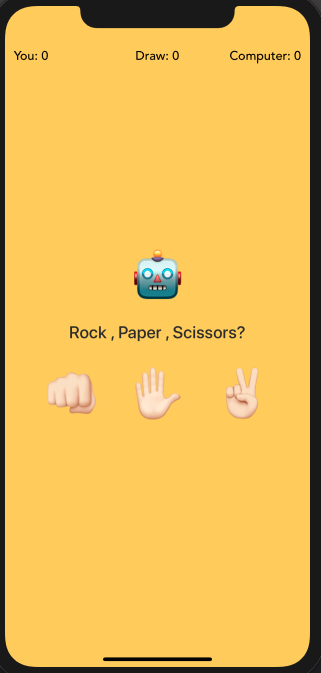
In a view controller file:
import UIKit
import GameplayKit
class RPSVC: UIViewController {
//declare the variable
var drawScoreInt : Int = 0
var userScoreInt : Int = 0
var computerScoreInt : Int = 0
var choice : String! //choice string will have
the choice
let randomChoice =
GKRandomDistribution(lowestValue: 0, highestValue: 2) //random
number
//create an button and label
@IBOutlet weak var rockBtn: UIButton!
@IBOutlet weak var paperBtn: UIButton!
@IBOutlet weak var scissorsBtn: UIButton!
@IBOutlet weak var computerChoice:
UILabel!
@IBOutlet weak var statusLabel: UILabel!
@IBOutlet weak var userChoice: UILabel!
@IBOutlet weak var userScore: UILabel!
@IBOutlet weak var drawScore: UILabel!
@IBOutlet weak var computerScore: UILabel!
override func viewDidLoad() {
super.viewDidLoad()
}
//button press event of rock
@IBAction func rockBtnPressed(_ sender: Any)
{
choice = "??"
getResult()
}
//button press event of paper
@IBAction func paperBtnPressed(_ sender: Any)
{
choice = "✋?"
getResult()
}
//button press event of rock
@IBAction func scissors(_ sender: Any) {
choice = "✌?"
getResult()
}
//find the result
func getResult() {
paperBtn.isHidden =
true
scissorsBtn.isHidden =
true
rockBtn.isHidden =
true
userChoice.isHidden =
false
userChoice.text =
choice
computerChoice.text =
randomSign() //get the random selection
statusLabel.text =
calculateResult(user: choice, computer: computerChoice.text!)
//call the function to calculate the result
DispatchQueue.main.asyncAfter(deadline: .now() + 0.7, execute:
{
self.resetItems() //reset the all items
})
}
//check for the which sgn has selected
func randomSign() -> String { //return a
String
let sign =
randomChoice.nextInt()
if sign == 0 { // return
rock sign
let rock : String = "??"
return rock
} else if sign == 1 {
//return paper
let paper : String = "✋?"
return paper
} else { //return
scissor
let scissors : String = "✌?"
return scissors
}
}
//function will calculate the result and return
as a string
func calculateResult(user: String , computer:
String) -> String {
if user == computer {
//check for the user selection and computer selection is same
drawScoreInt = drawScoreInt + 1 //add the draw sore
updateScores() //update score
return "Draw!" //return the draw string
} else if (user == "??"
&& computer == "✋?") || (user == "✋?" && computer
== "✌?") || (user == "✌?" && computer == "??") { //check
for the comuter win
UIView.animate(withDuration: 0.2, animations: { () -> Void in
//animation 2 secnds
self.view.backgroundColor = #colorLiteral(red: 0.9058823529, green:
0.2980392157, blue: 0.2352941176, alpha: 1) //background color to
red to 2 seconds
})
whiteLabels() //call the function
computerScoreInt = computerScoreInt + 1 //add the computer
sore
updateScores()
return "You Lose" //return the string
} else {
UIView.animate(withDuration: 0.2, animations: { () -> Void
in
self.view.backgroundColor = #colorLiteral(red: 0.1529411765, green:
0.6823529412, blue: 0.3764705882, alpha: 1) //background color to
green to 2 seconds
})
whiteLabels() // call the function
userScoreInt = userScoreInt + 1 //add the user sore
updateScores()
return "You win!" //return the string
}
}
func whiteLabels() {
UIView.animate(withDuration: 0.2, animations: { () -> Void
in
//set the all label text to white
self.userScore.textColor = #colorLiteral(red: 1, green: 1, blue: 1,
alpha: 1)
self.computerScore.textColor = #colorLiteral(red: 1, green: 1,
blue: 1, alpha: 1)
self.drawScore.textColor = #colorLiteral(red: 1, green: 1, blue: 1,
alpha: 1)
self.statusLabel.textColor = #colorLiteral(red: 1, green: 1, blue:
1, alpha: 1)
})
}
func resetItems() { //reset the items of the
UIView
UIView.animate(withDuration: 0.2, animations: { () -> Void
in
self.view.backgroundColor = #colorLiteral(red: 0.9960784314, green:
0.8039215686, blue: 0.2470588235, alpha: 1) //yellow
self.statusLabel.textColor = #colorLiteral(red: 0.1706000417,
green: 0.1706000417, blue: 0.1706000417, alpha: 1)
//transparent
self.userScore.textColor = #colorLiteral(red: 0.1706000417, green:
0.1706000417, blue: 0.1706000417, alpha: 1) //transparent
self.computerScore.textColor = #colorLiteral(red: 0.1706000417,
green: 0.1706000417, blue: 0.1706000417, alpha: 1)
//transparent
self.drawScore.textColor = #colorLiteral(red: 0.1706000417, green:
0.1706000417, blue: 0.1706000417, alpha: 1)//transparent
})
paperBtn.isHidden =
false //hide the button
scissorsBtn.isHidden =
false //hide the button
rockBtn.isHidden = false
//hide the button
userChoice.isHidden =
true
computerChoice.text =
"?"
statusLabel.text = "Rock
, Paper , Scissors?"
}
func updateScores() { //display the score to the
user, computer and draw score
userScore.text = "You:
\(Int(userScoreInt))"
drawScore.text = "Draw:
\(Int(drawScoreInt))"
computerScore.text =
"Computer: \(Int(computerScoreInt))"
}
override var prefersStatusBarHidden: Bool
{
return true
}
}
sample output:
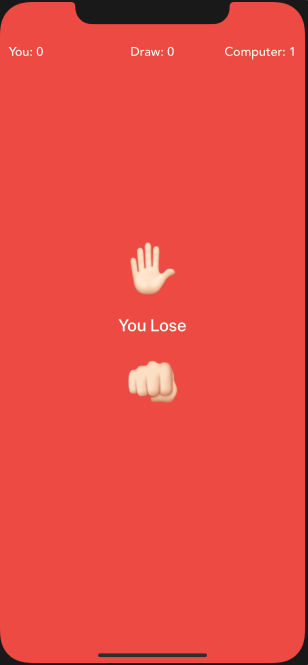
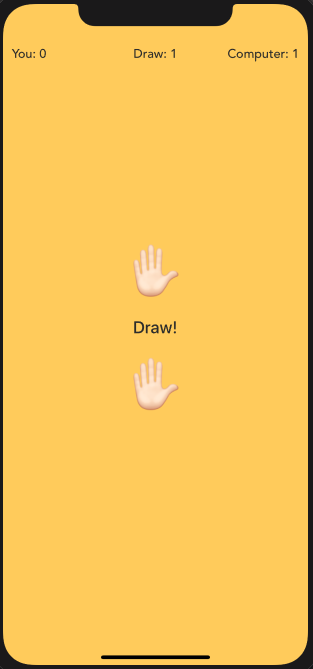
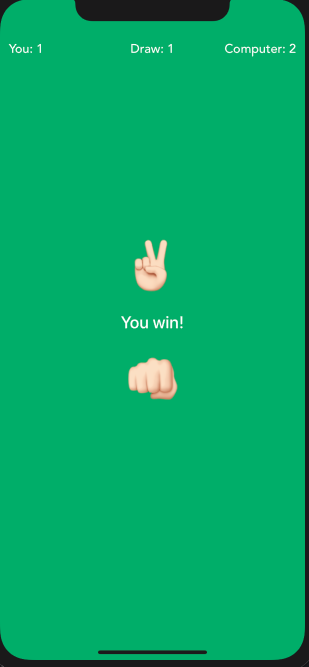
Add Answer to:
hello need help with making a simple game application in Xcode
with using the swift language...
Need help with Swift Please help. Instructions are in the help. Need help please 2. (15+15-30 points) Write in Swift 4 on 3 (three) different ways function say HelloTo: personName -> "Hello...
 Need help with Swift Please help. Instructions are in the
help. Need help please
2. (15+15-30 points) Write in Swift 4 on 3 (three) different ways function say HelloTo: personName -> "Hello," +personName+"!" Test the function sayHelloTo in: (a -3*5-15 points) Swift for Windows 1.8 Hint How to install Swift for Windows, for example, visit: メ繡for windows 1.8 Compiler Select swift file to compile or ru Select File Compile Run Compiler Settings double click on tet Seld to change setings...
Need help with Swift Please help. Instructions are in the
help. Need help please
2. (15+15-30 points) Write in Swift 4 on 3 (three) different ways function say HelloTo: personName -> "Hello," +personName+"!" Test the function sayHelloTo in: (a -3*5-15 points) Swift for Windows 1.8 Hint How to install Swift for Windows, for example, visit: メ繡for windows 1.8 Compiler Select swift file to compile or ru Select File Compile Run Compiler Settings double click on tet Seld to change setings...
Need Guessing game (number) with graphics (simple one) / python language
Need Guessing game (number) with graphics (simple one) / python language
Using Swift playground and / or the command line for macOS (open Xcode, create a new...
Using Swift playground and / or the command line for macOS (open Xcode, create a new Xcode project, macOS, command line tool), practice the following exercises: Exercise: Swift Variables Declare 2 variables/constants with some random values and any name of your choice Considering these 2 variables, one as a value of PI and other as a radius of circle, find the area of circle Print the area of circle Declare a string variable explicitly with value “Northeastern”. Declare a string...
Hello Sir/Madam, could you please help me for the code to write UNO CARD GAME using...
Hello Sir/Madam, could you please help me for the code to write UNO CARD GAME using following elements using JAVA Language: 1. Use of at least three Abstract Data Types 2. Use of inheritance and polymorphism 3. Use of recursion 4. Connection and use of a simple database 5. At least one sorting algorithm 6. At least one search algorithm 7. Use of a graphical user interface. Thank you in advance!
I need this code to be written in C language. Also, I'm using Xcode on mac...
 I need this code to be written in C language. Also, I'm using
Xcode on mac so I need the steps in order to know how to do
it.
Please save the program with the name 'files.c' Write a program that merges two files as follows. The two files are in the docsharing which you can download it. One file will contain usernames (usernames.txt): foster001 smith023 nyuyen002 The other file will contain passwords (passwords.txt): x34rdf3e P43e4rdd w32eds22 The program should...
I need this code to be written in C language. Also, I'm using
Xcode on mac so I need the steps in order to know how to do
it.
Please save the program with the name 'files.c' Write a program that merges two files as follows. The two files are in the docsharing which you can download it. One file will contain usernames (usernames.txt): foster001 smith023 nyuyen002 The other file will contain passwords (passwords.txt): x34rdf3e P43e4rdd w32eds22 The program should...
HELLO. I'M KINDA NEW TO JAVA AND I NEED HELP WITH A METHOD. USING RECURSION ONLY....
HELLO. I'M KINDA NEW TO JAVA AND I NEED HELP WITH A METHOD. USING RECURSION ONLY. public static int sumaEnRango (int start,int end) -RECURSIVE METHOD THAT RETURNS THE SUM OF ALL THE CONSECUTIVE INTEGER NUMBERS BETWEEN "START" AND "END. IT ALSO RETURNS 0 IN CASE "START" IS GREATER THAN "END" THIS METHOD RETURNS AN ARITHMERIC EXCEPTION IN CASE THE PARAMETER NUMBER IS NEGATIVE I KNOW THIS IS SIMPLE METHOD BUT I'M STILL CONFUSED WHEN USING RECURSION. THANKS A LOT !!!
Can anyone help me make a simple maze using C++? Not an actual game just a...
Can anyone help me make a simple maze using C++? Not an actual game just a maze. I'm learning the basics of C++ and I'm already stumped. I basically need C++ code to create a simple 32x32 ascii portrait of a maze. Please if anyone is a C++ I need some help thank you!
please i need help with the pseudocode and actual code of making a concordance program using...
please i need help with the pseudocode and actual code of making a concordance program using C programming language
Using java in android studio, I need help in making a barcode scanner thanks for the...
Using java in android studio, I need help in making a barcode scanner thanks for the help
Hello, I need help with the function below, The language I am using is Ocaml open...
Hello, I need help with the function below, The language I am using is Ocaml open Printf let () = for i = 1 to Array.length Sys.argv - 1 do if i + 1 <> Array.length Sys.argv then ( if Sys.argv.(i) > Sys.argv.(i+1) then ( --> printf "%s\n" Sys.argv.(i+1); ) else printf "%s\n" Sys.argv.(i); ) else printf "%s\n" Sys.argv.(i) done;; the function is taking command arguments and print them in...
 Need help with Swift Please help. Instructions are in the
help. Need help please
2. (15+15-30 points) Write in Swift 4 on 3 (three) different ways function say HelloTo: personName -> "Hello," +personName+"!" Test the function sayHelloTo in: (a -3*5-15 points) Swift for Windows 1.8 Hint How to install Swift for Windows, for example, visit: メ繡for windows 1.8 Compiler Select swift file to compile or ru Select File Compile Run Compiler Settings double click on tet Seld to change setings...
Need help with Swift Please help. Instructions are in the
help. Need help please
2. (15+15-30 points) Write in Swift 4 on 3 (three) different ways function say HelloTo: personName -> "Hello," +personName+"!" Test the function sayHelloTo in: (a -3*5-15 points) Swift for Windows 1.8 Hint How to install Swift for Windows, for example, visit: メ繡for windows 1.8 Compiler Select swift file to compile or ru Select File Compile Run Compiler Settings double click on tet Seld to change setings...
 I need this code to be written in C language. Also, I'm using
Xcode on mac so I need the steps in order to know how to do
it.
Please save the program with the name 'files.c' Write a program that merges two files as follows. The two files are in the docsharing which you can download it. One file will contain usernames (usernames.txt): foster001 smith023 nyuyen002 The other file will contain passwords (passwords.txt): x34rdf3e P43e4rdd w32eds22 The program should...
I need this code to be written in C language. Also, I'm using
Xcode on mac so I need the steps in order to know how to do
it.
Please save the program with the name 'files.c' Write a program that merges two files as follows. The two files are in the docsharing which you can download it. One file will contain usernames (usernames.txt): foster001 smith023 nyuyen002 The other file will contain passwords (passwords.txt): x34rdf3e P43e4rdd w32eds22 The program should...
Most questions answered within 3 hours.
-
Where is the error in this code sequence?
String s1 = "Hello";
String s2 = "ello";...
asked 10 months ago -
Financial data for Joel de Paris, Inc., for last year
follow:
Joel de Paris, Inc.
Balance...
asked 10 months ago -
Consider this reaction:
Al2(SO4)3 (aq)+ BaCl3
(aq) Al2Cl6 (aq)- +
3BaSO4(s) . What is the...
asked 10 months ago -
Suppose that Savneet is considering increasing her
recent random sample from 20 car rentals to 40...
asked 10 months ago -
Trucks arrive at an unloading terminal at an average rate of 120
per hour.
Trucks arrive...
asked 10 months ago -
Why are methanol and ethanol completely soluble in water while
octanol is not very little soluble....
asked 10 months ago -
A facilities manager at a university reads in a research report
that the mean amount of...
asked 10 months ago -
When the CuSO4 is rehydrated by adding water to the anhydrous
compound, is this an endothermic...
asked 10 months ago -
A ray of sunlight is passing from diamond into crown glass; the
angle of incidence is...
asked 10 months ago -
A block of mass 0.249 kg is placed on top of a light, vertical
spring of...
asked 10 months ago -
how do the kidneys compensate in the presences of acidosis
a) trigger hyperventilate
b) reserve acid...
asked 10 months ago -
Question 501 pts
The rental rate of capital to the firm increases. Which of the
following...
asked 10 months ago