Write a program using JAVAFX that collects: a) hourly rate of pay in a textbox; b)...
Write a program using JAVAFX that collects: a) hourly rate of pay in a textbox; b) hours worked in a textbox; c) a radio button indicating weekly or bi-weekly (never both); and d) a button labelled Net Pay. Using the information in these fields, calculate and display in appropriate non-editable text boxes: i) Gross pay (hours x rate); ii) Canada Pension Plan (4% of gross pay over $65 per week); iii) Employment Insurance (2% of gross pay); iv) income tax (20% of gross pay over $230 per week); and finally v) Net Pay. Design the interface to be neat and professional.
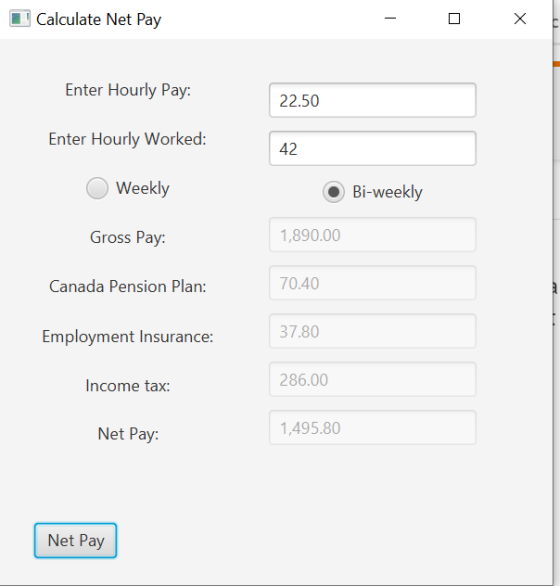
Test the program with the following numbers: a) 42 hours @ $22.50/hr - for two weeks
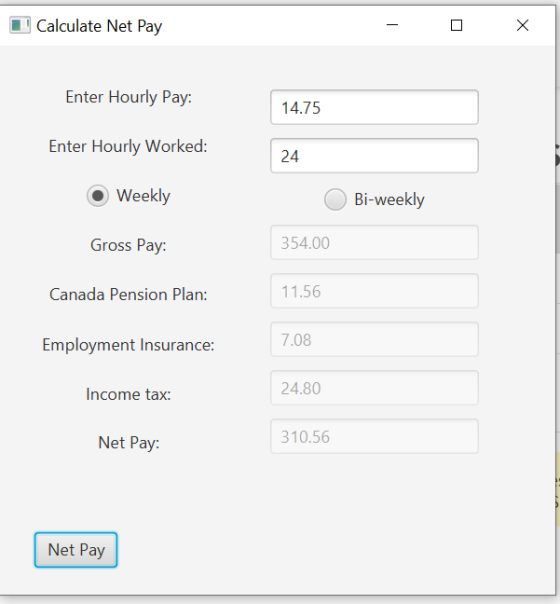
b) 24 hours @ $14.75/hr - for one week
c) 86 hours @ $32.00/hr – for two weeks
d) 34 hours @ $21.80/hr – for one week
ONLY JAVAFX TO BE USED.
Homework Answers
import javafx.application.Application;
import javafx.stage.Stage;
import javafx.scene.Scene;
import javafx.scene.layout.HBox;
import javafx.scene.layout.VBox;
import javafx.geometry.Pos;
import javafx.geometry.Insets;
import javafx.scene.control.Label;
import javafx.scene.control.RadioButton;
import javafx.scene.control.TextField;
import javafx.scene.control.ToggleGroup;
import javafx.scene.control.Button;
import javafx.event.EventHandler;
import javafx.event.ActionEvent;
import javafx.event.Event;
import javafx.scene.layout.FlowPane;
public class Payment extends Application {
// Fields
private TextField hourlyPayTextField;
private TextField hoursWorkedTextField;
private TextField grossPayTextField;
private TextField canadaPensionTextField;
private TextField insuranceTextField;
private TextField taxTextField;
private TextField netPayTextField;
private Label hourlyPayLabel, hoursWorkedLabel,
grossPayLabel, canadaPensionLabel, insuranceLabel, taxLabel,
netPayLabel;
private RadioButton weeklyButton, biWeeklyButton;
public static void main(String[] args) {
// Launch the application.
launch(args);
}
@Override
public void start(Stage primaryStage) {
// Create labels to display a
prompt.
hourlyPayLabel = new Label("Enter
Hourly Pay:");
hoursWorkedLabel = new Label("Enter
Hourly Worked:");
grossPayLabel = new Label("Gross
Pay:");
canadaPensionLabel = new
Label("Canada Pension Plan:");
insuranceLabel = new
Label("Employment Insurance:");
taxLabel = new Label("Income
tax:");
netPayLabel = new Label("Net
Pay:");
// Create TextFields for
input.
hourlyPayTextField = new
TextField();
hoursWorkedTextField = new
TextField();
grossPayTextField = new
TextField();
canadaPensionTextField = new
TextField();
insuranceTextField = new
TextField();
taxTextField = new
TextField();
netPayTextField = new
TextField();
// Disable resultant
textfield
grossPayTextField.setDisable(true);
canadaPensionTextField.setDisable(true);
insuranceTextField.setDisable(true);
taxTextField.setDisable(true);
netPayTextField.setDisable(true);
// radio buttons
weeklyButton = new
RadioButton("Weekly");
weeklyButton.setSelected(true);
biWeeklyButton = new
RadioButton("Bi-weekly");
// Add radio buttons to a toggle
group so that only one can be selected
ToggleGroup positionButtonGroup =
new ToggleGroup();
weeklyButton.setToggleGroup(positionButtonGroup);
biWeeklyButton.setToggleGroup(positionButtonGroup);
// Create a Button to perform
the calculation.
Button calcButton = new Button("Net
Pay");
// Register the event
handler.
calcButton.setOnAction(new
CalcButtonHandler());
// Put the labels in a
VBox.
VBox vbox1 = new VBox();
vbox1.getChildren().addAll(hourlyPayLabel, hoursWorkedLabel,
weeklyButton, grossPayLabel, canadaPensionLabel,
insuranceLabel, taxLabel, netPayLabel);
vbox1.setAlignment(Pos.CENTER);
Insets insets = new Insets(8, 10,
10, 10);
VBox.setMargin(hourlyPayLabel,
insets);
VBox.setMargin(hoursWorkedLabel,
insets);
VBox.setMargin(weeklyButton,
insets);
VBox.setMargin(grossPayLabel,
insets);
VBox.setMargin(canadaPensionLabel,
insets);
VBox.setMargin(insuranceLabel,
insets);
VBox.setMargin(taxLabel,
insets);
VBox.setMargin(netPayLabel,
insets);
// Put the text fields in a
VBox.
VBox vbox2 = new VBox();
vbox2.getChildren().addAll(hourlyPayTextField,
hoursWorkedTextField, biWeeklyButton, grossPayTextField,
canadaPensionTextField, insuranceTextField,
taxTextField, netPayTextField);
vbox2.setAlignment(Pos.CENTER);
insets = new Insets(5, 10, 5,
10);
VBox.setMargin(hourlyPayTextField,
insets);
VBox.setMargin(hoursWorkedTextField, insets);
VBox.setMargin(biWeeklyButton,
insets);
VBox.setMargin(grossPayTextField,
insets);
VBox.setMargin(canadaPensionTextField, insets);
VBox.setMargin(insuranceTextField,
insets);
VBox.setMargin(taxTextField,
insets);
VBox.setMargin(netPayTextField,
insets);
// Put the button in a
HBox
HBox hboxButton = new HBox();
hboxButton.getChildren().add(calcButton);
hboxButton.setAlignment(Pos.CENTER);
insets = new Insets(15, 55, 15,
15);
HBox.setMargin(calcButton,
insets);
// Put label and text field
panel to a HBox
HBox hbox = new HBox();
hbox.getChildren().addAll(vbox1,
vbox2);
hbox.setAlignment(Pos.CENTER);
insets = new Insets(10, 10, 10,
10);
HBox.setMargin(vbox1,
insets);
HBox.setMargin(vbox2, insets);
// Create a FlowPane and add
hbox and button to it
FlowPane pane = new
FlowPane();
pane.getChildren().addAll(hbox,
hboxButton);
insets = new Insets(10, 10, 10,
10);
FlowPane.setMargin(hbox,
insets);
FlowPane.setMargin(hboxButton,
insets);
// Create a Scene.
Scene scene = new Scene(pane);
// Add the Scene to the
Stage.
primaryStage.setScene(scene);
// Set the stage title.
primaryStage.setTitle("Calculate
Net Pay");
// Show the window.
primaryStage.show();
}
/*
* Event handler class for calcButton
*/
class CalcButtonHandler implements
EventHandler<ActionEvent> {
@Override
public void handle(ActionEvent
event) {
// Get the
hourlypay and hoursWorked from text fields
double hourlyPay
= Double.parseDouble(hourlyPayTextField.getText());
double
hoursWorked =
Double.parseDouble(hoursWorkedTextField.getText());
// Calculate
weekly grossPay
double grossPay
= hourlyPay * hoursWorked;
double tax =
0;
double canada =
0;
// Calculate
canada pension and tax
if (grossPay
> 65) {
canada = (grossPay - 65) * 4 / 100;
}
if (grossPay
> 230) {
tax = (grossPay - 230) * 20 / 100;
}
// If
bi-weekly button is selected
// double gross,
canada and tax
if
(biWeeklyButton.isSelected()) {
grossPay *= 2;
canada *= 2;
tax *= 2;
}
// Calculate
insurace and netPay
double insurance
= grossPay * 2 / 100;
double netPay =
grossPay - (canada + insurance + tax);
// Display
the results.
grossPayTextField.setText(String.format("%,.2f", grossPay));
canadaPensionTextField.setText(String.format("%,.2f",
canada));
insuranceTextField.setText(String.format("%,.2f",
insurance));
taxTextField.setText(String.format("%,.2f", tax));
netPayTextField.setText(String.format("%,.2f", netPay));
}
}
}
OUTPUT
Add Answer to:
Write a program using JAVAFX that collects: a) hourly rate of
pay in a textbox; b)...
use at least two functions in your program. . Write a program that calculates weekly payment....
use at least two functions in your program. . Write a program that calculates weekly payment. The program will ask the user full name, ID number (make one up), and hours worked. An hourly worker’s gross pay is basically his/her work hours that week multiplied by his/her regular hourly pay rate. However, after the first 40 work hours of the week, each additional work hour is paid at an overtime rate that is 1.5 times of the regular hourly rate....
Program Description: Write the pseudocode for a program that will calculate and display an employee’s gross...
Program Description: Write the pseudocode for a program that will calculate and display an employee’s gross pay. Input the number of hours an employee worked for each of the 5 days of the week. Add them all up to get his hours worked for the week. Weekly Pay is calculated by adding an employee’s normal pay plus any overtime pay. Normal hours are paid at $10/hr. Any over time is paid at $15/hr. Any hours over 40 are considered overtime....
Styles Program Description Write a C++ program that computes and displays employees' earnings. Prompt the user...
 Styles Program Description Write a C++ program that computes and displays employees' earnings. Prompt the user for type of employee (hourly ("h"or "H") or management ("'m" or "M") If the employee is management: . get the annual salary get the pay period (weekly ("w" or "W"), bi-weekly ("b" or "B") or monthly ("m" or e compute the gross salary for the pay period (Divide annual salary by 52 for weekly, 26 for bi-weekly, and 12 for monthly) deduct from gross...
Financial Accounting AC1130 Question #1 Complete the Payroll Register using the following information: Required: You are...
 Financial Accounting AC1130 Question #1 Complete the Payroll Register using the following information: Required: You are the Payroll Manager for Potter Corp. Complete the payroll register for the month ending January 31, 2020. Note: • Hours in excess of 160 in any given month are paid at time and a half to all employees, including salaried employees • The Qatari employees receive QR 700 Social Allowance per month • All Canadian employees contribute QR 60 towards social club fees. Ron...
 Styles Program Description Write a C++ program that computes and displays employees' earnings. Prompt the user for type of employee (hourly ("h"or "H") or management ("'m" or "M") If the employee is management: . get the annual salary get the pay period (weekly ("w" or "W"), bi-weekly ("b" or "B") or monthly ("m" or e compute the gross salary for the pay period (Divide annual salary by 52 for weekly, 26 for bi-weekly, and 12 for monthly) deduct from gross...
 Financial Accounting AC1130 Question #1 Complete the Payroll Register using the following information: Required: You are the Payroll Manager for Potter Corp. Complete the payroll register for the month ending January 31, 2020. Note: • Hours in excess of 160 in any given month are paid at time and a half to all employees, including salaried employees • The Qatari employees receive QR 700 Social Allowance per month • All Canadian employees contribute QR 60 towards social club fees. Ron...
Most questions answered within 3 hours.
-
Where is the error in this code sequence?
String s1 = "Hello";
String s2 = "ello";...
asked 10 months ago -
Financial data for Joel de Paris, Inc., for last year
follow:
Joel de Paris, Inc.
Balance...
asked 10 months ago -
Consider this reaction:
Al2(SO4)3 (aq)+ BaCl3
(aq) Al2Cl6 (aq)- +
3BaSO4(s) . What is the...
asked 10 months ago -
Suppose that Savneet is considering increasing her
recent random sample from 20 car rentals to 40...
asked 10 months ago -
Trucks arrive at an unloading terminal at an average rate of 120
per hour.
Trucks arrive...
asked 10 months ago -
Why are methanol and ethanol completely soluble in water while
octanol is not very little soluble....
asked 10 months ago -
A facilities manager at a university reads in a research report
that the mean amount of...
asked 10 months ago -
When the CuSO4 is rehydrated by adding water to the anhydrous
compound, is this an endothermic...
asked 10 months ago -
A ray of sunlight is passing from diamond into crown glass; the
angle of incidence is...
asked 10 months ago -
A block of mass 0.249 kg is placed on top of a light, vertical
spring of...
asked 10 months ago -
how do the kidneys compensate in the presences of acidosis
a) trigger hyperventilate
b) reserve acid...
asked 10 months ago -
Question 501 pts
The rental rate of capital to the firm increases. Which of the
following...
asked 10 months ago