How apply Gaussian and ideal highpass filters in the frequency domain on a grey-scale image on MA...
how apply Gaussian and ideal highpass filters in the frequency domain on a grey-scale image on MATLAB?
Homework Answers
Simple Matlab implementation of frequency domain filters on grayscale images including
1. gaussian low pass filter
2. butterworth low pass filter
3. gaussian high pass filter
4. butterworth high pass filter
5. high boost filter using gaussian high pass
6. high boost filter using butterworth high pass
functions with simple codes:
1.bhp(im,thresh,n)
function res = bhp(im,thresh,n)
% inputs
% im is the fourier transform of the image
% thresh is the cutoff circle radius
%outputs
% res is the filtered image
[r,c]=size(im);
d0=thresh;
d=zeros(r,c);
h=zeros(r,c);
for i=1:r
for j=1:c
d(i,j)= sqrt( (i-(r/2))^2 + (j-(c/2))^2);
end
end
for i=1:r
for j=1:c
h(i,j)= 1 / (1+ (d0/d(i,j))^(2*n) ) ;
end
end
for i=1:r
for j=1:c
res(i,j)=(h(i,j))*im(i,j);
end
end
2.blpf(im,thresh,n)
function res = blpf(im,thresh,n)
% inputs
% im is the fourier transform of the image
% thresh is the cutoff circle radius (1,2,3...)
% n is the order of the filter (1,2,3...)
%outputs
% res is the filtered image
[r,c]=size(im);
d0=thresh;
d=zeros(r,c);
h=zeros(r,c);
for i=1:r
for j=1:c
d(i,j)= sqrt( (i-(r/2))^2 + (j-(c/2))^2);
end
end
for i=1:r
for j=1:c
h(i,j)= 1 / (1+ (d(i,j)/d0)^(2*n) ) ;
end
end
for i=1:r
for j=1:c
res(i,j)=(h(i,j))*im(i,j);
end
end
3.Freqfilter.m
% simple implementation of frequency domain filters
clear all
%read input image
dim=imread('lena.pgm');
cim=double(dim);
[r,c]=size(cim);
r1=2*r;
c1=2*c;
pim=zeros((r1),(c1));
kim=zeros((r1),(c1));
%padding
for i=1:r
for j=1:c
pim(i,j)=cim(i,j);
end
end
%center the transform
for i=1:r
for j=1:c
kim(i,j)=pim(i,j)*((-1)^(i+j));
end
end
%2D fft
fim=fft2(kim);
n=1; %order for butterworth filter
thresh=10; % cutoff radius in frequency domain for filters
% % function call for low pass filters
% him=glp(fim,thresh); % gaussian low pass filter
% him=blpf(fim,thresh,n); % butterworth low pass filter
% % function calls for high pass filters
% him=ghp(fim,thresh); % gaussian low pass filter
% him=bhp(fim,thresh,n); %butterworth high pass filter
% % function call for high boost filtering
% him=hbg(fim,thresh); % using gaussian high pass filter
% him=hbb(fim,thresh,n); % using butterworth high pass filter
%inverse 2D fft
ifim=ifft2(him);
for i=1:r1
for j=1:c1
ifim(i,j)=ifim(i,j)*((-1)^(i+j));
end
end
% removing the padding
for i=1:r
for j=1:c
rim(i,j)=ifim(i,j);
end
end
% retaining the ral parts of the matrix
rim=real(rim);
rim=uint8(rim);
figure, imshow(rim);
% figure;
% subplot(2,3,1);imshow(dim);title('Original image');
% subplot(2,3,2);imshow(uint8(kim));title('Padding');
% subplot(2,3,3);imshow(uint8(fim));title('Transform centering');
% subplot(2,3,4);imshow(uint8(him));title('Fourier Transform');
% subplot(2,3,5);imshow(uint8(ifim));title('Inverse fourier transform');
% subplot(2,3,6);imshow(uint8(rim));title('Cropped image');
4. ghp(im,thresh)
function res = ghp(im,thresh)
% inputs
% im is the fourier transform of the image
% thresh is the cutoff circle radius
%outputs
% res is the filtered image
[r,c]=size(im);
d0=thresh;
d=zeros(r,c);
h=zeros(r,c);
for i=1:r
for j=1:c
d(i,j)= sqrt( (i-(r/2))^2 + (j-(c/2))^2);
end
end
for i=1:r
for j=1:c
h(i,j)=1- exp ( -( (d(i,j)^2)/(2*(d0^2)) ) );
end
end
for i=1:r
for j=1:c
res(i,j)=(h(i,j))*im(i,j);
end
end
5.glp(im,thresh)
function res = glp(im,thresh)
% inputs
% im is the fourier transform of the image
% thresh is the cutoff circle radius
%outputs
% res is the filtered image
[r,c]=size(im);
d0=thresh;
d=zeros(r,c);
h=zeros(r,c);
for i=1:r
for j=1:c
d(i,j)= sqrt( (i-(r/2))^2 + (j-(c/2))^2);
end
end
for i=1:r
for j=1:c
h(i,j)= exp ( -( (d(i,j)^2)/(2*(d0^2)) ) );
end
end
for i=1:r
for j=1:c
res(i,j)=(h(i,j))*im(i,j);
end
end
6.hbb(im,thresh,n)
function res = hbb(im,thresh,n)
% inputs
% im is the fourier transform of the image
% thresh is the cutoff circle radius
%outputs
% res is the filtered image
[r,c]=size(im);
d0=thresh;
d=zeros(r,c);
h=zeros(r,c);
A=1.75; % boost factor or coefficient
for i=1:r
for j=1:c
d(i,j)= sqrt( (i-(r/2))^2 + (j-(c/2))^2);
end
end
for i=1:r
for j=1:c
h(i,j)= 1 / (1+ (d0/d(i,j))^(2*n) ) ;
h(i,j)=(A-1)+h(i,j);
end
end
for i=1:r
for j=1:c
res(i,j)=(h(i,j))*im(i,j);
end
end
7.hbg(im,thresh)
function res = hbg(im,thresh)
% inputs
% im is the fourier transform of the image
% thresh is the cutoff circle radius
%outputs
% res is the boosted image
[r,c]=size(im);
d0=thresh;
d=zeros(r,c);
h=zeros(r,c);
for i=1:r
for j=1:c
d(i,j)= sqrt( (i-(r/2))^2 + (j-(c/2))^2);
end
end
A=1.75; % boost factor or coefficient
for i=1:r
for j=1:c
h(i,j)= 1-exp ( -( (d(i,j)^2)/(2*(d0^2)) ) );
h(i,j)=(A-1)+h(i,j);
end
end
for i=1:r
for j=1:c
res(i,j)=(h(i,j))*im(i,j);
end
end
****************************NOTE**************************
If there is any doubt, please reply in the comments.
If everything is clear, please rate positively :)
Add Answer to:
How apply Gaussian and ideal highpass filters in the frequency domain on a grey-scale image on MA...
How I apply the spectrum of the product between the Fourier spectrum of the image and the ideal h...
how I apply the spectrum of the product between the Fourier spectrum of the image and the ideal highpass filter.
2) One application of Low-pass filter is noise reduction. However, it has adverse effect on the...
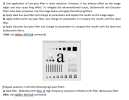 2) One application of Low-pass filter is noise reduction. However, it has adverse effect on the image edges and may cause Ring effect. To mitigate the aforementioned issues, Butterworth and Gaussian filters have been proposed. Use the image below and apply the following filters. a) Apply Ideal low-pass filter and change its parameters and explain the results on the image edges. b) Apply Butterworth low-pass filter and change its parameters to compare the results with the ideal filter. c) Apply...
Question 4: Image processing 12 marks 11) Briefly describe the quantization in a grey scale image....
 Question 4: Image processing 12 marks 11) Briefly describe the quantization in a grey scale image. 2 marks 12) Consider the 1D image fragment below. Filter this image with: 4marks (1 mark each) () 1x3 median filter (ii State how the image boundaries are handled. 60 180 180 60 180 180 (iv) Give an example of when it would be beneficial disadvantage median filter, but also state a use 13) What is an image histogram and what information does it...
The image is .mat file in matlab i just need a program to find its frequency...
 The image is .mat file in matlab i just need a program to find
its frequency please.
Write a (short) Matlab program to find the frequency of each grey level in your personal image Sxx 16. Hence (by hand), derive the Huffman code for this image. What is the average number of bits per pixel for this Huffman code? How close to optimal is the Huffman code? In terms of average word length, how does the Huffman code compare with...
The image is .mat file in matlab i just need a program to find
its frequency please.
Write a (short) Matlab program to find the frequency of each grey level in your personal image Sxx 16. Hence (by hand), derive the Huffman code for this image. What is the average number of bits per pixel for this Huffman code? How close to optimal is the Huffman code? In terms of average word length, how does the Huffman code compare with...
J) When measuring the frequency response of the different Active Filters, how do you ma ke...
 J) When measuring the frequency response of the different Active Filters, how do you ma ke sure that your voltage gain measurements on the oscilloscope are accurate when your output v low in amplitude with interfering noise? oltage was very
5.57 Let np(t) be a zero-mean white Gaussian noise with the power spectral density 20 let this noise be passed through an ideal bandpass filter with the bandwidth 2W centered at the frequency fe...
 5.57 Let np(t) be a zero-mean white Gaussian noise with the power spectral density 20 let this noise be passed through an ideal bandpass filter with the bandwidth 2W centered at the frequency fe. Denote the output process by nt). 1. Assuming fo fe, find the power content of the in-phase and quadrature components of n(t). We were unable to transcribe this image
5.57 Let np(t) be a zero-mean white Gaussian noise with the power spectral density 20 let this...
5.57 Let np(t) be a zero-mean white Gaussian noise with the power spectral density 20 let this noise be passed through an ideal bandpass filter with the bandwidth 2W centered at the frequency fe. Denote the output process by nt). 1. Assuming fo fe, find the power content of the in-phase and quadrature components of n(t). We were unable to transcribe this image
5.57 Let np(t) be a zero-mean white Gaussian noise with the power spectral density 20 let this...
How do I compile c++ code in terminal. Below i have some code to apply Gaussian...
 How do I compile c++ code in terminal. Below i have some code to
apply Gaussian Filter on an image using OpenCV. I have tried
compling using the code
g++ Project2.cpp -o Project2 `pkg-config --cflags --libs opencv`
&& ./Project2
and it gives me a whole list of errors saying directory not
found.
---------------------------------------------------------------------------------------------------------
#include "opencv2/highgui/highgui.hpp"
#include "opencv2/imgproc/imgproc.hpp"
#include <opencv2/core/core.hpp>
#include <iostream>
using namespace cv;
using namespace std;
int main()
{
Mat image = imread("//u//oowens//First.jpg");
int rows=image.rows;
int cols=image.cols;
if (image.empty())...
How do I compile c++ code in terminal. Below i have some code to
apply Gaussian Filter on an image using OpenCV. I have tried
compling using the code
g++ Project2.cpp -o Project2 `pkg-config --cflags --libs opencv`
&& ./Project2
and it gives me a whole list of errors saying directory not
found.
---------------------------------------------------------------------------------------------------------
#include "opencv2/highgui/highgui.hpp"
#include "opencv2/imgproc/imgproc.hpp"
#include <opencv2/core/core.hpp>
#include <iostream>
using namespace cv;
using namespace std;
int main()
{
Mat image = imread("//u//oowens//First.jpg");
int rows=image.rows;
int cols=image.cols;
if (image.empty())...
scale spring with mirror spring's image If Figure . How to correctly measure the position of...
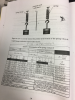 scale spring with mirror spring's image If Figure . How to correctly measure the position of the bottom of the spring when the weight hanger carries the required added massesa - euiu. Table # 1: Determination ofthe spring constant K -9.80m/s(cm)- F(N) x(m) rf (N/m) 100 150t 200 250 constant Force constant Kew from the slope of % relative difference betueen K and Kim Mi: Mass of the weight hanger Mr: Total Mass slape of the trendline in the graph...
 2) One application of Low-pass filter is noise reduction. However, it has adverse effect on the image edges and may cause Ring effect. To mitigate the aforementioned issues, Butterworth and Gaussian filters have been proposed. Use the image below and apply the following filters. a) Apply Ideal low-pass filter and change its parameters and explain the results on the image edges. b) Apply Butterworth low-pass filter and change its parameters to compare the results with the ideal filter. c) Apply...
 Question 4: Image processing 12 marks 11) Briefly describe the quantization in a grey scale image. 2 marks 12) Consider the 1D image fragment below. Filter this image with: 4marks (1 mark each) () 1x3 median filter (ii State how the image boundaries are handled. 60 180 180 60 180 180 (iv) Give an example of when it would be beneficial disadvantage median filter, but also state a use 13) What is an image histogram and what information does it...
 The image is .mat file in matlab i just need a program to find
its frequency please.
Write a (short) Matlab program to find the frequency of each grey level in your personal image Sxx 16. Hence (by hand), derive the Huffman code for this image. What is the average number of bits per pixel for this Huffman code? How close to optimal is the Huffman code? In terms of average word length, how does the Huffman code compare with...
The image is .mat file in matlab i just need a program to find
its frequency please.
Write a (short) Matlab program to find the frequency of each grey level in your personal image Sxx 16. Hence (by hand), derive the Huffman code for this image. What is the average number of bits per pixel for this Huffman code? How close to optimal is the Huffman code? In terms of average word length, how does the Huffman code compare with...
 J) When measuring the frequency response of the different Active Filters, how do you ma ke sure that your voltage gain measurements on the oscilloscope are accurate when your output v low in amplitude with interfering noise? oltage was very
 5.57 Let np(t) be a zero-mean white Gaussian noise with the power spectral density 20 let this noise be passed through an ideal bandpass filter with the bandwidth 2W centered at the frequency fe. Denote the output process by nt). 1. Assuming fo fe, find the power content of the in-phase and quadrature components of n(t). We were unable to transcribe this image
5.57 Let np(t) be a zero-mean white Gaussian noise with the power spectral density 20 let this...
5.57 Let np(t) be a zero-mean white Gaussian noise with the power spectral density 20 let this noise be passed through an ideal bandpass filter with the bandwidth 2W centered at the frequency fe. Denote the output process by nt). 1. Assuming fo fe, find the power content of the in-phase and quadrature components of n(t). We were unable to transcribe this image
5.57 Let np(t) be a zero-mean white Gaussian noise with the power spectral density 20 let this...
 How do I compile c++ code in terminal. Below i have some code to
apply Gaussian Filter on an image using OpenCV. I have tried
compling using the code
g++ Project2.cpp -o Project2 `pkg-config --cflags --libs opencv`
&& ./Project2
and it gives me a whole list of errors saying directory not
found.
---------------------------------------------------------------------------------------------------------
#include "opencv2/highgui/highgui.hpp"
#include "opencv2/imgproc/imgproc.hpp"
#include <opencv2/core/core.hpp>
#include <iostream>
using namespace cv;
using namespace std;
int main()
{
Mat image = imread("//u//oowens//First.jpg");
int rows=image.rows;
int cols=image.cols;
if (image.empty())...
How do I compile c++ code in terminal. Below i have some code to
apply Gaussian Filter on an image using OpenCV. I have tried
compling using the code
g++ Project2.cpp -o Project2 `pkg-config --cflags --libs opencv`
&& ./Project2
and it gives me a whole list of errors saying directory not
found.
---------------------------------------------------------------------------------------------------------
#include "opencv2/highgui/highgui.hpp"
#include "opencv2/imgproc/imgproc.hpp"
#include <opencv2/core/core.hpp>
#include <iostream>
using namespace cv;
using namespace std;
int main()
{
Mat image = imread("//u//oowens//First.jpg");
int rows=image.rows;
int cols=image.cols;
if (image.empty())...
 scale spring with mirror spring's image If Figure . How to correctly measure the position of the bottom of the spring when the weight hanger carries the required added massesa - euiu. Table # 1: Determination ofthe spring constant K -9.80m/s(cm)- F(N) x(m) rf (N/m) 100 150t 200 250 constant Force constant Kew from the slope of % relative difference betueen K and Kim Mi: Mass of the weight hanger Mr: Total Mass slape of the trendline in the graph...
Most questions answered within 3 hours.
-
Where is the error in this code sequence?
String s1 = "Hello";
String s2 = "ello";...
asked 11 months ago -
Financial data for Joel de Paris, Inc., for last year
follow:
Joel de Paris, Inc.
Balance...
asked 11 months ago -
Consider this reaction:
Al2(SO4)3 (aq)+ BaCl3
(aq) Al2Cl6 (aq)- +
3BaSO4(s) . What is the...
asked 11 months ago -
Suppose that Savneet is considering increasing her
recent random sample from 20 car rentals to 40...
asked 11 months ago -
Trucks arrive at an unloading terminal at an average rate of 120
per hour.
Trucks arrive...
asked 11 months ago -
Why are methanol and ethanol completely soluble in water while
octanol is not very little soluble....
asked 11 months ago -
A facilities manager at a university reads in a research report
that the mean amount of...
asked 11 months ago -
When the CuSO4 is rehydrated by adding water to the anhydrous
compound, is this an endothermic...
asked 11 months ago -
A ray of sunlight is passing from diamond into crown glass; the
angle of incidence is...
asked 11 months ago -
A block of mass 0.249 kg is placed on top of a light, vertical
spring of...
asked 11 months ago -
how do the kidneys compensate in the presences of acidosis
a) trigger hyperventilate
b) reserve acid...
asked 11 months ago -
Question 501 pts
The rental rate of capital to the firm increases. Which of the
following...
asked 11 months ago