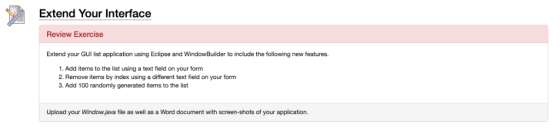
I want to extend this GUI application in java language. Thanks for the help in advance.
import java.awt.EventQueue;
import javax.swing.JFrame;
import javax.swing.JButton;
import java.awt.event.ActionListener;
import java.awt.event.ActionEvent;
public class FormWindow {
private JFrame frame;
/**
* Launch the application.
*/
public static void main(String[] args) {
EventQueue.invokeLater(new Runnable() {
public void run() {
try {
FormWindow window = new FormWindow();
window.frame.setVisible(true);
} catch (Exception e) {
e.printStackTrace();
}
}
});
}
/**
* Create the application.
*/
public FormWindow() {
initialize();
}
/**
* Initialize the contents of the frame.
*/
private void initialize() {
frame = new JFrame();
frame.setBounds(100, 100, 450, 300);
frame.setDefaultCloseOperation(JFrame.EXIT_ON_CLOSE);
frame.getContentPane().setLayout(null);
JButton btnNewButton = new JButton("Exit App!");
btnNewButton.addActionListener(new ActionListener() {
public void actionPerformed(ActionEvent e) {
System.exit(0);
}
});
btnNewButton.setBounds(149, 104, 127, 73);
frame.getContentPane().add(btnNewButton);
JButton btnNewButton_1 = new JButton("Write Output");
btnNewButton_1.addActionListener(new ActionListener() {
public void actionPerformed(ActionEvent e) {
System.err.println("Output Test");
}
});
btnNewButton_1.setBounds(149, 59, 127, 34);
frame.getContentPane().add(btnNewButton_1);
}
}

Student.java Account.java Sys def Write Output Exit App!
Homework Answers
package say.swing;
import java.awt.EventQueue;
import javax.swing.JFrame;
import javax.swing.JOptionPane;
import javax.swing.JTextField;
import javax.swing.JButton;
import java.awt.event.ActionListener;
import java.util.ArrayList;
import java.util.List;
import java.awt.event.ActionEvent;
public class FormWindow {
private JFrame frame;
/**
* Launch the application.
*/
List<String> listItem = new ArrayList<String>();
public static void main(String[] args) {
EventQueue.invokeLater(new
Runnable() {
public void
run() {
try {
FormWindow window = new
FormWindow();
window.frame.setVisible(true);
} catch (Exception e) {
e.printStackTrace();
}
}
});
}
/**
* Create the application.
*/
public FormWindow() {
initialize();
}
/**
* Initialize the contents of the frame.
*/
private void initialize() {
//UI componenets
frame = new JFrame();
frame.setBounds(100, 100, 450,
300);
frame.setDefaultCloseOperation(JFrame.EXIT_ON_CLOSE);
frame.getContentPane().setLayout(null);
JTextField addItem = new
JTextField("Add Item");
JTextField removeItem = new
JTextField("Remove Item");
JButton addItemButton = new
JButton("Add Item");
JButton removeItemButton = new
JButton("Remove Item");
//Event listner
removeItemButton.addActionListener(new ActionListener() {
public void
actionPerformed(ActionEvent e) {
if (removeItem.getText().trim().length() != 0)
{
//Check index and display
message or delete
int index =
Integer.parseInt(removeItem.getText().trim());
if(index >
listItem.size()) {
JOptionPane.showMessageDialog(null, "Index out of range. Enter
index with in " + (listItem.size()-1));
}else {
listItem.remove(index);
}
}
else
JOptionPane.showMessageDialog(null, "Write something in add item
box then click button");
}
});
addItem.setBounds(50, 10, 100,
25);
removeItem.setBounds(200, 10, 100,
25);
frame.getContentPane().add(addItem);
frame.getContentPane().add(removeItem);
////Event listner
addItemButton.addActionListener(new
ActionListener() {
public void
actionPerformed(ActionEvent e) {
//Check index and display message or add
if (addItem.getText().trim().length() !=
0)
listItem.add(addItem.getText().trim());
else
JOptionPane.showMessageDialog(null, "Write something in add item
box then click button");
}
});
addItemButton.setBounds(10, 104,
127, 73);
frame.getContentPane().add(addItemButton);
removeItemButton.setBounds(300,
104, 127, 73);
frame.getContentPane().add(removeItemButton);
JButton btnNewButton = new
JButton("Exit App!");
////Event listner
btnNewButton.addActionListener(new
ActionListener() {
public void
actionPerformed(ActionEvent e) {
//Exit
System.exit(0);
}
});
btnNewButton.setBounds(149, 174,
127, 73);
frame.getContentPane().add(btnNewButton);
//Write output
JButton btnNewButton_1 = new
JButton("Write Output");
//Event listner
btnNewButton_1.addActionListener(new ActionListener() {
public void
actionPerformed(ActionEvent e) {
//Loop thru all item
StringBuffer sb = new StringBuffer();
for(String s: listItem) {
sb.append(s+" ");
//Print to console
System.out.println(s);
}
//Display
JOptionPane.showMessageDialog(null,
sb.toString());
}
});
btnNewButton_1.setBounds(149, 59,
127, 34);
frame.getContentPane().add(btnNewButton_1);
}
}
-----------
![FormWindow [Java Application] C: te cation. ne Two Four Five 3 Write Output Bro of the frame ontents lize() { Message Add Ite](http://img.homeworklib.com/images/23a41ad5-d1a1-4220-bae6-09f65cfce0c6.png?x-oss-process=image/resize,w_560)
Add Answer to:
I want to extend this GUI application in java language. Thanks for the help in advance. import java.awt.EventQueue; import javax.swing.JFrame; import javax.swing.JButton; import java.awt.event.Action...
I am getting this Error can you please fix my Java code. import java.awt.Dialog; import java.awt.Label;...
 I am getting this Error can you please fix my Java
code.
import java.awt.Dialog;
import java.awt.Label;
import java.awt.TextArea;
import java.awt.event.ActionEvent;
import java.awt.event.ActionListener;
import java.util.ArrayList;
import java.util.HashMap;
import java.util.List;
import java.util.Map.Entry;
import javax.swing.JButton;
import javax.swing.JFrame;
import javax.swing.JPanel;
public class Fall_2017 {
public TextArea courseInput;
public Label textAreaLabel;
public JButton addData;
public Dialog confirmDialog;
HashMap<Integer, ArrayList<String>> students;
public Fall_2017(){
courseInput = new TextArea(20, 40);
textAreaLabel = new Label("Student's data:");
addData = new JButton("Add...
I am getting this Error can you please fix my Java
code.
import java.awt.Dialog;
import java.awt.Label;
import java.awt.TextArea;
import java.awt.event.ActionEvent;
import java.awt.event.ActionListener;
import java.util.ArrayList;
import java.util.HashMap;
import java.util.List;
import java.util.Map.Entry;
import javax.swing.JButton;
import javax.swing.JFrame;
import javax.swing.JPanel;
public class Fall_2017 {
public TextArea courseInput;
public Label textAreaLabel;
public JButton addData;
public Dialog confirmDialog;
HashMap<Integer, ArrayList<String>> students;
public Fall_2017(){
courseInput = new TextArea(20, 40);
textAreaLabel = new Label("Student's data:");
addData = new JButton("Add...
Simple java GUI language translator. English to Spanish, French, or German import javax.swing.*; import java.awt.*; import...
Simple java GUI language translator. English to Spanish, French, or German import javax.swing.*; import java.awt.*; import java.awt.event.ActionEvent; import java.awt.event.ActionListener; public class translatorApp extends JFrame implements ActionListener { public static final int width = 500; public static final int height = 300; public static final int no_of_lines = 10; public static final int chars_per_line = 20; private JTextArea lan1; private JTextArea lan2; public static void main(String[] args){ translatorApp gui = new translatorApp();...
import java.awt.*; import javax.swing.*; import java.awt.event.*; import javax.swing.BorderFactory; import javax.swing.border.Border; public class Q1 extends JFrame {...
 import java.awt.*;
import javax.swing.*;
import java.awt.event.*;
import javax.swing.BorderFactory;
import javax.swing.border.Border;
public class Q1 extends JFrame {
public static void createAndShowGUI() {
JFrame frame = new
JFrame("Q1");
frame.setDefaultCloseOperation(JFrame.EXIT_ON_CLOSE);
Font courierFont = new
Font("Courier", Font.BOLD, 40);
Font arialFont = new Font("Arial",
Font.BOLD, 40);
Font sansFont = new
Font("Sans-serif", Font.BOLD, 20);
JLabel label = new JLabel("Enter a
word"); label.setFont(sansFont);
Font font1 = new Font("Sans-serif",
Font.BOLD, 40);
...
import java.awt.*;
import javax.swing.*;
import java.awt.event.*;
import javax.swing.BorderFactory;
import javax.swing.border.Border;
public class Q1 extends JFrame {
public static void createAndShowGUI() {
JFrame frame = new
JFrame("Q1");
frame.setDefaultCloseOperation(JFrame.EXIT_ON_CLOSE);
Font courierFont = new
Font("Courier", Font.BOLD, 40);
Font arialFont = new Font("Arial",
Font.BOLD, 40);
Font sansFont = new
Font("Sans-serif", Font.BOLD, 20);
JLabel label = new JLabel("Enter a
word"); label.setFont(sansFont);
Font font1 = new Font("Sans-serif",
Font.BOLD, 40);
...
package timing; import java.awt.event.*; import javax.swing.*; public class Timing implements ActionListener{ JButton button1; JLabel...
package timing; import java.awt.event.*; import javax.swing.*; public class Timing implements ActionListener{ JButton button1; JLabel label1; public int minutes=3;//initial time public int time=minutes*60;//total amount of time in seconds only public int seconds=time%60; public String defaulttimeset="0"+Integer.toString(minutes)+":0"+Integer.toString(seconds); public static void main(String[] args) { Timing move=new Timing(); move.go(); } public void go(){ JFrame frame=new JFrame(); frame.setBounds(50,50,400,400); JPanel panel2=new JPanel(); button1=new JButton("Start Time"); panel2.add(button1); button1.setBounds(30,50,150,170); frame.getContentPane().add(button1);...
I have currently a functional Java progam with a gui. Its a simple table of contacts...
 I have currently a functional Java progam with a gui. Its a
simple table of contacts with 3 buttons: add, remove, and edit.
Right now the buttons are in the program but they do not work yet.
I need the buttons to actually be able to add, remove, or edit
things on the table. Thanks so much.
Here is the working code so far:
//PersonTableModel.java
import java.util.List;
import javax.swing.table.AbstractTableModel;
public class PersonTableModel extends AbstractTableModel
{
private static final int...
I have currently a functional Java progam with a gui. Its a
simple table of contacts with 3 buttons: add, remove, and edit.
Right now the buttons are in the program but they do not work yet.
I need the buttons to actually be able to add, remove, or edit
things on the table. Thanks so much.
Here is the working code so far:
//PersonTableModel.java
import java.util.List;
import javax.swing.table.AbstractTableModel;
public class PersonTableModel extends AbstractTableModel
{
private static final int...
Can you help me to link two frames in Java Swing and then if you click...
Can you help me to link two frames in Java Swing and then if you click "Proceed button" it will link to the Second Frame...Thank you :) First frame code: //First import javax.swing.*; import java.awt.event.*; import java.io.*; public class Sample extends JFrame implements ActionListener { JMenuBar mb; JMenu file; JMenuItem open; JTextArea ta; JButton proceed= new JButton("Proceed"); Sample() { open = new JMenuItem("Open File"); open.addActionListener(this); file = new JMenu("File"); file.add(open); mb = new JMenuBar(); mb.setBounds(0, 0, 400, 20); mb.add(file); ta...
please help me debug this Create a GUI for an application that lets the user calculate...
please help me debug this Create a GUI for an application that lets the user calculate the hypotenuse of a right triangle. Use the Pythagorean Theorem to calculate the length of the third side. The Pythagorean Theorem states that the square of the hypotenuse of a right-triangle is equal to the sum of the squares of the opposite sides: alidate the user input so that the user must enter a double value for side A and B of the triangle....
This is the java GUI program. I want to add an icon to a button, but...
 This is the java GUI program.
I want to add an icon to a button, but it shows nothing.
Can you fix it for me please?
import java.awt.BorderLayout;
import java.awt.Container;
import javax.swing.ImageIcon;
import javax.swing.JButton;
import javax.swing.JFrame;
import javax.swing.JPanel;
class Icon extends JFrame{
public static
void main(String args[]){
Icon frame = new Icon("title");
frame.setVisible(true);
}
Icon(String title){
setTitle(title);
setBounds(100, 100, 300, 250);
setDefaultCloseOperation(JFrame.EXIT_ON_CLOSE);
JPanel p = new JPanel();
ImageIcon icon1 = new
ImageIcon("https://static.thenounproject.com/png/610387-200.png");
JButton button1 = new JButton(icon1);
p.add(button1);
Container contentPane...
This is the java GUI program.
I want to add an icon to a button, but it shows nothing.
Can you fix it for me please?
import java.awt.BorderLayout;
import java.awt.Container;
import javax.swing.ImageIcon;
import javax.swing.JButton;
import javax.swing.JFrame;
import javax.swing.JPanel;
class Icon extends JFrame{
public static
void main(String args[]){
Icon frame = new Icon("title");
frame.setVisible(true);
}
Icon(String title){
setTitle(title);
setBounds(100, 100, 300, 250);
setDefaultCloseOperation(JFrame.EXIT_ON_CLOSE);
JPanel p = new JPanel();
ImageIcon icon1 = new
ImageIcon("https://static.thenounproject.com/png/610387-200.png");
JButton button1 = new JButton(icon1);
p.add(button1);
Container contentPane...
Can you fix my error? I created a program that changes labels every second in Java....
Can you fix my error? I created a program that changes labels every second in Java. But, it does not change. And, it will starts with second label. This is also an error. import java.awt.BorderLayout; import java.awt.Color; import java.awt.event.ActionEvent; import java.awt.event.ActionListener; import javax.swing.JButton; import javax.swing.JFrame; import javax.swing.JLabel; import javax.swing.JPanel; import javax.swing.Timer; public class Map2 extends JFrame{ JPanel panel; JLabel pic; Timer tm; int x = 0; String ly = "<html> " + "<br> <font size='10' color='red'> <b> 111111111 <b/> </font>...
Using the template below create a GUI with a push button event. Use a JTextArea to...
Using the template below create a GUI with a push button event. Use a JTextArea to display which button was selected. /******************* Name: Date: Notes: *******************/ import javax.swing.*; import java.awt.*; import java.awt.event.*; class Actions extends JFrame implements ActionListener { Create the components (textarea and buttons) public Actions() { create the window (include a close operation) create the container (include FlowLayout) add the event listeners (button.addActionListener) add the components } public...
 I am getting this Error can you please fix my Java
code.
import java.awt.Dialog;
import java.awt.Label;
import java.awt.TextArea;
import java.awt.event.ActionEvent;
import java.awt.event.ActionListener;
import java.util.ArrayList;
import java.util.HashMap;
import java.util.List;
import java.util.Map.Entry;
import javax.swing.JButton;
import javax.swing.JFrame;
import javax.swing.JPanel;
public class Fall_2017 {
public TextArea courseInput;
public Label textAreaLabel;
public JButton addData;
public Dialog confirmDialog;
HashMap<Integer, ArrayList<String>> students;
public Fall_2017(){
courseInput = new TextArea(20, 40);
textAreaLabel = new Label("Student's data:");
addData = new JButton("Add...
I am getting this Error can you please fix my Java
code.
import java.awt.Dialog;
import java.awt.Label;
import java.awt.TextArea;
import java.awt.event.ActionEvent;
import java.awt.event.ActionListener;
import java.util.ArrayList;
import java.util.HashMap;
import java.util.List;
import java.util.Map.Entry;
import javax.swing.JButton;
import javax.swing.JFrame;
import javax.swing.JPanel;
public class Fall_2017 {
public TextArea courseInput;
public Label textAreaLabel;
public JButton addData;
public Dialog confirmDialog;
HashMap<Integer, ArrayList<String>> students;
public Fall_2017(){
courseInput = new TextArea(20, 40);
textAreaLabel = new Label("Student's data:");
addData = new JButton("Add...
 import java.awt.*;
import javax.swing.*;
import java.awt.event.*;
import javax.swing.BorderFactory;
import javax.swing.border.Border;
public class Q1 extends JFrame {
public static void createAndShowGUI() {
JFrame frame = new
JFrame("Q1");
frame.setDefaultCloseOperation(JFrame.EXIT_ON_CLOSE);
Font courierFont = new
Font("Courier", Font.BOLD, 40);
Font arialFont = new Font("Arial",
Font.BOLD, 40);
Font sansFont = new
Font("Sans-serif", Font.BOLD, 20);
JLabel label = new JLabel("Enter a
word"); label.setFont(sansFont);
Font font1 = new Font("Sans-serif",
Font.BOLD, 40);
...
import java.awt.*;
import javax.swing.*;
import java.awt.event.*;
import javax.swing.BorderFactory;
import javax.swing.border.Border;
public class Q1 extends JFrame {
public static void createAndShowGUI() {
JFrame frame = new
JFrame("Q1");
frame.setDefaultCloseOperation(JFrame.EXIT_ON_CLOSE);
Font courierFont = new
Font("Courier", Font.BOLD, 40);
Font arialFont = new Font("Arial",
Font.BOLD, 40);
Font sansFont = new
Font("Sans-serif", Font.BOLD, 20);
JLabel label = new JLabel("Enter a
word"); label.setFont(sansFont);
Font font1 = new Font("Sans-serif",
Font.BOLD, 40);
...
 I have currently a functional Java progam with a gui. Its a
simple table of contacts with 3 buttons: add, remove, and edit.
Right now the buttons are in the program but they do not work yet.
I need the buttons to actually be able to add, remove, or edit
things on the table. Thanks so much.
Here is the working code so far:
//PersonTableModel.java
import java.util.List;
import javax.swing.table.AbstractTableModel;
public class PersonTableModel extends AbstractTableModel
{
private static final int...
I have currently a functional Java progam with a gui. Its a
simple table of contacts with 3 buttons: add, remove, and edit.
Right now the buttons are in the program but they do not work yet.
I need the buttons to actually be able to add, remove, or edit
things on the table. Thanks so much.
Here is the working code so far:
//PersonTableModel.java
import java.util.List;
import javax.swing.table.AbstractTableModel;
public class PersonTableModel extends AbstractTableModel
{
private static final int...
Most questions answered within 3 hours.
-
Where is the error in this code sequence?
String s1 = "Hello";
String s2 = "ello";...
asked 11 months ago -
Financial data for Joel de Paris, Inc., for last year
follow:
Joel de Paris, Inc.
Balance...
asked 11 months ago -
Consider this reaction:
Al2(SO4)3 (aq)+ BaCl3
(aq) Al2Cl6 (aq)- +
3BaSO4(s) . What is the...
asked 11 months ago -
Suppose that Savneet is considering increasing her
recent random sample from 20 car rentals to 40...
asked 11 months ago -
Trucks arrive at an unloading terminal at an average rate of 120
per hour.
Trucks arrive...
asked 11 months ago -
Why are methanol and ethanol completely soluble in water while
octanol is not very little soluble....
asked 11 months ago -
A facilities manager at a university reads in a research report
that the mean amount of...
asked 11 months ago -
When the CuSO4 is rehydrated by adding water to the anhydrous
compound, is this an endothermic...
asked 11 months ago -
A ray of sunlight is passing from diamond into crown glass; the
angle of incidence is...
asked 11 months ago -
A block of mass 0.249 kg is placed on top of a light, vertical
spring of...
asked 11 months ago -
how do the kidneys compensate in the presences of acidosis
a) trigger hyperventilate
b) reserve acid...
asked 11 months ago -
Question 501 pts
The rental rate of capital to the firm increases. Which of the
following...
asked 11 months ago