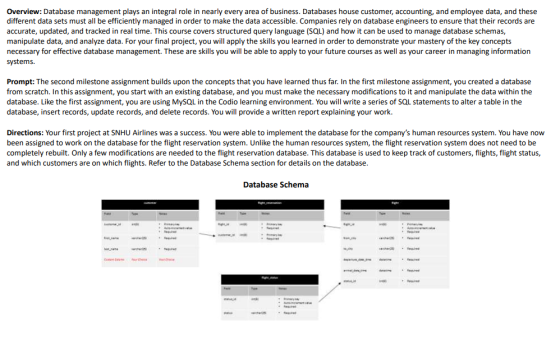
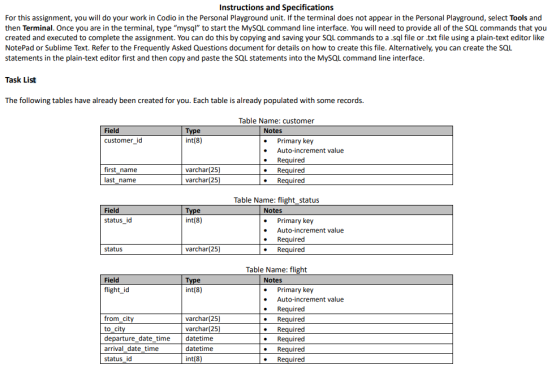
Instructions and Specifications For this assignment, you will do your work in Codio in the Personal Playground unit. If the terminal does not appear in the Personal Playground, select Tools and then Terminal. Once you are in the terminal, type "mysql" to start the MySQL Command line interface. You will need to provide all of the SQL commands that you created and executed to complete the assignment. You can do this by copying and saving your SQL commands to a .sql file or .txt file using a plain-text editor like NotePad or Sublime Text. Refer to the Frequently Asked Questions document for details on how to create this file. Alternatively, you can create the SQL the plain-text editor first and then copy and paste the SQL statements into the MySQL command line interface. statements Task List The following tables have already been created for you. Each table is already populated with some records. Table Name: customer Field Туре Notes int(8) customer id Primary key Auto-increment value Required Required Required varchar(25) first name varchar(25) last name Table Name: flight status Field Туре int(8) Notes status_id Primary key Auto-increment value Required Required varchar(25) status Table Name: flight Field Туре int(8) Notes flight_id Primary key Auto-increment value Required varchar(25) varchar(25) from_city Required to city Required Required departure_date_time datetime arrival date time datetime Required status id int(8) Required
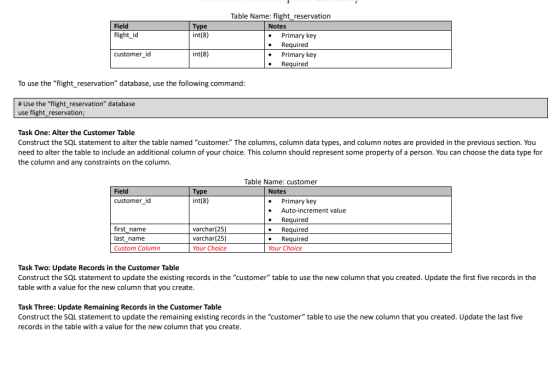
Table Name: flight_reservation Field Notes Туре int(8) flight_id Primary key Required Primary key Required int(8) customer id To use the "flight_reservation" database, use the following command: # Use the "flight_reservation" database use flight_reservation; Task One: Alter the Customer Table Construct the SQL statement to alter the table named "customer." The columns, column data types, and column notes are provided in the previous section. You need to alter the table to include an additional column of your choice. This column should represent some property of a person. You can choose the data type for the column and any constraints on the column. Table Name: customer Field Туре int(8) Notes customer_id Primary key Auto-increment value Required first_name last_name varchar(25) Required Required Your Choice . varchar(25) Custom Column Your Choice Task Two: Update Records in the Customer Table Construct the SQL statement to update the existing records in the "customer" table to use the new column that you created. Update the first five records in the table with a value for the new column that you create. ... Task Three: Update Remaining Records in the Customer Table Construct the SQL statement to update the remaining existing records in the "customer" table to use the new column that you created. Update the last five records in the table with a value for the new column that you create.
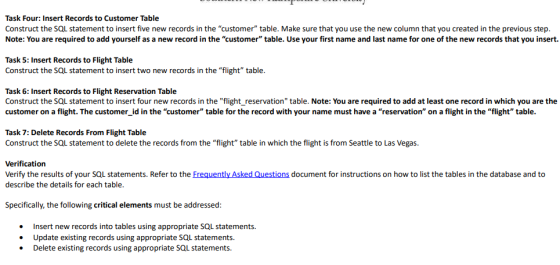
Task Four: Insert Records to Customer Table Construct the SQL statement to insert five new records in the "customer" table. Make sure that you use the new column that you created in the previous step. Note: You are required to add yourself as a new record in the "customer" table. Use your first name and last name for one of the new records that you insert. Task 5: Insert Records to Flight Table Construct the SQL statement to insert two new records in the "flight" table. Task 6: Insert Records to Flight Reservation Table Construct the SQL statement to insert four new records in the "flight_reservation" table. Note: You are required to add at least one record in which you are the customer on a flight. The customer_id in the "customer" table for the record with your name must have a "reservation" on a flight in the "flight" table. Task 7: Delete Records From Flight Table Construct the SQL statement to delete the records from the "flight" table in which the flight is from Seattle to Las Vegas Verification Verify the results of your SQL statements. Refer to the Frequently Asked Questions document for instructions on how to list the tables in the database and to describe the details for each table. Specifically, the following critical elements must be addressed: Insert new records into tables using appropriate SQL statements. Update existing records using appropriate SQL statements. Delete existing records using appropriate SQL statements.
Homework Answers
Task 1 : ALTER customer ADD( city varchar(15) NOT NULL);
Task 2 : UPDATE TOP(5) customer SET city='Delhi'
ORDER BY customer_id; //For top 5 rows
Task 3 : UPDATE TOP(5) customer SET city='Mumbai'
ORDER BY customer_id DESC; //For bottom 5 rows
Task 4 :-> INSERT INTO customer
VALUES(11223344,'Rohan','Malik','Amritsar');
-> INSERT INTO customer
VALUES(11223346,'Rishi','Verma','Delhi');
-> INSERT INTO customer
VALUES(11223348,'Vishwas','Rana','Mumbai');
-> INSERT INTO customer
VALUES(11223350,'Lalit','Kumar','Kolkata');
-> INSERT INTO customer
VALUES(11223352,'Naman','Adab','Pune');
Task 5 : INSERT INTO flight
VALUES(40221211,'Delhi','Amritsar','2019-07-14 10:23:00','2019-07-14 12:40:00',16644551);
-> INSERT INTO flight
VALUES(40221212,'Delhi','Mumbai','2019-07-16 11:25:00','2019-07-16 14:40:00',16644555);
Task 6 : INSERT INTO flight_reservation
VALUES(40221211,11223344);
-> INSERT INTO flight_reservation
VALUES(40221212,11223348);
Task 7 : DELETE FROM flight WHERE from_city='Seattle' AND to_city='Las Vegas' ;
Add Answer to:
Overview: Database management plays an integral role in nearly every area of business. Databases house customer, accoun...
Help In Database: Next comes the data entry: Make up data for your database, or find...
Help In Database: Next comes the data entry: Make up data for your database, or find real data. You can enter the data with INSERT statements, but it is much easier to use PhpAdmin. It has a form where you can type the data directly. Alternatively, you can use PhpAdmin to import CSV data (comma-separated values), which you can export from Excel. Include at least 3 rows in each of the entity relations, and as many rows as you need...
Database Management 6. [5] Create the following table: CREATE TABLE customer ( cust_name VARCHAR(30) NOT NULL,...
 Database Management
6. [5] Create the following table: CREATE TABLE customer ( cust_name VARCHAR(30) NOT NULL, address VARCHAR(60), UNIQUE (cust name, address)); A. Run the following inserts and explain why both work and how will you prevent it INSERT INTO customer VALUES ('Alex Doe', NULL); INSERT INTO customer VALUES ('Alex Doe', NULL); 7. [5] Modify the following table definition to ensure that all employees have a minimum wage of $10 CREATE TABLE employee ( empId INT PRIMARY KEY, empName VARCHAR(40)...
Database Management
6. [5] Create the following table: CREATE TABLE customer ( cust_name VARCHAR(30) NOT NULL, address VARCHAR(60), UNIQUE (cust name, address)); A. Run the following inserts and explain why both work and how will you prevent it INSERT INTO customer VALUES ('Alex Doe', NULL); INSERT INTO customer VALUES ('Alex Doe', NULL); 7. [5] Modify the following table definition to ensure that all employees have a minimum wage of $10 CREATE TABLE employee ( empId INT PRIMARY KEY, empName VARCHAR(40)...
use workbench please Task 1: Create a database and name it practical2DB. (2 marks) Task 2:...
 use workbench please
Task 1: Create a database and name it practical2DB. (2
marks)
Task 2: Create all the four tables according to the relational
scheme in Figure 1. (8 marks)
Task 3: Insert 5 records to into each table. (5 marks)
Task 4: Write a query to list alphabetically ordered names,
addresses, and IDs of all the customers whose postcode is in
(40150, 40400, 47500).
(10 marks)
Task 5: Delete 1 record from Products table using their primary
keys....
use workbench please
Task 1: Create a database and name it practical2DB. (2
marks)
Task 2: Create all the four tables according to the relational
scheme in Figure 1. (8 marks)
Task 3: Insert 5 records to into each table. (5 marks)
Task 4: Write a query to list alphabetically ordered names,
addresses, and IDs of all the customers whose postcode is in
(40150, 40400, 47500).
(10 marks)
Task 5: Delete 1 record from Products table using their primary
keys....
Create a table tHW2_1_xxxx with the following fields and their data types (id:int, auto increment, Name:...
Create a table tHW2_1_xxxx with the following fields and their data types (id:int, auto increment, Name: varchar(10), birthday: date, annual_salary: float, bno: varchar(8)), where id is primary key and bno is a foreign key to the branchno column of Branch table in the dreamhome database. All fields cannot be null. then insert five records into your tHW2_1_xxxx table. All the name, birthday, should be different.
CREATE TABLE Gender ( gender CHAR(1), description VARCHAR(10), PRIMARY KEY (gender) ); CREATE TABLE People (...
CREATE TABLE Gender ( gender CHAR(1), description VARCHAR(10), PRIMARY KEY (gender) ); CREATE TABLE People ( ID INT, name VARCHAR(50), gender CHAR(1), height FLOAT, PRIMARY KEY (ID), FOREIGN KEY (gender) REFERENCES Gender (gender) ); CREATE TABLE Sports ( ID INT, name VARCHAR(50), record FLOAT, PRIMARY KEY (ID), UNIQUE (name) ); CREATE TABLE Competitions ( ID INT, place VARCHAR(50), held DATE, PRIMARY KEY (ID) ); CREATE TABLE Results ( peopleID INT NOT NULL, competitionID INT NOT NULL, sportID INT NOT NULL,...
Someone Please Help Me modify this in PHP I'm in desperate need I cant figure this out ... Make t...
Someone Please Help Me modify this in PHP I'm in desperate need I cant figure this out ... Make the following modifications: For the vendors table: Comment out the table-level primary key Change the VendorIDcolumn to be a column-level primary key Add a VendorEmail column to the bottom of the table definition (define the data type for the column as variable character and set it to not exceed 45 characters) After the lineItems table, add code to create a table...
Using MySQL commands answer the questions listed below using the Premier Products Company schema. 1.Using Views...
Using MySQL commands answer the questions listed below using the Premier Products Company schema. 1.Using Views a) Create a view called part_location that has the following attributes: part_num, part_description, part_quantity, warehouse_name, warehouse_address. This data comes from the part and warehouse entities. b) Write a query using the view that shows the total number of parts ordered from each warehouse. The output should look like this: 2. Using Triggers a) Execute the following SQL to create the customer_audit table in the...
Assume that The Queen Anne Curiosity Shop designs a database with the following tables. CUSTOMER (CustomerID,...
Assume that The Queen Anne Curiosity Shop designs a database with the following tables. CUSTOMER (CustomerID, LastName, FirstName, EmailAddress, EncyptedPassword, City, State, ZIP, Phone, ReferredBy) EMPLOYEE (EmployeeID, LastName, FirstName, Position, Supervisor, OfficePhone, EmailAddress) VENDOR (VendorID, CompanyName, ContactLastName, ContactFirstName, Address, City, State, ZIP, Phone, Fax, EmailAddress) ITEM (ItemID, ItemDescription, PurchaseDate, ItemCost, ItemPrice, VendorID) SALE (SaleID, CustomerID, EmployeeID, SaleDate, SubTotal, Tax, Total) SALE_ITEM (SaleID, SaleItemID, ItemID, ItemPrice) The referential integrity constraints are: ReferredBy in CUSTOMER must exist in CustomerID in CUSTOMER Supervisor...
1. Write a script that creates a user-defined database role named OrderEntry in the MyGuitarShop database....
1. Write a script that creates a user-defined database role named OrderEntry in the MyGuitarShop database. Give INSERT and UPDATE permission to the new role for the Orders and OrderItems table. Give SELECT permission for all user tables. 3) Write a script that uses dynamic SQL and a cursor to loop through each row of the Administrators table and (1) create a login ID for each row in that consists of the administrator�s first and last name with no space...
For this hands-on project, you will use the SQL Server named instance SQLSERVERHOA, and the HandsOnOne...
For this hands-on project, you will use the SQL Server named instance SQLSERVERHOA, and the HandsOnOne database and tables you created in previous chapters. The objective of this activity is to practice generating keys and encrypting/decrypting data. Document each step by taking a screen shot of the Query Editor window after successfully executing each SQL query. 1.In SQL Server Management Studio, open a new Query Editor window, which you will use for completing all steps in this activity. 2.Create a...
 Database Management
6. [5] Create the following table: CREATE TABLE customer ( cust_name VARCHAR(30) NOT NULL, address VARCHAR(60), UNIQUE (cust name, address)); A. Run the following inserts and explain why both work and how will you prevent it INSERT INTO customer VALUES ('Alex Doe', NULL); INSERT INTO customer VALUES ('Alex Doe', NULL); 7. [5] Modify the following table definition to ensure that all employees have a minimum wage of $10 CREATE TABLE employee ( empId INT PRIMARY KEY, empName VARCHAR(40)...
Database Management
6. [5] Create the following table: CREATE TABLE customer ( cust_name VARCHAR(30) NOT NULL, address VARCHAR(60), UNIQUE (cust name, address)); A. Run the following inserts and explain why both work and how will you prevent it INSERT INTO customer VALUES ('Alex Doe', NULL); INSERT INTO customer VALUES ('Alex Doe', NULL); 7. [5] Modify the following table definition to ensure that all employees have a minimum wage of $10 CREATE TABLE employee ( empId INT PRIMARY KEY, empName VARCHAR(40)...
 use workbench please
Task 1: Create a database and name it practical2DB. (2
marks)
Task 2: Create all the four tables according to the relational
scheme in Figure 1. (8 marks)
Task 3: Insert 5 records to into each table. (5 marks)
Task 4: Write a query to list alphabetically ordered names,
addresses, and IDs of all the customers whose postcode is in
(40150, 40400, 47500).
(10 marks)
Task 5: Delete 1 record from Products table using their primary
keys....
use workbench please
Task 1: Create a database and name it practical2DB. (2
marks)
Task 2: Create all the four tables according to the relational
scheme in Figure 1. (8 marks)
Task 3: Insert 5 records to into each table. (5 marks)
Task 4: Write a query to list alphabetically ordered names,
addresses, and IDs of all the customers whose postcode is in
(40150, 40400, 47500).
(10 marks)
Task 5: Delete 1 record from Products table using their primary
keys....
Most questions answered within 3 hours.
-
Where is the error in this code sequence?
String s1 = "Hello";
String s2 = "ello";...
asked 11 months ago -
Financial data for Joel de Paris, Inc., for last year
follow:
Joel de Paris, Inc.
Balance...
asked 11 months ago -
Consider this reaction:
Al2(SO4)3 (aq)+ BaCl3
(aq) Al2Cl6 (aq)- +
3BaSO4(s) . What is the...
asked 11 months ago -
Suppose that Savneet is considering increasing her
recent random sample from 20 car rentals to 40...
asked 11 months ago -
Trucks arrive at an unloading terminal at an average rate of 120
per hour.
Trucks arrive...
asked 11 months ago -
Why are methanol and ethanol completely soluble in water while
octanol is not very little soluble....
asked 11 months ago -
A facilities manager at a university reads in a research report
that the mean amount of...
asked 11 months ago -
When the CuSO4 is rehydrated by adding water to the anhydrous
compound, is this an endothermic...
asked 11 months ago -
A ray of sunlight is passing from diamond into crown glass; the
angle of incidence is...
asked 11 months ago -
A block of mass 0.249 kg is placed on top of a light, vertical
spring of...
asked 11 months ago -
how do the kidneys compensate in the presences of acidosis
a) trigger hyperventilate
b) reserve acid...
asked 11 months ago -
Question 501 pts
The rental rate of capital to the firm increases. Which of the
following...
asked 11 months ago