Order StatusThe Middletown Wire Company sells spools of copper wiring for $100 each. The n...
Order Status
The Middletown Wire Company sells spools of copper wiring for $100 each. The normal delivery charge is $10 per spool. Rush delivery costs $15 per spool. Create an application that displays the status of an order. The status should include the following:
• The number of spools ready to ship
• The number of spools on back order
• The shipping and handling charges
• The total amount due
The application’s form should resemble the one shown in Figure 1.
Figure 1 Order Status form
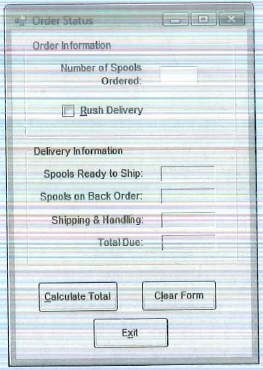
The user should enter the number of spools ordered into the text box, and check the Rush Delivery check box if rush delivery is desired. When the Calculate Total button is clicked, an input box should appear asking the user to enter the number of spools currently in stock. If the user has ordered more spools than are in stock, a portion of the order is back-ordered. For example, if the user orders 200 spools and there are only 150 spools in stock, then 150 spools are ready to ship and 50 spools are back-ordered.
The application should have the following functions, called from the Calculate Total button’s Click event handler:
GetlnStock Displays an input box asking the user to enter the number of spools in stock. The function should return the value entered by the user.
ReadyToShip Accepts the following arguments: the number of spools in stock and the number of spools ordered. The function returns the number of spools ready to ship.
Backordered Accepts the following arguments: the number of spools in stock and the number of spools ordered. The function returns the number of spools on back order. If no spools are on back order, it returns 0.
ShippingCharges Accepts the following arguments: the number of spools ready to ship and the per-spool shipping charges. The function returns the total shipping and handling charges.
The application should have the following procedures, called from the Clear Form button’s Click event handler:
ResetSpools Clears the text box and the check box.
Reset Delivery Clears the labels that display the delivery information
Input Validation: Do not accept orders for less than one spool.
Step-by-Step Solution
Request Solution!
We need at least 10 more requests to produce the solution.
0 / 10 have requested this problem solution
The more requests, the faster the answer.
Most questions answered within 3 hours.
-
Calculating the space time for parallel reactions. m-Xylene is reacted over a ZSM-5 zeolit...
-
Determine Vo and ID for the networks of Fig. 2.160.FIG. 2.160
-
The truck travels along a circular road that has a radius of 50 m at a speed of 4 m/s. F...
-
A state legislature enacted a statute that required any motorcycle operator or passenger...
-
A 1024 × 1024 8-bit image with 5.3 bits/pixel entropy [computed from its histogram using E...
-
In Problem 3.3, we estimated the equationwhere we now report standard errors along with th...
-
In each of the following cases, deduce the nature of the light that is consistent with the...
-
Solve Example 20.5 such that the x, y, z axes move with curvilinear translation, Ω = 0 in...
-
In Fig. 6.43, if i = cos 4t and v = sin 4t, the element is:(a)a resistor(b) a capacitor(c)...
-
Sketch vo for each network of Fig. 2.181 for the input shown.FIG. 2.181
-
(Supplement B) Computing and Reporting Cash Flow Effectsof Sale of Plant and EquipmentDuri...
-
A 350-mL spherical flask contains 0.075 mol of an ideal gas at a temperature of 293 K. Wha...