
 please use multisim
Homework Answers
Please i am requesting you not to forget to upvote,feel free to comment in case of any doubts.
Thank you
Answer
Taking Measurements
Each picture of Vin,Vo1 and Vo2
Picture of Vin
![Sawtooth - Multisim - Sawtooth *] file Edit View Place MCU Simulate Transfer Tools Reports Options Window Help G --- In-Use L](http://img.homeworklib.com/questions/9d85a340-e318-11ea-a9a4-5bb8f2f21c3b.png?x-oss-process=image/resize,w_560)
Picture of V01
![Sawtooth - Multisim - Sawtooth *] file Edit View Place MCU Simulate Transfer Tools Reports Options Window Help G --- In-Use L](http://img.homeworklib.com/questions/9e3c3660-e318-11ea-ac55-2991fdbfff07.png?x-oss-process=image/resize,w_560)
Picture of V02
![Sawtooth - Multisim - Sawtooth *] - ? QQ@ge File Edit View Place MCU Simulate Transfer Tools Reports Options Window Help ---](http://img.homeworklib.com/questions/9f0e4300-e318-11ea-ba48-499a3d46751d.png?x-oss-process=image/resize,w_560)
Fundamental frequency of Ouput Vo2
f02 = 1.02kHz
Image showing Frequncey of f02
![Sawtooth - Multisim - Sawtooth *] File Edit View Place MCU Simulate Transfer Tools Reports Options Window Help G --- In-Use L](http://img.homeworklib.com/questions/9fcca580-e318-11ea-95cd-35294aa170cf.png?x-oss-process=image/resize,w_560)
2)
The shape of V02 is inverted Sawtooth or 180 degrees shifted Sawtooth waveform.
3)
By observing the output waveform of the LM139AJ,we can say that it is acting as a square wave generator by taking sawtooth waveform as in input.
4)
The AD741CH is acting as a Inverting amplifier,because we can see that the non-inverting terminal is grounded and there is a input to the inverting terminal along with the feedback,
This type of configuration is called Inverting Amplifier.
For frequency of Vo2 is matching with 500Hz.
The Waveform of Vin is
![Sawtooth - Multisim - Sawtooth *] Eile Edit View Place MCU Simulate Transfer Tools Reports Options Window Help --- In-Use Lis](http://img.homeworklib.com/questions/a0816f20-e318-11ea-b4e9-01caf7086713.png?x-oss-process=image/resize,w_560)
The Waveform of V01 is
![මු Q & G | D Agilent it MS Sawtooth - Multisim - Sawtooth *] Eile Edit View Place MCU Simulate Transfer Tools Reports Options](http://img.homeworklib.com/questions/a149a0a0-e318-11ea-829a-71c4ba8aefd6.png?x-oss-process=image/resize,w_560)
The Waveform of V02 is
![Sawtooth - Multisim - (Sawtooth*] - File Edit View Place MCU Simulate Transfer Tools Reports Options Window Help -2X --- In-U](http://img.homeworklib.com/questions/a2023b00-e318-11ea-b93e-f980a24a9698.png?x-oss-process=image/resize,w_560)
1)Peak to peak voltage of Vin is 9.77V
Pictue showing Vpp of Vin
![Chand Sawtooth - Multisim - Sawtooth *] - ? QQ@ga File Edit View Place MCU Simulate Transfer Tools Reports Options Window Hel](http://img.homeworklib.com/questions/a2d4c860-e318-11ea-a8e6-b5eebc2774fc.png?x-oss-process=image/resize,w_560)
Functioning of the circuit,
We can say that the circuit is acting as a square wave generator as well an in inverse Sawtooth waveform generator
Also it is acting as a frequency double because the output frequency of VO2 is twice as the frequency of the Vin,
Add Answer to:
please use multisim
XFG1 xsci Agilent PP 0 0 0 Vin R3 12k0 두 12V XSC2...
8.) In the OP amp circuit shown in Figure 8 , determine the value of resistor...
 8.) In the OP amp circuit shown in Figure 8 , determine the
value of resistor R2 needed to establish an input trip point
voltage of 6.75 Volts ( i.e. when input signal voltage V in exceeds
6.75 V the OP amp’s output voltage changes state ) . ( 60 pts )
R2 = _______________
If the OP AMP in Figure 8 was biased by DC voltages of + / - 15
Volts , and the value of resistor R2...
8.) In the OP amp circuit shown in Figure 8 , determine the
value of resistor R2 needed to establish an input trip point
voltage of 6.75 Volts ( i.e. when input signal voltage V in exceeds
6.75 V the OP amp’s output voltage changes state ) . ( 60 pts )
R2 = _______________
If the OP AMP in Figure 8 was biased by DC voltages of + / - 15
Volts , and the value of resistor R2...
Inverting Amplifier Figure 4.2 shows the fundamental configuration of Op-Amp in which it is used as...
 Inverting Amplifier Figure 4.2 shows the fundamental configuration of Op-Amp in which it is used as an inverting amplifier. In this configuration the ratio, R2/R1 completely controls the effective gain of the amplifier and it can be verified that the output voltage is equal to Vo = - (R2/R1)Vin R2 100K Q-10V R1 Vinow 20K 1 2 7 V Vo 3 -10v Figure 4.2 Part 1 - Inverting Amp: Procedure 1. Construct the circuit of figure 4.2 using Op-Amp IC...
Laboratory 1: operation amplifier characteristics A. Objectives: 1. To study the basic characteri...
 thanks
Laboratory 1: operation amplifier characteristics A. Objectives: 1. To study the basic characteristics of an operational amplifier 2. To study the bias circuit of an operational amplifier B. Apparatus: 1. DC Power supply 2. Experimental board and corresponding components 3. Electronic calculator (prepared by students) 4. Digital camera (prepared by students for photo taking of the experimental results) 5. Laptop computer with the software PicoScope 6 and Microsoft Word installed. 6. PicoScope PC Oscilloscope and its accessories. 7. Multimeter...
thanks
Laboratory 1: operation amplifier characteristics A. Objectives: 1. To study the basic characteristics of an operational amplifier 2. To study the bias circuit of an operational amplifier B. Apparatus: 1. DC Power supply 2. Experimental board and corresponding components 3. Electronic calculator (prepared by students) 4. Digital camera (prepared by students for photo taking of the experimental results) 5. Laptop computer with the software PicoScope 6 and Microsoft Word installed. 6. PicoScope PC Oscilloscope and its accessories. 7. Multimeter...
Number 2 R, 220 k 2 R 6.8 k22 Q+12V Presented 3-stage phase-shift generator 1. Calculate...
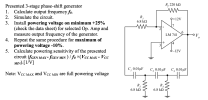 Number 2
R, 220 k 2 R 6.8 k22 Q+12V Presented 3-stage phase-shift generator 1. Calculate output frequency fo. 2. Simulate the circuit. 3. Install powering voltage on minimum +25% (check the data sheet) for selected Op. Amp and measure output frequency of the generator. 4. Repeat the same procedure for maximum of powering voltage -10%. 5. Calculate powering sensitivity of the presented circuit (fGEN MAX-fGEN MIN ) / fox(VCC MAX-Vcc MIN).[1/V] LM 741 ov 0 + 3 -12V C,...
Number 2
R, 220 k 2 R 6.8 k22 Q+12V Presented 3-stage phase-shift generator 1. Calculate output frequency fo. 2. Simulate the circuit. 3. Install powering voltage on minimum +25% (check the data sheet) for selected Op. Amp and measure output frequency of the generator. 4. Repeat the same procedure for maximum of powering voltage -10%. 5. Calculate powering sensitivity of the presented circuit (fGEN MAX-fGEN MIN ) / fox(VCC MAX-Vcc MIN).[1/V] LM 741 ov 0 + 3 -12V C,...
1. In this class and in other physics lab classes you will often use oscilloscopes to...
 1. In this class and in other physics lab classes you will often use oscilloscopes to look at signal that change in time. Below is a sinusoidal AC signal on an oscilloscope screen. The vertical axis is set to 10 mV/division and the horizontal axis is set to 50 ms/division For the signal shown, what is the: a. Average voltage? b. Peak voltage? c. Peak-to-peak voltage? d. RMS voltage? e. Period? f. Frequency? g. If you were to write an...
Build an Op-Amp Circuit Network. Note you only have a power source of 5V available. You...
Build an Op-Amp Circuit Network. Note you only have a power source of 5V available. You have a voltage signal that latches at a constant 1.5V. Create a difference circuit to produce an output voltage of 2V. Put P/Ns and element values in your design. Show your work. From part a)’s output voltage, assign that now as a reference voltage (Vref) to compare to an analog sensor signal (Vin) that can range between 0V – 5V. Make sure your circuit...
For each filter mentioned in the following cases, first simulate the circuit using Multisim. You can get a plot of the transfer function that is called the Bode plot. From the right toolbar, select &...
 For each filter mentioned in the following cases, first simulate the circuit using Multisim. You can get a plot of the transfer function that is called the Bode plot. From the right toolbar, select "Bode Plotter". Change initial (I) and final (F frequencies to 1Hz and 200 KHz, respectively. Use a Voltage AC source as the input signal. You do not need to change any parameter from voltage AC source Connect "Bode Plotter" to input and output of your circuit...
Simulation For each filter mentioned in the following cases, first simulate the circuit using Multisim. You can get a plot of the transfer function that is called the Bode plot. From the right toolba...
 Simulation For each filter mentioned in the following cases, first simulate the circuit using Multisim. You can get a plot of the transfer function that is called the Bode plot. From the right toolbar, select "Bode Plotter". Change initial (I) and final (F) frequencies to 1Hz and 200 KHz, respectively. Use a Voltage AC source as the input signal. You do not need to change any parameter from voltage AC source. Connect "Bode Plotter" to input and output of your...
Could you please show me how I can drw those circuits. please using (NI Multisim 14)...
 Could you please show me how I can drw those circuits.
please using (NI Multisim 14)
Optocoupler Objectives Use an ohmmeter to determine the condition of the optoisolator. Observe the operation of an optocoupler. Determine the maximum frequency response of the optocoupler. Required Materials (1) Dual DC power supply (1) Function generator (1) Oscilloscope (2) Multimeters (1) Optocoupler (ECG3040) (1) 3.9ΚΩ resistor (1) 220 resistor Introduction An optoisolator is a hybrid integrated circuit that contains an LED on one side...
Could you please show me how I can drw those circuits.
please using (NI Multisim 14)
Optocoupler Objectives Use an ohmmeter to determine the condition of the optoisolator. Observe the operation of an optocoupler. Determine the maximum frequency response of the optocoupler. Required Materials (1) Dual DC power supply (1) Function generator (1) Oscilloscope (2) Multimeters (1) Optocoupler (ECG3040) (1) 3.9ΚΩ resistor (1) 220 resistor Introduction An optoisolator is a hybrid integrated circuit that contains an LED on one side...
*USE Multisim( Provide Pictures of work on Multisim for each step) and Fill the Tables Below...
 *USE Multisim( Provide Pictures of work on Multisim for each
step) and Fill the Tables Below
PROCEDURE: Review the front panel controls in each of the major groups. Then turn on the oscilloscope, select Chl, set the SEC/DIV to 0.1 ms/div, select AUTO triggering, and obtain a line across the face of the CRT. Although many of the measurements described in this experiment are automated in newer scopes, it is useful to learn to make these measurements manually. Turn on...
*USE Multisim( Provide Pictures of work on Multisim for each
step) and Fill the Tables Below
PROCEDURE: Review the front panel controls in each of the major groups. Then turn on the oscilloscope, select Chl, set the SEC/DIV to 0.1 ms/div, select AUTO triggering, and obtain a line across the face of the CRT. Although many of the measurements described in this experiment are automated in newer scopes, it is useful to learn to make these measurements manually. Turn on...
 8.) In the OP amp circuit shown in Figure 8 , determine the
value of resistor R2 needed to establish an input trip point
voltage of 6.75 Volts ( i.e. when input signal voltage V in exceeds
6.75 V the OP amp’s output voltage changes state ) . ( 60 pts )
R2 = _______________
If the OP AMP in Figure 8 was biased by DC voltages of + / - 15
Volts , and the value of resistor R2...
8.) In the OP amp circuit shown in Figure 8 , determine the
value of resistor R2 needed to establish an input trip point
voltage of 6.75 Volts ( i.e. when input signal voltage V in exceeds
6.75 V the OP amp’s output voltage changes state ) . ( 60 pts )
R2 = _______________
If the OP AMP in Figure 8 was biased by DC voltages of + / - 15
Volts , and the value of resistor R2...
 Inverting Amplifier Figure 4.2 shows the fundamental configuration of Op-Amp in which it is used as an inverting amplifier. In this configuration the ratio, R2/R1 completely controls the effective gain of the amplifier and it can be verified that the output voltage is equal to Vo = - (R2/R1)Vin R2 100K Q-10V R1 Vinow 20K 1 2 7 V Vo 3 -10v Figure 4.2 Part 1 - Inverting Amp: Procedure 1. Construct the circuit of figure 4.2 using Op-Amp IC...
 thanks
Laboratory 1: operation amplifier characteristics A. Objectives: 1. To study the basic characteristics of an operational amplifier 2. To study the bias circuit of an operational amplifier B. Apparatus: 1. DC Power supply 2. Experimental board and corresponding components 3. Electronic calculator (prepared by students) 4. Digital camera (prepared by students for photo taking of the experimental results) 5. Laptop computer with the software PicoScope 6 and Microsoft Word installed. 6. PicoScope PC Oscilloscope and its accessories. 7. Multimeter...
thanks
Laboratory 1: operation amplifier characteristics A. Objectives: 1. To study the basic characteristics of an operational amplifier 2. To study the bias circuit of an operational amplifier B. Apparatus: 1. DC Power supply 2. Experimental board and corresponding components 3. Electronic calculator (prepared by students) 4. Digital camera (prepared by students for photo taking of the experimental results) 5. Laptop computer with the software PicoScope 6 and Microsoft Word installed. 6. PicoScope PC Oscilloscope and its accessories. 7. Multimeter...
 Number 2
R, 220 k 2 R 6.8 k22 Q+12V Presented 3-stage phase-shift generator 1. Calculate output frequency fo. 2. Simulate the circuit. 3. Install powering voltage on minimum +25% (check the data sheet) for selected Op. Amp and measure output frequency of the generator. 4. Repeat the same procedure for maximum of powering voltage -10%. 5. Calculate powering sensitivity of the presented circuit (fGEN MAX-fGEN MIN ) / fox(VCC MAX-Vcc MIN).[1/V] LM 741 ov 0 + 3 -12V C,...
Number 2
R, 220 k 2 R 6.8 k22 Q+12V Presented 3-stage phase-shift generator 1. Calculate output frequency fo. 2. Simulate the circuit. 3. Install powering voltage on minimum +25% (check the data sheet) for selected Op. Amp and measure output frequency of the generator. 4. Repeat the same procedure for maximum of powering voltage -10%. 5. Calculate powering sensitivity of the presented circuit (fGEN MAX-fGEN MIN ) / fox(VCC MAX-Vcc MIN).[1/V] LM 741 ov 0 + 3 -12V C,...
 1. In this class and in other physics lab classes you will often use oscilloscopes to look at signal that change in time. Below is a sinusoidal AC signal on an oscilloscope screen. The vertical axis is set to 10 mV/division and the horizontal axis is set to 50 ms/division For the signal shown, what is the: a. Average voltage? b. Peak voltage? c. Peak-to-peak voltage? d. RMS voltage? e. Period? f. Frequency? g. If you were to write an...
 For each filter mentioned in the following cases, first simulate the circuit using Multisim. You can get a plot of the transfer function that is called the Bode plot. From the right toolbar, select "Bode Plotter". Change initial (I) and final (F frequencies to 1Hz and 200 KHz, respectively. Use a Voltage AC source as the input signal. You do not need to change any parameter from voltage AC source Connect "Bode Plotter" to input and output of your circuit...
 Simulation For each filter mentioned in the following cases, first simulate the circuit using Multisim. You can get a plot of the transfer function that is called the Bode plot. From the right toolbar, select "Bode Plotter". Change initial (I) and final (F) frequencies to 1Hz and 200 KHz, respectively. Use a Voltage AC source as the input signal. You do not need to change any parameter from voltage AC source. Connect "Bode Plotter" to input and output of your...
 Could you please show me how I can drw those circuits.
please using (NI Multisim 14)
Optocoupler Objectives Use an ohmmeter to determine the condition of the optoisolator. Observe the operation of an optocoupler. Determine the maximum frequency response of the optocoupler. Required Materials (1) Dual DC power supply (1) Function generator (1) Oscilloscope (2) Multimeters (1) Optocoupler (ECG3040) (1) 3.9ΚΩ resistor (1) 220 resistor Introduction An optoisolator is a hybrid integrated circuit that contains an LED on one side...
Could you please show me how I can drw those circuits.
please using (NI Multisim 14)
Optocoupler Objectives Use an ohmmeter to determine the condition of the optoisolator. Observe the operation of an optocoupler. Determine the maximum frequency response of the optocoupler. Required Materials (1) Dual DC power supply (1) Function generator (1) Oscilloscope (2) Multimeters (1) Optocoupler (ECG3040) (1) 3.9ΚΩ resistor (1) 220 resistor Introduction An optoisolator is a hybrid integrated circuit that contains an LED on one side...
 *USE Multisim( Provide Pictures of work on Multisim for each
step) and Fill the Tables Below
PROCEDURE: Review the front panel controls in each of the major groups. Then turn on the oscilloscope, select Chl, set the SEC/DIV to 0.1 ms/div, select AUTO triggering, and obtain a line across the face of the CRT. Although many of the measurements described in this experiment are automated in newer scopes, it is useful to learn to make these measurements manually. Turn on...
*USE Multisim( Provide Pictures of work on Multisim for each
step) and Fill the Tables Below
PROCEDURE: Review the front panel controls in each of the major groups. Then turn on the oscilloscope, select Chl, set the SEC/DIV to 0.1 ms/div, select AUTO triggering, and obtain a line across the face of the CRT. Although many of the measurements described in this experiment are automated in newer scopes, it is useful to learn to make these measurements manually. Turn on...
Most questions answered within 3 hours.
-
Where is the error in this code sequence?
String s1 = "Hello";
String s2 = "ello";...
asked 10 months ago -
Financial data for Joel de Paris, Inc., for last year
follow:
Joel de Paris, Inc.
Balance...
asked 10 months ago -
Consider this reaction:
Al2(SO4)3 (aq)+ BaCl3
(aq) Al2Cl6 (aq)- +
3BaSO4(s) . What is the...
asked 10 months ago -
Suppose that Savneet is considering increasing her
recent random sample from 20 car rentals to 40...
asked 10 months ago -
Trucks arrive at an unloading terminal at an average rate of 120
per hour.
Trucks arrive...
asked 10 months ago -
Why are methanol and ethanol completely soluble in water while
octanol is not very little soluble....
asked 10 months ago -
A facilities manager at a university reads in a research report
that the mean amount of...
asked 10 months ago -
When the CuSO4 is rehydrated by adding water to the anhydrous
compound, is this an endothermic...
asked 10 months ago -
A ray of sunlight is passing from diamond into crown glass; the
angle of incidence is...
asked 10 months ago -
A block of mass 0.249 kg is placed on top of a light, vertical
spring of...
asked 10 months ago -
how do the kidneys compensate in the presences of acidosis
a) trigger hyperventilate
b) reserve acid...
asked 10 months ago -
Question 501 pts
The rental rate of capital to the firm increases. Which of the
following...
asked 10 months ago