

![Go Run Terminal Help 2 4 8 9 <> as6b.html x <> asb.html >... 1 ! DOCTYPE html] <html> 3 <head> 5 <meta charset=utf-8> 6 <ti](http://img.homeworklib.com/questions/e9d94bc0-03ab-11eb-a708-830134df8c95.png?x-oss-process=image/resize,w_560)


Homework Answers
/********************* as6b.html ************************/
<!DOCTYPE html>
<html lang="en">
<head>
<meta charset="UTF-8">
<meta name="viewport" content="width=device-width, initial-scale=1.0">
<title>Assignment 6b - Event Delegation</title>
<link rel="stylesheet" href="main.css" />
<script src="main.js" defer></script>
</head>
<body>
<div>
<h1>Shopping List</h1>
<ul id='todo-list'>
<li class='todo-item'>Butter, Unsalted
<span class='remove'></span> </li>
<li class='todo-item'>Dozen Eggs
<span class='remove'></span> </li>
<li class='todo-item'>Chick Peas
<span class='remove'></span> </li>
<li class='todo-item'>Sugar
<span class='remove'></span> </li>
<li class='todo-item'>Laundry Soap
<span class='remove'></span> </li>
</ul>
<p class='todo-new'>
<input type="text" id="new-item-text" />
<a href="#" id="add-item">+</a>
</p>
</div>
</body>
</html>

/************************* main.css *******************************/
body {
background-color: #BCDBF2;
font-family: Helvetica, Arial, sans-serif;
}
body > div {
width: 300px;
margin: 50px auto;
}
h1 {
text-align: center;
}
#todo-list {
list-style: none;
padding: 0px;
}
.todo-item {
border: 2px solid #444;
margin-top: -2px;
padding: 10px;
cursor: pointer;
display: block;
background-color: #ffffff;
}
.todo-new {
display: block;
margin-top: 10px;
content: "20S";
}
.todo-new input[type="text"] {
width: 260px;
height: 22px;
border: 2px solid #444;
}
.todo-new a {
font-size: 1.5em;
color: black;
text-decoration: none;
background-color: #ffffff;
border: 2px solid #444;
display: block;
width: 24px;
float: right;
text-align: center;
}
.todo-new a:hover {
background-color: #0EB0dd;
}
.remove {
float: right;
font-family: Helvetica, Arial, sans-serif;
font-size: 0.8em;
color: #dd0000;
}
.remove:before {
content: 'X';
}
.remove:hover {
color: #ffffff;
}
.todo-item::after:hover {
background-color: #dd0000;
color: white;
}
.todo-item:hover {
background-color: #0EB0FF;
color: white;
}
.completed {
text-decoration: line-through;
opacity: 0.5;
}


/*********************** main.js ****************************/
function listListener(event) {
console.log(event.target.tagName);
if (event.target.tagName == "LI") {
event.target.classList.add("completed");
}
else if (event.target.tagName == "SPAN") {
event.target.parentNode.remove();
}
else {
console.log("Unknown TagName: " + event.target.tagName)
}
}
function addItem() {
list = document.getElementById('todo-list');
item = document.createElement('li');
deleteButton = document.createElement('span');
itemField = document.getElementById('new-item-text')
item.classList.add('todo-item');
item.appendChild(document.createTextNode(itemField.value));
item.appendChild(deleteButton);
deleteButton.classList.add('remove');
list.appendChild(item);
itemField.value = "";
}
document.getElementById('todo-list').addEventListener('click', listListener);
document.getElementById('add-item').addEventListener('click', () => {
console.log("Add Button Pressed");
addItem();
});
document.getElementById('new-item-text').addEventListener('keydown', (event) => {
if (event.key == 'Enter' || event.keyCode == 13) {
console.log("key " + event.keyCode + " Pressed in Text Field!");
addItem();
}
});


/***************** Output *****************/


/*************** If you have any questions you may ask in comments *************/
/******************* Thanks for reading ***********************************************/
Add Answer to:
given below are the project description and their Html and css
files i need javascript according...
given below are the project description and their Html and css files i need javascript according to the project and other files!
 HTML------------------------------------------------------CSS---------------------------------------------------WEB230 - JavaScript 1 Assignment 7 - FormsSome of these tasks would be better done in HTML or CSS but do them in JavaScript to practice whatwe have learned.1. Select the form element and save it in a variable. From here we can access all of the form fields.2. When the page loads do the following:add the password value "monkey"select the favourite city "New York"clear the textarea3. Add an event handler to the "name" field to change the background color...
To do list - Javascript Javascript(only) needs to be added in order to do the following:...
To do list - Javascript Javascript(only) needs to be added in order to do the following: Add a new todo item to the list, complete with trash icon Remove the item when the trash icon is clicked Clear the input when the user clicks back into it to add another item. This is already in place in the JS window: (codepen) (function(){ })(); HTML: <div class="card"> <div class="card-body"> <h3 class="card-title">Today's To Do List</h3> <form id="todo-form"> <div class="form-group"> <input type="text" class="form-control"...
To do list - Javascript Javascript(only) needs to be added in order to do the following: Add...
To do list - Javascript Javascript(only) needs to be added in order to do the following: Add a new todo item to the list, complete with trash icon Remove the item when the trash icon is clicked Clear the input when the user clicks back into it to add another item. This is already in place in the JS window: (codepen) (function(){ })(); HTML: <div class="card"> <div class="card-body"> <h3 class="card-title">Today's To Do List</h3> <form id="todo-form"> ...
I cant seem to get the CSS at the bottom of this HTML to work. <!doctype...
I cant seem to get the CSS at the bottom of this HTML to work. <!doctype html> <html lang="en"> <head> <!--Madison McCuiston--> <meta charset="utf-8"> <title>Amelie Boulangerie</title> <link href="style.css" rel="stylesheet" type="text/css"> </head> <body> <div id="wrapper"> <header>Amelie Boulangerie</header> <!-- change this to header tag --> <nav> <ul> <li><a href="index.html">Home</a></li> <li><a href="pastries.html">Pastries</a></li> <li><a href="events.html">Events</a></li> <li><a href="contact.html">Contact</a></li> </ul> </nav> <main> <H2>Experience the Difference</H2> <p><span class="bakery">Amelie Boulangerie</span> is the master of flavor combinations.The jewel-colored macarons come in the most tempting of flavors. Experience the difference...
How do I get my HTML and CSS to look similar to this mockup? HTML: <!DOCTYPE...
 How do I get my HTML and CSS to look similar to this mockup?
HTML:
<!DOCTYPE html>
<html lang="en">
<head>
<meta charset="UTF-8">
<meta name="viewport"
content="width=device-width, initial-scale=1.0">
<title>nitro
site</title>
<link href="css/main.css"
rel="stylesheet"/>
</head>
<body>
<header class="header">
<section class="navlist">
<img
class="logo" src="assets/logobeans.png"/>
<h2
class="headertitle">nitro</h2>
<nav>
<ul>
<li><a
href="index.html"
target="_parent">About</a></li>
<li><a
href="/html/menu.html"
target="_blank">Menu</a></li>
<li><a
href="/html/menu.html">Shop Now</a></li>
</ul>
</nav>
</section>
<section
class="headerContainer">
<h1
class="heading">Nitro Coffee</h1>
<p
class="productDesc">Coffee is a brewed drink prepared from
roasted coffee beans, the seeds of berries from certain Coffea
species.</p>...
How do I get my HTML and CSS to look similar to this mockup?
HTML:
<!DOCTYPE html>
<html lang="en">
<head>
<meta charset="UTF-8">
<meta name="viewport"
content="width=device-width, initial-scale=1.0">
<title>nitro
site</title>
<link href="css/main.css"
rel="stylesheet"/>
</head>
<body>
<header class="header">
<section class="navlist">
<img
class="logo" src="assets/logobeans.png"/>
<h2
class="headertitle">nitro</h2>
<nav>
<ul>
<li><a
href="index.html"
target="_parent">About</a></li>
<li><a
href="/html/menu.html"
target="_blank">Menu</a></li>
<li><a
href="/html/menu.html">Shop Now</a></li>
</ul>
</nav>
</section>
<section
class="headerContainer">
<h1
class="heading">Nitro Coffee</h1>
<p
class="productDesc">Coffee is a brewed drink prepared from
roasted coffee beans, the seeds of berries from certain Coffea
species.</p>...
Javascript to edit a HTML file. Where to begin? <!doctype html> <html> <head> <meta charset="utf-8"> <title>TODO:...
Javascript to edit a HTML file. Where to begin? <!doctype html> <html> <head> <meta charset="utf-8"> <title>TODO: Change The Title</title> </head> <body> <h1></h1> <p>First paragraph.</p> <p class="intro">Second <span>paragraph</span>.</p> <button id="start">Start</button> <main> </main> <!-- Test 6: DOM Programming You MAY consult the notes for week 7, but you MAY NOT discuss this test or your code with any other students. All work must be your own. Instructions: 1. Put all solution code in a file named solution.js. When you upload your solution to...
As part of this assignment we are using the base Gallery HTML and writing JavaScript code...
As part of this assignment we are using the base Gallery HTML and writing JavaScript code that will: 1) preload the images provided to us, 2) Create rollover functionality for each of the thumbnails in your image gallery 3) Use appropriate images found in the images folder. 4) Write developer comments to describe the variables being declared and explain the functions and logical blocks of JavaScript code pertaining to the gallery. I know it has to be an external JS...
I have never created an external style before. This is the main Html that I am...
I have never created an external style before. This is the main Html that I am using. <!doctype html> <html lang="en"> <head> <!--Madison McCuiston--> <meta charset="utf-8"> <title>Amelie Boulangerie</title> <link href="style.css" rel="stylesheet" type="text/css"> </head> <body> <div id="wrapper"> <header>Amelie Boulangerie</header> <!-- change this to header tag --> <nav> <ul> <li><a href="index.html">Home</a></li> <li><a href="pastries.html">Pastries</a></li> <li><a href="events.html">Events</a></li> <li><a href="contact.html">Contact</a></li> </ul> </nav> <main> <H2>Experience the Difference</H2> <p><span class="bakery">Amelie Boulangerie</span> is the master of flavor combinations.The jewel-colored macarons come in the most tempting of flavors. Experience...
In this problem, you will create a selectable “To Do” List. To add a task to...
 In this problem, you will create a selectable “To Do” List. To
add a task to this list, the user clicks the Add Task button and
enters a description of the task. To delete a task from the list,
the user selects the task and then clicks the Delete Task
button.
Open the HTML and JavaScript files provided as start-up files
(index.html from within todo_list_Q.zip file). Then,
review the HTML in this file. Note, within the div element, there
is...
In this problem, you will create a selectable “To Do” List. To
add a task to this list, the user clicks the Add Task button and
enters a description of the task. To delete a task from the list,
the user selects the task and then clicks the Delete Task
button.
Open the HTML and JavaScript files provided as start-up files
(index.html from within todo_list_Q.zip file). Then,
review the HTML in this file. Note, within the div element, there
is...
JQuery- need help with the option to Edit the items on To-Do list program...either an option...
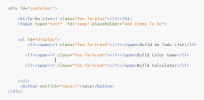 JQuery- need help with the option to Edit the
items on To-Do list program...either an option for edit
button or double clicking the item will enable user to edit the
list
<div id="container"> <hl>To-Do List<i class=" fas fa-plus"></i></hl> <input type ="text" ame' placeholder="Add Items To Do" id-'nan kul id-"display" <li><span>i class="fas fa-trash"></i></span> Build An Todo List</li> <li><span><i class="fas fa-trash"></i></span>Build Color Game</li> <li><span><i class="fas fa-trash"></i></span> Build Calculator</li> </ul> <button onclick="save ()">save< /button> </div> ("ul").on("click", "li",function () 5 $(this).toggleclass ("completed"); 6 7...
JQuery- need help with the option to Edit the
items on To-Do list program...either an option for edit
button or double clicking the item will enable user to edit the
list
<div id="container"> <hl>To-Do List<i class=" fas fa-plus"></i></hl> <input type ="text" ame' placeholder="Add Items To Do" id-'nan kul id-"display" <li><span>i class="fas fa-trash"></i></span> Build An Todo List</li> <li><span><i class="fas fa-trash"></i></span>Build Color Game</li> <li><span><i class="fas fa-trash"></i></span> Build Calculator</li> </ul> <button onclick="save ()">save< /button> </div> ("ul").on("click", "li",function () 5 $(this).toggleclass ("completed"); 6 7...
 How do I get my HTML and CSS to look similar to this mockup?
HTML:
<!DOCTYPE html>
<html lang="en">
<head>
<meta charset="UTF-8">
<meta name="viewport"
content="width=device-width, initial-scale=1.0">
<title>nitro
site</title>
<link href="css/main.css"
rel="stylesheet"/>
</head>
<body>
<header class="header">
<section class="navlist">
<img
class="logo" src="assets/logobeans.png"/>
<h2
class="headertitle">nitro</h2>
<nav>
<ul>
<li><a
href="index.html"
target="_parent">About</a></li>
<li><a
href="/html/menu.html"
target="_blank">Menu</a></li>
<li><a
href="/html/menu.html">Shop Now</a></li>
</ul>
</nav>
</section>
<section
class="headerContainer">
<h1
class="heading">Nitro Coffee</h1>
<p
class="productDesc">Coffee is a brewed drink prepared from
roasted coffee beans, the seeds of berries from certain Coffea
species.</p>...
How do I get my HTML and CSS to look similar to this mockup?
HTML:
<!DOCTYPE html>
<html lang="en">
<head>
<meta charset="UTF-8">
<meta name="viewport"
content="width=device-width, initial-scale=1.0">
<title>nitro
site</title>
<link href="css/main.css"
rel="stylesheet"/>
</head>
<body>
<header class="header">
<section class="navlist">
<img
class="logo" src="assets/logobeans.png"/>
<h2
class="headertitle">nitro</h2>
<nav>
<ul>
<li><a
href="index.html"
target="_parent">About</a></li>
<li><a
href="/html/menu.html"
target="_blank">Menu</a></li>
<li><a
href="/html/menu.html">Shop Now</a></li>
</ul>
</nav>
</section>
<section
class="headerContainer">
<h1
class="heading">Nitro Coffee</h1>
<p
class="productDesc">Coffee is a brewed drink prepared from
roasted coffee beans, the seeds of berries from certain Coffea
species.</p>...
 In this problem, you will create a selectable “To Do” List. To
add a task to this list, the user clicks the Add Task button and
enters a description of the task. To delete a task from the list,
the user selects the task and then clicks the Delete Task
button.
Open the HTML and JavaScript files provided as start-up files
(index.html from within todo_list_Q.zip file). Then,
review the HTML in this file. Note, within the div element, there
is...
In this problem, you will create a selectable “To Do” List. To
add a task to this list, the user clicks the Add Task button and
enters a description of the task. To delete a task from the list,
the user selects the task and then clicks the Delete Task
button.
Open the HTML and JavaScript files provided as start-up files
(index.html from within todo_list_Q.zip file). Then,
review the HTML in this file. Note, within the div element, there
is...
 JQuery- need help with the option to Edit the
items on To-Do list program...either an option for edit
button or double clicking the item will enable user to edit the
list
<div id="container"> <hl>To-Do List<i class=" fas fa-plus"></i></hl> <input type ="text" ame' placeholder="Add Items To Do" id-'nan kul id-"display" <li><span>i class="fas fa-trash"></i></span> Build An Todo List</li> <li><span><i class="fas fa-trash"></i></span>Build Color Game</li> <li><span><i class="fas fa-trash"></i></span> Build Calculator</li> </ul> <button onclick="save ()">save< /button> </div> ("ul").on("click", "li",function () 5 $(this).toggleclass ("completed"); 6 7...
JQuery- need help with the option to Edit the
items on To-Do list program...either an option for edit
button or double clicking the item will enable user to edit the
list
<div id="container"> <hl>To-Do List<i class=" fas fa-plus"></i></hl> <input type ="text" ame' placeholder="Add Items To Do" id-'nan kul id-"display" <li><span>i class="fas fa-trash"></i></span> Build An Todo List</li> <li><span><i class="fas fa-trash"></i></span>Build Color Game</li> <li><span><i class="fas fa-trash"></i></span> Build Calculator</li> </ul> <button onclick="save ()">save< /button> </div> ("ul").on("click", "li",function () 5 $(this).toggleclass ("completed"); 6 7...
Most questions answered within 3 hours.
-
Where is the error in this code sequence?
String s1 = "Hello";
String s2 = "ello";...
asked 10 months ago -
Financial data for Joel de Paris, Inc., for last year
follow:
Joel de Paris, Inc.
Balance...
asked 10 months ago -
Consider this reaction:
Al2(SO4)3 (aq)+ BaCl3
(aq) Al2Cl6 (aq)- +
3BaSO4(s) . What is the...
asked 10 months ago -
Suppose that Savneet is considering increasing her
recent random sample from 20 car rentals to 40...
asked 10 months ago -
Trucks arrive at an unloading terminal at an average rate of 120
per hour.
Trucks arrive...
asked 10 months ago -
Why are methanol and ethanol completely soluble in water while
octanol is not very little soluble....
asked 10 months ago -
A facilities manager at a university reads in a research report
that the mean amount of...
asked 10 months ago -
When the CuSO4 is rehydrated by adding water to the anhydrous
compound, is this an endothermic...
asked 10 months ago -
A ray of sunlight is passing from diamond into crown glass; the
angle of incidence is...
asked 10 months ago -
A block of mass 0.249 kg is placed on top of a light, vertical
spring of...
asked 10 months ago -
how do the kidneys compensate in the presences of acidosis
a) trigger hyperventilate
b) reserve acid...
asked 10 months ago -
Question 501 pts
The rental rate of capital to the firm increases. Which of the
following...
asked 10 months ago