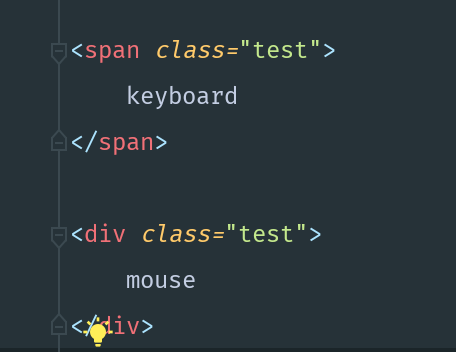
I want make keyboard's font size become to 50pt, so I wrote the css code:
span .test {
    font-size:50pt;
}
but, it doesn't work, why? Can you help me with this? You can't change the html code.
Homework Answers
<!DOCTYPE html>
<html>
<style type="text/css">
/* You need to use them without any pace between them */
span.test{
font-size: 50pt;
}
</style>
<body>
<span class="test">
keyboard
</span>
<div class="test">
mouse
</div>
</body>
</html>
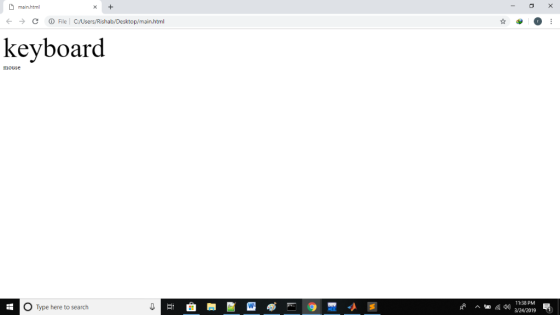
Sample Output
Add Answer to:
I want make keyboard's font size become to 50pt, so I wrote the
css code:
span...
Look at the following illustrated output for an HTML and a css given below <!DOCTYPE html>...
 Look at the following illustrated output for an HTML and
a css given below
<!DOCTYPE html>
<head>
<title>TABLE with STYLE
SHEET</title>
<meta charset="utf-8" />
<meta name="description" content="Godaddy Webpage
original" />
<link rel = "stylesheet"
href="GoDaddy_assignment_1.css">
<body>
<img src= "GoDaddy.png"/>
<p>Welcome
to:<strong>webhamster.com</strong></br>
This web page is
parked<strong>Free</strong>courtesy of
<a class="aclass1" href
="https://www.godaddy.com">GoDaddy.com</a></p>
<h1>Want to buy<span class
="span2">webmaster.com ?</span></h1>
<div class ="div1">
<a class ="aclass2"
href="https://www.godaddy.com">Learn How</a>
</div>
</hr>
<button>Search Ads</button>
</body>
</html>
“
QUESTION continued Given the corresponding css
file
.aclass1{color:purple;}...
Look at the following illustrated output for an HTML and
a css given below
<!DOCTYPE html>
<head>
<title>TABLE with STYLE
SHEET</title>
<meta charset="utf-8" />
<meta name="description" content="Godaddy Webpage
original" />
<link rel = "stylesheet"
href="GoDaddy_assignment_1.css">
<body>
<img src= "GoDaddy.png"/>
<p>Welcome
to:<strong>webhamster.com</strong></br>
This web page is
parked<strong>Free</strong>courtesy of
<a class="aclass1" href
="https://www.godaddy.com">GoDaddy.com</a></p>
<h1>Want to buy<span class
="span2">webmaster.com ?</span></h1>
<div class ="div1">
<a class ="aclass2"
href="https://www.godaddy.com">Learn How</a>
</div>
</hr>
<button>Search Ads</button>
</body>
</html>
“
QUESTION continued Given the corresponding css
file
.aclass1{color:purple;}...
HTML css When i refresh the page, the picture doesnt move at all for #i1 i...
HTML css When i refresh the page, the picture doesnt move at all for #i1 i have width and height but the pictuers doesn't move please fix it. <!DOCTYPE html> <html> <head> <meta charset="UTF-8"> <title>Title of the document</title> <style> body{ background-color:#FFA07A; } #h1{ color:white; text-decoration:none; padding:30px; } #h2{ color:white; text-decoration:none; padding:30px; } #navbar1{ background-color:grey; text-align:center; font-size:35px; height:100%px; border:1px solid black; position:absolute; text-decoration:none; margin-left:300px; } #h3{ color:white; text-decoration:none; padding:30px; } #b1{ background-color:grey; font-size:30px; } i1{ width:10px; height:20px; } </style> <body> <div...
HTML and css using notepad++ WHen you run the code, you will see a horizontal menue...
HTML and css using notepad++ WHen you run the code, you will see a horizontal menue with several options. I want a small horizontal line between each option. I also want that done using div inside a div. Thank you <!DOCTYPE html> <html> <head> <meta charset="UTF-8"> <title>Title of the document</title> <style> body{ background-color:#FFA07A; } #h1{ color:white; text-decoration:none; padding:30px; } #h2{ color:white; text-decoration:none; padding:30px; } #navbar1{ background-color:grey; text-align:center; font-size:35px; height:100%px; border:1px solid black; position:absolute; text-decoration:none; margin-left:300px; } #h3{ color:white; text-decoration:none; padding:30px;...
I cant seem to get the CSS at the bottom of this HTML to work. <!doctype...
I cant seem to get the CSS at the bottom of this HTML to work. <!doctype html> <html lang="en"> <head> <!--Madison McCuiston--> <meta charset="utf-8"> <title>Amelie Boulangerie</title> <link href="style.css" rel="stylesheet" type="text/css"> </head> <body> <div id="wrapper"> <header>Amelie Boulangerie</header> <!-- change this to header tag --> <nav> <ul> <li><a href="index.html">Home</a></li> <li><a href="pastries.html">Pastries</a></li> <li><a href="events.html">Events</a></li> <li><a href="contact.html">Contact</a></li> </ul> </nav> <main> <H2>Experience the Difference</H2> <p><span class="bakery">Amelie Boulangerie</span> is the master of flavor combinations.The jewel-colored macarons come in the most tempting of flavors. Experience the difference...
As part of this assignment we are using the base Gallery HTML and writing JavaScript code...
As part of this assignment we are using the base Gallery HTML and writing JavaScript code that will: 1) preload the images provided to us, 2) Create rollover functionality for each of the thumbnails in your image gallery 3) Use appropriate images found in the images folder. 4) Write developer comments to describe the variables being declared and explain the functions and logical blocks of JavaScript code pertaining to the gallery. I know it has to be an external JS...
In my HTML and CSS pages I want to make this aside output in 2 even...
In my HTML and CSS pages I want to make this aside output in 2 even columns rather than the way it is (do I need a column layout?), below is my code for the html AND the CSS: HTML: <aside> <h3>Surfer Slang</h3> <dl> <dt>barney</dt> <dd>A new and inexperienced surfer</dd> <dt>boost</dt> <dd>To take off from a wave into an aerial</dd> <dt>cutback</dt> <dd>To change direction when streaking ahead of the curl</dd> <dt>gandalf</dt>...
HTML Bootstrap question: I want to use 6 bootstrap modal windows(different content) on the same Web...
 HTML Bootstrap question:
I want to use 6 bootstrap modal windows(different content) on
the same Web page. However, although I change the modal body, I can
just see the first modal body. I want to get other content. What
should I change in my code, I will put my code below. I must use
the Bootstrap version 4.3.1.
MODAL WINDOW くa name="button"></a> <div class-"modal fade" id-"exampleModaL" tabindex-"-1" role-"dialog" aria-labelledby-"examp LeModalLabel" aria hidden-"true" <div class-"modal-dialog" role-"document" <div class-"modal-content"> <div class-"modal-header"> h5...
HTML Bootstrap question:
I want to use 6 bootstrap modal windows(different content) on
the same Web page. However, although I change the modal body, I can
just see the first modal body. I want to get other content. What
should I change in my code, I will put my code below. I must use
the Bootstrap version 4.3.1.
MODAL WINDOW くa name="button"></a> <div class-"modal fade" id-"exampleModaL" tabindex-"-1" role-"dialog" aria-labelledby-"examp LeModalLabel" aria hidden-"true" <div class-"modal-dialog" role-"document" <div class-"modal-content"> <div class-"modal-header"> h5...
Please edit and add all the code needed to make the images side by side and to put the buttons in...
 Please edit and add all the code needed to make the images side
by side and to put the buttons in the middle of the images. Thank
you
index.html
<!DOCTYPE html>
<html lang="en">
<head>
<meta charset="utf-8">
<meta http-equiv="X-UA-Compatible"
content="IE=edge">
<meta name="viewport" content="width=device-width,
initial-scale=1">
<title>Untitled Document</title>
<!-- Bootstrap -->
<link href="css/bootstrap-4.0.0.css"
rel="stylesheet">
<link href="style.css" rel="stylesheet"
type="text/css">
<link rel="stylesheet"
href="https://cdnjs.cloudflare.com/ajax/libs/font-awesome/4.7.0/css/font-awesome.min.css">
</head>
<body>
<header>
<nav class="navbar navbar-expand-lg navbar-light
bg-light"> <a class="navbar-brand" href="#">Lakeside
Resort Spot</a>
<button class="navbar-toggler"
type="button" data-toggle="collapse"
data-target="#navbarSupportedContent1"
aria-controls="navbarSupportedContent1" aria-expanded="false"
aria-label="Toggle navigation">...
Please edit and add all the code needed to make the images side
by side and to put the buttons in the middle of the images. Thank
you
index.html
<!DOCTYPE html>
<html lang="en">
<head>
<meta charset="utf-8">
<meta http-equiv="X-UA-Compatible"
content="IE=edge">
<meta name="viewport" content="width=device-width,
initial-scale=1">
<title>Untitled Document</title>
<!-- Bootstrap -->
<link href="css/bootstrap-4.0.0.css"
rel="stylesheet">
<link href="style.css" rel="stylesheet"
type="text/css">
<link rel="stylesheet"
href="https://cdnjs.cloudflare.com/ajax/libs/font-awesome/4.7.0/css/font-awesome.min.css">
</head>
<body>
<header>
<nav class="navbar navbar-expand-lg navbar-light
bg-light"> <a class="navbar-brand" href="#">Lakeside
Resort Spot</a>
<button class="navbar-toggler"
type="button" data-toggle="collapse"
data-target="#navbarSupportedContent1"
aria-controls="navbarSupportedContent1" aria-expanded="false"
aria-label="Toggle navigation">...
I have never created an external style before. This is the main Html that I am...
I have never created an external style before. This is the main Html that I am using. <!doctype html> <html lang="en"> <head> <!--Madison McCuiston--> <meta charset="utf-8"> <title>Amelie Boulangerie</title> <link href="style.css" rel="stylesheet" type="text/css"> </head> <body> <div id="wrapper"> <header>Amelie Boulangerie</header> <!-- change this to header tag --> <nav> <ul> <li><a href="index.html">Home</a></li> <li><a href="pastries.html">Pastries</a></li> <li><a href="events.html">Events</a></li> <li><a href="contact.html">Contact</a></li> </ul> </nav> <main> <H2>Experience the Difference</H2> <p><span class="bakery">Amelie Boulangerie</span> is the master of flavor combinations.The jewel-colored macarons come in the most tempting of flavors. Experience...
given below are the project description and their Html and css files i need javascript according...
 given below are the project description and their Html and css
files i need javascript according to the project and other
files!
WEB230 - JavaScript 1 Assignment 6b - Event Delegation Before starting, study the HTML and open it in a browser so that you understand the structure of the document. You will add functionality to perform several tasks in our shopping list app. Clicking the red "X" at the right of an item will delete that item. Clicking on...
given below are the project description and their Html and css
files i need javascript according to the project and other
files!
WEB230 - JavaScript 1 Assignment 6b - Event Delegation Before starting, study the HTML and open it in a browser so that you understand the structure of the document. You will add functionality to perform several tasks in our shopping list app. Clicking the red "X" at the right of an item will delete that item. Clicking on...
 Look at the following illustrated output for an HTML and
a css given below
<!DOCTYPE html>
<head>
<title>TABLE with STYLE
SHEET</title>
<meta charset="utf-8" />
<meta name="description" content="Godaddy Webpage
original" />
<link rel = "stylesheet"
href="GoDaddy_assignment_1.css">
<body>
<img src= "GoDaddy.png"/>
<p>Welcome
to:<strong>webhamster.com</strong></br>
This web page is
parked<strong>Free</strong>courtesy of
<a class="aclass1" href
="https://www.godaddy.com">GoDaddy.com</a></p>
<h1>Want to buy<span class
="span2">webmaster.com ?</span></h1>
<div class ="div1">
<a class ="aclass2"
href="https://www.godaddy.com">Learn How</a>
</div>
</hr>
<button>Search Ads</button>
</body>
</html>
“
QUESTION continued Given the corresponding css
file
.aclass1{color:purple;}...
Look at the following illustrated output for an HTML and
a css given below
<!DOCTYPE html>
<head>
<title>TABLE with STYLE
SHEET</title>
<meta charset="utf-8" />
<meta name="description" content="Godaddy Webpage
original" />
<link rel = "stylesheet"
href="GoDaddy_assignment_1.css">
<body>
<img src= "GoDaddy.png"/>
<p>Welcome
to:<strong>webhamster.com</strong></br>
This web page is
parked<strong>Free</strong>courtesy of
<a class="aclass1" href
="https://www.godaddy.com">GoDaddy.com</a></p>
<h1>Want to buy<span class
="span2">webmaster.com ?</span></h1>
<div class ="div1">
<a class ="aclass2"
href="https://www.godaddy.com">Learn How</a>
</div>
</hr>
<button>Search Ads</button>
</body>
</html>
“
QUESTION continued Given the corresponding css
file
.aclass1{color:purple;}...
 HTML Bootstrap question:
I want to use 6 bootstrap modal windows(different content) on
the same Web page. However, although I change the modal body, I can
just see the first modal body. I want to get other content. What
should I change in my code, I will put my code below. I must use
the Bootstrap version 4.3.1.
MODAL WINDOW くa name="button"></a> <div class-"modal fade" id-"exampleModaL" tabindex-"-1" role-"dialog" aria-labelledby-"examp LeModalLabel" aria hidden-"true" <div class-"modal-dialog" role-"document" <div class-"modal-content"> <div class-"modal-header"> h5...
HTML Bootstrap question:
I want to use 6 bootstrap modal windows(different content) on
the same Web page. However, although I change the modal body, I can
just see the first modal body. I want to get other content. What
should I change in my code, I will put my code below. I must use
the Bootstrap version 4.3.1.
MODAL WINDOW くa name="button"></a> <div class-"modal fade" id-"exampleModaL" tabindex-"-1" role-"dialog" aria-labelledby-"examp LeModalLabel" aria hidden-"true" <div class-"modal-dialog" role-"document" <div class-"modal-content"> <div class-"modal-header"> h5...
 Please edit and add all the code needed to make the images side
by side and to put the buttons in the middle of the images. Thank
you
index.html
<!DOCTYPE html>
<html lang="en">
<head>
<meta charset="utf-8">
<meta http-equiv="X-UA-Compatible"
content="IE=edge">
<meta name="viewport" content="width=device-width,
initial-scale=1">
<title>Untitled Document</title>
<!-- Bootstrap -->
<link href="css/bootstrap-4.0.0.css"
rel="stylesheet">
<link href="style.css" rel="stylesheet"
type="text/css">
<link rel="stylesheet"
href="https://cdnjs.cloudflare.com/ajax/libs/font-awesome/4.7.0/css/font-awesome.min.css">
</head>
<body>
<header>
<nav class="navbar navbar-expand-lg navbar-light
bg-light"> <a class="navbar-brand" href="#">Lakeside
Resort Spot</a>
<button class="navbar-toggler"
type="button" data-toggle="collapse"
data-target="#navbarSupportedContent1"
aria-controls="navbarSupportedContent1" aria-expanded="false"
aria-label="Toggle navigation">...
Please edit and add all the code needed to make the images side
by side and to put the buttons in the middle of the images. Thank
you
index.html
<!DOCTYPE html>
<html lang="en">
<head>
<meta charset="utf-8">
<meta http-equiv="X-UA-Compatible"
content="IE=edge">
<meta name="viewport" content="width=device-width,
initial-scale=1">
<title>Untitled Document</title>
<!-- Bootstrap -->
<link href="css/bootstrap-4.0.0.css"
rel="stylesheet">
<link href="style.css" rel="stylesheet"
type="text/css">
<link rel="stylesheet"
href="https://cdnjs.cloudflare.com/ajax/libs/font-awesome/4.7.0/css/font-awesome.min.css">
</head>
<body>
<header>
<nav class="navbar navbar-expand-lg navbar-light
bg-light"> <a class="navbar-brand" href="#">Lakeside
Resort Spot</a>
<button class="navbar-toggler"
type="button" data-toggle="collapse"
data-target="#navbarSupportedContent1"
aria-controls="navbarSupportedContent1" aria-expanded="false"
aria-label="Toggle navigation">...
 given below are the project description and their Html and css
files i need javascript according to the project and other
files!
WEB230 - JavaScript 1 Assignment 6b - Event Delegation Before starting, study the HTML and open it in a browser so that you understand the structure of the document. You will add functionality to perform several tasks in our shopping list app. Clicking the red "X" at the right of an item will delete that item. Clicking on...
given below are the project description and their Html and css
files i need javascript according to the project and other
files!
WEB230 - JavaScript 1 Assignment 6b - Event Delegation Before starting, study the HTML and open it in a browser so that you understand the structure of the document. You will add functionality to perform several tasks in our shopping list app. Clicking the red "X" at the right of an item will delete that item. Clicking on...
Most questions answered within 3 hours.
-
Where is the error in this code sequence?
String s1 = "Hello";
String s2 = "ello";...
asked 11 months ago -
Financial data for Joel de Paris, Inc., for last year
follow:
Joel de Paris, Inc.
Balance...
asked 11 months ago -
Consider this reaction:
Al2(SO4)3 (aq)+ BaCl3
(aq) Al2Cl6 (aq)- +
3BaSO4(s) . What is the...
asked 11 months ago -
Suppose that Savneet is considering increasing her
recent random sample from 20 car rentals to 40...
asked 11 months ago -
Trucks arrive at an unloading terminal at an average rate of 120
per hour.
Trucks arrive...
asked 11 months ago -
Why are methanol and ethanol completely soluble in water while
octanol is not very little soluble....
asked 11 months ago -
A facilities manager at a university reads in a research report
that the mean amount of...
asked 11 months ago -
When the CuSO4 is rehydrated by adding water to the anhydrous
compound, is this an endothermic...
asked 11 months ago -
A ray of sunlight is passing from diamond into crown glass; the
angle of incidence is...
asked 11 months ago -
A block of mass 0.249 kg is placed on top of a light, vertical
spring of...
asked 11 months ago -
how do the kidneys compensate in the presences of acidosis
a) trigger hyperventilate
b) reserve acid...
asked 11 months ago -
Question 501 pts
The rental rate of capital to the firm increases. Which of the
following...
asked 11 months ago