Queues, Deques and Priority Queues. Enter the necessary code where indicated (using: MyQues.java - below and...
Queues, Deques and Priority Queues.
Enter the necessary code where indicated (using: MyQues.java - below and questions)
How would you use a stack to verify whether a given string is a palindrome or not?
How would you check if a string is a palindrome or not, using queues and deques?
import java.util.*;
/*
* From useQueue, print out
* [Strawberries, Whipped Cream, Blueberries, Whipped Cream,
Strawberries, Whipped Crean, Powdered Choclolate]
*
* From useDeque, print out
* [Pineapple Cake, Whipped Cream, Strawberries, Whipped Cream, Powdered
Choclolate]
*
* From usePque, print out
* [Bananas, Vanilla Wafers, Whipped Cream]
*
* Do not remove or modify the code below.
* You can add code where indicated.
*/
public class MyQues{
public static void main(String[] args){
System.out.println();
useQueue();
System.out.println();
useDeque();
System.out.println();
usePque();
System.out.println();
}
public static void useQueue(){
Queue<String> myQueue = new LinkedList<>();
myQueue.offer("Blueberries");
myQueue.offer("Strawberries");
myQueue.offer("Whipped Cream");
myQueue.poll();
myQueue.poll();
myQueue.offer("Whipped Cream");
myQueue.offer("Strawberries");
myQueue.offer("Whipped Cream");
myQueue.offer("Powdered Choclolate");
// Add code below
// Add code above
System.out.print(myQueue);
}
public static void useDeque(){
Deque<String> myQueue = new LinkedList<>();
myQueue.offer("Blueberries");
myQueue.offer("Strawberries");
myQueue.offer("Whipped Cream");
myQueue.poll();
myQueue.poll();
myQueue.offer("Whipped Cream");
myQueue.offer("Strawberries");
myQueue.offer("Whipped Cream");
myQueue.offer("Powdered Choclolate");
// Add code below
// Add code above
System.out.print(myQueue);
}
public static void usePque(){
PriorityQueue<String> myQueue = new PriorityQueue<>();
myQueue.offer("Blueberries");
myQueue.offer("Strawberries");
myQueue.offer("Whipped Cream");
myQueue.poll();
myQueue.poll();
myQueue.offer("Whipped Cream");
myQueue.offer("Strawberries");
myQueue.offer("Whipped Cream");
myQueue.offer("Powdered Choclolate");
// Add code below
// Add code above
System.out.print(myQueue);
}
}
Homework Answers
Ans:
/*
The required changes that can be done on the above given program so that the expected output is obtained from it is as follows:
*/
import java.util.*;
/*
* From useQueue, print out
* [Strawberries, Whipped Cream, Blueberries, Whipped Cream,
Strawberries, Whipped Crean, Powdered Choclolate]
*
* From useDeque, print out
* [Pineapple Cake, Whipped Cream, Strawberries, Whipped Cream, Powdered
Choclolate]
*
* From usePque, print out
* [Bananas, Vanilla Wafers, Whipped Cream]
*
* Do not remove or modify the code below.
* You can add code where indicated.
*/
public class MyQues{
public static void main(String[] args){
System.out.println();
useQueue();
System.out.println();
useDeque();
System.out.println();
usePque();
System.out.println();
}
public static void useQueue(){
Queue<String> myQueue = new LinkedList<>();
myQueue.offer("Blueberries");
myQueue.offer("Strawberries");
myQueue.offer("Whipped Cream");
myQueue.poll();
myQueue.poll();
myQueue.offer("Whipped Cream");
myQueue.offer("Strawberries");
myQueue.offer("Whipped Cream");
myQueue.offer("Powdered Choclolate");
// Add code below
myQueue.poll();
myQueue.poll();
myQueue.poll();
myQueue.poll();
myQueue.poll();
myQueue.add("Strawberries");
myQueue.add("Whipped Cream");
myQueue.add("Blueberries");
myQueue.add("Whipped Cream");
myQueue.add("Strawberries");
myQueue.add("Whipped Cream");
myQueue.add("Powdered Choclolate");
// Add code above
System.out.print(myQueue);
}
public static void useDeque(){
Deque<String> myQueue = new LinkedList<>();
myQueue.offer("Blueberries");
myQueue.offer("Strawberries");
myQueue.offer("Whipped Cream");
myQueue.poll();
myQueue.poll();
myQueue.offer("Whipped Cream");
myQueue.offer("Strawberries");
myQueue.offer("Whipped Cream");
myQueue.offer("Powdered Choclolate");
// Add code below
myQueue.poll();
myQueue.addFirst("Pineapple Cake");
// Add code above
System.out.print(myQueue);
}
public static void usePque(){
PriorityQueue<String> myQueue = new PriorityQueue<>();
myQueue.offer("Blueberries");
myQueue.offer("Strawberries");
myQueue.offer("Whipped Cream");
myQueue.poll();
myQueue.poll();
myQueue.offer("Whipped Cream");
myQueue.offer("Strawberries");
myQueue.offer("Whipped Cream");
myQueue.offer("Powdered Choclolate");
// Add code below
myQueue.poll();
myQueue.poll();
myQueue.poll();
myQueue.poll();
myQueue.poll();
myQueue.add("Bananas");
myQueue.add("Vanilla Wafers");
myQueue.add("Whipped Cream");
// Add code above
System.out.print(myQueue);
}
}
// OUTPUT:
![[Strawberries, whipped cream, Blueberries, whipped cream, Strawberries, whipped cream, Powdered Choclolate] [Pineapple Cake,](http://img.homeworklib.com/questions/80ac1500-f22b-11eb-8cf9-fdc738efb869.png?x-oss-process=image/resize,w_560)
// Stack Based Palindrome checking program:
![import java.util.*; import java.io.*; public class Main { public static void main(String[] args) { Scanner sc = new Scanner(S](http://img.homeworklib.com/questions/8108d6e0-f22b-11eb-a218-41b78c658c18.png?x-oss-process=image/resize,w_560)
// Program:
import java.util.*;
import java.io.*;
public class Main
{
public static void main(String[] args) {
Scanner sc = new
Scanner(System.in);
Stack<Character> stack = new
Stack<Character>();
System.out.print("Enter a string:
");
String s = sc.nextLine();
for(char ch :
s.toCharArray()){
stack.push(ch);
}
Boolean flag = true;
for(char ch :
s.toCharArray()){
if(ch != stack.pop()){
flag = false;
System.out.println("Entered String
"+s+" is not a palindrome!");
break;
}
}
if(flag){
System.out.println("Entered String
"+s+" is a palindrome!");
}
}
}
// OUTPUT :
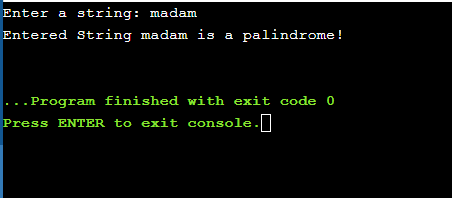
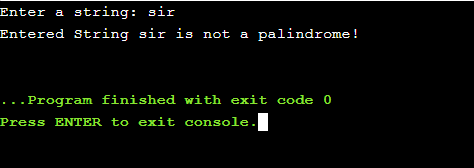
// Queue Based Palindrome Checking Program:
![8 9 Main.java 1 import java.util.*; 2 import java.io.*; 3 4 public class Main 5-{ 6 public static void main(String[] args) {](http://img.homeworklib.com/questions/8225aca0-f22b-11eb-b85b-abf6d50a3242.png?x-oss-process=image/resize,w_560)
// Program:
import java.util.*;
import java.io.*;
public class Main
{
public static void main(String[] args) {
Scanner sc = new
Scanner(System.in);
Queue<Character> queue = new
LinkedList<>();
System.out.print("Enter a string:
");
String s = sc.nextLine();
for(char ch :
s.toCharArray()){
queue.offer(ch);
}
Boolean flag = true;
for(int i = s.length()-1; i >=
0; i--){
if(s.charAt(i) !=
queue.poll()){
flag = false;
System.out.println("Entered String
"+s+" is not a palindrome!");
break;
}
}
if(flag){
System.out.println("Entered String
"+s+" is a palindrome!");
}
}
}
// OUTPUT:
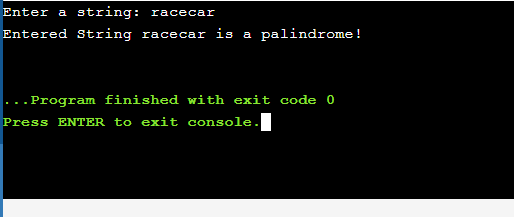
// Dequeue Based palindrome checking program:
![1 9 Main.java import java.util.*; 2 import java.io.*; 3 4 public class Main 5- 6 public static void main(String[] args) { 7 8](http://img.homeworklib.com/questions/82f20e20-f22b-11eb-b72c-05446d93fa85.png?x-oss-process=image/resize,w_560)
// Program:
import java.util.*;
import java.io.*;
public class Main
{
public static void main(String[] args) {
Scanner sc = new
Scanner(System.in);
Deque<Character> dequeue =
new LinkedList<>();
System.out.print("Enter a string:
");
String s = sc.nextLine();
for(char ch :
s.toCharArray()){
dequeue.offerLast(ch);
}
Boolean flag = true;
for(char ch :
s.toCharArray()){
if(ch != dequeue.pollLast()){
flag = false;
System.out.println("Entered String
"+s+" is not a palindrome!");
break;
}
}
if(flag){
System.out.println("Entered String
"+s+" is a palindrome!");
}
}
}
// OUTPUT:
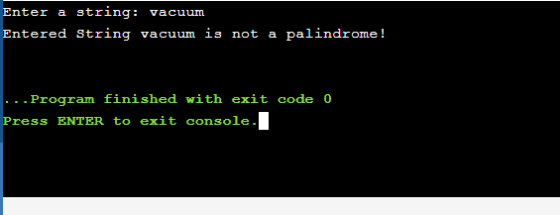
// THANK YOU SO MUCH IN ADVANCE!
// PLEASE DO LIKE AND UPVOTE IF THIS WAS HELPFUL!
Add Answer to:
Queues, Deques and Priority
Queues.
Enter the necessary code where indicated (using:
MyQues.java - below and...
Please make the following code modular. Therefore contained in a package with several classes and not...
Please make the following code modular. Therefore contained in a package with several classes and not just one. import java.util.*; public class Q { public static LinkedList<String> dogs = new LinkedList<String> (); public static LinkedList<String> cats = new LinkedList<String> (); public static LinkedList<String> animals = new LinkedList<String> (); public static void enqueueCats(){ System.out.println("Enter name"); Scanner sc=new Scanner(System.in); String name = sc.next(); cats.addLast(name); animals.addLast(name); } ...
Complete the printPalindrome method in the provided Palindrome.java program. The printPalindrome method accepts a String as...
Complete the printPalindrome method in the provided Palindrome.java program. The printPalindrome method accepts a String as a parameter and prints whether the parameter String is a palindrome (i.e., reads the same forwards as it does backwards, for example, "abba" or "racecar"). Make the code case-insensitive, so that words like "Abba" and "Madam" will be considered palindromes. import java.util.*; /** * Determines if a user entered String is a palindrome, which means the String * is the same forward and reverse....
Activity 2. Complete the code inside the Java file below, ListUtil.java, such that this class supplies...
 Activity 2. Complete the code inside the Java file below, ListUtil.java, such that this class supplies a utility method to reverse the entries in a linked list. Then, test your code using the tester class, Reverse Tester.java, given below. ListUtil.java import java.util.LinkedList; /** This class supplies a utility method to reverse the entries in a linked list. */ public class ListUtil { /** Reverses the elements in a linked list @param strings the linked list to reverse public static void...
What will the code shown below print to the console? public class Cascade public static void...
 What will the code shown below print to the console? public class Cascade public static void print(int arg){ for(int i=0; i<arg; i++){ System.out.print(""); } System.out.println(""); if(arg > 1){ print(arg-1); } } public static void main(String[] args) { print(4); } } E B IV AA- IES XX, SE V GT 12pt Paragraph -
BELOW IS THE CODE I ALREADY HAVE Linked List - Delete Modify Lab 5 and include...
 BELOW IS THE CODE I ALREADY HAVE
Linked List - Delete Modify Lab 5 and include the method to delete a node from the Linked List. In summary: 1) Add the method Delete 2) Method call to delete, with a number that IS in the list 3) Method call to delete, with a number that is NOT in the list - Be sure to include comments - Use meaningful identifier names (constants where appropriate) import java.io.*; 1/ Java program to...
BELOW IS THE CODE I ALREADY HAVE
Linked List - Delete Modify Lab 5 and include the method to delete a node from the Linked List. In summary: 1) Add the method Delete 2) Method call to delete, with a number that IS in the list 3) Method call to delete, with a number that is NOT in the list - Be sure to include comments - Use meaningful identifier names (constants where appropriate) import java.io.*; 1/ Java program to...
I need to make this code access the main method I suppose, but I don't know...
I need to make this code access the main method I suppose, but I don't know how to make that happen... Help please! QUESTION: Write a method called switchEmUp that accepts two integer arrays as parameters and switches the contents of the arrays. Make sure that you have code which considers if the two arrays are different sizes. Instructor comment: This will work since you never go back to the main method, but if you did, it wouldn't print out...
10. What prints when the following code is executed? public static void main (String args) "Cattywampus"; for (...
 10. What prints when the following code is executed? public static void main (String args) "Cattywampus"; for (int i-s.length )-1 i> 0 i-2) if (s.charAt (i)a') System.out.print(""); ] else if (s.charAt (i)'t') System.out.print (s.charAt (i-2)) i+ti else System. out. print (s . charAt (İ) ) ; if (i<2) System.out.print ("y"); System.out.println ()
10. What prints when the following code is executed? public static void main (String args) "Cattywampus"; for (int i-s.length )-1 i> 0 i-2) if (s.charAt (i)a') System.out.print(""); ]...
10. What prints when the following code is executed? public static void main (String args) "Cattywampus"; for (int i-s.length )-1 i> 0 i-2) if (s.charAt (i)a') System.out.print(""); ] else if (s.charAt (i)'t') System.out.print (s.charAt (i-2)) i+ti else System. out. print (s . charAt (İ) ) ; if (i<2) System.out.print ("y"); System.out.println ()
10. What prints when the following code is executed? public static void main (String args) "Cattywampus"; for (int i-s.length )-1 i> 0 i-2) if (s.charAt (i)a') System.out.print(""); ]...
Priority Queue Demo import java.util.*; public class PriorityQueueDemo { public static void main(String[] args) {...
Priority Queue Demo import java.util.*; public class PriorityQueueDemo { public static void main(String[] args) { //TODO 1: Create a priority queue of Strings and assign it to variable queue1 //TODO 2: Add Oklahoma, Indiana, Georgia, Texas to queue1 System.out.println("Priority queue using Comparable:"); //TODO 3: remove from queue1 all the strings one by one // with the "smaller" strings (higher priority) ahead of "bigger"...
What is the output of the following code? class C1 { public double PI=3.1; public void...
What is the output of the following code? class C1 { public double PI=3.1; public void m1() { System.out.println("M1 of C1"); } } class C2 extends C1 { public double PI=3.14; public void m1() { System.out.println("M1 of C2"); } } public class C { public static void main(String[] args) { C1 obj = new C2(); System.out.print(obj.PI); } } 3.1 3.14 None of the above
To do: Now add code to Pet and PetPlay to complete the comments in the code....
To do: Now add code to Pet and PetPlay to complete the comments in the code. import java.util.ArrayList; public class PetPlay { //----------------------------------------------------------------- // Stores and modifies a list of pets //----------------------------------------------------------------- public static void main (String[] args) { // always make your array lists generic ArrayList pets = new ArrayList(); pets.add(new Pet("dog", "Bella")); pets.add(new Pet("cat","Blackie")); pets.add(new Pet("bird", "Babs")); pets.add(new Pet("dog", "Lassie")); pets.add(new Pet("horse", "Sam")); pets.add(new Pet("dog", "Blackie")); pets.add(new Pet("turtle", "Joe")); pets.add(new Pet("bird","Annie")); pets.add(new Pet("bird", "Alex"));...
 Activity 2. Complete the code inside the Java file below, ListUtil.java, such that this class supplies a utility method to reverse the entries in a linked list. Then, test your code using the tester class, Reverse Tester.java, given below. ListUtil.java import java.util.LinkedList; /** This class supplies a utility method to reverse the entries in a linked list. */ public class ListUtil { /** Reverses the elements in a linked list @param strings the linked list to reverse public static void...
 What will the code shown below print to the console? public class Cascade public static void print(int arg){ for(int i=0; i<arg; i++){ System.out.print(""); } System.out.println(""); if(arg > 1){ print(arg-1); } } public static void main(String[] args) { print(4); } } E B IV AA- IES XX, SE V GT 12pt Paragraph -
 BELOW IS THE CODE I ALREADY HAVE
Linked List - Delete Modify Lab 5 and include the method to delete a node from the Linked List. In summary: 1) Add the method Delete 2) Method call to delete, with a number that IS in the list 3) Method call to delete, with a number that is NOT in the list - Be sure to include comments - Use meaningful identifier names (constants where appropriate) import java.io.*; 1/ Java program to...
BELOW IS THE CODE I ALREADY HAVE
Linked List - Delete Modify Lab 5 and include the method to delete a node from the Linked List. In summary: 1) Add the method Delete 2) Method call to delete, with a number that IS in the list 3) Method call to delete, with a number that is NOT in the list - Be sure to include comments - Use meaningful identifier names (constants where appropriate) import java.io.*; 1/ Java program to...
 10. What prints when the following code is executed? public static void main (String args) "Cattywampus"; for (int i-s.length )-1 i> 0 i-2) if (s.charAt (i)a') System.out.print(""); ] else if (s.charAt (i)'t') System.out.print (s.charAt (i-2)) i+ti else System. out. print (s . charAt (İ) ) ; if (i<2) System.out.print ("y"); System.out.println ()
10. What prints when the following code is executed? public static void main (String args) "Cattywampus"; for (int i-s.length )-1 i> 0 i-2) if (s.charAt (i)a') System.out.print(""); ]...
10. What prints when the following code is executed? public static void main (String args) "Cattywampus"; for (int i-s.length )-1 i> 0 i-2) if (s.charAt (i)a') System.out.print(""); ] else if (s.charAt (i)'t') System.out.print (s.charAt (i-2)) i+ti else System. out. print (s . charAt (İ) ) ; if (i<2) System.out.print ("y"); System.out.println ()
10. What prints when the following code is executed? public static void main (String args) "Cattywampus"; for (int i-s.length )-1 i> 0 i-2) if (s.charAt (i)a') System.out.print(""); ]...
Most questions answered within 3 hours.
-
Where is the error in this code sequence?
String s1 = "Hello";
String s2 = "ello";...
asked 10 months ago -
Financial data for Joel de Paris, Inc., for last year
follow:
Joel de Paris, Inc.
Balance...
asked 10 months ago -
Consider this reaction:
Al2(SO4)3 (aq)+ BaCl3
(aq) Al2Cl6 (aq)- +
3BaSO4(s) . What is the...
asked 10 months ago -
Suppose that Savneet is considering increasing her
recent random sample from 20 car rentals to 40...
asked 10 months ago -
Trucks arrive at an unloading terminal at an average rate of 120
per hour.
Trucks arrive...
asked 10 months ago -
Why are methanol and ethanol completely soluble in water while
octanol is not very little soluble....
asked 10 months ago -
A facilities manager at a university reads in a research report
that the mean amount of...
asked 10 months ago -
When the CuSO4 is rehydrated by adding water to the anhydrous
compound, is this an endothermic...
asked 10 months ago -
A ray of sunlight is passing from diamond into crown glass; the
angle of incidence is...
asked 10 months ago -
A block of mass 0.249 kg is placed on top of a light, vertical
spring of...
asked 10 months ago -
how do the kidneys compensate in the presences of acidosis
a) trigger hyperventilate
b) reserve acid...
asked 10 months ago -
Question 501 pts
The rental rate of capital to the firm increases. Which of the
following...
asked 10 months ago