Random Number File Reader This exercise assumes you have completed Programming Problem 13, Random Number File...
Random Number File Reader This exercise assumes you have completed Programming Problem 13, Random Number File Writer . Create another application that uses an OpenFileDialog control to let the user select the file that was created by the application that you wrote for Problem 13. This application should read the numbers from the file, display the numbers in a ListBox control, and then display the following data: • The total of the numbers • The number of random numbers read from the file. TO BE DONE in C#
Homework Answers
//Program.cs
using System;
using System.Collections.Generic;
using System.Linq;
using System.Threading.Tasks;
using System.Windows.Forms;
namespace Random_File_Reader
{
static class Program
{
/// <summary>
/// The main entry point for the application.
/// </summary>
[STAThread]
static void Main()
{
Application.EnableVisualStyles();
Application.SetCompatibleTextRenderingDefault(false);
Application.Run(new Form1());
}
}
}
//Form1.Designer.cs
namespace Random_File_Reader
{
partial class Form1
{
/// <summary>
/// Required designer variable.
/// </summary>
private System.ComponentModel.IContainer components = null;
/// <summary>
/// Clean up any resources being used.
/// </summary>
/// <param name="disposing">true if managed resources should
be disposed; otherwise, false.</param>
protected override void Dispose(bool disposing)
{
if (disposing && (components != null))
{
components.Dispose();
}
base.Dispose(disposing);
}
#region Windows Form Designer generated code
/// <summary>
/// Required method for Designer support - do not modify
/// the contents of this method with the code editor.
/// </summary>
private void InitializeComponent()
{
this.components = new System.ComponentModel.Container();
this.write = new System.Windows.Forms.Button();
this.read = new System.Windows.Forms.Button();
this.msg = new System.Windows.Forms.ToolTip(this.components);
this.output = new System.Windows.Forms.ListBox();
this.outOne = new System.Windows.Forms.Label();
this.outTwo = new System.Windows.Forms.Label();
this.SuspendLayout();
//
// write
//
this.write.Location = new System.Drawing.Point(54, 28);
this.write.Name = "write";
this.write.Size = new System.Drawing.Size(143, 33);
this.write.TabIndex = 0;
this.write.Text = "Write Random Numbers";
this.msg.SetToolTip(this.write, "Click to Write Random Numbers to
the File");
this.write.UseVisualStyleBackColor = true;
this.write.Click += new
System.EventHandler(this.write_Click);
//
// read
//
this.read.Location = new System.Drawing.Point(267, 28);
this.read.Name = "read";
this.read.Size = new System.Drawing.Size(143, 33);
this.read.TabIndex = 1;
this.read.Text = "Read Random Numbers";
this.msg.SetToolTip(this.read, "Click to Read Random Numbers from
the File");
this.read.UseVisualStyleBackColor = true;
this.read.Click += new System.EventHandler(this.read_Click);
//
// output
//
this.output.FormattingEnabled = true;
this.output.Location = new System.Drawing.Point(28, 81);
this.output.Name = "output";
this.output.Size = new System.Drawing.Size(437, 238);
this.output.TabIndex = 2;
//
// outOne
//
this.outOne.AutoSize = true;
this.outOne.Font = new System.Drawing.Font("Microsoft Sans Serif",
11.25F);
this.outOne.ForeColor = System.Drawing.Color.Green;
this.outOne.Location = new System.Drawing.Point(86, 332);
this.outOne.Name = "outOne";
this.outOne.Size = new System.Drawing.Size(234, 18);
this.outOne.TabIndex = 3;
this.outOne.Text = "Total Random Numbers Read : ";
//
// outTwo
//
this.outTwo.AutoSize = true;
this.outTwo.Font = new System.Drawing.Font("Microsoft Sans Serif",
11.25F);
this.outTwo.ForeColor = System.Drawing.Color.Green;
this.outTwo.Location = new System.Drawing.Point(86, 366);
this.outTwo.Name = "outTwo";
this.outTwo.Size = new System.Drawing.Size(233, 18);
this.outTwo.TabIndex = 4;
this.outTwo.Text = "Sum of Random Numbers Read : ";
//
// Form1
//
this.AutoScaleDimensions = new System.Drawing.SizeF(6F, 13F);
this.AutoScaleMode = System.Windows.Forms.AutoScaleMode.Font;
this.ClientSize = new System.Drawing.Size(487, 393);
this.Controls.Add(this.outTwo);
this.Controls.Add(this.outOne);
this.Controls.Add(this.output);
this.Controls.Add(this.read);
this.Controls.Add(this.write);
this.Name = "Form1";
this.Text = "Random Number Reader";
this.ResumeLayout(false);
this.PerformLayout();
}
#endregion
private System.Windows.Forms.Button write;
private System.Windows.Forms.ToolTip msg;
private System.Windows.Forms.Button read;
private System.Windows.Forms.ListBox output;
private System.Windows.Forms.Label outOne;
private System.Windows.Forms.Label outTwo;
}
}
//Form1.cs
using System;
using System.IO;
using System.Windows.Forms;
namespace Random_File_Reader
{
public partial class Form1 : Form
{
public Form1()
{
InitializeComponent();
}
private void write_Click(object sender, EventArgs e)
{
write_random();
}
private void write_random()
{
Random rand = new Random();
//ask user the location to save
SaveFileDialog dialog = new SaveFileDialog();
dialog.Title = "Enter the location and file name to Save";
string name = "";
if(dialog.ShowDialog() == DialogResult.OK)
{
name = dialog.FileName;
}
else
{
MessageBox.Show("Default File name with Random.txt is saved in
current directory");
name = "Random.txt";
}
//write random number of numbers in the file selected
try
{
StreamWriter sw = new StreamWriter(name);
int num;
//generate a random number and write to file selected by the
user
for (int i = 0; i < rand.Next(100, 1000); i++)
{
num = rand.Next(1, 1000);
Console.WriteLine("Writing Random Number: " +num );
sw.WriteLine(num);
}
sw.Close();
}
catch(Exception)
{
MessageBox.Show("Error occured");
}
}
private void read_Click(object sender, EventArgs e)
{
read_random();
}
private void read_random()
{
string name = "";
//ask user the location of random number to be read which contains
random numbers
OpenFileDialog dialog = new OpenFileDialog();
dialog.Title = "Select the File that contains the Random
numbers";
if(dialog.ShowDialog() == DialogResult.OK)
{
name = dialog.FileName;
try
{
StreamReader sr = new StreamReader(name);
string line = sr.ReadLine();
int num;
int sum = 0;
int total = 0;
//read a line
while(line!=null)
{
line = line.Trim();
try
{
//convert line to integer
//if it is int no error occure
//increment total and add sum
num = Convert.ToInt32(line);
sum += num;
total += 1;
output.Items.Add(line + "\n");
Console.WriteLine(num);
}
catch (Exception)
{
Console.WriteLine(line + " is not a number");
}
line = sr.ReadLine();
}
outOne.Text = "Total Random Numbers Read : " + total;
outTwo.Text = "Sum of Random Numbers Read : " + sum;
}
catch(Exception)
{
MessageBox.Show("Error occured while reading file");
}
}
else
{
MessageBox.Show("Unable to Load Random Number File");
}
}
}
}
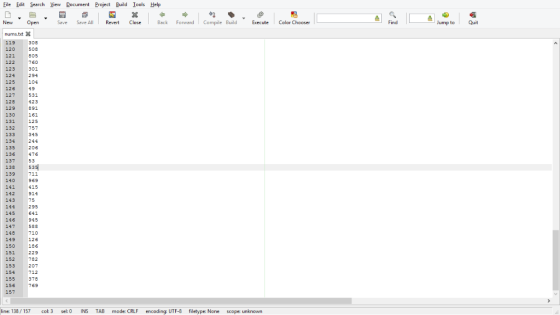
//sample run of the file
//nums.txt contains the 156 random numbers generated
//nums.txt
100
608
128
150
87
990
382
179
310
375
503
216
169
675
603
85
527
408
81
60
405
5
186
41
760
270
437
760
597
154
965
497
124
344
44
754
293
591
575
191
67
298
237
73
361
928
674
275
651
265
737
965
662
105
428
944
40
953
792
343
409
900
724
806
858
703
563
349
700
525
582
81
942
810
86
522
82
297
879
384
982
444
702
207
717
599
785
854
755
213
94
169
754
70
189
408
806
466
326
254
952
890
376
557
974
147
597
664
683
397
725
365
258
795
429
313
691
612
308
508
805
760
301
294
104
49
531
423
891
161
125
757
345
244
206
476
53
535
711
969
415
914
75
295
641
945
588
710
126
186
229
782
207
712
378
769
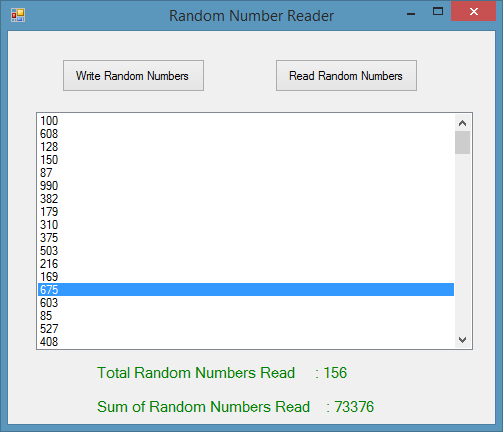
//user selects the nums.txt file and program loads it and calculates the number of numbers and their sum
//sample output
Add Answer to:
Random Number File Reader This exercise assumes you have
completed Programming Problem 13, Random Number File...
Please help me this problem. Provide the design and codes with pictures also separate answer Than...
 Please help me this problem. Provide the design and codes with
pictures also separate answer
Thank you
Random Number File Reader This exercise assumes you have completed Programming Problem 13, Randorm Number File Writer. Create another application that uses an OpenFileDialog con- trol to let the user select the file that was created by the application that you wrote for Problem 13. This application should read the numbers from the file, display the numbers in a ListBox control, and then...
Please help me this problem. Provide the design and codes with
pictures also separate answer
Thank you
Random Number File Reader This exercise assumes you have completed Programming Problem 13, Randorm Number File Writer. Create another application that uses an OpenFileDialog con- trol to let the user select the file that was created by the application that you wrote for Problem 13. This application should read the numbers from the file, display the numbers in a ListBox control, and then...
This assignment assumes you have completed Programming Assignment 6, Random Number File Writer. Write another program...
 This assignment assumes you have completed Programming
Assignment 6, Random Number File Writer. Write another program that
reads the random numbers from the random.txt file created in
Programming Assignment 6, display the numbers, and then display the
following data: The total of the numbers. The number of numbers
read from the file. Please program in python
This assignment assumes you have completed Programming
Assignment 6, Random Number File Writer. Write another program that
reads the random numbers from the random.txt file created in
Programming Assignment 6, display the numbers, and then display the
following data: The total of the numbers. The number of numbers
read from the file. Please program in python
I need help in Python. This is a two step problem So I have the code...
I need help in Python. This is a two step problem So I have the code down, but I am missing some requirements that I am stuck on. Also, I need help verifying the problem is correct.:) 7. Random Number File Writer Write a program that writes a series of random numbers to a file. Each random number should be in the range of 1 through 500. The application should let the user specify how many random numbers the file...
Having some trouble on this Python problem. It has 2 parts. Part 1: Random Number file...
Having some trouble on this Python problem. It has 2 parts. Part 1: Random Number file Writer Write a program that writes a series of random numbers to a file. Each random number should be in the range of 100 through 500. The application should let the user specify how many random numbers the file will hold. sample Outputs Enter the name of the file to which results should be written: ran_numbers_dude.txt Enter the number of random numbers to be...
Write a program that writes a series of random numbers to a file. Each random number...
Write a program that writes a series of random numbers to a file. Each random number should be in the range of 1 through 500 inclusive. 1.Use a file called randoms.txt as a input file and output file a. If you go to open the file and its not there then ask the user to create the file and then quit 2. Ask the user to specify how many random numbers the file will hold. a.Make sure that the...
For this assignment you are to create two programming projects. The first should have a project...
For this assignment you are to create two programming projects. The first should have a project directory with Lab02-2WriteNumbers and the second should have a project directory with Lab02-2ReadNumbers. Lab02-03WriteNumbers – Write a program that asks the user to enter five numbers. Use a double data type to hold the numbers. The program should create a file and save all five numbers to the file. Enter a number (1 of 5): 45 Enter a number (2 0f 5): 23 Enter...
For this assignment you are to create two programming projects. The first should have a project...
For this assignment you are to create two programming projects. The first should have a project directory with Lab02-2WriteNumbers and the second should have a project directory with Lab02-2ReadNumbers. Lab02-03WriteNumbers – Write a program that asks the user to enter five numbers. Use a double data type to hold the numbers. The program should create a file and save all five numbers to the file. Enter a number (1 of 5): 45 Enter a number (2 0f 5): 23 Enter...
I need help writing these 2 programs please include all the indents :) In this programming...
I need help writing these 2 programs please include all the indents :) In this programming challenge you are to create two Python programs: randomwrite.py andrandomread.py. One program, randomwrite.py, is to write a set of random numbers to a file. The second program, randomread.py, is to read a set of random numbers from a file, counts how many were read, displays the random numbers, and displays the total count of random numbers. Random Number File Writer (randomwrite.py) Create a program...
1.Write a python program that writes a series of random numbers to a file named random.txt....
1.Write a python program that writes a series of random numbers to a file named random.txt. Each random number should be in the range of 1 through 300. The application should let the user specify how many random numbers the file will hold. 2. Write another program that reads the random numbers from the random.txt file, displays the numbers, then displays the following data: I. The total of the numbers II. The number of random numbers read from the file
Chapter 7, Problem 5PP in Starting out with Visual C# (4th Edition) World Series Champions Teams.txt...
Chapter 7, Problem 5PP in Starting out with Visual C# (4th Edition) World Series Champions Teams.txt - This ile contains a list of several Major League baseball teams in alphabetical order. Each team listed in the file has one the World Series at least once. WorldSeriesWinners.txt - This file contains a chronological list of the World Series' winning teams from 1903 through 2012. Create an application that displays the contents of the Teams.txt file in a ListBox control. When the...
 Please help me this problem. Provide the design and codes with
pictures also separate answer
Thank you
Random Number File Reader This exercise assumes you have completed Programming Problem 13, Randorm Number File Writer. Create another application that uses an OpenFileDialog con- trol to let the user select the file that was created by the application that you wrote for Problem 13. This application should read the numbers from the file, display the numbers in a ListBox control, and then...
Please help me this problem. Provide the design and codes with
pictures also separate answer
Thank you
Random Number File Reader This exercise assumes you have completed Programming Problem 13, Randorm Number File Writer. Create another application that uses an OpenFileDialog con- trol to let the user select the file that was created by the application that you wrote for Problem 13. This application should read the numbers from the file, display the numbers in a ListBox control, and then...
 This assignment assumes you have completed Programming
Assignment 6, Random Number File Writer. Write another program that
reads the random numbers from the random.txt file created in
Programming Assignment 6, display the numbers, and then display the
following data: The total of the numbers. The number of numbers
read from the file. Please program in python
This assignment assumes you have completed Programming
Assignment 6, Random Number File Writer. Write another program that
reads the random numbers from the random.txt file created in
Programming Assignment 6, display the numbers, and then display the
following data: The total of the numbers. The number of numbers
read from the file. Please program in python
Most questions answered within 3 hours.
-
Where is the error in this code sequence?
String s1 = "Hello";
String s2 = "ello";...
asked 11 months ago -
Financial data for Joel de Paris, Inc., for last year
follow:
Joel de Paris, Inc.
Balance...
asked 11 months ago -
Consider this reaction:
Al2(SO4)3 (aq)+ BaCl3
(aq) Al2Cl6 (aq)- +
3BaSO4(s) . What is the...
asked 11 months ago -
Suppose that Savneet is considering increasing her
recent random sample from 20 car rentals to 40...
asked 11 months ago -
Trucks arrive at an unloading terminal at an average rate of 120
per hour.
Trucks arrive...
asked 11 months ago -
Why are methanol and ethanol completely soluble in water while
octanol is not very little soluble....
asked 11 months ago -
A facilities manager at a university reads in a research report
that the mean amount of...
asked 11 months ago -
When the CuSO4 is rehydrated by adding water to the anhydrous
compound, is this an endothermic...
asked 11 months ago -
A ray of sunlight is passing from diamond into crown glass; the
angle of incidence is...
asked 11 months ago -
A block of mass 0.249 kg is placed on top of a light, vertical
spring of...
asked 11 months ago -
how do the kidneys compensate in the presences of acidosis
a) trigger hyperventilate
b) reserve acid...
asked 11 months ago -
Question 501 pts
The rental rate of capital to the firm increases. Which of the
following...
asked 11 months ago