Please help me this problem. Provide the design and codes with
pictures also separate answer
Thank you
Homework Answers
Dear Student ,
As per the requirement submitted above , kindly find the below solution.
Here a new Windows Forms Application in C# is created using Visual Studio 2017 with name "Demo_RandomNumberFileReader".This application contains a form with name "Form1.cs".Below are the files associated with form1.
1.Form1.cs[Design]

2.Form1.Designer.cs
namespace Demo_RandomNumberFileReader
{
partial class Form1
{
/// <summary>
/// Required designer variable.
/// </summary>
private System.ComponentModel.IContainer components = null;
/// <summary>
/// Clean up any resources being used.
/// </summary>
/// <param name="disposing">true if managed resources should
be disposed; otherwise, false.</param>
protected override void Dispose(bool disposing)
{
if (disposing && (components != null))
{
components.Dispose();
}
base.Dispose(disposing);
}
#region Windows Form Designer generated code
/// <summary>
/// Required method for Designer support - do not modify
/// the contents of this method with the code editor.
/// </summary>
private void InitializeComponent()
{
this.lstRandomNumbers = new System.Windows.Forms.ListBox();
this.lblNumbers = new System.Windows.Forms.Label();
this.btnReadFile = new System.Windows.Forms.Button();
this.btnExit = new System.Windows.Forms.Button();
this.SuspendLayout();
//
// lstRandomNumbers
//
this.lstRandomNumbers.FormattingEnabled = true;
this.lstRandomNumbers.Location = new System.Drawing.Point(12,
26);
this.lstRandomNumbers.Name = "lstRandomNumbers";
this.lstRandomNumbers.Size = new System.Drawing.Size(116,
186);
this.lstRandomNumbers.TabIndex = 0;
//
// lblNumbers
//
this.lblNumbers.AutoSize = true;
this.lblNumbers.Location = new System.Drawing.Point(159, 39);
this.lblNumbers.Name = "lblNumbers";
this.lblNumbers.Size = new System.Drawing.Size(0, 13);
this.lblNumbers.TabIndex = 1;
//
// btnReadFile
//
this.btnReadFile.Font = new System.Drawing.Font("Microsoft Sans
Serif", 12F, System.Drawing.FontStyle.Regular,
System.Drawing.GraphicsUnit.Point, ((byte)(0)));
this.btnReadFile.Location = new System.Drawing.Point(162,
150);
this.btnReadFile.Name = "btnReadFile";
this.btnReadFile.Size = new System.Drawing.Size(152, 36);
this.btnReadFile.TabIndex = 2;
this.btnReadFile.Text = "&Click to Read File";
this.btnReadFile.UseVisualStyleBackColor = true;
this.btnReadFile.Click += new
System.EventHandler(this.btnReadFile_Click);
//
// btnExit
//
this.btnExit.Font = new System.Drawing.Font("Microsoft Sans Serif",
12F, System.Drawing.FontStyle.Regular,
System.Drawing.GraphicsUnit.Point, ((byte)(0)));
this.btnExit.Location = new System.Drawing.Point(162, 192);
this.btnExit.Name = "btnExit";
this.btnExit.Size = new System.Drawing.Size(152, 26);
this.btnExit.TabIndex = 3;
this.btnExit.Text = "E&xit\r\n";
this.btnExit.UseVisualStyleBackColor = true;
this.btnExit.Click += new
System.EventHandler(this.btnExit_Click);
//
// Form1
//
this.AutoScaleDimensions = new System.Drawing.SizeF(6F, 13F);
this.AutoScaleMode = System.Windows.Forms.AutoScaleMode.Font;
this.ClientSize = new System.Drawing.Size(336, 230);
this.Controls.Add(this.btnExit);
this.Controls.Add(this.btnReadFile);
this.Controls.Add(this.lstRandomNumbers);
this.Controls.Add(this.lblNumbers);
this.Name = "Form1";
this.Text = "Random Number File Reader";
this.ResumeLayout(false);
this.PerformLayout();
}
#endregion
private System.Windows.Forms.ListBox lstRandomNumbers;
private System.Windows.Forms.Label lblNumbers;
private System.Windows.Forms.Button btnReadFile;
private System.Windows.Forms.Button btnExit;
}
}
3.Form1.cs
//namespace
using System;
using System.Windows.Forms;
using System.IO;
//application namespace
namespace Demo_RandomNumberFileReader
{
public partial class Form1 : Form
{
public Form1()
{
InitializeComponent();
}
//Read file button clcik
private void btnReadFile_Click(object sender, EventArgs e)
{
//creating object of open file dialog
OpenFileDialog fileDialog = new OpenFileDialog();
//display dialog
fileDialog.ShowDialog();
//selected file path
string Path = fileDialog.FileName;
//creating object of stream reader
StreamReader reader = new StreamReader(Path);
string lineFromFile = "";
//declaring variables
int sumofNumbers = 0;
int totalNumbers = 0;
while ((lineFromFile = reader.ReadLine()) != null)
{
//add number in the listbox
lstRandomNumbers.Items.Add(lineFromFile);
//calculate sum
sumofNumbers = sumofNumbers + int.Parse(lineFromFile);
//increment count
totalNumbers++;
}
//display sum and number count on the label
lblNumbers.Text = "Total Numbers are " + totalNumbers +
Environment.NewLine + "Sum of Numbers are :" + sumofNumbers;
}
//Exit button click
private void btnExit_Click(object sender, EventArgs e)
{
Application.Exit();//close application
}
}
}
Screen for code :

======================================================
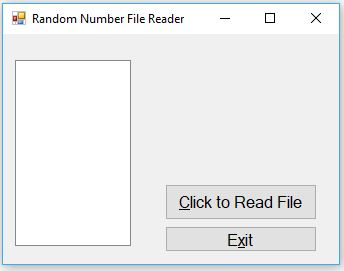
Output : Run application using F5 and will get the screen as shown below
Screen 1 :
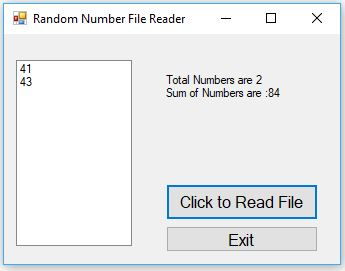
Screen 2 :Screen showing open file dialog

Screen 3:Screen showing total numbers and sum of numbers
Screen 4 :Sample.txt

NOTE : PLEASE FEEL FREE TO PROVIDE FEEDBACK ABOUT THE SOLUTION.
Add Answer to:
Please help me this problem. Provide the design and codes with pictures also separate answer Than...
Random Number File Reader This exercise assumes you have completed Programming Problem 13, Random Number File...
Random Number File Reader This exercise assumes you have completed Programming Problem 13, Random Number File Writer . Create another application that uses an OpenFileDialog control to let the user select the file that was created by the application that you wrote for Problem 13. This application should read the numbers from the file, display the numbers in a ListBox control, and then display the following data: • The total of the numbers • The number of random numbers read...
This assignment assumes you have completed Programming Assignment 6, Random Number File Writer. Write another program...
 This assignment assumes you have completed Programming
Assignment 6, Random Number File Writer. Write another program that
reads the random numbers from the random.txt file created in
Programming Assignment 6, display the numbers, and then display the
following data: The total of the numbers. The number of numbers
read from the file. Please program in python
This assignment assumes you have completed Programming
Assignment 6, Random Number File Writer. Write another program that
reads the random numbers from the random.txt file created in
Programming Assignment 6, display the numbers, and then display the
following data: The total of the numbers. The number of numbers
read from the file. Please program in python
I need help in Python. This is a two step problem So I have the code...
I need help in Python. This is a two step problem So I have the code down, but I am missing some requirements that I am stuck on. Also, I need help verifying the problem is correct.:) 7. Random Number File Writer Write a program that writes a series of random numbers to a file. Each random number should be in the range of 1 through 500. The application should let the user specify how many random numbers the file...
I need help writing these 2 programs please include all the indents :) In this programming...
I need help writing these 2 programs please include all the indents :) In this programming challenge you are to create two Python programs: randomwrite.py andrandomread.py. One program, randomwrite.py, is to write a set of random numbers to a file. The second program, randomread.py, is to read a set of random numbers from a file, counts how many were read, displays the random numbers, and displays the total count of random numbers. Random Number File Writer (randomwrite.py) Create a program...
Chapter 7, Problem 5PP in Starting out with Visual C# (4th Edition) World Series Champions Teams.txt...
Chapter 7, Problem 5PP in Starting out with Visual C# (4th Edition) World Series Champions Teams.txt - This ile contains a list of several Major League baseball teams in alphabetical order. Each team listed in the file has one the World Series at least once. WorldSeriesWinners.txt - This file contains a chronological list of the World Series' winning teams from 1903 through 2012. Create an application that displays the contents of the Teams.txt file in a ListBox control. When the...
I am learning programming in JAVA. Please help me with this programming assignment. Your lab assignment...
I am learning programming in JAVA. Please help me with this programming assignment. Your lab assignment this week is to build a little math program to help kids practice their addition and subtraction. You will create a menu and have the kid select what kind of math problem they want to solve. Once the kid selects what kind of problem. Randomly generate two numbers, display the problem and allow the kid to enter the answer. If the answer is correct....
Having some trouble on this Python problem. It has 2 parts. Part 1: Random Number file...
Having some trouble on this Python problem. It has 2 parts. Part 1: Random Number file Writer Write a program that writes a series of random numbers to a file. Each random number should be in the range of 100 through 500. The application should let the user specify how many random numbers the file will hold. sample Outputs Enter the name of the file to which results should be written: ran_numbers_dude.txt Enter the number of random numbers to be...
I really need help on this programming problem that am doing in Visual Studio 2019 in...
I really need help on this programming problem that am doing in Visual Studio 2019 in C++ Submit your .cpp file as well as the input file, the output file, and the screen shot of all the files tiled next to each other here! Instructions: Write a menu driven program that has three options: Option 1: Write a function that calculates the tax for an iphone. The price and the tax rate should be asked from the user. Input validation:...
PLEASE HELP C++ some of the content in random.txt Program #2 This problem is a modification...
 PLEASE HELP C++
some of the content in random.txt
Program #2 This problem is a modification of Problem 24 on page 302 of the Gaddis text with two small additions. (A scan of this problem can be found on the last page of the assignment.) In this assignment, your program will read in a list of random numbers from an input file, random. txt (found on eLearning in the "Homework Input Files" folder), and calculate the following statistics on those...
PLEASE HELP C++
some of the content in random.txt
Program #2 This problem is a modification of Problem 24 on page 302 of the Gaddis text with two small additions. (A scan of this problem can be found on the last page of the assignment.) In this assignment, your program will read in a list of random numbers from an input file, random. txt (found on eLearning in the "Homework Input Files" folder), and calculate the following statistics on those...
Please help with this exercises in c++ language Thanks Lab Activity #5-More Functions/FILES Exercise# Write a...
 Please help with this exercises in c++ language
Thanks
Lab Activity #5-More Functions/FILES Exercise# Write a program that will generate 1000 random numbers (all of which are between 10 and 20) and then write all of the even numbers (from those 1000 numbers) to a new file called "myEvenRandoms.txt Exercise #2 (DO ONLY IF WE COVERED ARRAYS OF CHARACT Write a program that will ask the user to enter a sentence. Then create a separate function that will count the...
Please help with this exercises in c++ language
Thanks
Lab Activity #5-More Functions/FILES Exercise# Write a program that will generate 1000 random numbers (all of which are between 10 and 20) and then write all of the even numbers (from those 1000 numbers) to a new file called "myEvenRandoms.txt Exercise #2 (DO ONLY IF WE COVERED ARRAYS OF CHARACT Write a program that will ask the user to enter a sentence. Then create a separate function that will count the...
 This assignment assumes you have completed Programming
Assignment 6, Random Number File Writer. Write another program that
reads the random numbers from the random.txt file created in
Programming Assignment 6, display the numbers, and then display the
following data: The total of the numbers. The number of numbers
read from the file. Please program in python
This assignment assumes you have completed Programming
Assignment 6, Random Number File Writer. Write another program that
reads the random numbers from the random.txt file created in
Programming Assignment 6, display the numbers, and then display the
following data: The total of the numbers. The number of numbers
read from the file. Please program in python
 PLEASE HELP C++
some of the content in random.txt
Program #2 This problem is a modification of Problem 24 on page 302 of the Gaddis text with two small additions. (A scan of this problem can be found on the last page of the assignment.) In this assignment, your program will read in a list of random numbers from an input file, random. txt (found on eLearning in the "Homework Input Files" folder), and calculate the following statistics on those...
PLEASE HELP C++
some of the content in random.txt
Program #2 This problem is a modification of Problem 24 on page 302 of the Gaddis text with two small additions. (A scan of this problem can be found on the last page of the assignment.) In this assignment, your program will read in a list of random numbers from an input file, random. txt (found on eLearning in the "Homework Input Files" folder), and calculate the following statistics on those...
 Please help with this exercises in c++ language
Thanks
Lab Activity #5-More Functions/FILES Exercise# Write a program that will generate 1000 random numbers (all of which are between 10 and 20) and then write all of the even numbers (from those 1000 numbers) to a new file called "myEvenRandoms.txt Exercise #2 (DO ONLY IF WE COVERED ARRAYS OF CHARACT Write a program that will ask the user to enter a sentence. Then create a separate function that will count the...
Please help with this exercises in c++ language
Thanks
Lab Activity #5-More Functions/FILES Exercise# Write a program that will generate 1000 random numbers (all of which are between 10 and 20) and then write all of the even numbers (from those 1000 numbers) to a new file called "myEvenRandoms.txt Exercise #2 (DO ONLY IF WE COVERED ARRAYS OF CHARACT Write a program that will ask the user to enter a sentence. Then create a separate function that will count the...
Most questions answered within 3 hours.
-
Where is the error in this code sequence?
String s1 = "Hello";
String s2 = "ello";...
asked 11 months ago -
Financial data for Joel de Paris, Inc., for last year
follow:
Joel de Paris, Inc.
Balance...
asked 11 months ago -
Consider this reaction:
Al2(SO4)3 (aq)+ BaCl3
(aq) Al2Cl6 (aq)- +
3BaSO4(s) . What is the...
asked 11 months ago -
Suppose that Savneet is considering increasing her
recent random sample from 20 car rentals to 40...
asked 11 months ago -
Trucks arrive at an unloading terminal at an average rate of 120
per hour.
Trucks arrive...
asked 11 months ago -
Why are methanol and ethanol completely soluble in water while
octanol is not very little soluble....
asked 11 months ago -
A facilities manager at a university reads in a research report
that the mean amount of...
asked 11 months ago -
When the CuSO4 is rehydrated by adding water to the anhydrous
compound, is this an endothermic...
asked 11 months ago -
A ray of sunlight is passing from diamond into crown glass; the
angle of incidence is...
asked 11 months ago -
A block of mass 0.249 kg is placed on top of a light, vertical
spring of...
asked 11 months ago -
how do the kidneys compensate in the presences of acidosis
a) trigger hyperventilate
b) reserve acid...
asked 11 months ago -
Question 501 pts
The rental rate of capital to the firm increases. Which of the
following...
asked 11 months ago