Ex: In relation to image painting in frame, the following code is the use of getImage()...
Ex: In relation to image painting in frame, the following code
is the use of getImage() in toolkit.
Modify the image() through ImageIcon and imageIO.read() of javax
into a converted form using imageIO.read().
import java.awt.*;
import javax.swing.*;
public class FrameImage extends JPanel{
public void paint(Graphics g) {
Toolkit toolkit = Toolkit.getDefaultToolkit();
Image image = toolkit.getImage("image/grapes.gif");
g.drawImage(image, 60, 40, this);
}
public static void main(String[] args) {
JFrame frame = new JFrame();
FrameImage pannell = new FrameImage();
frame.add(pannell);
frame.setTitle("image paint");
frame.setDefaultCloseOperation(JFrame.EXIT_ON_CLOSE);
frame.pack();
frame.setVisible(true);
}
}
Please solve the problem. and Please Let me explain the process.
Thank you:)
Homework Answers
// Dear student i have explained all program each steps using comment above the code this code is working good
and i attached the output screen shot at end of the program
import java.awt.Color;
import java.awt.Container;
import java.awt.FlowLayout;
import java.awt.image.BufferedImage;
import java.io.IOException;
import javax.imageio.ImageIO;
import javax.swing.ImageIcon;
import javax.swing.JFrame;
import javax.swing.JLabel;
// The class FrameImage is inheriting all the properties of
JFrame
public class FrameImage extends JFrame {
// this is used to add a label
JLabel label;
// created a default construct to load an image
public FrameImage() throws IOException
{
// create an ojbect to JLabel
class
label=new JLabel("Hello world");
// this method is used to read an image
BufferedImage wPic =
ImageIO.read(this.getClass().getResource("image/road.jpg"));
// this method display the image in Jlable icon
JLabel wIcon = new JLabel(new ImageIcon(wPic));
// this method makes the frame to visible
this.setVisible(true);
// this method sets the title
this.setTitle("Frame Image");
// this method is used to
Container
c=this.getContentPane();
// this method is used to set the
layout
c.setLayout(new
FlowLayout());
c.add(label);
c.add(wIcon);
// it set the size of the
window
this.setSize(500,500);
//this method closes the JFrame
Operations
this.setDefaultCloseOperation(JFrame.EXIT_ON_CLOSE);
}
public static void main(String[] args) throws
IOException {
// when we created and object to a
class
FrameImage fi=new
FrameImage();
}
}
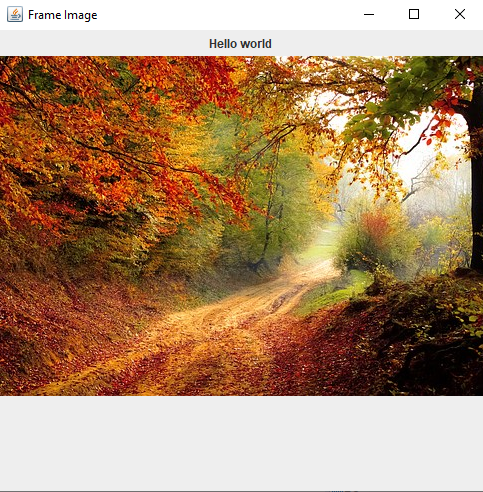
Output:
Add Answer to:
Ex: In relation to image painting in frame, the following code
is the use of getImage()...
2. Find the error(s), correct it, and write output. Point 5 package javaapplication154 import javax.swing.* import...
 2. Find the error(s), correct it, and write output. Point 5 package javaapplication154 import javax.swing.* import java.awt. import java.awt.Color publie class JGraphicsPanel extends JPanel f public JGraphiesPanel(Color color) f this.setBackground(color); public void paint(Graphies super.paint0; setColor(0,0,0); filloval(10, 5, 40, 40); fillOval(60, 5, 40, 40); package javaapplication154; import java.awt.Color; import javax.swing.JFrame; public class JavaApplication154 public static void main(Stringl) args) [ JFrame frame- new JFrame( "Using colors"); frame.setDefaultCloseOperation( JFrame.EXIT_ON_CLOSE); JGraphiesPanel GraphiesPanel-new JGraphiesPanel(Color.RED); frame.setSize( 400, 180); frame.setVisible );
tart from the following code, and add Action Listener to make it functional to do the...
 tart from the following code, and add Action Listener to make it
functional to do the temperature conversion in the direction of the
arrow that is clicked.
. (Need about 10 lines)
Note:
import javax.swing.*;
import
java.awt.GridLayout;
import
java.awt.event.*;
import
java.text.DecimalFormat;
public class temperatureConverter extends JFrame {
public static void
main(String[] args) {
JFrame frame = new temperatureConverter();
frame.setTitle("Temp");
frame.setSize(200, 100);
frame.setLocationRelativeTo(null);
frame.setDefaultCloseOperation(JFrame.EXIT_ON_CLOSE);
frame.setVisible(true);
}
public
temperatureConverter() {
JLabel lblC = new...
tart from the following code, and add Action Listener to make it
functional to do the temperature conversion in the direction of the
arrow that is clicked.
. (Need about 10 lines)
Note:
import javax.swing.*;
import
java.awt.GridLayout;
import
java.awt.event.*;
import
java.text.DecimalFormat;
public class temperatureConverter extends JFrame {
public static void
main(String[] args) {
JFrame frame = new temperatureConverter();
frame.setTitle("Temp");
frame.setSize(200, 100);
frame.setLocationRelativeTo(null);
frame.setDefaultCloseOperation(JFrame.EXIT_ON_CLOSE);
frame.setVisible(true);
}
public
temperatureConverter() {
JLabel lblC = new...
Add a timer to the lightbulb ON/OFF program such that the bulb stays on for 10...
 Add a timer to the lightbulb ON/OFF program such that the bulb
stays on for 10 seconds after the ON button is pushed and then goes
off. Put a new label on the lightbulb panel that counts
the number of seconds the bulb is on and displays the number of
seconds as it counts up from 0 to 10. THIS IS A JAVA PROGRAM. The
image above is what it should look like.
// Demonstrates mnemonics and tool tips.
//********************************************************************...
Add a timer to the lightbulb ON/OFF program such that the bulb
stays on for 10 seconds after the ON button is pushed and then goes
off. Put a new label on the lightbulb panel that counts
the number of seconds the bulb is on and displays the number of
seconds as it counts up from 0 to 10. THIS IS A JAVA PROGRAM. The
image above is what it should look like.
// Demonstrates mnemonics and tool tips.
//********************************************************************...
I need to implement game logic for tic tac toe in this code. Can someone help...
I need to implement game logic for tic tac toe in this code. Can someone help me. It just needs to be a a player vs player again and ask if you want to play again. import javax.swing.*; import java.awt.*; import java.awt.event.MouseAdapter; import java.awt.event.MouseEvent; import java.awt.event.MouseListener; public class TicTacToe { public static void main(String[] args) { JFrame frame = new JFrame(" TicTacToe"); frame.setDefaultCloseOperation(JFrame.EXIT_ON_CLOSE); frame.setSize(290, 300); Board board = new Board(); frame.add(board); frame.setResizable(false); frame.setVisible(true); } } class Board extends JComponent {...
There 2 parts to complete: import javax.swing.*; import java.awt.event.*; import java.awt.*; public class Q4 extends JFrame...
There 2 parts to complete: import javax.swing.*; import java.awt.event.*; import java.awt.*; public class Q4 extends JFrame { private int xPos, yPos; public Q4() { JPanel drawPanel = new JPanel() { @Override public void paintComponent(Graphics g) { super.paintComponent(g); // paint parent's background //complete this: } }; drawPanel.addMouseListener(new MouseAdapter() { public void mouseClicked(MouseEvent evt) { //complete this :- set the xPos, yPos } }); setContentPane(drawPanel); setDefaultCloseOperation(JFrame.EXIT_ON_CLOSE); setTitle("Mouse-Click Demo"); setSize(400, 250); setVisible(true); } public static void main(String[] args) { SwingUtilities.invokeLater(new Runnable() {...
The program given here will draw the Olympic logo. Modify the program as the following: 1.Change...
The program given here will draw the Olympic logo. Modify the program as the following: 1.Change the class name to Test1OlympicYourFirstNameYourLastName 2.Change the OlympicRingPanel class name to OlympicRingPanelYourfirstNameYourLastName 3.Modify the program so that the first ring will be filled with random color with a random alpha value. I have shown 3 sample output here for your references. 4.Modify the paintComponent so your name will be displayed under the Olympic rings.The color of your name should be random color as well....
What is wrong with this code please. I need to draw CIRCLES in JFrame JAVA. recursively Draw...
What is wrong with this code please. I need to draw CIRCLES in JFrame JAVA. recursively Draw a circle centered near the top of the JPanel After drawing a circle, your program should draw two more circles half way to the left and right of the circle just drawn and located "one level" lower in the JPanel. Do this drawing as long as the drawing would not be below the bottom of the JPanel Each newly drawn circle then follows the...
This is the java GUI program. I want to add an icon to a button, but...
 This is the java GUI program.
I want to add an icon to a button, but it shows nothing.
Can you fix it for me please?
import java.awt.BorderLayout;
import java.awt.Container;
import javax.swing.ImageIcon;
import javax.swing.JButton;
import javax.swing.JFrame;
import javax.swing.JPanel;
class Icon extends JFrame{
public static
void main(String args[]){
Icon frame = new Icon("title");
frame.setVisible(true);
}
Icon(String title){
setTitle(title);
setBounds(100, 100, 300, 250);
setDefaultCloseOperation(JFrame.EXIT_ON_CLOSE);
JPanel p = new JPanel();
ImageIcon icon1 = new
ImageIcon("https://static.thenounproject.com/png/610387-200.png");
JButton button1 = new JButton(icon1);
p.add(button1);
Container contentPane...
This is the java GUI program.
I want to add an icon to a button, but it shows nothing.
Can you fix it for me please?
import java.awt.BorderLayout;
import java.awt.Container;
import javax.swing.ImageIcon;
import javax.swing.JButton;
import javax.swing.JFrame;
import javax.swing.JPanel;
class Icon extends JFrame{
public static
void main(String args[]){
Icon frame = new Icon("title");
frame.setVisible(true);
}
Icon(String title){
setTitle(title);
setBounds(100, 100, 300, 250);
setDefaultCloseOperation(JFrame.EXIT_ON_CLOSE);
JPanel p = new JPanel();
ImageIcon icon1 = new
ImageIcon("https://static.thenounproject.com/png/610387-200.png");
JButton button1 = new JButton(icon1);
p.add(button1);
Container contentPane...
Basic button tracking Deliverables Updated files for app6.java myJFrame6.java myJPanel6.java student.java Contents You can start with...
 Basic button tracking
Deliverables
Updated files for
app6.java
myJFrame6.java
myJPanel6.java
student.java
Contents
You can start with the files available here.
public class app6
{
public static void main(String args[])
{
myJFrame6 mjf = new myJFrame6();
}
}
import java.awt.*;
import javax.swing.*;
import java.awt.event.*;
public class myJFrame6 extends JFrame
{
myJPanel6 p6;
public myJFrame6 ()
{
super ("My First Frame");
//------------------------------------------------------
// Create components: Jpanel, JLabel and JTextField
p6 = new myJPanel6();
//------------------------------------------------------...
Basic button tracking
Deliverables
Updated files for
app6.java
myJFrame6.java
myJPanel6.java
student.java
Contents
You can start with the files available here.
public class app6
{
public static void main(String args[])
{
myJFrame6 mjf = new myJFrame6();
}
}
import java.awt.*;
import javax.swing.*;
import java.awt.event.*;
public class myJFrame6 extends JFrame
{
myJPanel6 p6;
public myJFrame6 ()
{
super ("My First Frame");
//------------------------------------------------------
// Create components: Jpanel, JLabel and JTextField
p6 = new myJPanel6();
//------------------------------------------------------...
Why when executed my frame does not contain what i have added to it? Here is...
Why when executed my frame does not contain what i have added to it? Here is my code import java.awt.Panel; import java.awt.event.ActionEvent; import java.awt.event.ActionListener; import javax.swing.JButton; import javax.swing.JFrame; import javax.swing.JLabel; import javax.swing.JTextArea; import javax.swing.JTextField; import javax.swing.JPanel; @SuppressWarnings("serial") public class AddressBook1 extends JFrame implements ActionListener { /** * */ JLabel name = new JLabel("Name: "); JLabel address = new JLabel("Address: "); JLabel phone = new JLabel("Phone: "); JLabel email = new JLabel("Email: ");...
 2. Find the error(s), correct it, and write output. Point 5 package javaapplication154 import javax.swing.* import java.awt. import java.awt.Color publie class JGraphicsPanel extends JPanel f public JGraphiesPanel(Color color) f this.setBackground(color); public void paint(Graphies super.paint0; setColor(0,0,0); filloval(10, 5, 40, 40); fillOval(60, 5, 40, 40); package javaapplication154; import java.awt.Color; import javax.swing.JFrame; public class JavaApplication154 public static void main(Stringl) args) [ JFrame frame- new JFrame( "Using colors"); frame.setDefaultCloseOperation( JFrame.EXIT_ON_CLOSE); JGraphiesPanel GraphiesPanel-new JGraphiesPanel(Color.RED); frame.setSize( 400, 180); frame.setVisible );
 tart from the following code, and add Action Listener to make it
functional to do the temperature conversion in the direction of the
arrow that is clicked.
. (Need about 10 lines)
Note:
import javax.swing.*;
import
java.awt.GridLayout;
import
java.awt.event.*;
import
java.text.DecimalFormat;
public class temperatureConverter extends JFrame {
public static void
main(String[] args) {
JFrame frame = new temperatureConverter();
frame.setTitle("Temp");
frame.setSize(200, 100);
frame.setLocationRelativeTo(null);
frame.setDefaultCloseOperation(JFrame.EXIT_ON_CLOSE);
frame.setVisible(true);
}
public
temperatureConverter() {
JLabel lblC = new...
tart from the following code, and add Action Listener to make it
functional to do the temperature conversion in the direction of the
arrow that is clicked.
. (Need about 10 lines)
Note:
import javax.swing.*;
import
java.awt.GridLayout;
import
java.awt.event.*;
import
java.text.DecimalFormat;
public class temperatureConverter extends JFrame {
public static void
main(String[] args) {
JFrame frame = new temperatureConverter();
frame.setTitle("Temp");
frame.setSize(200, 100);
frame.setLocationRelativeTo(null);
frame.setDefaultCloseOperation(JFrame.EXIT_ON_CLOSE);
frame.setVisible(true);
}
public
temperatureConverter() {
JLabel lblC = new...
 Add a timer to the lightbulb ON/OFF program such that the bulb
stays on for 10 seconds after the ON button is pushed and then goes
off. Put a new label on the lightbulb panel that counts
the number of seconds the bulb is on and displays the number of
seconds as it counts up from 0 to 10. THIS IS A JAVA PROGRAM. The
image above is what it should look like.
// Demonstrates mnemonics and tool tips.
//********************************************************************...
Add a timer to the lightbulb ON/OFF program such that the bulb
stays on for 10 seconds after the ON button is pushed and then goes
off. Put a new label on the lightbulb panel that counts
the number of seconds the bulb is on and displays the number of
seconds as it counts up from 0 to 10. THIS IS A JAVA PROGRAM. The
image above is what it should look like.
// Demonstrates mnemonics and tool tips.
//********************************************************************...
 Basic button tracking
Deliverables
Updated files for
app6.java
myJFrame6.java
myJPanel6.java
student.java
Contents
You can start with the files available here.
public class app6
{
public static void main(String args[])
{
myJFrame6 mjf = new myJFrame6();
}
}
import java.awt.*;
import javax.swing.*;
import java.awt.event.*;
public class myJFrame6 extends JFrame
{
myJPanel6 p6;
public myJFrame6 ()
{
super ("My First Frame");
//------------------------------------------------------
// Create components: Jpanel, JLabel and JTextField
p6 = new myJPanel6();
//------------------------------------------------------...
Basic button tracking
Deliverables
Updated files for
app6.java
myJFrame6.java
myJPanel6.java
student.java
Contents
You can start with the files available here.
public class app6
{
public static void main(String args[])
{
myJFrame6 mjf = new myJFrame6();
}
}
import java.awt.*;
import javax.swing.*;
import java.awt.event.*;
public class myJFrame6 extends JFrame
{
myJPanel6 p6;
public myJFrame6 ()
{
super ("My First Frame");
//------------------------------------------------------
// Create components: Jpanel, JLabel and JTextField
p6 = new myJPanel6();
//------------------------------------------------------...
Most questions answered within 3 hours.
-
Where is the error in this code sequence?
String s1 = "Hello";
String s2 = "ello";...
asked 10 months ago -
Financial data for Joel de Paris, Inc., for last year
follow:
Joel de Paris, Inc.
Balance...
asked 10 months ago -
Consider this reaction:
Al2(SO4)3 (aq)+ BaCl3
(aq) Al2Cl6 (aq)- +
3BaSO4(s) . What is the...
asked 10 months ago -
Suppose that Savneet is considering increasing her
recent random sample from 20 car rentals to 40...
asked 10 months ago -
Trucks arrive at an unloading terminal at an average rate of 120
per hour.
Trucks arrive...
asked 10 months ago -
Why are methanol and ethanol completely soluble in water while
octanol is not very little soluble....
asked 10 months ago -
A facilities manager at a university reads in a research report
that the mean amount of...
asked 10 months ago -
When the CuSO4 is rehydrated by adding water to the anhydrous
compound, is this an endothermic...
asked 10 months ago -
A ray of sunlight is passing from diamond into crown glass; the
angle of incidence is...
asked 10 months ago -
A block of mass 0.249 kg is placed on top of a light, vertical
spring of...
asked 10 months ago -
how do the kidneys compensate in the presences of acidosis
a) trigger hyperventilate
b) reserve acid...
asked 10 months ago -
Question 501 pts
The rental rate of capital to the firm increases. Which of the
following...
asked 10 months ago