What is wrong with this code please. I need to draw CIRCLES in JFrame JAVA. recursively Draw...
What is wrong with this code please. I need to draw CIRCLES in JFrame JAVA. recursively
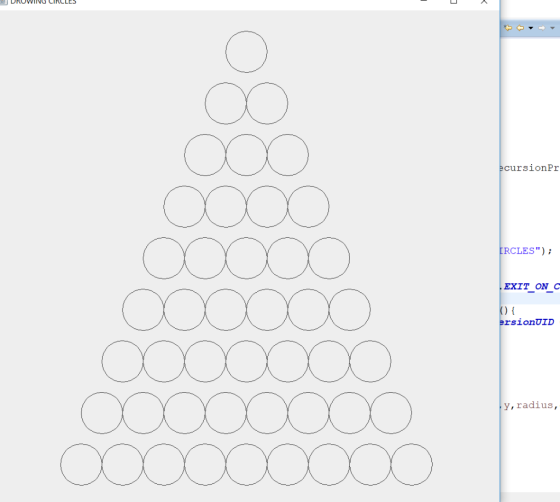
- Draw a circle centered near the top of the JPanel
- After drawing a circle, your program should draw two more circles half way to the left and right of the circle just drawn and located "one level" lower in the JPanel. Do this drawing as long as the drawing would not be below the bottom of the JPanel
- Each newly drawn circle then follows the rule at B.
import java.awt.Graphics;
import javax.swing.JFrame;
import javax.swing.JPanel;
public class RecursionProblem_3 {
public static void main(String[] args) {
RecursionProblem_3 drowCircle = new
RecursionProblem_3();
}
public RecursionProblem_3() {
JFrame frame = new JFrame ("DROWING
CIRCLES");
frame.setSize(1000, 1000);
frame.setDefaultCloseOperation(JFrame.EXIT_ON_CLOSE);
frame.getContentPane().add(new
JPanel(){
public void
paint(Graphics g) {
int radius = 80;
int x = getWidth()/2.4 = 80;
RecursionProblem_3(x,y,radius,g,hight());
}
});
frame.setVisible(true);
}
public static void RecursionProblem_3(int x, int y,
int radius, Graphics g.bottom) {
if (y >= bottom) {
return;
}else {
g.drawOval(X-redius/2, y-radius/2, radius, radius);
RecursionProblem_3(x-radius/2, y +100, radius, g.bottom);
RecursionProblem_3(x+radius/2, y +100, g.bottom);
}
}
}
try to create JPanel. thank you.
Homework Answers
Please find the code below:::
RecursionProblem_3.java
package classes1;
import java.awt.Graphics;
import javax.swing.JFrame;
import javax.swing.JPanel;
public class RecursionProblem_3 {
public static void main(String[] args) {
RecursionProblem_3 drowCircle = new RecursionProblem_3();
}
public RecursionProblem_3() {
JFrame frame = new JFrame ("DROWING CIRCLES");
frame.setSize(1000, 1000);
frame.setDefaultCloseOperation(JFrame.EXIT_ON_CLOSE);
frame.getContentPane().add(new
JPanel(){
private static
final long serialVersionUID = 1L;
public void paint(Graphics g) {
int radius = 80;
int x = getWidth()/2;
int y = 80;
RecursionProblem_drawCircle(x,y,radius,g,getHeight());
}
});
frame.setVisible(true);
}
public static void RecursionProblem_drawCircle(int x,
int y, int radius, Graphics g,int bottom) {
if (y >= bottom) {
return;
}else {
g.drawOval(x-radius/2, y-radius/2, radius, radius);
RecursionProblem_drawCircle(x-radius/2, y +100, radius,
g,bottom);
RecursionProblem_drawCircle(x+radius/2, y +100,radius,
g,bottom);
}
}
}
output:
Add Answer to:
What is wrong with this code please. I need to draw CIRCLES in
JFrame JAVA. recursively
Draw...
In Java Swing, in my ButtonHandler class, I need to have 2 different showDialog messages show...
In Java Swing, in my ButtonHandler class, I need to have 2 different showDialog messages show when my acceptbutton1 is pressed. One message is if the mouse HAS been dragged. One is if the mouse HAS NOT been dragged. /// I tried to make the Points class or the Mouse Dragged function return a boolean of true, so that I could construct an IF/THEN statement for the showDialog messages, but my boolean value was never accepted by ButtonHandler. *************************ButtonHandler class************************************...
I am getting this Error can you please fix my Java code. import java.awt.Dialog; import java.awt.Label;...
 I am getting this Error can you please fix my Java
code.
import java.awt.Dialog;
import java.awt.Label;
import java.awt.TextArea;
import java.awt.event.ActionEvent;
import java.awt.event.ActionListener;
import java.util.ArrayList;
import java.util.HashMap;
import java.util.List;
import java.util.Map.Entry;
import javax.swing.JButton;
import javax.swing.JFrame;
import javax.swing.JPanel;
public class Fall_2017 {
public TextArea courseInput;
public Label textAreaLabel;
public JButton addData;
public Dialog confirmDialog;
HashMap<Integer, ArrayList<String>> students;
public Fall_2017(){
courseInput = new TextArea(20, 40);
textAreaLabel = new Label("Student's data:");
addData = new JButton("Add...
I am getting this Error can you please fix my Java
code.
import java.awt.Dialog;
import java.awt.Label;
import java.awt.TextArea;
import java.awt.event.ActionEvent;
import java.awt.event.ActionListener;
import java.util.ArrayList;
import java.util.HashMap;
import java.util.List;
import java.util.Map.Entry;
import javax.swing.JButton;
import javax.swing.JFrame;
import javax.swing.JPanel;
public class Fall_2017 {
public TextArea courseInput;
public Label textAreaLabel;
public JButton addData;
public Dialog confirmDialog;
HashMap<Integer, ArrayList<String>> students;
public Fall_2017(){
courseInput = new TextArea(20, 40);
textAreaLabel = new Label("Student's data:");
addData = new JButton("Add...
I need to implement game logic for tic tac toe in this code. Can someone help...
I need to implement game logic for tic tac toe in this code. Can someone help me. It just needs to be a a player vs player again and ask if you want to play again. import javax.swing.*; import java.awt.*; import java.awt.event.MouseAdapter; import java.awt.event.MouseEvent; import java.awt.event.MouseListener; public class TicTacToe { public static void main(String[] args) { JFrame frame = new JFrame(" TicTacToe"); frame.setDefaultCloseOperation(JFrame.EXIT_ON_CLOSE); frame.setSize(290, 300); Board board = new Board(); frame.add(board); frame.setResizable(false); frame.setVisible(true); } } class Board extends JComponent {...
The program given here will draw the Olympic logo. Modify the program as the following: 1.Change...
The program given here will draw the Olympic logo. Modify the program as the following: 1.Change the class name to Test1OlympicYourFirstNameYourLastName 2.Change the OlympicRingPanel class name to OlympicRingPanelYourfirstNameYourLastName 3.Modify the program so that the first ring will be filled with random color with a random alpha value. I have shown 3 sample output here for your references. 4.Modify the paintComponent so your name will be displayed under the Olympic rings.The color of your name should be random color as well....
Modify the NervousShapes program so that it displays equilateral triangles as well as circles and rectangles....
 Modify the NervousShapes program so that it displays equilateral
triangles as well as circles and rectangles. You will need to
define a Triangle class containing a single instance variable,
representing the length of one of the triangle’s sides. Have the
program create circles, rectangles, and triangles with equal
probability. Circle and Rectangle is done, please comment on your
methods so i can understand
*/
package NervousShapes;
import java.awt.*;
import java.awt.event.*;
import java.awt.image.*;
import javax.imageio.*;
import javax.swing.*;
import javax.swing.event.*;
public class...
Modify the NervousShapes program so that it displays equilateral
triangles as well as circles and rectangles. You will need to
define a Triangle class containing a single instance variable,
representing the length of one of the triangle’s sides. Have the
program create circles, rectangles, and triangles with equal
probability. Circle and Rectangle is done, please comment on your
methods so i can understand
*/
package NervousShapes;
import java.awt.*;
import java.awt.event.*;
import java.awt.image.*;
import javax.imageio.*;
import javax.swing.*;
import javax.swing.event.*;
public class...
A Java Problem. In this problem you are going write a class to model a traffic...
 A Java Problem. In this problem you are going write a class to
model a traffic light that can cycle through colors, red, green,
yellow. To do this, you will have to maintain the state of the
traffic light. Maintaining state is one of the design pattern
discussed in this week's lesson. The state of the
TrafficLight indicates which light is lit. It
changes every time the TrafficLight cycles.
Specification
TrafficLight will have a constructor that takes the x and...
A Java Problem. In this problem you are going write a class to
model a traffic light that can cycle through colors, red, green,
yellow. To do this, you will have to maintain the state of the
traffic light. Maintaining state is one of the design pattern
discussed in this week's lesson. The state of the
TrafficLight indicates which light is lit. It
changes every time the TrafficLight cycles.
Specification
TrafficLight will have a constructor that takes the x and...
import java.awt.*; import javax.swing.*; import java.awt.event.*; import javax.swing.BorderFactory; import javax.swing.border.Border; public class Q1 extends JFrame {...
 import java.awt.*;
import javax.swing.*;
import java.awt.event.*;
import javax.swing.BorderFactory;
import javax.swing.border.Border;
public class Q1 extends JFrame {
public static void createAndShowGUI() {
JFrame frame = new
JFrame("Q1");
frame.setDefaultCloseOperation(JFrame.EXIT_ON_CLOSE);
Font courierFont = new
Font("Courier", Font.BOLD, 40);
Font arialFont = new Font("Arial",
Font.BOLD, 40);
Font sansFont = new
Font("Sans-serif", Font.BOLD, 20);
JLabel label = new JLabel("Enter a
word"); label.setFont(sansFont);
Font font1 = new Font("Sans-serif",
Font.BOLD, 40);
...
import java.awt.*;
import javax.swing.*;
import java.awt.event.*;
import javax.swing.BorderFactory;
import javax.swing.border.Border;
public class Q1 extends JFrame {
public static void createAndShowGUI() {
JFrame frame = new
JFrame("Q1");
frame.setDefaultCloseOperation(JFrame.EXIT_ON_CLOSE);
Font courierFont = new
Font("Courier", Font.BOLD, 40);
Font arialFont = new Font("Arial",
Font.BOLD, 40);
Font sansFont = new
Font("Sans-serif", Font.BOLD, 20);
JLabel label = new JLabel("Enter a
word"); label.setFont(sansFont);
Font font1 = new Font("Sans-serif",
Font.BOLD, 40);
...
(JAVA NetBeans) Write programs in java Example 10.21-24 //Animal.java /** Animal class * Anderson. Franceschi */...
 (JAVA NetBeans)
Write programs in java
Example 10.21-24
//Animal.java
/** Animal class
* Anderson. Franceschi
*/
import java.awt.Graphics;
public abstract class Animal
{
private int x; // x position
private int y; // y position
private String ID; // animal ID
/** default constructor
* Sets ID to empty String
*/
public Animal( )
{
ID = "";
}
/** Constructor
* @param rID Animal ID
* @param rX x position
* @param rY y position
*/
public Animal( String...
(JAVA NetBeans)
Write programs in java
Example 10.21-24
//Animal.java
/** Animal class
* Anderson. Franceschi
*/
import java.awt.Graphics;
public abstract class Animal
{
private int x; // x position
private int y; // y position
private String ID; // animal ID
/** default constructor
* Sets ID to empty String
*/
public Animal( )
{
ID = "";
}
/** Constructor
* @param rID Animal ID
* @param rX x position
* @param rY y position
*/
public Animal( String...
I need help with my java code i am having a hard time compiling it //...
I need help with my java code i am having a hard time compiling it // Cristian Benitez import java.awt.Color; import java.awt.Graphics; import java.util.ArrayList; import javax.swing.JPanel; Face class public class FaceDraw{ int width; int height; int x; int y; String smileStatus; //default constructor public FaceDraw(){ } // Getters and Setters for width,height,x,y public int getWidth(){ return width; } public void setWidth(int width){ this.width=width; } public int getHeight(){ return height; } public void setHeight(int height){ this.height=height; } public int getX(){ return...
Lab Description: Using graphics, polygons, and arrays, draw the tree shown below. You can change the...
 Lab Description: Using graphics, polygons, and arrays, draw the tree shown below. You can change the tree anyway you like to make it your own. Sample Data Sec below Files Needed:: GraphicaRunner.java Tree.java Sample Output: import java.awt.Graphics; import java.awt.color; import java.awt.Polygon; import java.awt.Font; import java.awt.Canvas; public class Tree extends Canvas public Tree() setBackground (Color.WHITE) public void paint ( Graphics window) window. setColor (Color.RED); window.setFont (new Font("TAHOMA" ,Font.BOLD,12) window.drawstring("Lab14h Tree Lab", 50, 50) tree(window); IONaA , Font.BOL.D,12) public void tree(Graphics window)...
 I am getting this Error can you please fix my Java
code.
import java.awt.Dialog;
import java.awt.Label;
import java.awt.TextArea;
import java.awt.event.ActionEvent;
import java.awt.event.ActionListener;
import java.util.ArrayList;
import java.util.HashMap;
import java.util.List;
import java.util.Map.Entry;
import javax.swing.JButton;
import javax.swing.JFrame;
import javax.swing.JPanel;
public class Fall_2017 {
public TextArea courseInput;
public Label textAreaLabel;
public JButton addData;
public Dialog confirmDialog;
HashMap<Integer, ArrayList<String>> students;
public Fall_2017(){
courseInput = new TextArea(20, 40);
textAreaLabel = new Label("Student's data:");
addData = new JButton("Add...
I am getting this Error can you please fix my Java
code.
import java.awt.Dialog;
import java.awt.Label;
import java.awt.TextArea;
import java.awt.event.ActionEvent;
import java.awt.event.ActionListener;
import java.util.ArrayList;
import java.util.HashMap;
import java.util.List;
import java.util.Map.Entry;
import javax.swing.JButton;
import javax.swing.JFrame;
import javax.swing.JPanel;
public class Fall_2017 {
public TextArea courseInput;
public Label textAreaLabel;
public JButton addData;
public Dialog confirmDialog;
HashMap<Integer, ArrayList<String>> students;
public Fall_2017(){
courseInput = new TextArea(20, 40);
textAreaLabel = new Label("Student's data:");
addData = new JButton("Add...
 Modify the NervousShapes program so that it displays equilateral
triangles as well as circles and rectangles. You will need to
define a Triangle class containing a single instance variable,
representing the length of one of the triangle’s sides. Have the
program create circles, rectangles, and triangles with equal
probability. Circle and Rectangle is done, please comment on your
methods so i can understand
*/
package NervousShapes;
import java.awt.*;
import java.awt.event.*;
import java.awt.image.*;
import javax.imageio.*;
import javax.swing.*;
import javax.swing.event.*;
public class...
Modify the NervousShapes program so that it displays equilateral
triangles as well as circles and rectangles. You will need to
define a Triangle class containing a single instance variable,
representing the length of one of the triangle’s sides. Have the
program create circles, rectangles, and triangles with equal
probability. Circle and Rectangle is done, please comment on your
methods so i can understand
*/
package NervousShapes;
import java.awt.*;
import java.awt.event.*;
import java.awt.image.*;
import javax.imageio.*;
import javax.swing.*;
import javax.swing.event.*;
public class...
 A Java Problem. In this problem you are going write a class to
model a traffic light that can cycle through colors, red, green,
yellow. To do this, you will have to maintain the state of the
traffic light. Maintaining state is one of the design pattern
discussed in this week's lesson. The state of the
TrafficLight indicates which light is lit. It
changes every time the TrafficLight cycles.
Specification
TrafficLight will have a constructor that takes the x and...
A Java Problem. In this problem you are going write a class to
model a traffic light that can cycle through colors, red, green,
yellow. To do this, you will have to maintain the state of the
traffic light. Maintaining state is one of the design pattern
discussed in this week's lesson. The state of the
TrafficLight indicates which light is lit. It
changes every time the TrafficLight cycles.
Specification
TrafficLight will have a constructor that takes the x and...
 import java.awt.*;
import javax.swing.*;
import java.awt.event.*;
import javax.swing.BorderFactory;
import javax.swing.border.Border;
public class Q1 extends JFrame {
public static void createAndShowGUI() {
JFrame frame = new
JFrame("Q1");
frame.setDefaultCloseOperation(JFrame.EXIT_ON_CLOSE);
Font courierFont = new
Font("Courier", Font.BOLD, 40);
Font arialFont = new Font("Arial",
Font.BOLD, 40);
Font sansFont = new
Font("Sans-serif", Font.BOLD, 20);
JLabel label = new JLabel("Enter a
word"); label.setFont(sansFont);
Font font1 = new Font("Sans-serif",
Font.BOLD, 40);
...
import java.awt.*;
import javax.swing.*;
import java.awt.event.*;
import javax.swing.BorderFactory;
import javax.swing.border.Border;
public class Q1 extends JFrame {
public static void createAndShowGUI() {
JFrame frame = new
JFrame("Q1");
frame.setDefaultCloseOperation(JFrame.EXIT_ON_CLOSE);
Font courierFont = new
Font("Courier", Font.BOLD, 40);
Font arialFont = new Font("Arial",
Font.BOLD, 40);
Font sansFont = new
Font("Sans-serif", Font.BOLD, 20);
JLabel label = new JLabel("Enter a
word"); label.setFont(sansFont);
Font font1 = new Font("Sans-serif",
Font.BOLD, 40);
...
 (JAVA NetBeans)
Write programs in java
Example 10.21-24
//Animal.java
/** Animal class
* Anderson. Franceschi
*/
import java.awt.Graphics;
public abstract class Animal
{
private int x; // x position
private int y; // y position
private String ID; // animal ID
/** default constructor
* Sets ID to empty String
*/
public Animal( )
{
ID = "";
}
/** Constructor
* @param rID Animal ID
* @param rX x position
* @param rY y position
*/
public Animal( String...
(JAVA NetBeans)
Write programs in java
Example 10.21-24
//Animal.java
/** Animal class
* Anderson. Franceschi
*/
import java.awt.Graphics;
public abstract class Animal
{
private int x; // x position
private int y; // y position
private String ID; // animal ID
/** default constructor
* Sets ID to empty String
*/
public Animal( )
{
ID = "";
}
/** Constructor
* @param rID Animal ID
* @param rX x position
* @param rY y position
*/
public Animal( String...
 Lab Description: Using graphics, polygons, and arrays, draw the tree shown below. You can change the tree anyway you like to make it your own. Sample Data Sec below Files Needed:: GraphicaRunner.java Tree.java Sample Output: import java.awt.Graphics; import java.awt.color; import java.awt.Polygon; import java.awt.Font; import java.awt.Canvas; public class Tree extends Canvas public Tree() setBackground (Color.WHITE) public void paint ( Graphics window) window. setColor (Color.RED); window.setFont (new Font("TAHOMA" ,Font.BOLD,12) window.drawstring("Lab14h Tree Lab", 50, 50) tree(window); IONaA , Font.BOL.D,12) public void tree(Graphics window)...
Most questions answered within 3 hours.
-
Where is the error in this code sequence?
String s1 = "Hello";
String s2 = "ello";...
asked 11 months ago -
Financial data for Joel de Paris, Inc., for last year
follow:
Joel de Paris, Inc.
Balance...
asked 11 months ago -
Consider this reaction:
Al2(SO4)3 (aq)+ BaCl3
(aq) Al2Cl6 (aq)- +
3BaSO4(s) . What is the...
asked 11 months ago -
Suppose that Savneet is considering increasing her
recent random sample from 20 car rentals to 40...
asked 11 months ago -
Trucks arrive at an unloading terminal at an average rate of 120
per hour.
Trucks arrive...
asked 11 months ago -
Why are methanol and ethanol completely soluble in water while
octanol is not very little soluble....
asked 11 months ago -
A facilities manager at a university reads in a research report
that the mean amount of...
asked 11 months ago -
When the CuSO4 is rehydrated by adding water to the anhydrous
compound, is this an endothermic...
asked 11 months ago -
A ray of sunlight is passing from diamond into crown glass; the
angle of incidence is...
asked 11 months ago -
A block of mass 0.249 kg is placed on top of a light, vertical
spring of...
asked 11 months ago -
how do the kidneys compensate in the presences of acidosis
a) trigger hyperventilate
b) reserve acid...
asked 11 months ago -
Question 501 pts
The rental rate of capital to the firm increases. Which of the
following...
asked 11 months ago