-Write a JavaFX application that displays a Label containing the opening sentence or two from your...
- -Write a JavaFX application that displays a Label containing the opening sentence or two from your favorite book. Save the project as FXBookQuote1a. -Add a button to the frame in the FXBookQuote program. When the user clicks the button, display the title of the book that contains the quote in a second label. Save the project as FXBookQuote1b.
Homework Answers
ANSWER:
Here is the completed code for this problem. Attached the two parts separately (FXBookQuote1a.java and FXBookQuote1b.java)and also you have to use Java 8 to run JavaFX applications. If you have it installed, try using NetBeans IDE.
SAMPLE CODE:
FXBookQuote1a.java
import javafx.application.Application;
import static javafx.application.Application.launch;
import javafx.geometry.Insets;
import javafx.scene.Scene;
import javafx.scene.control.Label;
import javafx.scene.layout.Pane;
import javafx.scene.text.Font;
import javafx.stage.Stage;
public class FXBookQuote1a extends Application {
//String storing the favorite quote from a book
String quote = "Not All Those Who Wander Are Lost";
@Override
public void start(Stage primaryStage) {
//creating a Label with the quote
Label label=new Label(quote);
//using a bigger font
label.setFont(new Font(20));
//creating a pane and adding the label
Pane root = new Pane(label);
//adding some padding space around the label
label.setPadding(new Insets(50));
//setting up a scene and displaying it
Scene scene = new Scene(root);
primaryStage.setScene(scene);
primaryStage.setTitle("FXBookQuote1a");
primaryStage.show();
}
public static void main(String[] args) {
launch(args);
}
}
FXBookQuote1b.java
import javafx.application.Application;
import static javafx.application.Application.launch;
import javafx.geometry.Insets;
import javafx.geometry.Pos;
import javafx.scene.Scene;
import javafx.scene.control.Button;
import javafx.scene.control.Label;
import javafx.scene.layout.Pane;
import javafx.scene.layout.VBox;
import javafx.scene.text.Font;
import javafx.stage.Stage;
public class FXBookQuote1b extends Application {
//String storing the favorite quote from a book
String quote = "Not All Those Who Wander Are Lost";
//book name
String bookName="Lord Of The Rings";
@Override
public void start(Stage primaryStage) {
//creating a Label with the quote
Label label1=new Label(quote);
//using a bigger font
label1.setFont(new Font(20));
//creating another label to display book name, it is empty by default
Label label2=new Label("");
//creating a Button
Button button=new Button("Show Book Name");
//adding action listener to the button
button.setOnAction(e->{
//updating label2 with book name
label2.setText(bookName);
});
//creating a VBox to arrange elements vertically, adding all elements
VBox root = new VBox(label1,label2,button);
root.setSpacing(10); //adding some space between components
//aligning elements at center
root.setAlignment(Pos.CENTER);
//adding some space around the vbox
root.setPadding(new Insets(30));
//setting up a scene and displaying it
Scene scene = new Scene(root);
primaryStage.setScene(scene);
primaryStage.setTitle("FXBookQuote1b");
primaryStage.show();
}
public static void main(String[] args) {
launch(args);
}
}
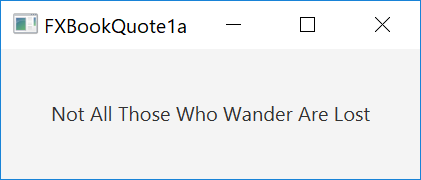
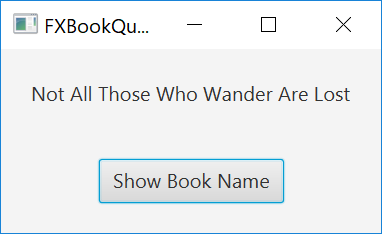
OUTPUT screenshots:

Add Answer to:
-Write a JavaFX application that displays a Label containing
the opening sentence or two from your...
1.A. Write a JavaFX application that displays a Label containing the opening sentence or two from...
1.A. Write a JavaFX application that displays a Label containing the opening sentence or two from your favorite book. Save the project as FXBookQuote1a. B. Add a button to the frame in the FXBookQuote program. When the user clicks the button, display the title of the book that contains the quote in a second label. Save the project as FXBookQuote1b.
***Please keep given code intact*** Write a JavaFX application that displays a label and a Button...
***Please keep given code intact*** Write a JavaFX application that displays a label and a Button to a frame in the FXBookQuote2 program. When the user clicks the button, display the title of the book that contains the opening sentence or two from your favorite book in the label. FXBookQuote2.java /* * To change this license header, choose License Headers in Project Properties. * To change this template file, choose Tools | Templates * and open the template in the...
in JAVA please and please show output!! Create a JavaFX application that simulates the rolling of...
 in JAVA please and please show output!!
Create a JavaFX application that simulates the rolling of a pair of
dice. When the user clicks a button, the application should
generate two random numbers, each in the range of 1 through 6, to
represent the value of the dice. Use ImageView component to display
the dice. Six images are included in the project folder for you to
use. For example, the first picture below is the initial window,
after clicking the...
in JAVA please and please show output!!
Create a JavaFX application that simulates the rolling of a pair of
dice. When the user clicks a button, the application should
generate two random numbers, each in the range of 1 through 6, to
represent the value of the dice. Use ImageView component to display
the dice. Six images are included in the project folder for you to
use. For example, the first picture below is the initial window,
after clicking the...
Exercise 1: Create a file by using any word processing program or text editor. Write an...
Exercise 1: Create a file by using any word processing program or text editor. Write an application that displays the file's name, size, and time of last modification. Save the file as FileStatistics.java. Exercise 2: Create a file that contains your favorite movie quote. Use a text editor, such as Notepad, and save the file as Quote.txt. Copy the file contents and paste them into a word processing program, such as Word. Save the file as Quote.doc. Write an application...
(A). Write an application that extends JPanel and displays a pharse in large font. Each time...
(A). Write an application that extends JPanel and displays a pharse in large font. Each time the user clicks a JButton, display the same pharse in a different color, a little further to the right, and in a slightly smaller font. Allow only three clicks…Save the file as JChangeSizeAndColorPanel.java (B). Modify the JChangeSizeAndColorPanel application so that it continuously changes the size, color, and location of phrase as long as the user continues to click the button. Save file as JChangeSizeAndColorPanel2.java
Using JavaFX create a Roll application that implements the GUI shown When the user clicks the Rol...
Using JavaFX create a Roll application that implements the GUI shown When the user clicks the Roll button, the program must roll the dice, change the figures randomly, calculate the sum of the dice and show it in a label
JAVAFX PROGRAM Write a program that will allow two users to play a game of tic-tac-toe....
 JAVAFX PROGRAM
Write a program that will allow two users to play a game of tic-tac-toe. The game area should consist of nine buttons for the play area, a reset button, and a label that will display the current player's turn. When the program starts, the game area buttons should have no values in them (i.e. they should be blank) When player one clicks on a game area button, the button should get the value X. When player two clicks...
JAVAFX PROGRAM
Write a program that will allow two users to play a game of tic-tac-toe. The game area should consist of nine buttons for the play area, a reset button, and a label that will display the current player's turn. When the program starts, the game area buttons should have no values in them (i.e. they should be blank) When player one clicks on a game area button, the button should get the value X. When player two clicks...
JAVASCRIPT Write a GUI application that has three labels, two text fields, and two buttons (with...
 JAVASCRIPT
Write a GUI application that has three labels, two text fields, and two buttons (with the titles Name and Age). When the program starts the user will enter his/her first name in the first text field and his age in the second text field. When the user clicks the Name button, the first name entered by the user will be displayed as a separate label with the words "CSC210 student at the back of it. When the user clicks...
JAVASCRIPT
Write a GUI application that has three labels, two text fields, and two buttons (with the titles Name and Age). When the program starts the user will enter his/her first name in the first text field and his age in the second text field. When the user clicks the Name button, the first name entered by the user will be displayed as a separate label with the words "CSC210 student at the back of it. When the user clicks...
PYTHON PROGRAM Write an application that accepts a sentence as input from the user and displays...
PYTHON PROGRAM Write an application that accepts a sentence as input from the user and displays all of the words in the sentence that have an odd number of letters in them
Java Write an application using the FileInputStream that OPENS a file which contains the name of...
Java Write an application using the FileInputStream that OPENS a file which contains the name of the user's favorite book and then DISPLAYS it to the user. IF the file does not exist, PROMPT the user for the book's title, and then WRITE it to the file by using a FileOutputStream. Save the file as BookApplication.java.
 in JAVA please and please show output!!
Create a JavaFX application that simulates the rolling of a pair of
dice. When the user clicks a button, the application should
generate two random numbers, each in the range of 1 through 6, to
represent the value of the dice. Use ImageView component to display
the dice. Six images are included in the project folder for you to
use. For example, the first picture below is the initial window,
after clicking the...
in JAVA please and please show output!!
Create a JavaFX application that simulates the rolling of a pair of
dice. When the user clicks a button, the application should
generate two random numbers, each in the range of 1 through 6, to
represent the value of the dice. Use ImageView component to display
the dice. Six images are included in the project folder for you to
use. For example, the first picture below is the initial window,
after clicking the...
 JAVAFX PROGRAM
Write a program that will allow two users to play a game of tic-tac-toe. The game area should consist of nine buttons for the play area, a reset button, and a label that will display the current player's turn. When the program starts, the game area buttons should have no values in them (i.e. they should be blank) When player one clicks on a game area button, the button should get the value X. When player two clicks...
JAVAFX PROGRAM
Write a program that will allow two users to play a game of tic-tac-toe. The game area should consist of nine buttons for the play area, a reset button, and a label that will display the current player's turn. When the program starts, the game area buttons should have no values in them (i.e. they should be blank) When player one clicks on a game area button, the button should get the value X. When player two clicks...
 JAVASCRIPT
Write a GUI application that has three labels, two text fields, and two buttons (with the titles Name and Age). When the program starts the user will enter his/her first name in the first text field and his age in the second text field. When the user clicks the Name button, the first name entered by the user will be displayed as a separate label with the words "CSC210 student at the back of it. When the user clicks...
JAVASCRIPT
Write a GUI application that has three labels, two text fields, and two buttons (with the titles Name and Age). When the program starts the user will enter his/her first name in the first text field and his age in the second text field. When the user clicks the Name button, the first name entered by the user will be displayed as a separate label with the words "CSC210 student at the back of it. When the user clicks...
Most questions answered within 3 hours.
-
Where is the error in this code sequence?
String s1 = "Hello";
String s2 = "ello";...
asked 11 months ago -
Financial data for Joel de Paris, Inc., for last year
follow:
Joel de Paris, Inc.
Balance...
asked 11 months ago -
Consider this reaction:
Al2(SO4)3 (aq)+ BaCl3
(aq) Al2Cl6 (aq)- +
3BaSO4(s) . What is the...
asked 11 months ago -
Suppose that Savneet is considering increasing her
recent random sample from 20 car rentals to 40...
asked 11 months ago -
Trucks arrive at an unloading terminal at an average rate of 120
per hour.
Trucks arrive...
asked 11 months ago -
Why are methanol and ethanol completely soluble in water while
octanol is not very little soluble....
asked 11 months ago -
A facilities manager at a university reads in a research report
that the mean amount of...
asked 11 months ago -
When the CuSO4 is rehydrated by adding water to the anhydrous
compound, is this an endothermic...
asked 11 months ago -
A ray of sunlight is passing from diamond into crown glass; the
angle of incidence is...
asked 11 months ago -
A block of mass 0.249 kg is placed on top of a light, vertical
spring of...
asked 11 months ago -
how do the kidneys compensate in the presences of acidosis
a) trigger hyperventilate
b) reserve acid...
asked 11 months ago -
Question 501 pts
The rental rate of capital to the firm increases. Which of the
following...
asked 11 months ago