Hello I need help with the following, I already have some of the code done below...
Hello I need help with the following, I already have some of the code done below
Create an application that demonstrates how binary numbers are related to decimal numbers. The user should be able to enter the individual digits of a binary number in separate controls (your choice). There should be between 4 and 8 binary digits available for the user to set. When designing your application, use controls so that it is not possible for the user to enter an incorrect number. You may want to consider using combo boxes or radio buttons or checkboxes, etc. In particular, using a TextField and error checking is insufficient for this application. Whenever a digit is changed, the display of the corresponding decimal number should change automatically.
//CODE
import javafx.application.*;
import javafx.stage.*;
import javafx.stage.FileChooser.*;
import javafx.scene.*;
import javafx.scene.control.*;
import javafx.scene.control.Alert.*;
import javafx.scene.input.*;
import javafx.scene.layout.*;
import javafx.scene.canvas.*;
import javafx.scene.paint.*;
import javafx.scene.effect.*;
import javafx.scene.shape.*;
import javafx.scene.text.*;
import javafx.event.*;
import javafx.animation.*;
import javafx.geometry.*;
import java.util.*;
import javafx.beans.value.*;
public class DESMethod extends Application
{
public static void main(String[] args)
{
try
{
launch(args);
}
catch (Exception e)
{
e.printStackTrace();
}
finally
{
System.exit(0);
}
}
public void start(Stage mainStage)
{
mainStage.setTitle("Binary Numbers to Decimals!");
BorderPane root = new BorderPane();
// make text bigger
root.setStyle( "-fx-font-size: 20;" );
// Create and set up the Menu Bar.
MenuBar bar = new MenuBar();
root.setTop(bar);
// Create the File and About Menus, and add them to the MenuBar.
Menu fileMenu = new Menu("File");
Menu aboutMenu = new Menu("About");
bar.getMenus().addAll(fileMenu, aboutMenu);
// Create the MenuItems for the File and About Menus.
MenuItem quit = new MenuItem("Quit");
MenuItem info = new MenuItem("Credits and Description");
// Add the MenuItems to their respective sub menus.
fileMenu.getItems().addAll(quit);
aboutMenu.getItems().addAll(info);
VBox centerBox = new VBox();
centerBox.setPadding(new Insets(16));
centerBox.setSpacing(8);
root.setCenter(centerBox);
Scene mainScene = new Scene(root);
mainStage.setScene(mainScene);
// The following line loads a stylesheet file; incorrect syntax will generate a parse warning
mainScene.getStylesheets().add("assets/stylesheet.css");
// Create the Label displaying the decimal number that will change as the ComboBox options change.
Label resultText = new Label("[Decimal Will Display Here]");
// -----------------------------------------------------
// Create the ComboBoxes for picking the Binary numbers.
// ----------------------------------------------------
// Create ComboBox for Value 1.
ComboBox<Integer> chooser1 = new ComboBox<Integer>();
chooser1.getItems().addAll(0, 1);
chooser1.setValue(0);
chooser1.valueProperty().addListener(
(ObservableValue<? extends Integer> ov, Integer oldValue, Integer newValue) ->
{
resultText.setText("The number chosen is now " + newValue + ". \n");
}
);
chooser1.getStyleClass().add("combo-box");
// Create ComboBox for Value 2.
ComboBox<Integer> chooser2 = new ComboBox<Integer>();
chooser2.getItems().addAll(0, 1);
chooser2.setValue(0);
chooser2.valueProperty().addListener(
(ObservableValue<? extends Integer> ov, Integer oldValue, Integer newValue) ->
{
resultText.setText("The number chosen is now " + newValue + ". \n");
}
);
chooser2.getStyleClass().add("combo-box");
// Create ComboBox for Value 3.
ComboBox<Integer> chooser3 = new ComboBox<Integer>();
chooser3.getItems().addAll(0, 1);
chooser3.setValue(0);
chooser3.valueProperty().addListener(
(ObservableValue<? extends Integer> ov, Integer oldValue, Integer newValue) ->
{
resultText.setText("The number chosen is now " + newValue + ". \n");
}
);
chooser3.getStyleClass().add("combo-box");
// Create ComboBox for Value 4.
ComboBox<Integer> chooser4 = new ComboBox<Integer>();
chooser4.getItems().addAll(0, 1);
chooser4.setValue(0);
chooser4.valueProperty().addListener(
(ObservableValue<? extends Integer> ov, Integer oldValue, Integer newValue) ->
{
resultText.setText("The number chosen is now " + newValue + ". \n");
}
);
chooser4.getStyleClass().add("combo-box");
// Create the HBoxes for organizing the ComboBoxes and resultText in the layout.
HBox comboRow = new HBox();
comboRow.getChildren().addAll(chooser1, chooser2, chooser3, chooser4);
HBox textRow = new HBox();
textRow.getChildren().addAll(resultText);
centerBox.getChildren().addAll(comboRow, textRow);
/*
// most generic functional interface: no inputs, no output, contains method run()
// The code for changing the decimal value based on the ComboBox choices will be here.
Runnable updateFunction = () ->
{
};
*/
// When the Credits and Description option is clicked.
info.setOnAction((ActionEvent event) ->
{
// Alert containing information for the user to read.
Alert infoAlert = new Alert( AlertType.INFORMATION );
infoAlert.setTitle("Binary Numbers to Decimals");
infoAlert.setHeaderText("Credits and Description");
infoAlert.setContentText("Author: Daniel Castro \n\n" +
"This program demonstrates how binary numbers are related \n" +
"to decimal numbers. The user can choose some of the digits \n" +
"of the binary number, and the displayed decimal will change \n" +
"accordingly.");
// Display the window and wait.
infoAlert.showAndWait();
});
// Allow the user to quit the program.
quit.setOnAction((ActionEvent event) ->
{
mainStage.close();
});
// custom code above --------------------------------------------
mainStage.show();
}
}
Homework Answers
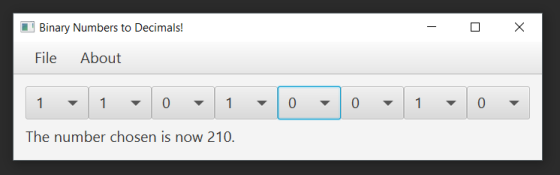
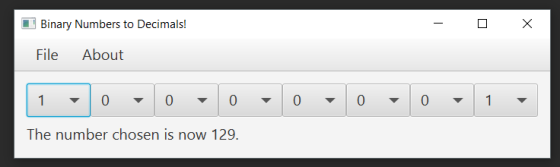
Hello, Here is my Solution according to your code for 8 digit Binary to Decimal
I have provided ScreenShots and Code below
DESMethod.java
import javafx.application. * ;
import javafx.stage. * ;
import javafx.stage.FileChooser. * ;
import javafx.scene. * ;
import javafx.scene.control. * ;
import javafx.scene.control.Alert. * ;
import javafx.scene.input. * ;
import javafx.scene.layout. * ;
import javafx.scene.canvas. * ;
import javafx.scene.paint. * ;
import javafx.scene.effect. * ;
import javafx.scene.shape. * ;
import javafx.scene.text. * ;
import javafx.event. * ;
import javafx.animation. * ;
import javafx.geometry. * ;
import java.util. * ;
import javafx.beans.value. * ;
public class DESMethod extends Application
{
public static void main(String[] args)
{
try
{
launch(args);
}
catch(Exception e)
{
e.printStackTrace();
}
finally
{
System.exit(0);
}
}
public static Integer
a1=0,a2=0,a3=0,a4=0,a5=0,a6=0,a7=0,a8=0;
static public int printA(){
String binary =
a1.toString()+a2.toString()+a3.toString()+a4.toString()+
a5.toString()+a6.toString()+a7.toString()+a8.toString();
int ans = Integer.parseInt(binary,2);
return ans;
}
public void start(Stage mainStage)
{
mainStage.setTitle("Binary Numbers to Decimals!");
BorderPane root = new BorderPane();
// make text bigger
root.setStyle("-fx-font-size: 20;");
// Create and set up the Menu Bar.
MenuBar bar = new MenuBar();
root.setTop(bar);
// Create the File and About Menus, and add them to the
MenuBar.
Menu fileMenu = new Menu("File");
Menu aboutMenu = new Menu("About");
bar.getMenus().addAll(fileMenu, aboutMenu);
// Create the MenuItems for the File and About Menus.
MenuItem quit = new MenuItem("Quit");
MenuItem info = new MenuItem("Credits and Description");
// Add the MenuItems to their respective sub menus.
fileMenu.getItems().addAll(quit);
aboutMenu.getItems().addAll(info);
VBox centerBox = new VBox();
centerBox.setPadding(new Insets(16));
centerBox.setSpacing(8);
root.setCenter(centerBox);
Scene mainScene = new Scene(root);
mainStage.setScene(mainScene);
// The following line loads a stylesheet file; incorrect syntax
will generate a parse warning
mainScene.getStylesheets().add("assets/stylesheet.css");
// Create the Label displaying the decimal number that will
change as the ComboBox options change.
Label resultText = new Label("[Decimal Will Display Here]");
// -----------------------------------------------------
// Create the ComboBoxes for picking the Binary numbers.
// ----------------------------------------------------
// Create ComboBox for Value 1.
ComboBox < Integer > chooser1 = new ComboBox < Integer > ();
chooser1.getItems().addAll(0, 1);
chooser1.setValue(0);
chooser1.valueProperty().addListener(
(ObservableValue < ?extends Integer > ov, Integer oldValue,
Integer newValue) ->
{
a1= newValue;
resultText.setText("The number chosen is now " + printA() + ".
\n");
});
chooser1.getStyleClass().add("combo-box");
// Create ComboBox for Value 2.
ComboBox < Integer > chooser2 = new ComboBox < Integer
> ();
chooser2.getItems().addAll(0, 1);
chooser2.setValue(0);
chooser2.valueProperty().addListener(
(ObservableValue < ?extends Integer > ov, Integer oldValue,
Integer newValue) ->
{
a2= newValue;
resultText.setText("The number chosen is now " + printA() + ".
\n");
});
chooser2.getStyleClass().add("combo-box");
// Create ComboBox for Value 3.
ComboBox < Integer > chooser3 = new ComboBox < Integer
> ();
chooser3.getItems().addAll(0, 1);
chooser3.setValue(0);
chooser3.valueProperty().addListener(
(ObservableValue < ?extends Integer > ov, Integer oldValue,
Integer newValue) ->
{
a3= newValue;
resultText.setText("The number chosen is now " + printA() + ".
\n");
});
chooser3.getStyleClass().add("combo-box");
// Create ComboBox for Value 4.
ComboBox < Integer > chooser4 = new ComboBox < Integer
> ();
chooser4.getItems().addAll(0, 1);
chooser4.setValue(0);
chooser4.valueProperty().addListener(
(ObservableValue < ?extends Integer > ov, Integer oldValue,
Integer newValue) ->
{
a4= newValue;
resultText.setText("The number chosen is now " + printA() + ".
\n");
});
chooser4.getStyleClass().add("combo-box");
// Create ComboBox for Value 5.
ComboBox < Integer > chooser5 = new ComboBox < Integer
> ();
chooser5.getItems().addAll(0, 1);
chooser5.setValue(0);
chooser5.valueProperty().addListener(
(ObservableValue < ?extends Integer > ov, Integer oldValue,
Integer newValue) ->
{
a5= newValue;
resultText.setText("The number chosen is now " + printA() + ".
\n");
});
chooser5.getStyleClass().add("combo-box");
// Create ComboBox for Value 6.
ComboBox < Integer > chooser6 = new ComboBox < Integer
> ();
chooser6.getItems().addAll(0, 1);
chooser6.setValue(0);
chooser6.valueProperty().addListener(
(ObservableValue < ?extends Integer > ov, Integer oldValue,
Integer newValue) ->
{
a6= newValue;
resultText.setText("The number chosen is now " + printA() + ".
\n");
});
chooser6.getStyleClass().add("combo-box");
// Create ComboBox for Value 7.
ComboBox < Integer > chooser7 = new ComboBox < Integer
> ();
chooser7.getItems().addAll(0, 1);
chooser7.setValue(0);
chooser7.valueProperty().addListener(
(ObservableValue < ?extends Integer > ov, Integer oldValue,
Integer newValue) ->
{
a7= newValue;
resultText.setText("The number chosen is now " + printA() + ".
\n");
});
chooser7.getStyleClass().add("combo-box");
// Create ComboBox for Value 8.
ComboBox < Integer > chooser8 = new ComboBox < Integer
> ();
chooser8.getItems().addAll(0, 1);
chooser8.setValue(0);
chooser8.valueProperty().addListener(
(ObservableValue < ?extends Integer > ov, Integer oldValue,
Integer newValue) ->
{
a8= newValue;
resultText.setText("The number chosen is now " + printA() + ".
\n");
});
chooser8.getStyleClass().add("combo-box");
// Create the HBoxes for organizing the ComboBoxes and resultText
in the layout.
HBox comboRow = new HBox();
comboRow.getChildren().addAll(chooser1, chooser2, chooser3, chooser4, chooser5 , chooser6 , chooser7, chooser8);
HBox textRow = new HBox();
textRow.getChildren().addAll(resultText);
centerBox.getChildren().addAll(comboRow, textRow);
/*
// most generic functional interface: no inputs, no output, contains method run()
// The code for changing the decimal value based on the ComboBox choices will be here.
Runnable updateFunction = () ->
{
};
*/
// When the Credits and Description option is clicked.
info.setOnAction((ActionEvent event) ->
{
// Alert containing information for the user to read.
Alert infoAlert = new Alert(AlertType.INFORMATION);
infoAlert.setTitle("Binary Numbers to Decimals");
infoAlert.setHeaderText("Credits and Description");
infoAlert.setContentText("Author: Daniel Castro \n\n" +
"This program demonstrates how binary numbers are related \n" +
"to decimal numbers. The user can choose some of the digits \n" +
"of the binary number, and the displayed decimal will change \n" +
"accordingly.");
// Display the window and wait.
infoAlert.showAndWait();
});
// Allow the user to quit the program.
quit.setOnAction((ActionEvent event) -> {
mainStage.close();
});
// custom code above
--------------------------------------------
mainStage.show();
}
}
Thanks and Regards.
Happy Coding!
Add Answer to:
Hello I need help with the following, I already have some of the
code done below...
JAVA Hello I am trying to add a menu to my Java code if someone can...
JAVA Hello I am trying to add a menu to my Java code if someone can help me I would really appreacite it thank you. I found a java menu code but I dont know how to incorporate it to my code this is the java menu code that i found. import java.awt.event.ActionEvent; import java.awt.event.ActionListener; import javax.swing.ButtonGroup; import javax.swing.JCheckBoxMenuItem; import javax.swing.JFrame; import javax.swing.JMenu; import javax.swing.JMenuBar; import javax.swing.JMenuItem; import javax.swing.JRadioButtonMenuItem; public class MenuExp extends JFrame { public MenuExp() { setTitle("Menu Example");...
This is my code. I need the UML for this code My code: public class Main...
This is my code. I need the UML for this code My code: public class Main extends FlightManager { Stage window; Scene scene; Button button; HBox layout = new HBox(20); Label dateTxt, airlineTxt, originTxt, destTxt, clssTxt, scopeTxt, adultsTxt, childTxt; @Override public void start(Stage stage) { // create the UI and show it here window = stage; window.setTitle("Reservations 2020"); button = new Button("New Flight"); VBox group3 = new VBox(10); dateTxt = Text("", group3);...
This is done in c programming and i have the code for the programs that it wants at the bottom i ...
 This is done in c programming and i have the code for the
programs that it wants at the bottom i jut dont know how to call
the functions
Program 2:Tip,Tax,Total
int main(void)
{
// Constant and Variable Declarations
double costTotal= 0;
double taxTotal = 0;
double totalBill = 0;
double tipPercent = 0;
// *** Your program goes here ***
printf("Enter amount of the bill: $");
scanf("%lf", &costTotal);
printf("\n");
// *** processing ***
taxTotal = 0.07 * costTotal;
totalBill...
This is done in c programming and i have the code for the
programs that it wants at the bottom i jut dont know how to call
the functions
Program 2:Tip,Tax,Total
int main(void)
{
// Constant and Variable Declarations
double costTotal= 0;
double taxTotal = 0;
double totalBill = 0;
double tipPercent = 0;
// *** Your program goes here ***
printf("Enter amount of the bill: $");
scanf("%lf", &costTotal);
printf("\n");
// *** processing ***
taxTotal = 0.07 * costTotal;
totalBill...
Hello, I have some errors in my C++ code when I try to debug it. I...
 Hello, I have some errors in my C++ code when I try to debug it.
I tried to follow the requirements stated below:
Code:
// Linked.h
#ifndef INTLINKEDQUEUE
#define INTLINKEDQUEUE
#include <iostream>
usingnamespace std;
class IntLinkedQueue
{
private: struct Node {
int data;
Node *next;
};
Node *front; // -> first item
Node *rear; // -> last item
Node *p; // traversal position
Node *pp ; // previous position
int size; // number of elements in the queue
public:
IntLinkedQueue();...
Hello, I have some errors in my C++ code when I try to debug it.
I tried to follow the requirements stated below:
Code:
// Linked.h
#ifndef INTLINKEDQUEUE
#define INTLINKEDQUEUE
#include <iostream>
usingnamespace std;
class IntLinkedQueue
{
private: struct Node {
int data;
Node *next;
};
Node *front; // -> first item
Node *rear; // -> last item
Node *p; // traversal position
Node *pp ; // previous position
int size; // number of elements in the queue
public:
IntLinkedQueue();...
Hello, I needed help on the following In Java: Note that if you intend to append...
Hello, I needed help on the following In Java: Note that if you intend to append data to the end of a file, you need to create an instance of the "FileWriter" class rather than the "File" class: FileWriter fwriter = new FileWriter("RunningList.txt", true); PrintWriter outfile = new PrintWriter(fwriter); Remember that PrintWriter objects can throw an exception, so make sure to amend your main method header with the clause "throws IOException". (Cannot use try-catch, must include clause "throws IOException") Write...
// I need help with the following questions. Please use java programming ECLIPSE language to solve...
// I need help with the following questions. Please use java programming ECLIPSE language to solve the questions. YOU ONLY NEED TO DIRECTLY COPY IT IN YOUR ECLIPSE APPLICATION AND RUN IT. I NEED THOSE PART WHICH IS SAYS --> "TO BE COMPLETED" I NEED HELP WITH [GET*] AND [REPLACE ALL] AND [ADD INT DOUBLE] PLEASE. import java.util.ArrayList; public class CustomArrayList { //instance variables public int[] data; //data.length gives the capacity public int nItems; //nItems gives items currently in the...
Look for some finshing touches java help with this program. I just two more things added...
Look for some finshing touches java help with this program. I just two more things added to this code. A loop at the end that will ask the user if they want to quit if they do want to quit the program stops if they don't it loads a new number sequence. import java.util.Random; import java.util.ArrayList; import java.util.Scanner; import java.util.Arrays; import java.util.List; import java.util.Collections; public class main { public static void main(String[] args) { List < Sequence > list =...
Hello, I need help with the following C code. This program asks the user to enter...
Hello, I need help with the following C code. This program asks the user to enter three numbers and outputs the sum on the screen , all im trying to do is have the program reprompt the user for a number if anything other than a number is entered for each of the entries. I wanted to use do while for each of the functions but that did not work for example: Enter Number 1: 2 Enter Number 2: Hello...
JAVA JAR HELP...ASAP I have the code that i need for my game Connect 4, but...
 JAVA JAR HELP...ASAP
I have the code that i need for my game Connect 4, but i need to
create a jar file . the instructions are below. It has to pass some
parameters. I am really confused on doing so.l I dont know what to
do next. Can someone help me and give detailed descritiopm opn how
you ran the jar file in CMD
import java.awt.*;
import java.awt.event.*;
import javax.swing.*;
public class Connect4 {
...
JAVA JAR HELP...ASAP
I have the code that i need for my game Connect 4, but i need to
create a jar file . the instructions are below. It has to pass some
parameters. I am really confused on doing so.l I dont know what to
do next. Can someone help me and give detailed descritiopm opn how
you ran the jar file in CMD
import java.awt.*;
import java.awt.event.*;
import javax.swing.*;
public class Connect4 {
...
Python: I need help with the following quit function ! The quit menu option should not...
Python: I need help with the following quit function ! The quit menu option should not be case sensitive - 'q' or 'Q' should quit the program menu.add_option('Q', 'Quit', quit_program) NB: Remaining code ! """ Program to create and manage a list of books that the user wishes to read, and books that the user has read. """ from bookstore import Book, BookStore from menu import Menu import ui store = BookStore() def main(): menu = create_menu() while True: choice...
 This is done in c programming and i have the code for the
programs that it wants at the bottom i jut dont know how to call
the functions
Program 2:Tip,Tax,Total
int main(void)
{
// Constant and Variable Declarations
double costTotal= 0;
double taxTotal = 0;
double totalBill = 0;
double tipPercent = 0;
// *** Your program goes here ***
printf("Enter amount of the bill: $");
scanf("%lf", &costTotal);
printf("\n");
// *** processing ***
taxTotal = 0.07 * costTotal;
totalBill...
This is done in c programming and i have the code for the
programs that it wants at the bottom i jut dont know how to call
the functions
Program 2:Tip,Tax,Total
int main(void)
{
// Constant and Variable Declarations
double costTotal= 0;
double taxTotal = 0;
double totalBill = 0;
double tipPercent = 0;
// *** Your program goes here ***
printf("Enter amount of the bill: $");
scanf("%lf", &costTotal);
printf("\n");
// *** processing ***
taxTotal = 0.07 * costTotal;
totalBill...
 Hello, I have some errors in my C++ code when I try to debug it.
I tried to follow the requirements stated below:
Code:
// Linked.h
#ifndef INTLINKEDQUEUE
#define INTLINKEDQUEUE
#include <iostream>
usingnamespace std;
class IntLinkedQueue
{
private: struct Node {
int data;
Node *next;
};
Node *front; // -> first item
Node *rear; // -> last item
Node *p; // traversal position
Node *pp ; // previous position
int size; // number of elements in the queue
public:
IntLinkedQueue();...
Hello, I have some errors in my C++ code when I try to debug it.
I tried to follow the requirements stated below:
Code:
// Linked.h
#ifndef INTLINKEDQUEUE
#define INTLINKEDQUEUE
#include <iostream>
usingnamespace std;
class IntLinkedQueue
{
private: struct Node {
int data;
Node *next;
};
Node *front; // -> first item
Node *rear; // -> last item
Node *p; // traversal position
Node *pp ; // previous position
int size; // number of elements in the queue
public:
IntLinkedQueue();...
 JAVA JAR HELP...ASAP
I have the code that i need for my game Connect 4, but i need to
create a jar file . the instructions are below. It has to pass some
parameters. I am really confused on doing so.l I dont know what to
do next. Can someone help me and give detailed descritiopm opn how
you ran the jar file in CMD
import java.awt.*;
import java.awt.event.*;
import javax.swing.*;
public class Connect4 {
...
JAVA JAR HELP...ASAP
I have the code that i need for my game Connect 4, but i need to
create a jar file . the instructions are below. It has to pass some
parameters. I am really confused on doing so.l I dont know what to
do next. Can someone help me and give detailed descritiopm opn how
you ran the jar file in CMD
import java.awt.*;
import java.awt.event.*;
import javax.swing.*;
public class Connect4 {
...
Most questions answered within 3 hours.
-
Where is the error in this code sequence?
String s1 = "Hello";
String s2 = "ello";...
asked 10 months ago -
Financial data for Joel de Paris, Inc., for last year
follow:
Joel de Paris, Inc.
Balance...
asked 10 months ago -
Consider this reaction:
Al2(SO4)3 (aq)+ BaCl3
(aq) Al2Cl6 (aq)- +
3BaSO4(s) . What is the...
asked 10 months ago -
Suppose that Savneet is considering increasing her
recent random sample from 20 car rentals to 40...
asked 10 months ago -
Trucks arrive at an unloading terminal at an average rate of 120
per hour.
Trucks arrive...
asked 10 months ago -
Why are methanol and ethanol completely soluble in water while
octanol is not very little soluble....
asked 10 months ago -
A facilities manager at a university reads in a research report
that the mean amount of...
asked 10 months ago -
When the CuSO4 is rehydrated by adding water to the anhydrous
compound, is this an endothermic...
asked 10 months ago -
A ray of sunlight is passing from diamond into crown glass; the
angle of incidence is...
asked 10 months ago -
A block of mass 0.249 kg is placed on top of a light, vertical
spring of...
asked 10 months ago -
how do the kidneys compensate in the presences of acidosis
a) trigger hyperventilate
b) reserve acid...
asked 10 months ago -
Question 501 pts
The rental rate of capital to the firm increases. Which of the
following...
asked 10 months ago