Python Programming Topics: list, file input/output You will write a program that allows the user to...
Python Programming
Topics: list, file input/output
You will write a program that allows the user to read grade data from a text file, view computed statistical values based on the data, and to save the computed statistics to a text file. You will use a list to store the data read in, and for computing the statistics. You must use functions.
The data:
The user has the option to load a data file. The data consists of integer values representing student grades in a class. The value ranges from 0 to 100. The data is stored in a text file with each value separated by a white space. You may assume that that number of data points in the file will never exceed 1,000.
Descriptive Statistics:
The user has the option to compute statistics on the grade data. Your program will compute the following values:
- Min - the lowest value in the data
- Max -the highest value in the data
- Mean - the average value
- Median – the middle value of the sorted values
To compute the median, you must first sort the data. When the data size is odd, there’s only one middle value to pick from as the median. When the data size is even, there are two middle values and you can pick either one as the median.
Saving result:
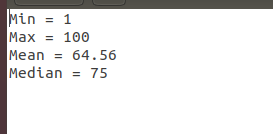
The user has the option to save the statistics to a file. Your program will save the descriptive statistics result to a text file, each value per line. The format as in the sample below:
Min = 35
Max = 100
Mean = 79
Median = 73
Grading:
Points are assigned to different part of the program.
Reading the input file 2 points
Sorting the data 1 point
Min, Max, Mean, Median 4 point
Saving output file 2 points
Comments/Style 1 point
Submission:
You must zip your program and upload in the usual way.If you submit an unzipped file, you will lose 1 point.
Sample run:
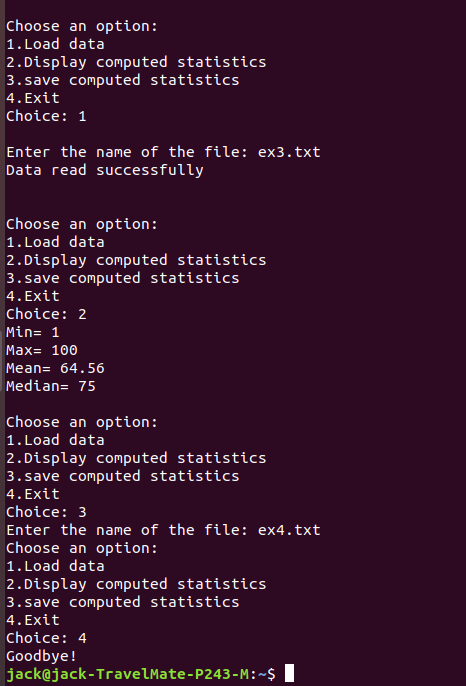
Choose an option:
1. Load data
2. Display computed statistics
3. Save computed statistics
4. Exit
Choice: 1
Enter the name of the file: data.txt
Data read successfully.
Choose an option:
1. Load data
2. Display computed statistics
3. Save computed statistics
4. Exit
Choice: 2
Below are the compute values:
Min = 35
Max = 100
Mean = 79.3
Median = 73
Choose an option:
1. Load data
2. Display computed statistics
3. Save computed statistics
4. Exit
Choice: 3
Enter the name of the file: data-stats.txt
Result saved successful.
Choose an option:
1. Load data
2. Display computed statistics
3. Save computed statistics
4. Exit
Choice: 4
Goodbye!
Homework Answers
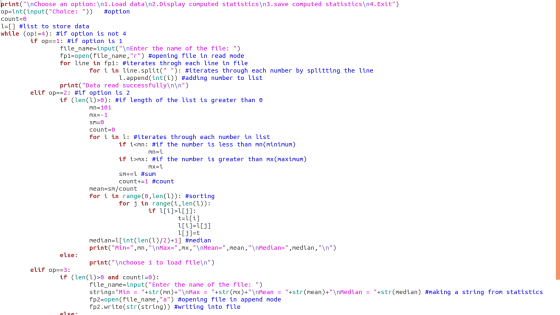

print("\nChoose an option:\n1.Load data\n2.Display computed
statistics\n3.save computed statistics\n4.Exit")
op=int(input("Choice: ")) #option
count=0
l=[] #list to store data
while (op!=4): #if option is not 4
if op==1: #if option is 1
file_name=input("\nEnter the name
of the file: ")
fp1=open(file_name,"r") #opening
file in read mode
for line in fp1: #iterates throgh
each line in file
for i in
line.split(" "): #iterates through each number by splitting the
line
l.append(int(i)) #adding number to list
print("Data read
successfully\n\n")
elif op==2: #if option is 2
if (len(l)>0): #if length of the
list is greater than 0
mn=101
mx=-1
sm=0
count=0
for i in l:
#iterates through each number in list
if i<mn: #if the number is less than
mn(minimum)
mn=i
if i>mx: #if the number is greater than
mx(maximum)
mx=i
sm+=i #sum
count+=1 #count
mean=sm/count
for i in
range(0,len(l)): #sorting
for j in range(i,len(l)):
if l[i]>l[j]:
t=l[i]
l[i]=l[j]
l[j]=t
median=l[int(len(l)/2)+1] #median
print("Min=",mn,"\nMax=",mx,"\nMean=",mean,"\nMedian=",median,"\n")
else:
print("\nchoose
1 to load file\n")
elif op==3:
if (len(l)>0 and
count!=0):
file_name=input("Enter the name of the file: ")
string="Min =
"+str(mn)+"\nMax = "+str(mx)+"\nMean = "+str(mean)+"\nMedian =
"+str(median) #making a string from statistics
fp2=open(file_name,"a") #opening file in append mode
fp2.write(str(string)) #writing into file
else:
print("\n\nChoose 1 and 2 to load file and compute
statistics")
print("Choose an option:\n1.Load data\n2.Display
computed statistics\n3.save computed statistics\n4.Exit")
op=int(input("Choice: ")) #taking choice
print("Goodbye!")
Add Answer to:
Python Programming
Topics: list, file input/output
You will write a program that allows the user to...
Topics: list, file input/output (Python) You will write a program that allows the user to read...
Topics: list, file input/output (Python) You will write a program that allows the user to read grade data from a text file, view computed statistical values based on the data, and to save the computed statistics to a text file. You will use a list to store the data read in, and for computing the statistics. You must use functions. The data: The user has the option to load a data file. The data consists of integer values representing student...
Write a program that allows a user to view a table of temperature conversion. The user...
Write a program that allows a user to view a table of temperature conversion. The user should be able to enter a starting value and an ending value in to textboxes. Your program will display a list of temperature conversion from Celsius to Fahrenheit in a text area like the example below: You can choose any color, design and font for this interface. Use javafx scene builder for program. When you click on "Display" button it read values from text...
The file lab10movies.cpp contains a program that allows the user to read movie names and movie re...
 Please answer using C++
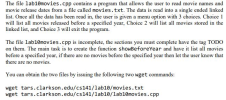
The file lab10movies.cpp contains a program that allows the user to read movie names and movie release dates from a file called movies.txt. The data is read into a single ended linked list. Once all the data has been read in, the user is given a menu option with 3 choices. Choice 1 will list all movies released before a specified year, Choice 2 will list all movies stored in the linked list, and Choice 3...
Please answer using C++
The file lab10movies.cpp contains a program that allows the user to read movie names and movie release dates from a file called movies.txt. The data is read into a single ended linked list. Once all the data has been read in, the user is given a menu option with 3 choices. Choice 1 will list all movies released before a specified year, Choice 2 will list all movies stored in the linked list, and Choice 3...
Write a program to read the contents of data.txt file, and determine the smallest value (min),...
Write a program to read the contents of data.txt file, and determine the smallest value (min), largest value (max), and the average value (ave). The minimum, maximum, and average values must be calculated in the function calc(). Remember to declare the stdlib.h library, so that you can use the atof function, which will convert the number in the text file into float number. Also, remember to check if there is an error opening the file or not. If there is...
C++ programming language Write a program that asks the user for a file name. The file...
C++ programming language Write a program that asks the user for a file name. The file contains a series of scores(integers), each written on a separate line. The program should read the contents of the file into an array and then display the following content: 1) The scores in rows of 10 scores and in sorted in descending order. 2) The lowest score in the array 3) The highest score in the array 4) The total number of scores in...
C++ (1) Write a program to prompt the user for an input and output file name....
C++ (1) Write a program to prompt the user for an input and output file name. The program should check for errors in opening the files, and print the name of any file which has an error, and exit if an error occurs. For example, (user input shown in caps in first line, and in second case, trying to write to a folder which you may not have write authority in) Enter input filename: DOESNOTEXIST.T Error opening input file: DOESNOTEXIST.T...
Python Programming Write a program that counts how often a word occurs in a text file....
Python Programming Write a program that counts how often a word occurs in a text file. Input: Ask the user for the name of an ASCII text file. Output: Display the numbers of top frequently appeared words and their frequencies. Pseudocode: 1) Read the file 2) Split the file into words 3) Count each word 4) Sort the words by frequencies, starting with the most frequent ones 5) Internally you should use some sort of data structure to keep track...
The name of the C++ file must be search.cpp Write a program that will read data...
 The name of the C++ file must be search.cpp Write a program that will read data from a file. The program will allow the user to specify the filename. Use a loop that will check if the file is opened correctly, otherwise display an error message and allow the user to re-enter a filename until successful. Read the values from the file and store into an integer array. The program should then prompt the user for an integer which will...
Write a contacts database program that presents the user with a menu that allows the user...
Write a contacts database program that presents the user with a menu that allows the user to select between the following options: (In Java) Save a contact. Search for a contact. Print all contacts out to the screen. Quit If the user selects the first option, the user is prompted to enter a person's name and phone number which will get saved at the end of a file named contacts.txt. If the user selects the second option, the program prompts...
In Python, write a program that reads a text file that is provided by the user...
In Python, write a program that reads a text file that is provided by the user - ensure that the file exists before processing it! The file might be in a different directory, so be sure to test you logic - the user will provide the absolute path to the file if it is not in the same directory as the Python script! You should then ask the user for what string to search for in the file. Your program...
 Please answer using C++
The file lab10movies.cpp contains a program that allows the user to read movie names and movie release dates from a file called movies.txt. The data is read into a single ended linked list. Once all the data has been read in, the user is given a menu option with 3 choices. Choice 1 will list all movies released before a specified year, Choice 2 will list all movies stored in the linked list, and Choice 3...
Please answer using C++
The file lab10movies.cpp contains a program that allows the user to read movie names and movie release dates from a file called movies.txt. The data is read into a single ended linked list. Once all the data has been read in, the user is given a menu option with 3 choices. Choice 1 will list all movies released before a specified year, Choice 2 will list all movies stored in the linked list, and Choice 3...
 The name of the C++ file must be search.cpp Write a program that will read data from a file. The program will allow the user to specify the filename. Use a loop that will check if the file is opened correctly, otherwise display an error message and allow the user to re-enter a filename until successful. Read the values from the file and store into an integer array. The program should then prompt the user for an integer which will...
Most questions answered within 3 hours.
-
Where is the error in this code sequence?
String s1 = "Hello";
String s2 = "ello";...
asked 11 months ago -
Financial data for Joel de Paris, Inc., for last year
follow:
Joel de Paris, Inc.
Balance...
asked 11 months ago -
Consider this reaction:
Al2(SO4)3 (aq)+ BaCl3
(aq) Al2Cl6 (aq)- +
3BaSO4(s) . What is the...
asked 11 months ago -
Suppose that Savneet is considering increasing her
recent random sample from 20 car rentals to 40...
asked 11 months ago -
Trucks arrive at an unloading terminal at an average rate of 120
per hour.
Trucks arrive...
asked 11 months ago -
Why are methanol and ethanol completely soluble in water while
octanol is not very little soluble....
asked 11 months ago -
A facilities manager at a university reads in a research report
that the mean amount of...
asked 11 months ago -
When the CuSO4 is rehydrated by adding water to the anhydrous
compound, is this an endothermic...
asked 11 months ago -
A ray of sunlight is passing from diamond into crown glass; the
angle of incidence is...
asked 11 months ago -
A block of mass 0.249 kg is placed on top of a light, vertical
spring of...
asked 11 months ago -
how do the kidneys compensate in the presences of acidosis
a) trigger hyperventilate
b) reserve acid...
asked 11 months ago -
Question 501 pts
The rental rate of capital to the firm increases. Which of the
following...
asked 11 months ago