JAVA program Note: you can't change anything is already written Student.java public class Student { ...
JAVA program
Note: you can't change anything is already written
Student.java
public class Student {
private String name;
private String major;
private double gpa;
public Student(String name, String major, double
gpa) {
// TO-DO: Assign the given
parameters to the data fields. Use the this keyword.
}
public double getGPA() {
// TO-DO: return this.gpa
}
public String getName() {
// TO-DO: return this.name
}
// toString method: this is a handy way to specify
what you want it to look like when you
// print a Student object. Without this, printing a
student using System.out.println(student)
// will print a memory address. The toString method is
called implicitly (you don't have to
// call it explicitly when you print)
public String toString() {
return "[" + name + ", " + major +
", " + gpa + "]";
}
}
StudentShuffle.java
/* Your Name
* Date
* Homework 3 – StudentShuffle
*/
import java.util.Scanner;
import java.io.*;
public class StudentShuffle {
private Student[] studentArray;
public StudentShuffle() {
this.studentArray = new
Student[15];
}
public Student[] getStudentArray() {
return this.studentArray;
}
public void getDataFromFile() {
/* TO-DO: write a method to get
data from the text file, store the data in
* Student objects, and store the
students in an array.
* Suggestion: use Scanner myScanner
= new Scanner(new FileReader("students_list.txt"))
* to access the file.
* Write your code inside the try
block (you can leave the catch block as-is).
* Some useful methods: Scanner
hasNextLine(), String split(), Double.valueOf()
*/
// You may initialize some
variables here
try {
// Your code
here
} catch(FileNotFoundException
e){
System.out.println(e.getMessage());
}
}
public void printStudents(Student[] students)
{
// TO-DO: write code to print each
student on a new line.
// The toString method in Student
class is already written, so
// using
system.out.println(students[i]) will print a student using my
format
// NOTE: you must not display null
values
// Your code here
}
public double findLowestGPA() {
// TO-DO: write a method to find
the lowest GPA and return that value.
// Make sure to write logic to
handle null values in the array.
// Hint: use the method getGPA from
Student class
// Your code here
}
public Student[] getStudentsWithPerfectGPA()
{
// TO-DO: write code that finds the
students with perfect GPA (4.0),
// adds those students to a new
array, and returns that array
// Hint: use the method getGPA from
Student class
// Your code here
}
public Student[] sortAlphabetically(Student[]
students) {
// BONUS: write code to sort the
student array alphabetically by name from A -> Z.
// I suggest creating a new array
so as to not modify the original (although this
// is not required).
// You may use any sorting
algorithm, as long as you implement it yourself.
// Hints: use getName() method from
Student class, compareTo method.
// Be sure to deal with null values
in the array.
// Your code here
}
public static void main(String[] args) {
// TO-DO: implement your main
method (see notes below)
System.out.println("\nPart1 -
Get data from file and print students");
System.out.println("------------------------------------------------");
// Instantiate a StudentShuffle
object.
// Call the method
getDataFromFile() using the StudentShuffle object,
// for example
shuffle.getDataFromFile().
// Call
shuffle.printStudents(shuffle.getStudentArray()) to print the
students
System.out.println("\nPart2 -
Find the lowest GPA value");
System.out.println("------------------------------------------------");
// Call findLowestGPA() method,
save the value returned, and print it
System.out.println("\nPart3 -
Find the students with highest GPA");
System.out.println("------------------------------------------------");
// Call getStudentsWithPerfectGPA()
method, save the returned array,
// and use your printStudents
method to print the good students
System.out.println("\nPart4
Bonus - Sort the students alphabetically");
System.out.println("------------------------------------------------");
// Call your sortedAlphabetically
method and save the returned array.
// Use your printStudents method to
print the sorted array.
}
}
Student_list.text
Brenna Computer_Science 4.0
Janet Biology 3.4
Sandeep Physics 3.9
Grant Marketing 4.0
Wei Business 3.7
Andre Communications 3.7
Fernanda Math 3.9
Jonas Physiology 2.9
Grace Fine_arts 3.5
Stephanie Chemistry 4.0
Mohammed Business 3.9
Nozomi Computer_Science 3.5
Aparna Literature 3.7
Ayesha Business 3.5
1- you need to get data from file
2- print the data
3- print the lowest gpa
4- print student with gpa 4.0
5- sort Alphabetically and print them
Homework Answers
Note: Everything is done and tested...If you need any help feel free to comment.
Please UPRATE.
Thanks.
StudentShuffle.java
package StudentShuffle;
import java.util.Arrays;
import java.util.Comparator;
/* Your Name
* Date
* Homework 3 – StudentShuffle
*/
import java.util.Scanner;
import java.io.*;
public class StudentShuffle {
private Student[] studentArray;
public StudentShuffle() {
this.studentArray = new Student[15];
}
public Student[] getStudentArray() {
return this.studentArray;
}
public void getDataFromFile() {
/* TO-DO: write a method to get data from the text file, store the
data in
* Student objects, and store the students in an array.
* Suggestion: use Scanner myScanner = new Scanner(new
FileReader("students_list.txt"))
* to access the file.
* Write your code inside the try block (you can leave the catch
block as-is).
* Some useful methods: Scanner hasNextLine(), String split(),
Double.valueOf()
*/
// You may initialize some variables here
String[] arrOfStr;
String line,name,major;
double gpa;
int index=0;
Scanner myScanner = null;
try {
myScanner = new Scanner(new
FileReader("students_list.txt"));
while(myScanner.hasNextLine()){
line = myScanner.nextLine();
arrOfStr = line.split(" ");
if(arrOfStr.length == 3){
name = arrOfStr[0];
major = arrOfStr[1];
gpa
=Double.parseDouble(arrOfStr[2]);
Student stdObj=new
Student(name,major,gpa);
studentArray[index] =
stdObj;
index++;
//System.out.println(stdObj.toString());
}
}
} catch (FileNotFoundException e1) {
// TODO Auto-generated catch
block
e1.printStackTrace();
}finally{
if(myScanner!=null)
myScanner.close();
}
}
public void printStudents(Student[] students) {
// TO-DO: write code to print each student on a new line.
// The toString method in Student class is already written,
so
// using system.out.println(students[i]) will print a student using
my format
// NOTE: you must not display null values
// Your code here
for(Student x:students){
if(x!=null)
System.out.println(x.toString());
}
}
public double findLowestGPA() {
// TO-DO: write a method to find the lowest GPA and return that
value.
// Make sure to write logic to handle null values in the
array.
// Hint: use the method getGPA from Student class
// Your code here
double lowestGpa=1000;
for(Student x : studentArray){
if(x!=null){
if(x.getGPA()<lowestGpa)
{
lowestGpa=x.getGPA();
}
}
}
if(lowestGpa!=1000)
return lowestGpa;
else
return 0;
}
public Student[] getStudentsWithPerfectGPA() {
// TO-DO: write code that finds the students with perfect GPA
(4.0),
// adds those students to a new array, and returns that array
// Hint: use the method getGPA from Student class
// Your code here
int countPerfect=0;
int index=0;
for(Student x : studentArray){
if(x!=null &&
x.getGPA()==4)
{
countPerfect++;
}
}
Student[] student=new Student[countPerfect];
for(Student x : studentArray){
if(x!=null &&
x.getGPA()==4)
{
student[index]=x;
index++;
}
}
return student;
}
public Student[] sortAlphabetically(Student[] students) {
// BONUS: write code to sort the student array alphabetically by
name from A -> Z.
// I suggest creating a new array so as to not modify the original
(although this
// is not required).
// You may use any sorting algorithm, as long as you implement it
yourself.
// Hints: use getName() method from Student class, compareTo
method.
// Be sure to deal with null values in the array.
// Your code here
Student[] tempArray=students;
Arrays.sort(tempArray, new Comparator<Student>()
{
public int compare(Student s1,
Student s2) {
if (s1 == null
&& s2 == null) {
return 0;
}
if (s1 == null) {
return 1;
}
if (s2 == null) {
return -1;
}
return
s1.getName().compareTo(s2.getName());
}
});
return tempArray;
}
public static void main(String[] args) {
// TO-DO: implement your main method (see notes below)
System.out.println("\nPart1 - Get data from file and print
students");
System.out.println("------------------------------------------------");
// Instantiate a StudentShuffle object.
StudentShuffle shuffle=new StudentShuffle();
// Call the method getDataFromFile() using the StudentShuffle
object,
// for example shuffle.getDataFromFile().
shuffle.getDataFromFile();
// Call shuffle.printStudents(shuffle.getStudentArray()) to print
the students
shuffle.printStudents(shuffle.getStudentArray());
System.out.println("\nPart2 - Find the lowest GPA value");
System.out.println("------------------------------------------------");
// Call findLowestGPA() method, save the value returned, and print
it
System.out.println(shuffle.findLowestGPA());
System.out.println("\nPart3 - Find the students with highest
GPA");
System.out.println("------------------------------------------------");
// Call getStudentsWithPerfectGPA() method, save the returned
array,
// and use your printStudents method to print the good
students
Student[] tempArray=shuffle.getStudentsWithPerfectGPA();
shuffle.printStudents(tempArray);
System.out.println("\nPart4 Bonus - Sort the students
alphabetically");
System.out.println("------------------------------------------------");
// Call your sortedAlphabetically method and save the returned
array.
// Use your printStudents method to print the sorted array.
Student[]
tempArray2=shuffle.sortAlphabetically(shuffle.getStudentArray());
shuffle.printStudents(tempArray2);
}
}
Student.java :
package StudentShuffle;
public class Student {
private String name;
private String major;
private double gpa;
public Student(String name, String major, double gpa) {
// TO-DO: Assign the given parameters to the data fields. Use the
this keyword.
this.name =name;
this.major=major;
this.gpa=gpa;
}
public double getGPA() {
// TO-DO: return this.gpa
return gpa;
}
public String getName() {
// TO-DO: return this.name
return name;
}
// toString method: this is a handy way to specify what you want
it to look like when you
// print a Student object. Without this, printing a student using
System.out.println(student)
// will print a memory address. The toString method is called
implicitly (you don't have to
// call it explicitly when you print)
public String toString() {
return "[" + name + ", " + major + ", " + gpa + "]";
}
}
Output :
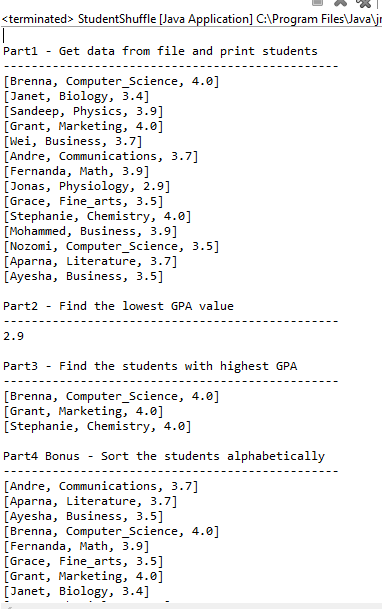
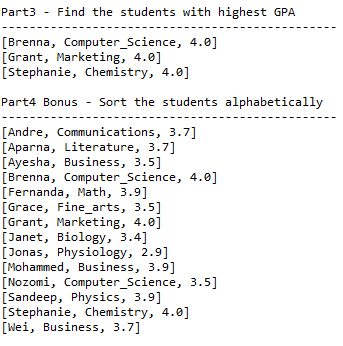
Add Answer to:
JAVA program
Note: you can't change anything is already written
Student.java
public class Student {
...
java This lab is intended to give you practice creating a class with a constructor method,...
java This lab is intended to give you practice creating a class with a constructor method, accessor methods, mutator methods, equals method , toString method and a equals method. In this lab you need to create two separate classes, one Student class and other Lab10 class. You need to define your instance variables, accessor methods, mutator methods, constructor, toString method and equals method in Student class. You need to create objects in Lab10 class which will have your main method...
import java.util.Scanner; public class StudentClient { public static void main(String[] args) { ...
import java.util.Scanner; public class StudentClient { public static void main(String[] args) { Student s1 = new Student(); Student s2 = new Student("Smith", "123-45-6789", 3.2); Student s3 = new Student("Jones", "987-65-4321", 3.7); System.out.println("The name of student #1 is "); System.out.println("The social security number of student #1 is " + s1.toString()); System.out.println("Student #2 is " + s2); System.out.println("the name of student #3 is " + s3.getName()); System.out.println("The social security number...
I need code in java The Student class: CODE IN JAVA: Student.java file: public class Student...
 I need code in java
The Student class:
CODE IN JAVA:
Student.java file:
public class Student {
private String name;
private double gpa;
private int idNumber;
public Student() {
this.name = "";
this.gpa = 0;
this.idNumber = 0;
}
public Student(String name, double gpa, int
idNumber) {
this.name = name;
this.gpa = gpa;
this.idNumber = idNumber;
}
public Student(Student s)...
I need code in java
The Student class:
CODE IN JAVA:
Student.java file:
public class Student {
private String name;
private double gpa;
private int idNumber;
public Student() {
this.name = "";
this.gpa = 0;
this.idNumber = 0;
}
public Student(String name, double gpa, int
idNumber) {
this.name = name;
this.gpa = gpa;
this.idNumber = idNumber;
}
public Student(Student s)...
Language Java Step 1: Design a class called Student. The Student class should contain the following...
Language Java Step 1: Design a class called Student. The Student class should contain the following data: firstName lastName studentID totalCredits gpa Your class should implement the “sets” and “gets” for the class. Include methods: equals, compareTo, toString. Change the toString method (from class) to put each member variable on a new line. Step 2: Write a driver program to test that Student works correctly. Test is with 3 students as given in class. Step 3: Write a “registration” program...
In Java(using BlueJ) Purpose Purpose is to practice using file input and output, and array list of objects. Also, this lab specification tells you only what to do, you now have more responsibility to...
In Java(using BlueJ) Purpose Purpose is to practice using file input and output, and array list of objects. Also, this lab specification tells you only what to do, you now have more responsibility to design how to do it. Problem description You are given a text file called 'Students.txt' that contains information on many students. Your program reads the file, creating many Student objects, all of which will be stored into an array list of Student objects, in the Students...
In Java(using BlueJ) Purpose Purpose is to practice using file input and output, and array list...
In Java(using BlueJ) Purpose Purpose is to practice using file input and output, and array list of objects. Also, this lab specification tells you only what to do, you now have more responsibility to design how to do it. Problem description You are given a text file called 'Students.txt' that contains information on many students. Your program reads the file, creating many Student objects, all of which will be stored into an array list of Student objects, in the Students...
Given a class called Student and a class called Course that contains an ArrayList of Student....
 Given a class called Student and a class called Course that
contains an ArrayList of Student. Write a method called
getDeansList() as described below. Refer to Student.java below to
learn what methods are available.
I will paste both of the simple .JAVA codes below
COURSE.JAVA
import java.util.*;
import java.io.*;
/******************************************************
* A list of students in a course
*****************************************************/
public class Course{
/** collection of Students */
private ArrayList<Student> roster;
/*****************************************************
Constructor for objects of class Course
*****************************************************/...
Given a class called Student and a class called Course that
contains an ArrayList of Student. Write a method called
getDeansList() as described below. Refer to Student.java below to
learn what methods are available.
I will paste both of the simple .JAVA codes below
COURSE.JAVA
import java.util.*;
import java.io.*;
/******************************************************
* A list of students in a course
*****************************************************/
public class Course{
/** collection of Students */
private ArrayList<Student> roster;
/*****************************************************
Constructor for objects of class Course
*****************************************************/...
Set-Up · Create a new project in your Eclipse workspace named: Lab13 · In the src...
Set-Up · Create a new project in your Eclipse workspace named: Lab13 · In the src folder, create a package named: edu.ilstu · Import the following files from T:\it168\Labs\lab13. Note that the .txt file must be in the top level of your project, not inside your src folder. o Student.java o StudentList.java o students.txt Carefully examine the Student.java and StudentList.java files. You are going to complete the StudentList class (updating all necessary Javadoc comments), following the instruction in the code....
In Java Code Needed is Below the Question Using Program 3: Encapsulating Dogs, modify this program...
In Java Code Needed is Below the Question Using Program 3: Encapsulating Dogs, modify this program to create a database of dogs of your own. You will also include File I/O with this program. You will create 3 classes for this assignment. The first class: Create a Class representing the information that is associated with one item (one dog) of your database. Name this class Dog. Using Lab 3, this will include the information in regard to one dog. The...
Java help: 1.1) Create a class TA that extends class Student. 1.2) Add a variable to the...
Java help: 1.1) Create a class TA that extends class Student. 1.2) Add a variable to the TA class to represent the course the student is TA'ing. 1.3) Provide a constructor for the class so the code in the PeopleFactory will work as provided. 1.4) Provide a toString() method for the TA class so that TA's will output as shown in the sample code. Provide a class Staff so that you can un-comment the lines of code in the PeopleFactory class that...
 I need code in java
The Student class:
CODE IN JAVA:
Student.java file:
public class Student {
private String name;
private double gpa;
private int idNumber;
public Student() {
this.name = "";
this.gpa = 0;
this.idNumber = 0;
}
public Student(String name, double gpa, int
idNumber) {
this.name = name;
this.gpa = gpa;
this.idNumber = idNumber;
}
public Student(Student s)...
I need code in java
The Student class:
CODE IN JAVA:
Student.java file:
public class Student {
private String name;
private double gpa;
private int idNumber;
public Student() {
this.name = "";
this.gpa = 0;
this.idNumber = 0;
}
public Student(String name, double gpa, int
idNumber) {
this.name = name;
this.gpa = gpa;
this.idNumber = idNumber;
}
public Student(Student s)...
 Given a class called Student and a class called Course that
contains an ArrayList of Student. Write a method called
getDeansList() as described below. Refer to Student.java below to
learn what methods are available.
I will paste both of the simple .JAVA codes below
COURSE.JAVA
import java.util.*;
import java.io.*;
/******************************************************
* A list of students in a course
*****************************************************/
public class Course{
/** collection of Students */
private ArrayList<Student> roster;
/*****************************************************
Constructor for objects of class Course
*****************************************************/...
Given a class called Student and a class called Course that
contains an ArrayList of Student. Write a method called
getDeansList() as described below. Refer to Student.java below to
learn what methods are available.
I will paste both of the simple .JAVA codes below
COURSE.JAVA
import java.util.*;
import java.io.*;
/******************************************************
* A list of students in a course
*****************************************************/
public class Course{
/** collection of Students */
private ArrayList<Student> roster;
/*****************************************************
Constructor for objects of class Course
*****************************************************/...
Most questions answered within 3 hours.
-
Where is the error in this code sequence?
String s1 = "Hello";
String s2 = "ello";...
asked 11 months ago -
Financial data for Joel de Paris, Inc., for last year
follow:
Joel de Paris, Inc.
Balance...
asked 11 months ago -
Consider this reaction:
Al2(SO4)3 (aq)+ BaCl3
(aq) Al2Cl6 (aq)- +
3BaSO4(s) . What is the...
asked 11 months ago -
Suppose that Savneet is considering increasing her
recent random sample from 20 car rentals to 40...
asked 11 months ago -
Trucks arrive at an unloading terminal at an average rate of 120
per hour.
Trucks arrive...
asked 11 months ago -
Why are methanol and ethanol completely soluble in water while
octanol is not very little soluble....
asked 11 months ago -
A facilities manager at a university reads in a research report
that the mean amount of...
asked 11 months ago -
When the CuSO4 is rehydrated by adding water to the anhydrous
compound, is this an endothermic...
asked 11 months ago -
A ray of sunlight is passing from diamond into crown glass; the
angle of incidence is...
asked 11 months ago -
A block of mass 0.249 kg is placed on top of a light, vertical
spring of...
asked 11 months ago -
how do the kidneys compensate in the presences of acidosis
a) trigger hyperventilate
b) reserve acid...
asked 11 months ago -
Question 501 pts
The rental rate of capital to the firm increases. Which of the
following...
asked 11 months ago