Flatten Text: Write a function to implement simple string flatten operation with the help of number...
Flatten Text: Write a function to implement simple string flatten operation with the help of number of occurrence of characters. For example, the string xxyzzzzzxxx results in x2ylz5x3. In case the "flattened" string doesn’t result in becoming shorter than what we started with, then the function simply returns the starting string. The string should use only uppercase and lowercase letters (a through z).
#include <iostream>
using namespace std;
string flattenText(string str)
{
string flattenedText = "";
return flattenedText;
}
int main()
{
string userString;
cout<<"Enter a string to flatten: "<<endl;
getline(cin, userString);
cout<<"You entered string:
"<<userString<<endl;
cout<<"Flattened string is:
"<<flattenText(userString)<<endl;
return 0;
}
Homework Answers
Here is code:
#include <iostream>
#include <string>
using namespace std;
string flattenText(string str)
{
string flattenedText = "";
int counter = 1, i;
for (i = 1; i < str.size(); ++i)
{
if (str[i] == str[i - 1])
{
counter++;
}
else
{
flattenedText += str[i - 1];
if (counter > 1)
flattenedText += to_string(counter);
counter = 1;
}
}
flattenedText += str[i - 1];
if (counter > 1)
flattenedText += to_string(counter);
return flattenedText;
}
int main()
{
string userString;
cout << "Enter a string to flatten: " << endl;
getline(cin, userString);
cout << "You entered string: " << userString << endl;
cout << "Flattened string is: " << flattenText(userString) << endl;
return 0;
}
Output:
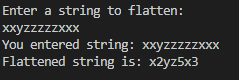
Add Answer to:
Flatten Text: Write a function to implement
simple string flatten operation with the help of number...
#include <iostream> #include <string> using namespace std; //Write a function that changes all characters in a...
#include <iostream> #include <string> using namespace std; //Write a function that changes all characters in a string to dashes string to_dash(string s){ for(int i = 0; i < s.length(); i++){ } return s; } int main(){ string s; cin >> s; s = to_dash(s); cout << s << endl; }
In C++ write a program that will read three strings from the user, a phrase, a...
In C++ write a program that will read three strings from the user, a phrase, a letter to replace, and a replacement letter. The program will change the phrase by replacing each occurrence of a letter with a replacement letter. For example, if the phrase is Mississippi and the letter to replace is 's' the new phrase will be "miizzizzippi". in the function, replace the first parameter is a modifiable string, the second parameter is the occurrence of a letter...
Program a clean_string function that combines both the convert_lower and remove_punct functionality in one function. In...
Program a clean_string function that combines both the convert_lower and remove_punct functionality in one function. In other words, take a string as a parameter and return a clean version of the string that has no punctuation, no spaces and is all lower case. #include <iostream> #include <string> using namespace std; // TODO: Add your clean_string function here int main() { string line; getline(cin, line); while(line != "quit") { cout << clean_string(line) << ": " << line << endl;...
Fix the function so that it checks if the string is a palindrome #include <iostream> using...
Fix the function so that it checks if the string is a palindrome #include <iostream> using namespace std; //Fix the function so that it checks if the string is a palindrome //(same forwards as backwards ex: racecar / radar) bool is_palindrome(string str, int i){ //base cases if (/* add the condition */) return false; if (/* add the condition */) return true; //recursive call return is_palindrome(str, i-1); } int main(){ string x; cin >> x; if (is_palindrome(x,x.length())){...
C++ Write a recursive function that reverses the given input string. No loops allowed, only use...
C++ Write a recursive function that reverses the given input string. No loops allowed, only use recursive functions. Do not add more or change the parameters to the original function. Do not change the main program. #include <iostream> #include <string> using namespace std; //Write a recursive function 'void reverse(string &str)' that reverses the given input string. void reverse(string &str) { /*Code needed*/ } int main() { string name = "sherry"; reverse(name); cout << name << endl; //should...
CODES: main.cpp #include <iostream> #include <string> #include "ShoppingCart.h" using namespace std; char PrintMenu() { char answer;...
CODES: main.cpp #include <iostream> #include <string> #include "ShoppingCart.h" using namespace std; char PrintMenu() { char answer; cout << "MENU" << endl; cout << "a - Add item to cart" << endl; cout << "d - Remove item from cart" << endl; cout << "c - Change item quantity" << endl; cout << "i - Output items' descriptions" << endl; cout << "o - Output shopping cart" << endl; cout << "q - Quit" << endl << endl; while (true) {...
#include <iostream> #include <cstring> #include <string> #include <istream> using namespace std; //Function prototypes int numVowels(char *str);...
#include <iostream> #include <cstring> #include <string> #include <istream> using namespace std; //Function prototypes int numVowels(char *str); int numConsonants(char *str); int main() { char string[100]; char inputChoice, choice[2]; int vowelTotal, consonantTotal; //Input a string cout << "Enter a string: " << endl; cin.getline(string, 100); do { //Displays the Menu cout << " (A) Count the number of vowels in the string"<<endl; cout << " (B) Count...
#include <iostream> #include <cstring> #include <string> #include <istream> using namespace std; //Function prototypes int numVowels(char *str);...
#include <iostream> #include <cstring> #include <string> #include <istream> using namespace std; //Function prototypes int numVowels(char *str); int numConsonants(char *str); int main() { char string[100]; char inputChoice, choice[2]; int vowelTotal, consonantTotal; //Input a string cout << "Enter a string: " << endl; cin.getline(string, 100); do { //Displays the Menu cout << " (A) Count the number of vowels in the string"<<endl; cout << " (B) Count...
trouble with formatting titles :( Your friend is in charge of recording titles of books in...
 trouble with formatting titles :( Your friend is in charge of recording titles of books in the library they work in. Since they know you're in EECS 183, they've asked you to write a function that turns a lowercase string into Title Case format. This way, they can use the function to correctly format the titles without having to worry about capitalizing anything themselves. The function you will implement is stringToTitleCase, which takes a lowercase string str as input and...
Convert to use functions where possible #include<iostream> #include<string> using namespace std; int main() { string...
Convert to use functions where possible #include<iostream> #include<string> using namespace std; int main() { string first, last, job; double hours, wages, net, gross, tax, taxrate = .40; double oPay, oHours; int deductions; // input section cout << "Enter First Name: "; cin >> first; cout << "Enter Last Name: "; cin >> last; cin.ignore(); cout << "Enter Job Title: "; getline(cin, job); cout << "Enter Hours Worked:...
 trouble with formatting titles :( Your friend is in charge of recording titles of books in the library they work in. Since they know you're in EECS 183, they've asked you to write a function that turns a lowercase string into Title Case format. This way, they can use the function to correctly format the titles without having to worry about capitalizing anything themselves. The function you will implement is stringToTitleCase, which takes a lowercase string str as input and...
Most questions answered within 3 hours.
-
Where is the error in this code sequence?
String s1 = "Hello";
String s2 = "ello";...
asked 11 months ago -
Financial data for Joel de Paris, Inc., for last year
follow:
Joel de Paris, Inc.
Balance...
asked 11 months ago -
Consider this reaction:
Al2(SO4)3 (aq)+ BaCl3
(aq) Al2Cl6 (aq)- +
3BaSO4(s) . What is the...
asked 11 months ago -
Suppose that Savneet is considering increasing her
recent random sample from 20 car rentals to 40...
asked 11 months ago -
Trucks arrive at an unloading terminal at an average rate of 120
per hour.
Trucks arrive...
asked 11 months ago -
Why are methanol and ethanol completely soluble in water while
octanol is not very little soluble....
asked 11 months ago -
A facilities manager at a university reads in a research report
that the mean amount of...
asked 11 months ago -
When the CuSO4 is rehydrated by adding water to the anhydrous
compound, is this an endothermic...
asked 11 months ago -
A ray of sunlight is passing from diamond into crown glass; the
angle of incidence is...
asked 11 months ago -
A block of mass 0.249 kg is placed on top of a light, vertical
spring of...
asked 11 months ago -
how do the kidneys compensate in the presences of acidosis
a) trigger hyperventilate
b) reserve acid...
asked 11 months ago -
Question 501 pts
The rental rate of capital to the firm increases. Which of the
following...
asked 11 months ago