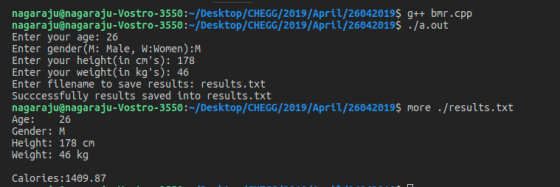
In C++, modify the bmr program to save its output to a file. The program, after...
In C++, modify the bmr program to save its output to a
file.
The program, after asking the user all the necessary information
to calculate
the calories, should do the following:
a. ask for the filename
b. open the filename as an ofstream
c. save the data (the same data you sent to cout) to the file
d. close the file
e. print a message saying that you saved to the file.
If using windows, you might try having the program open the file
in notepad,
as demonstrated in the lecture. With something like
system(fname.c_str());
Homework Answers
If yo u have any doubts, please give me comment...
#include<iostream>
#include<fstream>
#include<string>
#include<cctype>
using namespace std;
int main(){
int age;
char gender;
double height, weight;
cout<<"Enter your age: ";
cin>>age;
cout<<"Enter gender(M: Male, W:Women):";
cin>>gender;
gender = toupper(gender);
while(gender!='M' && gender!='W'){
cout<<"Invaid gender: Reenter: ";
cin>>gender;
gender = toupper(gender);
}
cout<<"Enter your height(in cm's): ";
cin>>height;
cout<<"Enter your weight(in kg's): ";
cin>>weight;
double bmr;
if(gender=='M')
bmr = 66.47 + (13.7*weight)+(5*height)-(6.8*age);
else
bmr = 655.1+(9.6*weight)+(1.88*height)-(4.7*age);
// cout<<"Calories: "<<bmr<<endl;
string filename;
cout<<"Enter filename to save results: ";
cin>>filename;
ofstream out;
out.open(filename.c_str());
out<<"Age:\t"<<age<<endl;
out<<"Gender:\t"<<gender<<endl;
out<<"Height:\t"<<height<<" cm"<<endl;
out<<"Weight:\t"<<weight<<" kg"<<endl;
out<<"\nCalories:"<<bmr<<endl;
out.close();
cout<<"Succcessfully results saved into "<<filename<<endl;
return 0;
}
Add Answer to:
In C++, modify the bmr program to save its output to a
file.
The program, after...
Use the file processing example program shown at the bottom. Modify the program to enter the...
Use the file processing example program shown at the bottom. Modify the program to enter the grades, and count number of grades. Also get total and average grade. Use the following data for grades: 79, 99, 85, 97, 88, 95, 100, 87, 94 EXAMPLE OUTPUT Total: 9 grades Total grade sum: 824 Average grade: 92 Letter grade: A / Using Break, and Continue #include "stdafx.h" #include using namespace std; int main() { int i = 0; for (int x =...
C++ OPEN AND COPY FILES Your task is to create a simple C++ program that prompts...
C++ OPEN AND COPY FILES Your task is to create a simple C++ program that prompts the user for two file names, opens both files, reads the data from one file and copies that data to the other file. After this is done, the files are both closed and the program ends. 1. Your program, opencopy.cpp, needs to use both an ifstream object and an ofstream object. 2. You only need to use #include for these but make sure that...
This is my assignment prompt This is an example of the input and output This is...
 This is my assignment prompt
This is an example of the
input and output
This is what I have so far
What is the 3rd ToDo in the main.cpp for
open the files and read the encrypted message? Does the rest of the
code look accurate?
Programming Assignment #6 Help Me Find The Secret Message Description: This assignment will require that you read in an encrypted message from a file, decode the message, and then output the message to a...
This is my assignment prompt
This is an example of the
input and output
This is what I have so far
What is the 3rd ToDo in the main.cpp for
open the files and read the encrypted message? Does the rest of the
code look accurate?
Programming Assignment #6 Help Me Find The Secret Message Description: This assignment will require that you read in an encrypted message from a file, decode the message, and then output the message to a...
c++ program Notes 1. Your program should use named string constant for the file name to open the file. Do not add any pa...
c++ program Notes 1. Your program should use named string constant for the file name to open the file. Do not add any path to the file name because the path on your computer is not likely to exist on the computer the instructor uses to grade the program. Points may be deducted if you don't follow this instruction. 2. Split statements and comments longer than 80 characters into multiple lines and use proper indentations for the split portions. 3....
Description: Save a text document to disk based on a name and content provided by the...
Description: Save a text document to disk based on a name and content provided by the user. Purpose: This application provides experience with user input and interaction in the Console, writing files to disk, working with exceptions, and writing programs in C#/.NET. Requirements: Project Name: Document Target Platform: Console Programming Language: C# Documentation: Types and variables (Links to an external site.) (Microsoft) Console.ReadLine Method () (Links to an external site.) (Microsoft) Strings (C# Programming Guide) (Links to an external site.)...
C++ (1) Write a program to prompt the user for an input and output file name....
C++ (1) Write a program to prompt the user for an input and output file name. The program should check for errors in opening the files, and print the name of any file which has an error, and exit if an error occurs. For example, (user input shown in caps in first line, and in second case, trying to write to a folder which you may not have write authority in) Enter input filename: DOESNOTEXIST.T Error opening input file: DOESNOTEXIST.T...
please c++ with functions *Modify the Guessing Game Write the secret number to a file. Then...
please c++ with functions *Modify the Guessing Game Write the secret number to a file. Then write each user guess and answer to the file. (on separate lines) Write the number of guesses to the file at the end of the game. After the game is finished, ask the user if they want to play again. If 'n' or 'N' don't play again, otherwise play again! NOTE: your file should have more than one game in it if the user...
C++ 3. Write a program that reads integers from a file, sums the values and calculates...
 C++
3. Write a program that reads integers from a file, sums the values and calculates the average. a. Write a value-returning function that opens an input file named in File txt. You may "hard-code" the file name, i.e., you do not need to ask the user for the file name. The function should check the file state of the input file and return a value indicating success or failure. Main should check the returned value and if the file...
C++
3. Write a program that reads integers from a file, sums the values and calculates the average. a. Write a value-returning function that opens an input file named in File txt. You may "hard-code" the file name, i.e., you do not need to ask the user for the file name. The function should check the file state of the input file and return a value indicating success or failure. Main should check the returned value and if the file...
C++ 1. Your program should use named string constant for the file name to open the...
C++ 1. Your program should use named string constant for the file name to open the file. Do not add any path to the file name because the path on your computer is not likely to exist on the computer the instructor uses to grade the program. Points may be deducted if you don't follow this instruction. 2. Split statements and comments longer than 80 characters into multiple lines and use proper indentations for the split portions. (Lab2b.cpp) Write a...
The name of the C++ file must be search.cpp Write a program that will read data...
 The name of the C++ file must be search.cpp Write a program that will read data from a file. The program will allow the user to specify the filename. Use a loop that will check if the file is opened correctly, otherwise display an error message and allow the user to re-enter a filename until successful. Read the values from the file and store into an integer array. The program should then prompt the user for an integer which will...
 This is my assignment prompt
This is an example of the
input and output
This is what I have so far
What is the 3rd ToDo in the main.cpp for
open the files and read the encrypted message? Does the rest of the
code look accurate?
Programming Assignment #6 Help Me Find The Secret Message Description: This assignment will require that you read in an encrypted message from a file, decode the message, and then output the message to a...
This is my assignment prompt
This is an example of the
input and output
This is what I have so far
What is the 3rd ToDo in the main.cpp for
open the files and read the encrypted message? Does the rest of the
code look accurate?
Programming Assignment #6 Help Me Find The Secret Message Description: This assignment will require that you read in an encrypted message from a file, decode the message, and then output the message to a...
 C++
3. Write a program that reads integers from a file, sums the values and calculates the average. a. Write a value-returning function that opens an input file named in File txt. You may "hard-code" the file name, i.e., you do not need to ask the user for the file name. The function should check the file state of the input file and return a value indicating success or failure. Main should check the returned value and if the file...
C++
3. Write a program that reads integers from a file, sums the values and calculates the average. a. Write a value-returning function that opens an input file named in File txt. You may "hard-code" the file name, i.e., you do not need to ask the user for the file name. The function should check the file state of the input file and return a value indicating success or failure. Main should check the returned value and if the file...
 The name of the C++ file must be search.cpp Write a program that will read data from a file. The program will allow the user to specify the filename. Use a loop that will check if the file is opened correctly, otherwise display an error message and allow the user to re-enter a filename until successful. Read the values from the file and store into an integer array. The program should then prompt the user for an integer which will...
Most questions answered within 3 hours.
-
Where is the error in this code sequence?
String s1 = "Hello";
String s2 = "ello";...
asked 10 months ago -
Financial data for Joel de Paris, Inc., for last year
follow:
Joel de Paris, Inc.
Balance...
asked 10 months ago -
Consider this reaction:
Al2(SO4)3 (aq)+ BaCl3
(aq) Al2Cl6 (aq)- +
3BaSO4(s) . What is the...
asked 10 months ago -
Suppose that Savneet is considering increasing her
recent random sample from 20 car rentals to 40...
asked 10 months ago -
Trucks arrive at an unloading terminal at an average rate of 120
per hour.
Trucks arrive...
asked 10 months ago -
Why are methanol and ethanol completely soluble in water while
octanol is not very little soluble....
asked 10 months ago -
A facilities manager at a university reads in a research report
that the mean amount of...
asked 10 months ago -
When the CuSO4 is rehydrated by adding water to the anhydrous
compound, is this an endothermic...
asked 10 months ago -
A ray of sunlight is passing from diamond into crown glass; the
angle of incidence is...
asked 10 months ago -
A block of mass 0.249 kg is placed on top of a light, vertical
spring of...
asked 10 months ago -
how do the kidneys compensate in the presences of acidosis
a) trigger hyperventilate
b) reserve acid...
asked 10 months ago -
Question 501 pts
The rental rate of capital to the firm increases. Which of the
following...
asked 10 months ago