How to write these steps in ladder diagram using PLC 1-Stop all motions 2-The sequence shall...
How to write these steps in ladder diagram using PLC 1-Stop all motions 2-The sequence shall be repeated when you re-press the start button after completion of the sequence 3- If the emergency stop is pressed at any time, stop all motions immediately.
Homework Answers
 Just as inputs and
outputs,timers are given labels as T.1,T.2,T.3 to be used in
branches of sequences S.1, S.2, S.3 respectively.
Just as inputs and
outputs,timers are given labels as T.1,T.2,T.3 to be used in
branches of sequences S.1, S.2, S.3 respectively.
Add Answer to:
How to write these steps in ladder diagram using PLC 1-Stop all
motions 2-The sequence shall...
All Ladder Logic and connection diagrams should be valid for the OMRON CP1L-M30DT PLC Write the Ladder logic program to...
All Ladder Logic and connection diagrams should be valid for the OMRON CP1L-M30DT PLC Write the Ladder logic program to implement the process. The sequence of operation is as follows: · Normally open start and normally closed stop pushbuttons are used to start and stop the process. · When the start button is pressed, solenoid A energizes to start filling the tank. · As the tank fills, the empty level sensor switch closes. When the tank is full, the full...
How to make the ladder diagram in PLC about this case ? 4. At the first...
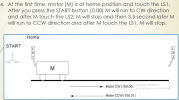 How to make the ladder diagram in PLC about this case ?
4. At the first time, motor (M) is at home position and touch the LS1. After you press the START button (0.00) M will run to CW direction and after M touch the LS2, M will stop and then 3.5 second later M will run to CCW direction and after M touch the LS1, M will stop. Home START L 2 Motor CW (100.00) Activate Windows Go to...
How to make the ladder diagram in PLC about this case ?
4. At the first time, motor (M) is at home position and touch the LS1. After you press the START button (0.00) M will run to CW direction and after M touch the LS2, M will stop and then 3.5 second later M will run to CCW direction and after M touch the LS1, M will stop. Home START L 2 Motor CW (100.00) Activate Windows Go to...
Design a PLC ladder diagram that controls three motors that have the following sequences: a) press...
Design a PLC ladder diagram that controls three motors that have the following sequences: a) press the start button to energize the first motor M1 and M1 remains ON. b) the second motor M2 starts after M1 has started for t-1seconds c) the third motor M3 starts after M2 has started for t-2seconds d) press the stop button to stop all three motors at once.
Design a relay-schematic ladder diagram to perform the following steps: Using FLUIDSIM A double-acting cylinder is...
Design a relay-schematic ladder diagram to perform the following steps: Using FLUIDSIM A double-acting cylinder is initially at fully-retract position. An electrical limit switch placed at the fully-retracted position will send a signal to the device described in Step 2. A double-solenoid 5/2 valve is placed right under the cylinder to control its motions. If an NO push button is pressed and released immediately, the double-acting cylinder will be moving forward with an adjustable speed When the cylinder is at...
Water process Tank Write a program to implement the process ilustrated in the Figure shown. The s...
 use logo! plc program
ladder program
Water process Tank Write a program to implement the process ilustrated in the Figure shown. The sequence of operation is to be as follows: Normally open start and normally closed stop pushbuttons are used to start and stop the process . When the start button is pressed, solenoid A energizes to start filling the tank. .As the tank fills, the empty level sensor switch closes. When the tank is full, the full level sensor...
use logo! plc program
ladder program
Water process Tank Write a program to implement the process ilustrated in the Figure shown. The sequence of operation is to be as follows: Normally open start and normally closed stop pushbuttons are used to start and stop the process . When the start button is pressed, solenoid A energizes to start filling the tank. .As the tank fills, the empty level sensor switch closes. When the tank is full, the full level sensor...
Needing assistance creating a PLC ladder logic diagram with timers With the use of a normally...
Needing assistance creating a PLC ladder logic diagram with timers With the use of a normally open toggle and a normally closed push button When the 1st button is pressed, light #1 comes on. After 10 seconds, light #2 comes on. Lastly, after an additional 10 seconds after the 2nd light, light #3 comes on. Needing to put a push-button switch that kills all 3 of the lights and the cycle should restart with the toggle being closed.
please solve all the questions Q1 (30 pts) Design a state-based PLC program to control a...
 please solve all the questions
Q1 (30 pts) Design a state-based PLC program to control a motor. The system specification is as follows. • Press a normally open push button, the motor will start. Motor stop will stop after 5 minutes or a normally close push button is pressed. . When the motor is running, a read light is ON. When the motor is stopped, a green light is ON. Use the "Fail Safe" concept, i.e., if the wire of...
please solve all the questions
Q1 (30 pts) Design a state-based PLC program to control a motor. The system specification is as follows. • Press a normally open push button, the motor will start. Motor stop will stop after 5 minutes or a normally close push button is pressed. . When the motor is running, a read light is ON. When the motor is stopped, a green light is ON. Use the "Fail Safe" concept, i.e., if the wire of...
Create ladder diagram after the immediate start of oil motor using push button. Spindle should start...
 Create ladder diagram after the immediate start of oil motor using push button. Spindle should start after 2 seconds. Also when spindle is stopped using a push button, oil motor should stop after 2 seconds of spindle stop. Note: No push button is needed to start the spindle.
2) If I need to sample an analog signal into a digital representation of it, what...
 2) If I need to sample an analog signal into a digital representation of it, what resolution and sampling rate would I need given the following: a) The maximum frequency I'm interested in is 38kHz. b) The analog signal is bounded between -5V and 5V. c) I need no more than 500uV of digitization error. 3) Write a ladder logic program for our PLC that will sense when one button (button A) is pressed and will start a fan. The...
Is there anyone out there could help me, please.. Objective: - Write a ladder logic program to s...
Is there anyone out there could help me, please.. Objective: - Write a ladder logic program to simulate an industrial process. - Explore additional PLC/HMI data types. Program Requirements: Part 1: ~~Red Button will be used to stop the system, Red light only should be on. ~~Green button press: -Yellow Light will flash for 10 seconds. -After elapsed time yellow light goes off, illuminate green light then the conveyor should start. Make sure the buttons remain in proper state. (Not...
 How to make the ladder diagram in PLC about this case ?
4. At the first time, motor (M) is at home position and touch the LS1. After you press the START button (0.00) M will run to CW direction and after M touch the LS2, M will stop and then 3.5 second later M will run to CCW direction and after M touch the LS1, M will stop. Home START L 2 Motor CW (100.00) Activate Windows Go to...
How to make the ladder diagram in PLC about this case ?
4. At the first time, motor (M) is at home position and touch the LS1. After you press the START button (0.00) M will run to CW direction and after M touch the LS2, M will stop and then 3.5 second later M will run to CCW direction and after M touch the LS1, M will stop. Home START L 2 Motor CW (100.00) Activate Windows Go to...
 use logo! plc program
ladder program
Water process Tank Write a program to implement the process ilustrated in the Figure shown. The sequence of operation is to be as follows: Normally open start and normally closed stop pushbuttons are used to start and stop the process . When the start button is pressed, solenoid A energizes to start filling the tank. .As the tank fills, the empty level sensor switch closes. When the tank is full, the full level sensor...
use logo! plc program
ladder program
Water process Tank Write a program to implement the process ilustrated in the Figure shown. The sequence of operation is to be as follows: Normally open start and normally closed stop pushbuttons are used to start and stop the process . When the start button is pressed, solenoid A energizes to start filling the tank. .As the tank fills, the empty level sensor switch closes. When the tank is full, the full level sensor...
 please solve all the questions
Q1 (30 pts) Design a state-based PLC program to control a motor. The system specification is as follows. • Press a normally open push button, the motor will start. Motor stop will stop after 5 minutes or a normally close push button is pressed. . When the motor is running, a read light is ON. When the motor is stopped, a green light is ON. Use the "Fail Safe" concept, i.e., if the wire of...
please solve all the questions
Q1 (30 pts) Design a state-based PLC program to control a motor. The system specification is as follows. • Press a normally open push button, the motor will start. Motor stop will stop after 5 minutes or a normally close push button is pressed. . When the motor is running, a read light is ON. When the motor is stopped, a green light is ON. Use the "Fail Safe" concept, i.e., if the wire of...
 Create ladder diagram after the immediate start of oil motor using push button. Spindle should start after 2 seconds. Also when spindle is stopped using a push button, oil motor should stop after 2 seconds of spindle stop. Note: No push button is needed to start the spindle.
 2) If I need to sample an analog signal into a digital representation of it, what resolution and sampling rate would I need given the following: a) The maximum frequency I'm interested in is 38kHz. b) The analog signal is bounded between -5V and 5V. c) I need no more than 500uV of digitization error. 3) Write a ladder logic program for our PLC that will sense when one button (button A) is pressed and will start a fan. The...
Most questions answered within 3 hours.
-
Where is the error in this code sequence?
String s1 = "Hello";
String s2 = "ello";...
asked 10 months ago -
Financial data for Joel de Paris, Inc., for last year
follow:
Joel de Paris, Inc.
Balance...
asked 10 months ago -
Consider this reaction:
Al2(SO4)3 (aq)+ BaCl3
(aq) Al2Cl6 (aq)- +
3BaSO4(s) . What is the...
asked 10 months ago -
Suppose that Savneet is considering increasing her
recent random sample from 20 car rentals to 40...
asked 10 months ago -
Trucks arrive at an unloading terminal at an average rate of 120
per hour.
Trucks arrive...
asked 10 months ago -
Why are methanol and ethanol completely soluble in water while
octanol is not very little soluble....
asked 10 months ago -
A facilities manager at a university reads in a research report
that the mean amount of...
asked 10 months ago -
When the CuSO4 is rehydrated by adding water to the anhydrous
compound, is this an endothermic...
asked 10 months ago -
A ray of sunlight is passing from diamond into crown glass; the
angle of incidence is...
asked 10 months ago -
A block of mass 0.249 kg is placed on top of a light, vertical
spring of...
asked 10 months ago -
how do the kidneys compensate in the presences of acidosis
a) trigger hyperventilate
b) reserve acid...
asked 10 months ago -
Question 501 pts
The rental rate of capital to the firm increases. Which of the
following...
asked 10 months ago