The ability of computers to perform complex tasks is built on combining simple commands into control...
The ability of computers to perform complex tasks is built on combining simple commands into control structures. Of these control structures, blocks, while loop, the do..while loop, and the for loop.
A block is the simplest type of structured statement. Its purpose is simply to group a sequence of statements into a single statement. The format of a block is:
{
}
Here are two examples of blocks:
{
System.out.print("The answer is ");
System.out.println(ans);
}
// This block exchanges the values of x and y
{
int temp; // A temporary variable for use in this block.
temp = x; // Save a copy of the value of x in temp.
x = y; // Copy the value of y into x.
y = temp; // Copy the value of temp into y.
}
A while loop is used to repeat a given statement over and over. Of course, it’s not likely that you would want to keep repeating it forever. That would be an infinite loop, something programmers typically try to avoid!
To be more specific, a while loop will repeat a statement over and over, but only so long as a specified condition remains true. A while loop has the form:
while ()
Since the statement can be, and usually is, a block, many while loops have the form:
while ()
{
}
The semantics of the while statement go like this:
When the computer comes to a while statement, it evaluates the , which yields either true or false as its value.If the value is false, the computer skips over the rest of the while loop and proceeds to the next command in the program.
If the value of the expression is true, the computer executes the or block of inside the loop.
Then it returns to the beginning of the while loop and repeats the process. That is, it re-evaluates the , ends the loop if the value is false, and continues it if the value is true. This will continue over and over until the value of the expression is false; if that never happens, then there will be an infinite loop.
Here is an example of a while loop that simply prints out the numbers 1, 2, 3, 4, 5:
int number; // The number to be printed.
number = 1; // Start with 1.
while ( number < 6 ) { // Keep going as long as number is < 6.
System.out.println(number);
number = number + 1; // Go on to the next number.
}
System.out.println("Done!");
A do..while statement is very similar to the while statement, except that the word “while,” along with the condition that it tests,has been moved to the end. The word “do” is added to mark the beginning of the loop. A do..while statement has the form
do while ( );
or, since, as usual, the can be a block,
do {
} while ( );
Note the semicolon, ’;’, at the very end. This semicolon is part of the statement, just as the semicolon at the end of an assignment statement or declaration is part of the statement.
Omitting it is a syntax error. (More generally, every statement in Java ends either with a semicolon or a right brace, ’}’.)
A for loop is executed in exactly the same way as the while loop:
The initialization part is executed once, before the loop begins. The continuation condition is executed before each execution of the loop, and the loop ends when this condition is false. The update part is executed at the end of each execution of the loop, just before jumping back to check the condition.
The formal syntax of the for statement is as follows:
for ( ; ; )
or, using a block statement:
for ( ; ; )
{
}
Here is a simple example, in which the numbers 1, 2, . . . , 10 are displayed on standard output:
for ( N = 1 ; N <= 10 ; N++ ) System.out.println( N );
It’s easy to count down from 10 to 1 instead of counting up. Just start with 10, decrement the loop control variable instead of incrementing it, and continue as long as the variable is greater than or equal to one:
for ( N = 10 ; N >= 1 ; N-- )System.out.println( N );
From your learning of the block, the while loop, the do..while loop, the for loop control structures, discuss with the class, with example(s), these control structure loops and branches, and how control structures loops can be used to repeat a sequence of statements along with the suitable selection control structure that allows to take into account the control of the flow of its execution.
(Just need 200 words about whats in bold)
Homework Answers
Loops in Java
Looping in programming languages is a feature which
facilitates the execution of a set of instructions/functions
repeatedly while some condition evaluates to true.
Java provides three ways for executing the loops. While all the
ways provide similar basic functionality, they differ in their
syntax and condition checking time.
- while loop: A while loop is a control flow
statement that allows code to be executed repeatedly based on a
given Boolean condition. The while loop can be thought of as a
repeating if statement.
Syntax :while (boolean condition) { loop statements... }Flowchart:
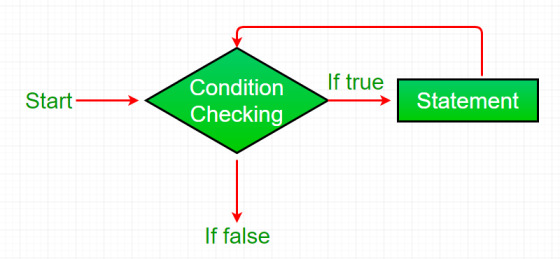
- While loop starts with the checking of condition. If it evaluated to true, then the loop body statements are executed otherwise first statement following the loop is executed. For this reason it is also called Entry control loop
- Once the condition is evaluated to true, the statements in the loop body are executed. Normally the statements contain an update value for the variable being processed for the next iteration.
- When the condition becomes false, the loop terminates which marks the end of its life cycle.
edit
play_arrow
brightness_4
// Java program to illustrate while loop
class whileLoopDemo
{
public static void main(String args[])
{
int x = 1;
// Exit when x becomes greater than 4
while (x <= 4)
{
System.out.println("Value of x:" + x);
// Increment the value of x for
// next iteration
x++;
}
}
}
Output:
Value of x:1
Value of x:2
Value of x:3
Value of x:4
- for loop: for loop provides a concise way of
writing the loop structure. Unlike a while loop, a for statement
consumes the initialization, condition and increment/decrement in
one line thereby providing a shorter, easy to debug structure of
looping.
Syntax:for (initialization condition; testing condition; increment/decrement) { statement(s) }Flowchart:
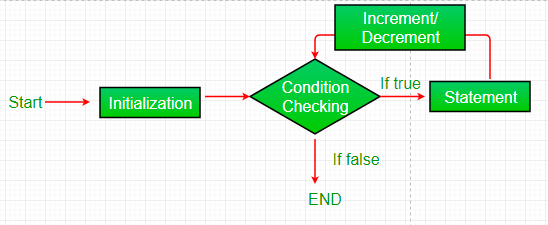
- Initialization condition: Here, we initialize the variable in use. It marks the start of a for loop. An already declared variable can be used or a variable can be declared, local to loop only.
- Testing Condition: It is used for testing the exit condition for a loop. It must return a boolean value. It is also an Entry Control Loop as the condition is checked prior to the execution of the loop statements.
- Statement execution: Once the condition is evaluated to true, the statements in the loop body are executed.
- Increment/ Decrement: It is used for updating the variable for next iteration.
- Loop termination:When the condition becomes false, the loop terminates marking the end of its life cycle.
edit
play_arrow
brightness_4
// Java program to illustrate for loop.
class forLoopDemo
{
public static void main(String args[])
{
// for loop begins when x=2
// and runs till x <=4
for (int x = 2; x <= 4; x++)
System.out.println("Value of x:" + x);
}
}
Output:
Value of x:2
Value of x:3
Value of x:4
Enhanced For loop
Java also includes another version of for loop introduced in Java 5. Enhanced for loop provides a simpler way to iterate through the elements of a collection or array. It is inflexible and should be used only when there is a need to iterate through the elements in sequential manner without knowing the index of currently processed element.
Also note that the object/variable is immutable when enhanced for loop is used i.e it ensures that the values in the array can not be modified, so it can be said as read only loop where you can’t update the values as opposite to other loops where values can be modified.
We recommend using this form of the for statement instead of the general form whenever possible.(as per JAVA doc.)
Syntax:for (T element:Collection obj/array) { statement(s) }Lets take an example to demonstrate how enhanced for loop can be used to simpify the work. Suppose there is an array of names and we want to print all the names in that array. Let’s see the difference with these two examples
filter_none
Enhanced for loop simplifies the work as follows-edit
play_arrow
brightness_4
// Java program to illustrate enhanced for loop
public class enhancedforloop
{
public static void main(String args[])
{
String array[] = {"Ron", "Harry", "Hermoine"};
//enhanced for loop
for (String x:array)
{
System.out.println(x);
}
/* for loop for same function
for (int i = 0; i < array.length; i++)
{
System.out.println(array[i]);
}
*/
}
}
Output:
Ron
Harry
Hermoine
- do while: do while loop is similar to while loop
with only difference that it checks for condition after executing
the statements, and therefore is an example of Exit Control
Loop.
Syntax:do { statements.. } while (condition);Flowchart:
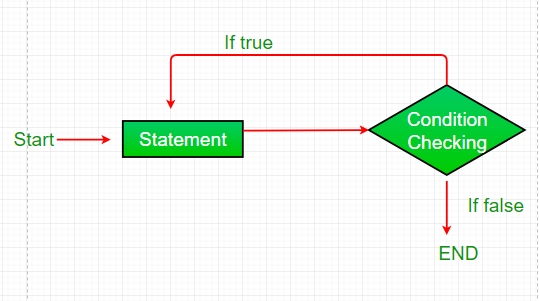
- do while loop starts with the execution of the statement(s). There is no checking of any condition for the first time.
- After the execution of the statements, and update of the variable value, the condition is checked for true or false value. If it is evaluated to true, next iteration of loop starts.
- When the condition becomes false, the loop terminates which marks the end of its life cycle.
- It is important to note that the do-while loop will execute its statements atleast once before any condition is checked, and therefore is an example of exit control loop.
edit
play_arrow
brightness_4
// Java program to illustrate do-while loop
class dowhileloopDemo
{
public static void main(String args[])
{
int x = 21;
do
{
// The line will be printed even
// if the condition is false
System.out.println("Value of x:" + x);
x++;
}
while (x < 20);
}
}
Output:
Value of x: 21
Pitfalls of Loops
- Infinite loop: One of the most common mistakes
while implementing any sort of looping is that that it may not ever
exit, that is the loop runs for infinite time. This happens when
the condition fails for some reason.
Examples:filter_noneedit
play_arrow
brightness_4
//Java program to illustrate various pitfalls.
public class LooppitfallsDemo
{
public static void main(String[] args)
{
// infinite loop because condition is not apt
// condition should have been i>0.
for (int i = 5; i != 0; i -= 2)
{
System.out.println(i);
}
int x = 5;
// infinite loop because update statement
// is not provided.
while (x == 5)
{
System.out.println("In the loop");
}
}
}
- Another pitfall is that you might be adding
something into you collection object through loop and you can run
out of memory. If you try and execute the below program, after some
time, out of memory exception will be
thrown.filter_none
edit
play_arrow
brightness_4
//Java program for out of memory exception.
import java.util.ArrayList;
public class Integer1
{
public static void main(String[] args)
{
ArrayList<Integer> ar = new ArrayList<>();
for (int i = 0; i < Integer.MAX_VALUE; i++)
{
ar.add(i);
}
}
}
Output:
Exception in thread "main" java.lang.OutOfMemoryError: Java heap space
at java.util.Arrays.copyOf(Unknown Source)
at java.util.Arrays.copyOf(Unknown Source)
at java.util.ArrayList.grow(Unknown Source)
at java.util.ArrayList.ensureCapacityInternal(Unknown Source)
at java.util.ArrayList.add(Unknown Source)
at article.Integer1.main(Integer1.java:9)
if you need more information ask me..i am ready to help you..
thank you..
if you have any doubts ask me .don't discourage me..
Add Answer to:
The ability of computers to perform complex tasks is built on
combining simple commands into control...
Q1: Which of the following is a double-selection control statement? do…while for if…else if. Q2: Which...
Q1: Which of the following is a double-selection control statement? do…while for if…else if. Q2: Which of the following is not a Java keyword? do next while for Q3: What is output by the following Java code segment? int temp; temp = 200; if ( temp > 90 ) System.out.println( "This porridge is too hot." ); if ( temp < 70 ) System.out.println( "This porridge is too cold." ); if ( temp == 80 ) System.out.println( "This...
need asap Homework (5) 1. There are two basic forms of loop constructs: - and 2....
 need asap
Homework (5) 1. There are two basic forms of loop constructs: - and 2. Which of the following is an alternate and faster way of performing the same function as many MATLAB for loops? a) a. Exhaustive enumeration b) b. Vectorization c) c. Variable declaration d) d. Amortization 3. A while loop is a block of statements that are repeated indefinitely as long as some condition is satisfied. a) True b) False 4. The for loop is a...
need asap
Homework (5) 1. There are two basic forms of loop constructs: - and 2. Which of the following is an alternate and faster way of performing the same function as many MATLAB for loops? a) a. Exhaustive enumeration b) b. Vectorization c) c. Variable declaration d) d. Amortization 3. A while loop is a block of statements that are repeated indefinitely as long as some condition is satisfied. a) True b) False 4. The for loop is a...
QUESTION 1 Which statement results in the value false? The value of count is 0; limit...
QUESTION 1 Which statement results in the value false? The value of count is 0; limit is 10. (count != 0)&&(limit < 20) (count == 0)&&(limit < 20) (count != 0)||(limit < 20) (count == 0)&&(limit < 20) 10 points QUESTION 2 If this code fragment were executed in an otherwise correct and complete program, what would the output be? int a = 3, b = 2, c = 5 if (a > b) a = 4; if (...
this is true and false for C++ (1 point each) Circle T for true or F...
 this is true and false for C++
(1 point each) Circle T for true or F for false for the following questions. 1. T/F The Boolean expression b1 || b2 evaluates to true if either Boolean value (b1, b2) is true. T/F The code we write in C++ (e.g. code in file project1.cpp) is referred to as source code. 2. 3. T/F The statement float scores[3][3] creates 3 arrays, each containing 3 floating-point variables. T/F For loops work best when...
this is true and false for C++
(1 point each) Circle T for true or F for false for the following questions. 1. T/F The Boolean expression b1 || b2 evaluates to true if either Boolean value (b1, b2) is true. T/F The code we write in C++ (e.g. code in file project1.cpp) is referred to as source code. 2. 3. T/F The statement float scores[3][3] creates 3 arrays, each containing 3 floating-point variables. T/F For loops work best when...
PROJECT TASKS 1. Read the problem definition below and write a C++ program that implements your...
PROJECT TASKS 1. Read the problem definition below and write a C++ program that implements your solution. Readability of the program will be graded based on variable naming, indentation, commenting (not too little and not too much), spacing, consistency, and styling in general including choice of functions. [NOTE: the code at the end of this document does not completely meet requirements as it uses many single letter variables and has no internal documentation. You need to improve it.] 2. Compile...
Language is C++ Complete the following Review Questions: 1. This is a control structure that repeats...
Language is C++ Complete the following Review Questions: 1. This is a control structure that repeats a group of statements in a program? a. loop b. switch c. main() function d. compiler 2. In the expression number++,the ++operator is in what mode? a. Prefix b. Pretest c. Postfix d. Posttest 3.This is a variable that controls the number of iterations performed by a loop. a. Loop control variable b. Accumulator c. Iteration register variable d. Repetition meter 4. The do-whileloop...
I need this code in java. Loops do just what they sound like they should -...
I need this code in java. Loops do just what they sound like they should - they perform a statement again and again until a condition is fulfilled. For this lab you will be practicing using loops, specifically a for loop. The for loop takes the form of: for(/*variable initialization*/;/*stop condition*/; /*increment*/){ //statements to be done multiple times } Task Write an application that displays every perfect number from 2 through 1,000. A perfect number is one that equals the...
How would I make it so these are dialog boxes instead of just like a regular...
How would I make it so these are dialog boxes instead of just like a regular question? Here are the instructions. "Ask the user to input a number. You must use an input dialog box for this input. Be sure to convert the String from the dialog box into an integer (int). The program needs to keep track of the smallest number the user entered as well as the largest number entered. Use a Confirm dialog box to ask the user...
QUESTION 7 Which of the following is a valid C++ assignment statement? (assume each letter is...
 QUESTION 7 Which of the following is a valid C++ assignment statement? (assume each letter is a different variable) A.y=b-c B.y +z = x C.x = a bi D.x = -(y*z): Ex = (x + (y z): QUESTION 8 Which of the following is a valid variable name according to C++ naming rules? A 2ndName B.%Last_Name C@Month D#55 Eyear03 QUESTION 9 Which library must be included to enable keyboard input? A kbdin B. cstdlib C input Diostream E lomanip QUESTION...
Programming Assignment #7 (Recursion) This assignment is to write some methods that perform simple array operations...
Programming Assignment #7 (Recursion) This assignment is to write some methods that perform simple array operations recursively. Specifically, you will write the bodies for the recursive methods of the ArrayRecursion class, available on the class web page. No credit will be given if any changes are made to ArrayRecursion.java, other than completing the method bodies Note that the public methods of ArrayRecursion – contains(), getIndexOfSmallest(), and sort() – cannot be recursive because they have no parameters. Each of these methods...
 need asap
Homework (5) 1. There are two basic forms of loop constructs: - and 2. Which of the following is an alternate and faster way of performing the same function as many MATLAB for loops? a) a. Exhaustive enumeration b) b. Vectorization c) c. Variable declaration d) d. Amortization 3. A while loop is a block of statements that are repeated indefinitely as long as some condition is satisfied. a) True b) False 4. The for loop is a...
need asap
Homework (5) 1. There are two basic forms of loop constructs: - and 2. Which of the following is an alternate and faster way of performing the same function as many MATLAB for loops? a) a. Exhaustive enumeration b) b. Vectorization c) c. Variable declaration d) d. Amortization 3. A while loop is a block of statements that are repeated indefinitely as long as some condition is satisfied. a) True b) False 4. The for loop is a...
 this is true and false for C++
(1 point each) Circle T for true or F for false for the following questions. 1. T/F The Boolean expression b1 || b2 evaluates to true if either Boolean value (b1, b2) is true. T/F The code we write in C++ (e.g. code in file project1.cpp) is referred to as source code. 2. 3. T/F The statement float scores[3][3] creates 3 arrays, each containing 3 floating-point variables. T/F For loops work best when...
this is true and false for C++
(1 point each) Circle T for true or F for false for the following questions. 1. T/F The Boolean expression b1 || b2 evaluates to true if either Boolean value (b1, b2) is true. T/F The code we write in C++ (e.g. code in file project1.cpp) is referred to as source code. 2. 3. T/F The statement float scores[3][3] creates 3 arrays, each containing 3 floating-point variables. T/F For loops work best when...
 QUESTION 7 Which of the following is a valid C++ assignment statement? (assume each letter is a different variable) A.y=b-c B.y +z = x C.x = a bi D.x = -(y*z): Ex = (x + (y z): QUESTION 8 Which of the following is a valid variable name according to C++ naming rules? A 2ndName B.%Last_Name C@Month D#55 Eyear03 QUESTION 9 Which library must be included to enable keyboard input? A kbdin B. cstdlib C input Diostream E lomanip QUESTION...
Most questions answered within 3 hours.
-
Where is the error in this code sequence?
String s1 = "Hello";
String s2 = "ello";...
asked 11 months ago -
Financial data for Joel de Paris, Inc., for last year
follow:
Joel de Paris, Inc.
Balance...
asked 11 months ago -
Consider this reaction:
Al2(SO4)3 (aq)+ BaCl3
(aq) Al2Cl6 (aq)- +
3BaSO4(s) . What is the...
asked 11 months ago -
Suppose that Savneet is considering increasing her
recent random sample from 20 car rentals to 40...
asked 11 months ago -
Trucks arrive at an unloading terminal at an average rate of 120
per hour.
Trucks arrive...
asked 11 months ago -
Why are methanol and ethanol completely soluble in water while
octanol is not very little soluble....
asked 11 months ago -
A facilities manager at a university reads in a research report
that the mean amount of...
asked 11 months ago -
When the CuSO4 is rehydrated by adding water to the anhydrous
compound, is this an endothermic...
asked 11 months ago -
A ray of sunlight is passing from diamond into crown glass; the
angle of incidence is...
asked 11 months ago -
A block of mass 0.249 kg is placed on top of a light, vertical
spring of...
asked 11 months ago -
how do the kidneys compensate in the presences of acidosis
a) trigger hyperventilate
b) reserve acid...
asked 11 months ago -
Question 501 pts
The rental rate of capital to the firm increases. Which of the
following...
asked 11 months ago