write a C code to create 5 processes Use nice and renice Linux commands to setup...
write a C code to create 5 processes Use nice and renice Linux commands to setup different priorities for the 5 processes
Homework Answers
code:
#include<stdio.h>
#include <string.h>
int main()
{
int i;
char snum[5];
char pids[10];
int j;
for( i=0,j=5; i<5; i++)
{
if(fork() == 0)
{
char str[100] = "renice -n ";
// string used to construct rnice
command
sprintf(snum, "%d", i+3);
//getting priority to string
sprintf(pids, "%d", getpid());
//getting process id to
string)
printf("[child] pid %d from [parent] pid
%d\n",getpid(),getppid());
strcat(str,snum);
strcat(str," -p ");
strcat(str,pids);
system(str);
//calling renice command for all
processes using system()
exit(0);
}
}
for( i=0; i<5; i++)
wait(NULL);
}
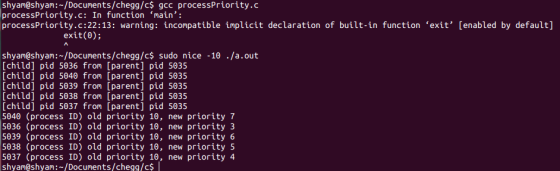
Output:
Add Answer to:
write a C code to create 5 processes Use nice
and renice Linux commands to setup...
Questions: 1) Write a simple program to create three processes using fork() commands. Use any three...
Questions: 1) Write a simple program to create three processes using fork() commands. Use any three of the six system calls to show how each child process executes new sub-programs using exec’s minions. Show the output of each of the child process with different data samples. 2) Write a simple program in your Linux environment using C++ to identify PID, PPID and GID for the processes created in Question 1 and display the real and effective user ID. 3) Modify...
WITH SCREENSHOTS PLEASE Linux+ Guide to Linux Certification Project 9-3 In this hands-on project, you run...
WITH SCREENSHOTS PLEASE Linux+ Guide to Linux Certification Project 9-3 In this hands-on project, you run processes in the background, kill them using the kill and killall commands, and change their priorities using the nice and renice commands. 1. On your Fedora Linux virtual machine, switch to a command-line terminal (tty2) by pressing Ctrl+Alt+F2 and log in to the terminal using the user name of root and the password of LNXrocks!. 2. At the command prompt, type sleep 6000 and...
1. the commands you used to create the directories and files in Linux and Windows; 2....
1. the commands you used to create the directories and files in Linux and Windows; 2. the commands you used to determine default permissions in Linux and Windows; 3. the commands you used to change permissions on your files in Linux and Windows; 4. a paragraph about how directories and file permissions work and what was the same or different between Windows and Linux.
Using only shell commands, create a directory structure in your Linux file system to organize files...
Using only shell commands, create a directory structure in your Linux file system to organize files for this course. An example structure may look like the following: osweb homework homework1.c homework2.java homework3.cpp labs lab1 setup.txt projects Include the following by only using shell commands: List the contents of a directory Write data to a text file Print the contents of a text file to the terminal Delete a text file Move a text file to a different directory Rename a...
Use linux commands to answer. Use a numeric value to change the permissions for the "test1"...
Use linux commands to answer. Use a numeric value to change the permissions for the "test1" file to the following : user/owner: read, write group: read, write other: read
Please write the Linux commands and run them. h. What is the command or commands that...
Please write the Linux commands and run them. h. What is the command or commands that would list the contents of the /var/log directory in alphanumeric order? List the command and its output. i. What is the command or commands used to list the files in /var/log in order of their size? List the command and its output. j. What is the command or commands used to list the top 10 file who use the most disk space? What is...
Need Linux Commands and instructions for the following: 6. Write a script to display numbers from...
 Need Linux Commands and instructions for the following:
6. Write a script to display numbers from 1 to n, where n is an integer provided by users (if not, default to 10). Hint: use "read" command to accept user input. a) Display the source code in an editor (#4-9) b) Execute your script in the terminal, and display the command and the result (#4-10)
Need Linux Commands and instructions for the following:
6. Write a script to display numbers from 1 to n, where n is an integer provided by users (if not, default to 10). Hint: use "read" command to accept user input. a) Display the source code in an editor (#4-9) b) Execute your script in the terminal, and display the command and the result (#4-10)
Without writing any explanations, write Linux commands to achieve the following tasks: 1) create the subdirectories...
 Without writing any explanations, write Linux commands to achieve the following tasks: 1) create the subdirectories with the names...alpha, beta, gamma, and delta based on the following path: ~/alpha/beta/gamma/delta 2) Move to the delta subddirectory and create the following files: a.txt, b.txt, c.txt, ... Zetxt (totally 26 files). list these files to make sure they are created. 3) Move a.txt, b.txt and cutxt to the gamma Subdirectory and list these files from within the gamma subdirectory. 4) Move to your...
Using a Linux command-line interpreter, show the screenshots for executing the following commands: (1) display the...
Using a Linux command-line interpreter, show the screenshots for executing the following commands: (1) display the current working directory, (2) list the contents of a directory, (3) change directory, (4) create a directory, (5) clear the screen, (6) copy a file from a directory into another directory, (7) delete a directory, (8) delete a file, (9) report information for a single process or set of processes, and (10) report a real-time statistics for current processes.
 Need Linux Commands and instructions for the following:
6. Write a script to display numbers from 1 to n, where n is an integer provided by users (if not, default to 10). Hint: use "read" command to accept user input. a) Display the source code in an editor (#4-9) b) Execute your script in the terminal, and display the command and the result (#4-10)
Need Linux Commands and instructions for the following:
6. Write a script to display numbers from 1 to n, where n is an integer provided by users (if not, default to 10). Hint: use "read" command to accept user input. a) Display the source code in an editor (#4-9) b) Execute your script in the terminal, and display the command and the result (#4-10)
 Without writing any explanations, write Linux commands to achieve the following tasks: 1) create the subdirectories with the names...alpha, beta, gamma, and delta based on the following path: ~/alpha/beta/gamma/delta 2) Move to the delta subddirectory and create the following files: a.txt, b.txt, c.txt, ... Zetxt (totally 26 files). list these files to make sure they are created. 3) Move a.txt, b.txt and cutxt to the gamma Subdirectory and list these files from within the gamma subdirectory. 4) Move to your...
Most questions answered within 3 hours.
-
Where is the error in this code sequence?
String s1 = "Hello";
String s2 = "ello";...
asked 10 months ago -
Financial data for Joel de Paris, Inc., for last year
follow:
Joel de Paris, Inc.
Balance...
asked 10 months ago -
Consider this reaction:
Al2(SO4)3 (aq)+ BaCl3
(aq) Al2Cl6 (aq)- +
3BaSO4(s) . What is the...
asked 10 months ago -
Suppose that Savneet is considering increasing her
recent random sample from 20 car rentals to 40...
asked 10 months ago -
Trucks arrive at an unloading terminal at an average rate of 120
per hour.
Trucks arrive...
asked 10 months ago -
Why are methanol and ethanol completely soluble in water while
octanol is not very little soluble....
asked 10 months ago -
A facilities manager at a university reads in a research report
that the mean amount of...
asked 10 months ago -
When the CuSO4 is rehydrated by adding water to the anhydrous
compound, is this an endothermic...
asked 10 months ago -
A ray of sunlight is passing from diamond into crown glass; the
angle of incidence is...
asked 10 months ago -
A block of mass 0.249 kg is placed on top of a light, vertical
spring of...
asked 10 months ago -
how do the kidneys compensate in the presences of acidosis
a) trigger hyperventilate
b) reserve acid...
asked 10 months ago -
Question 501 pts
The rental rate of capital to the firm increases. Which of the
following...
asked 10 months ago