write 2 pages of the below topic 1) Jupyter ( jupyter.org) - notebook UI - source...
write 2 pages of the below topic
1) Jupyter ( jupyter.org) - notebook UI - source of information: wikipedia and jupyter.org`
Homework Answers
Jupyter Notebook (formerly IPython Notebooks) is a web-based interactive computational environment for creating Jupyter notebooks documents. The "notebook" term can colloquially make reference to many different entities, mainly the Jupyter web application, Jupyter Python web server, or Jupyter document format depending on context. A Jupyter Notebook document is a JSONdocument, following a versioned schema, and containing an ordered list of input/output cells which can contain code, text (using Markdown), mathematics, plots and rich media, usually ending with the ".ipynb" extension.
1.1. Notebook document
Notebook documents (or “notebooks”, all lower case) are documents produced by the Jupyter Notebook App, which contain both computer code (e.g. python) and rich text elements (paragraph, equations, figures, links, etc…). Notebook documents are both human-readable documents containing the analysis description and the results (figures, tables, etc..) as well as executable documents which can be run to perform data analysis.
1.2. Jupyter Notebook App
The Jupyter Notebook App is a server-client application that allows editing and running notebook documents via a web browser. The Jupyter Notebook App can be executed on a local desktop requiring no internet access (as described in this document) or can be installed on a remote server and accessed through the internet.
In addition to displaying/editing/running notebook documents, the Jupyter Notebook App has a “Dashboard” (Notebook Dashboard), a “control panel” showing local files and allowing to open notebook documents or shutting down their kernels.
1.3. kernel
A notebook kernel is a “computational engine” that executes the code contained in a Notebook document. The ipython kernel, referenced in this guide, executes python code. Kernels for many other languages exist (official kernels).
When you open a Notebook document, the associated kernel is automatically launched. When the notebook is executed (either cell-by-cell or with menu Cell -> Run All), the kernel performs the computation and produces the results. Depending on the type of computations, the kernel may consume significant CPU and RAM. Note that the RAM is not released until the kernel is shut-down.
1.4. Notebook Dashboard
The Notebook Dashboard is the component which is shown first when you launch Jupyter Notebook App. The Notebook Dashboard is mainly used to open notebook documents, and to manage the running kernels (visualize and shutdown).
The Notebook Dashboard has other features similar to a file manager, namely navigating folders and renaming/deleting files.
Add Answer to:
write 2 pages of the below topic
1) Jupyter ( jupyter.org) - notebook UI - source...
please write 2 pages of the below topic (1) Apache Sentry ( authorization) Source: wikipedia and...
please write 2 pages of the below topic (1) Apache Sentry ( authorization) Source: wikipedia and Apache.org (2) MIT Kerberos (authentication system) (https://web.mit.edu/kerberos/)
write a function in jupyter notebook in python that calculate the # exact derivative value of...
write a function in jupyter notebook in python that calculate the # exact derivative value of f(x) = sin^3(x) at x = 1/5
Write a program in jupyter notebook to sum the following series: 1/3 + 3/5 + 5/7...
Write a program in jupyter notebook to sum the following series: 1/3 + 3/5 + 5/7 + 7/9 + 11/9 + ....+ 95/97 + 97/ 99
Write a python programme in a Jupyter notebook which asks the user to input the number...
Write a python programme in a Jupyter notebook which asks the user to input the number of radioactive nuclei in a sample, the number at a later time, and the elapsed time. The programme should calculate and display the decay constant and the half-life. The decay is described by the equations: ? = ? ?−?? ?0 ?1/2 = ln (2)/? PLEASE INCLUDE COMMENTS ON CODE. THANKS
could you write a python code program using version 3 and jupyter notebook to implement DBSCAN...
could you write a python code program using version 3 and jupyter notebook to implement DBSCAN algorithm?
Write a Python program in this Jupyter Notebook. This program will allow a user to choose...
Write a Python program in this Jupyter Notebook. This program will allow a user to choose from a menu to print various text shapes includeing rectangle, triangle, and diamond as well as a set of numbers in a pattern. This program will allow the user to select the type, the size and/or the fill character for a shape. Your program will verify user inputs such as size for certain range specifications, depending on the shapes.
Write a short python program in the Jupyter notebook using the TIPS dataset. Take a screenshot...
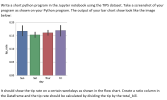 Write a short python program in the Jupyter notebook using the TIPS dataset. Take a screenshot of your program as shown on your Python program. The output of your bar chart show look like the image below: 0.20 0.15 tip_rate 0.10 0.05 0.00 Sun Sat Thur Fri day It should show the tip rate on a certain weekdays as shown in the flow chart. Create a ratio column in the Dataframe and the tip rate should be calculated by dividing...
Kindly write a 2-pages critique paper on this topic below. organelles positioning in muscles requires cooperation...
Kindly write a 2-pages critique paper on this topic below. organelles positioning in muscles requires cooperation between two kash protein and microtubules:
Write a paper consisting of two (2) to three (3) pages - summarizing the topic of...
Write a paper consisting of two (2) to three (3) pages - summarizing the topic of data resource management. The paper must be written in 3rd person with the exception of the Opinion section - it may be written in the 1st person. 1)Topic: data resource management 2)What is the Summary/Analysis of the topic? 3)Application of the topic in today’s world? 4)How would you apply this information to the (your) work place? 5)Opinion about the topic? 6)References – needs to...
Do research and write an essay of two pages in MLA format on the topic “Monetary...
Do research and write an essay of two pages in MLA format on the topic “Monetary Policy.” Make sure you cite your source and use MLA format
 Write a short python program in the Jupyter notebook using the TIPS dataset. Take a screenshot of your program as shown on your Python program. The output of your bar chart show look like the image below: 0.20 0.15 tip_rate 0.10 0.05 0.00 Sun Sat Thur Fri day It should show the tip rate on a certain weekdays as shown in the flow chart. Create a ratio column in the Dataframe and the tip rate should be calculated by dividing...
Most questions answered within 3 hours.
-
Where is the error in this code sequence?
String s1 = "Hello";
String s2 = "ello";...
asked 10 months ago -
Financial data for Joel de Paris, Inc., for last year
follow:
Joel de Paris, Inc.
Balance...
asked 10 months ago -
Consider this reaction:
Al2(SO4)3 (aq)+ BaCl3
(aq) Al2Cl6 (aq)- +
3BaSO4(s) . What is the...
asked 10 months ago -
Suppose that Savneet is considering increasing her
recent random sample from 20 car rentals to 40...
asked 10 months ago -
Trucks arrive at an unloading terminal at an average rate of 120
per hour.
Trucks arrive...
asked 10 months ago -
Why are methanol and ethanol completely soluble in water while
octanol is not very little soluble....
asked 10 months ago -
A facilities manager at a university reads in a research report
that the mean amount of...
asked 10 months ago -
When the CuSO4 is rehydrated by adding water to the anhydrous
compound, is this an endothermic...
asked 10 months ago -
A ray of sunlight is passing from diamond into crown glass; the
angle of incidence is...
asked 10 months ago -
A block of mass 0.249 kg is placed on top of a light, vertical
spring of...
asked 10 months ago -
how do the kidneys compensate in the presences of acidosis
a) trigger hyperventilate
b) reserve acid...
asked 10 months ago -
Question 501 pts
The rental rate of capital to the firm increases. Which of the
following...
asked 10 months ago