Write a public class called FindLastName with a main method. what it does 0. use the...
Write a public class called FindLastName with a main method.
what it does
0. use the list of last names below (data section below). You can
enter it into your program in any way you want. You may want to
create an array, for instance, and initialize it with the data below.
1. prompt the user to enter a last name (see examples below for exact language)
2. report whether the last name is found or not (again see exact language in examples).
3. program ends when user presses enter without entering any name.
Data
what follows is a list of 100 students that you should use in your
program. You could use an array or an arrayList to store the information.
"Palomba",
"Abdullah",
"Audette",
"Dever",
"Pittman",
"Pegram",
"Ramsdell",
"Espey",
"Schillinger",
"Barco",
"Brownstein",
"Colin",
"Freeburg",
"Gram",
"Curnutte",
"Lor",
"Catanzaro",
"Koziel",
"Diener",
"Defazio",
"Volz",
"Deveau",
"Palomba",
"Dambrosio",
"Yerger",
"Sprankle",
"Ellefson",
"Pouncy",
"Osier",
"Forst",
"Faulkenberry",
"Armstong",
"Takahashi",
"Hungerford",
"Igoe",
"Ingraham",
"Tabon",
"Witherite",
"Jessen",
"Gaulding",
"Jelley",
"Kogan",
"Klump",
"Stagner",
"Keesling",
"Kepler",
"Lott",
"Lovins",
"Weitzel",
"Pergande",
"Landwehr",
"Letsinger",
"Levingston",
"Buster",
"Lahey",
"Leroux",
"Lefevre",
"Laseter",
"Lowe",
"Morita",
"Recio",
"Marek",
"Cesar",
"Papa",
"Mcclaine",
"Godsey",
"Mccuen",
"Horace",
"Mcilrath",
"Noga",
"Schanz",
"Kerfien",
"Ferree",
"Roepke",
"Rubalcaba",
"Drummond",
"Schneller",
"Stacey",
"Bronstein",
"Schaner",
"Strawder",
"Murga",
"Ulrey",
"Pederson",
"Sang",
"Schnee",
"Cutsforth",
"Thompkins",
"Tynan",
"Tedrow",
"Tolson",
"Talor",
"Brotzman",
"Lucian",
"Kearl",
"Ertel",
"Fiorillo",
"Laury",
"Yao",
"Rogan"
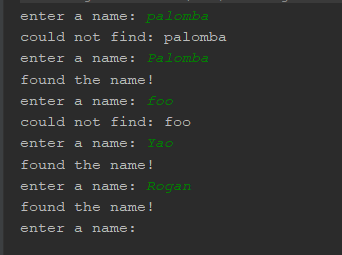
Examples:
% java FindLastName
enter a name: palomba
could not find: palomba
enter a name: Palomba
found the name!
enter a name: foo
could not find: foo
enter a name: Yao
found the name!
enter a name: Rogan
found the name!
enter a name:
% java FindLastName
enter a name:
%
Homework Answers
import java.util.ArrayList;
import java.util.Arrays;
import java.util.Scanner;

public class FindLastName {

    public static void main(String[] args) {
        ArrayList<String> lnames = new ArrayList<>(
                Arrays.asList("Palomba",
                        "Abdullah",
                        "Audette",
                        "Dever",
                        "Pittman",
                        "Pegram",
                        "Ramsdell",
                        "Espey",
                        "Schillinger",
                        "Barco",
                        "Brownstein",
                        "Colin",
                        "Freeburg",
                        "Gram",
                        "Curnutte",
                        "Lor",
                        "Catanzaro",
                        "Koziel",
                        "Diener",
                        "Defazio",
                        "Volz",
                        "Deveau",
                        "Palomba",
                        "Dambrosio",
                        "Yerger",
                        "Sprankle",
                        "Ellefson",
                        "Pouncy",
                        "Osier",
                        "Forst",
                        "Faulkenberry",
                        "Armstong",
                        "Takahashi",
                        "Hungerford",
                        "Igoe",
                        "Ingraham",
                        "Tabon",
                        "Witherite",
                        "Jessen",
                        "Gaulding",
                        "Jelley",
                        "Kogan",
                        "Klump",
                        "Stagner",
                        "Keesling",
                        "Kepler",
                        "Lott",
                        "Lovins",
                        "Weitzel",
                        "Pergande",
                        "Landwehr",
                        "Letsinger",
                        "Levingston",
                        "Buster",
                        "Lahey",
                        "Leroux",
                        "Lefevre",
                        "Laseter",
                        "Lowe",
                        "Morita",
                        "Recio",
                        "Marek",
                        "Cesar",
                        "Papa",
                        "Mcclaine",
                        "Godsey",
                        "Mccuen",
                        "Horace",
                        "Mcilrath",
                        "Noga",
                        "Schanz",
                        "Kerfien",
                        "Ferree",
                        "Roepke",
                        "Rubalcaba",
                        "Drummond",
                        "Schneller",
                        "Stacey",
                        "Bronstein",
                        "Schaner",
                        "Strawder",
                        "Murga",
                        "Ulrey",
                        "Pederson",
                        "Sang",
                        "Schnee",
                        "Cutsforth",
                        "Thompkins",
                        "Tynan",
                        "Tedrow",
                        "Tolson",
                        "Talor",
                        "Brotzman",
                        "Lucian",
                        "Kearl",
                        "Ertel",
                        "Fiorillo",
                        "Laury",
                        "Yao",
                        "Rogan")
        );

        Scanner in = new Scanner(System.in);
        String name;
        while (true) {
            System.out.print("enter a name: ");
            name = in.nextLine();
            if (name.isEmpty()) break;

            if (lnames.contains(name)) {
                System.out.println("found the name!");
            } else {
                System.out.println("could not find: " + name);
            }
        }
        in.close();
    }
}
Add Answer to:
Write a public class called FindLastName with a main method.
what it does
0. use the...
JAVA Write a public class call FunnyWord. class FunnyWord must have a main method. what it...
JAVA Write a public class call FunnyWord. class FunnyWord must have a main method. what it does: 0. prompt user for a String 1. read a String from the user 2. print whether the String is funny or not 3. continue until user enters the word "end" The String is funny if it looks the same read from left to right or right to left. In order to pass all tests you must find funny phrases when spaces, punctuation and...
specs for ComputeAverage ComputeAverage Write a class called ComputeAverage what it does: asks the user to...
specs for ComputeAverage ComputeAverage Write a class called ComputeAverage what it does: asks the user to enter three double numbers (see examples below), it uses Scanner class to read from standard input each one of the doubles entered by the user. it then prints the average of the three numbers. Suggested steps: 1. prompt the user to enter each of the three doubles by printing. 2. read each of the three doubles using a Scanner. Remember you need to declare...
This is JAVA language Create a .java class called MoreArrayFun.java with only a main method. This...
This is JAVA language Create a .java class called MoreArrayFun.java with only a main method. This program will use the ArrayManager class. The final version of the program is described below, but initially use it to test your ArrayManager class as you write it. Complete the ArrayManager class as specified below: The class will have exactly two instance variables: An array of integers A count of the number of elements currently in the array The class will have...
JAVA Language public class ArraySkills { public static void main(String[] args) { // *********************** // For...
JAVA Language public class ArraySkills { public static void main(String[] args) { // *********************** // For each item below you must code the solution. You may not use any of the // methods found in the Arrays class or the Collections classes // String[] myData; // 1. Instantiate the given array to hold 10 Strings. // 2. Add your name to the Array at index 0 and a friend's name to the Array at index 4 // 3. Move your...
Please use public class for java. Thank you. 1. (10 points) Write a method that computes...
 Please use public class for java. Thank you.
1. (10 points) Write a method that computes future investment value at a given interest rate for a specified number of years. The future investment is determined using the formula futurelnvestmentValue numberOfYears 12 investmentAmount X ( monthlyInterestRate) Use the following method header: public static double futurelnvestmentValue( double investmentAmount, double monthlyInterestRate, int years) For example, futureInvestmentValue 10000, 0.05/12, 5) returns 12833.59. Write a test program that prompts the user to enter the investment...
Please use public class for java. Thank you.
1. (10 points) Write a method that computes future investment value at a given interest rate for a specified number of years. The future investment is determined using the formula futurelnvestmentValue numberOfYears 12 investmentAmount X ( monthlyInterestRate) Use the following method header: public static double futurelnvestmentValue( double investmentAmount, double monthlyInterestRate, int years) For example, futureInvestmentValue 10000, 0.05/12, 5) returns 12833.59. Write a test program that prompts the user to enter the investment...
Some java questions: 18. Consider the following class definitions public class TestAB public static void main (String a...
 Some java questions:
18. Consider the following class definitions public class TestAB public static void main (String args) A bl new B() в ь2 -new B() ; b1.х, А.у, Ь2.х, в.у); System.out.printf ("%d, Sd, %d, d\n", class A public int x = 2; public static int y = 4; public A () ( X=y- class Bextends A public int x = 32; public static int y = 45; public B ( x ++y What is the result of attempting to...
Some java questions:
18. Consider the following class definitions public class TestAB public static void main (String args) A bl new B() в ь2 -new B() ; b1.х, А.у, Ь2.х, в.у); System.out.printf ("%d, Sd, %d, d\n", class A public int x = 2; public static int y = 4; public A () ( X=y- class Bextends A public int x = 32; public static int y = 45; public B ( x ++y What is the result of attempting to...
write a java program that does the following Part one Use a For loop to compute...
write a java program that does the following Part one Use a For loop to compute the sum of all the odd numbers from 1 through 99. Your result should be labeled, and the value should be 2500. Print your name 7 times using a While loop. String dogNames[ ] = {"Sam","Buster","Fido","Patches","Gromit","Flicka"}; Using the array defined here, print the values of the array vertically and horizontally using one For-Each loop. Reverse the logic (Nested loops: Indent text) so that the...
Given java code is below, please use it! import java.util.Scanner; public class LA2a { ...
 Given java code is below, please use it!
import java.util.Scanner;
public class LA2a {
/**
* Number of digits in a valid value sequence
*/
public static final int SEQ_DIGITS = 10;
/**
* Error for an invalid sequence
* (not correct number of characters
* or not made only of digits)
*/
public static final String ERR_SEQ = "Invalid
sequence";
/**
* Error for...
Given java code is below, please use it!
import java.util.Scanner;
public class LA2a {
/**
* Number of digits in a valid value sequence
*/
public static final int SEQ_DIGITS = 10;
/**
* Error for an invalid sequence
* (not correct number of characters
* or not made only of digits)
*/
public static final String ERR_SEQ = "Invalid
sequence";
/**
* Error for...
Activity: Writing Classes Page 1 of 10 Terminology attribute / state behavior class method header class...
 Activity: Writing Classes Page 1 of 10 Terminology attribute / state behavior class method header class header instance variable UML class diagram encapsulation client visibility (or access) modifier accessor method mutator method calling method method declaration method invocation return statement parameters constructor Goals By the end of this activity you should be able to do the following: > Create a class with methods that accept parameters and return a value Understand the constructor and the toString method of a class...
import java.util.ArrayList; import java.util.Scanner; public class AssertDemo { /* Work on this in a piecewise...
 import java.util.ArrayList;
import java.util.Scanner;
public class AssertDemo {
/* Work on this in a piecewise fashion by
uncommenting and focusing on one section at a time
* in isolation rather than running everything at
once.
*/
public static void main(String[] args) {
assert(true);
assert(false);
warmUpAsserts();
assertWithPrimitives();
assertWithObjects();
homeworkRelatedAsserts();
}
/*
* Just a...
import java.util.ArrayList;
import java.util.Scanner;
public class AssertDemo {
/* Work on this in a piecewise fashion by
uncommenting and focusing on one section at a time
* in isolation rather than running everything at
once.
*/
public static void main(String[] args) {
assert(true);
assert(false);
warmUpAsserts();
assertWithPrimitives();
assertWithObjects();
homeworkRelatedAsserts();
}
/*
* Just a...
 Please use public class for java. Thank you.
1. (10 points) Write a method that computes future investment value at a given interest rate for a specified number of years. The future investment is determined using the formula futurelnvestmentValue numberOfYears 12 investmentAmount X ( monthlyInterestRate) Use the following method header: public static double futurelnvestmentValue( double investmentAmount, double monthlyInterestRate, int years) For example, futureInvestmentValue 10000, 0.05/12, 5) returns 12833.59. Write a test program that prompts the user to enter the investment...
Please use public class for java. Thank you.
1. (10 points) Write a method that computes future investment value at a given interest rate for a specified number of years. The future investment is determined using the formula futurelnvestmentValue numberOfYears 12 investmentAmount X ( monthlyInterestRate) Use the following method header: public static double futurelnvestmentValue( double investmentAmount, double monthlyInterestRate, int years) For example, futureInvestmentValue 10000, 0.05/12, 5) returns 12833.59. Write a test program that prompts the user to enter the investment...
 Some java questions:
18. Consider the following class definitions public class TestAB public static void main (String args) A bl new B() в ь2 -new B() ; b1.х, А.у, Ь2.х, в.у); System.out.printf ("%d, Sd, %d, d\n", class A public int x = 2; public static int y = 4; public A () ( X=y- class Bextends A public int x = 32; public static int y = 45; public B ( x ++y What is the result of attempting to...
Some java questions:
18. Consider the following class definitions public class TestAB public static void main (String args) A bl new B() в ь2 -new B() ; b1.х, А.у, Ь2.х, в.у); System.out.printf ("%d, Sd, %d, d\n", class A public int x = 2; public static int y = 4; public A () ( X=y- class Bextends A public int x = 32; public static int y = 45; public B ( x ++y What is the result of attempting to...
 Given java code is below, please use it!
import java.util.Scanner;
public class LA2a {
/**
* Number of digits in a valid value sequence
*/
public static final int SEQ_DIGITS = 10;
/**
* Error for an invalid sequence
* (not correct number of characters
* or not made only of digits)
*/
public static final String ERR_SEQ = "Invalid
sequence";
/**
* Error for...
Given java code is below, please use it!
import java.util.Scanner;
public class LA2a {
/**
* Number of digits in a valid value sequence
*/
public static final int SEQ_DIGITS = 10;
/**
* Error for an invalid sequence
* (not correct number of characters
* or not made only of digits)
*/
public static final String ERR_SEQ = "Invalid
sequence";
/**
* Error for...
 Activity: Writing Classes Page 1 of 10 Terminology attribute / state behavior class method header class header instance variable UML class diagram encapsulation client visibility (or access) modifier accessor method mutator method calling method method declaration method invocation return statement parameters constructor Goals By the end of this activity you should be able to do the following: > Create a class with methods that accept parameters and return a value Understand the constructor and the toString method of a class...
 import java.util.ArrayList;
import java.util.Scanner;
public class AssertDemo {
/* Work on this in a piecewise fashion by
uncommenting and focusing on one section at a time
* in isolation rather than running everything at
once.
*/
public static void main(String[] args) {
assert(true);
assert(false);
warmUpAsserts();
assertWithPrimitives();
assertWithObjects();
homeworkRelatedAsserts();
}
/*
* Just a...
import java.util.ArrayList;
import java.util.Scanner;
public class AssertDemo {
/* Work on this in a piecewise fashion by
uncommenting and focusing on one section at a time
* in isolation rather than running everything at
once.
*/
public static void main(String[] args) {
assert(true);
assert(false);
warmUpAsserts();
assertWithPrimitives();
assertWithObjects();
homeworkRelatedAsserts();
}
/*
* Just a...
Most questions answered within 3 hours.
-
Where is the error in this code sequence?
String s1 = "Hello";
String s2 = "ello";...
asked 11 months ago -
Financial data for Joel de Paris, Inc., for last year
follow:
Joel de Paris, Inc.
Balance...
asked 11 months ago -
Consider this reaction:
Al2(SO4)3 (aq)+ BaCl3
(aq) Al2Cl6 (aq)- +
3BaSO4(s) . What is the...
asked 11 months ago -
Suppose that Savneet is considering increasing her
recent random sample from 20 car rentals to 40...
asked 11 months ago -
Trucks arrive at an unloading terminal at an average rate of 120
per hour.
Trucks arrive...
asked 11 months ago -
Why are methanol and ethanol completely soluble in water while
octanol is not very little soluble....
asked 11 months ago -
A facilities manager at a university reads in a research report
that the mean amount of...
asked 11 months ago -
When the CuSO4 is rehydrated by adding water to the anhydrous
compound, is this an endothermic...
asked 11 months ago -
A ray of sunlight is passing from diamond into crown glass; the
angle of incidence is...
asked 11 months ago -
A block of mass 0.249 kg is placed on top of a light, vertical
spring of...
asked 11 months ago -
how do the kidneys compensate in the presences of acidosis
a) trigger hyperventilate
b) reserve acid...
asked 11 months ago -
Question 501 pts
The rental rate of capital to the firm increases. Which of the
following...
asked 11 months ago