Complete the following sections (use a separate screenshot for each item): The PS1 environmental variable contains...
- Complete the following sections (use a separate screenshot for
each item):
- The PS1 environmental variable contains the configuration
parameters for how your command-prompt line appears. View the
contents of the PS1 variable and configure the PS1 variable as
follows:
- The PS1 environmental variable contains the configuration
parameters for how your command-prompt line appears. View the
contents of the PS1 variable and configure the PS1 variable as
follows:
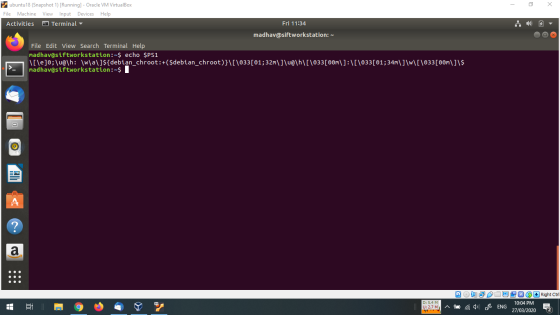
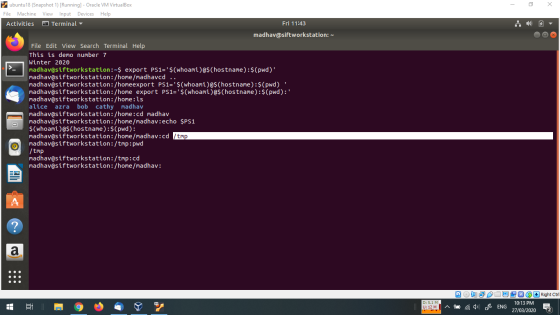
- Type echo $PS1 and press Enter.
- You see the contents of the PS1 variable as ___________________________.
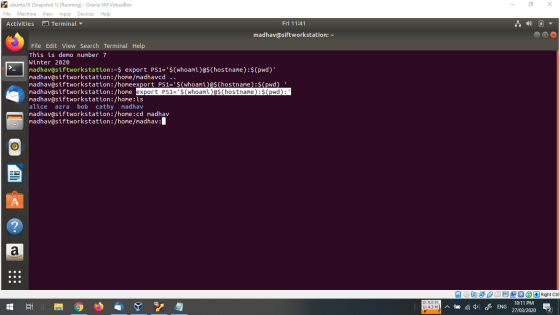
- Now change your command-prompt to display the full path of the current working directory using an environment variable, PWD. The PWD variable contains the full pathname of the current working directory. To display the contents of the PWD variable in the command-prompt, you would type PS1=____________________ and press Enter.
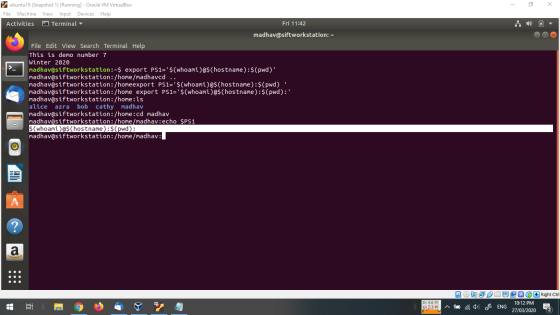
- What does your command-prompt look like now? _______________________
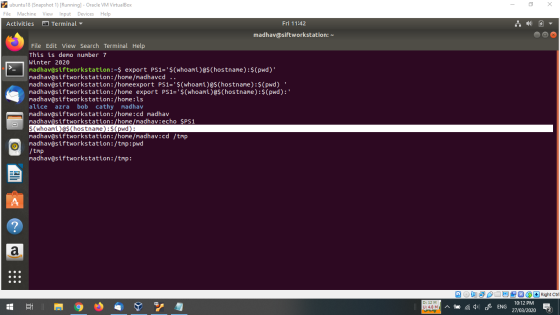
- Type cd /tmp and press Enter. What is your prompt now? _______________
- Type cd and press Enter. This will take you to your ______ directory. What is your prompt now? ________________________________________________
- Log out and then log back in as the same user. How does your prompt change from what you saw in step 5? _______________________________________
Homework Answers
Answer A
***********
Answer B
**************
\[\e]0;\u@\h:
\w\a\]${debian_chroot:+($debian_chroot)}\[\033[01;32m\]\u@\h\[\033[00m\]:\[\033[01;34m\]\w\[\033[00m\]\$
Answer C
************
export PS1='$(whoami)@$(hostname):$(pwd):'
Answer D
*************
$(whoami)@$(hostname):$(pwd):
Answer E
**************
/tmp
Answer F
***********
home directory
if you have any doubt then please ask me without any hesitation
in the comment section below , if you like my answer then please
thumbs up for the answer , before giving thumbs down please discuss
the question it may possible that we may understand the question
different way and we can edit and change the answers if you argue,
thanks :)
Add Answer to:
Complete the following sections (use a separate screenshot for
each item):
The PS1 environmental variable contains...
In this hands-on project, you compile and install a program from source code. On your Fedora...
In this hands-on project, you compile and install a program from source code. On your Fedora Linux virtual machine, switch to a graphical terminal (tty1) by pressingCtrl+Alt+F1 and log in to the GNOME desktop using the user name of user1 and the password of LNXrocks!. Open the Firefox Web browser and download the source code tarball for rdesktop 1.8.2 (rdesktop-1.8.2.tar.gz) from www.rdesktop.org. Save the source code tarball to the default location (/home/user1/Downloads) and log out of the GNOME desktop when...
Project 4-4 In this hands-on project, you make and view links to files and directories. Switch to...
Project 4-4 In this hands-on project, you make and view links to files and directories.Switch to a command-line terminal (tty2) by pressing Ctrl+Alt+F2 and log in to the terminal using the user name of root and the password of secret.At the command prompt, type cd samples and press Enter. Next, type ls -F at the command prompt and press Enter. What files do you see? Next, type ls -l at the command prompt and press Enter. What is the link...
Login to Suse Linux as root. Complete the task working as the root user. 1. What...
Login to Suse Linux as root. Complete the task working as the root user. 1. What is your current directory. What did you enter at the command prompt to determine your current working directory? 2. Change directories if needed to find your foods (or food) file. Use vi to make the file contain 10 food items. Save your file and quit. Use the cat command, and option, and the argument food to display the food file with numbered lines. Use...
Unix questions, i need help on Hint: Commands to study to answer this question: predefined shell...
Unix questions, i need help on Hint: Commands to study to answer this question: predefined shell variables, and .profile script file, echo SHELL, HOME, PATH, MAIL and TERM are predefined shell variables. You can use the value of a shell variable in a shell command putting $ in front of it. For example, to display the value of the HOME directory of the user, specify $HOME in the echo command like echo $HOME. Do not give just the value of...
On your Fedora Linux virtual machine, switch to a command-line terminal (tty2) by pressing Ctrl+Alt+F2 and...
On your Fedora Linux virtual machine, switch to a command-line terminal (tty2) by pressing Ctrl+Alt+F2 and log in to the terminal using the user name of root and the password of LNXrocks!. At the command prompt, type cat /etc/shadow and press Enter. Record the encrypted password for bozo’s user account. At the command prompt, type passwd –l bozo and press Enter to lock bozo’s user account. At the command prompt, type cat /etc/shadow and press Enter. What has been changed...
Project 3-7 In this hands-on project, you use the grep and egrep commands alongside regular ex...
Project 3-7 In this hands-on project, you use the grep and egrep commands alongside regular ex pression metacharacters to ex plore the contents of tex t files. 1. Switch to a command-line terminal (tty2) by pressing Ctrl+Alt+F2 and log in to the terminal using the user name of root and the password of LNXrocks!. 2. At the command prompt, type grep “Inn” sample1 and press Enter. What is displayed and why? 3. At the command prompt, type grep -v “Inn”...
2. Create a directory using “mkdir” and change into that directory using “cd”. Next, create another...
2. Create a directory using “mkdir” and change into that directory using “cd”. Next, create another directory within the new directory and then change into that directory. Now, run cdwithout any arguments, then run pwd. What do you conclude about the cd command when run with no arguments? 3. You won't find the set command in either /bin or /usr/bin, or in any directory listed in the PATH setting. How is it executed then? (That is, if there is no...
Question 2: Manipulate directory structures in Unix/Linux (24 marks – 4 marks each) Use the OS...
 Question 2: Manipulate directory structures in Unix/Linux (24 marks – 4 marks each) Use the OS that you set up from Question 1. Assume you are started at your home directory. a) Perform a command that displays the absolute path of your home directory (your current location). b) Create a new directory inside your home directory and name it “Assignment-Two” c) Without moving into the directory you just made (staying in your home directory), create three new directories using one...
WITH SCREENSHOTS PLEASE Linux+ Guide to Linux Certification Project 9-3 In this hands-on project, you run...
WITH SCREENSHOTS PLEASE Linux+ Guide to Linux Certification Project 9-3 In this hands-on project, you run processes in the background, kill them using the kill and killall commands, and change their priorities using the nice and renice commands. 1. On your Fedora Linux virtual machine, switch to a command-line terminal (tty2) by pressing Ctrl+Alt+F2 and log in to the terminal using the user name of root and the password of LNXrocks!. 2. At the command prompt, type sleep 6000 and...
On your Fedora Linux virtual machine, switch to a command-line terminal (tty2) by pressing Ctrl+Alt+F2 and...
On your Fedora Linux virtual machine, switch to a command-line terminal (tty2) by pressing Ctrl+Alt+F2 and log in to the terminal using the user name of root and the password of LNXrocks!. At the command prompt, type sleep 6000 and press Enter to start the sleep com- mand, which waits 6000 seconds in the foreground. Do you get your prompt back after you enter this command? Why? Send the process an INT signal by typing theCtrl+c key combination. At the...
 Question 2: Manipulate directory structures in Unix/Linux (24 marks – 4 marks each) Use the OS that you set up from Question 1. Assume you are started at your home directory. a) Perform a command that displays the absolute path of your home directory (your current location). b) Create a new directory inside your home directory and name it “Assignment-Two” c) Without moving into the directory you just made (staying in your home directory), create three new directories using one...
Most questions answered within 3 hours.
-
Where is the error in this code sequence?
String s1 = "Hello";
String s2 = "ello";...
asked 11 months ago -
Financial data for Joel de Paris, Inc., for last year
follow:
Joel de Paris, Inc.
Balance...
asked 11 months ago -
Consider this reaction:
Al2(SO4)3 (aq)+ BaCl3
(aq) Al2Cl6 (aq)- +
3BaSO4(s) . What is the...
asked 11 months ago -
Suppose that Savneet is considering increasing her
recent random sample from 20 car rentals to 40...
asked 11 months ago -
Trucks arrive at an unloading terminal at an average rate of 120
per hour.
Trucks arrive...
asked 11 months ago -
Why are methanol and ethanol completely soluble in water while
octanol is not very little soluble....
asked 11 months ago -
A facilities manager at a university reads in a research report
that the mean amount of...
asked 11 months ago -
When the CuSO4 is rehydrated by adding water to the anhydrous
compound, is this an endothermic...
asked 11 months ago -
A ray of sunlight is passing from diamond into crown glass; the
angle of incidence is...
asked 11 months ago -
A block of mass 0.249 kg is placed on top of a light, vertical
spring of...
asked 11 months ago -
how do the kidneys compensate in the presences of acidosis
a) trigger hyperventilate
b) reserve acid...
asked 11 months ago -
Question 501 pts
The rental rate of capital to the firm increases. Which of the
following...
asked 11 months ago