Below is the MATLAB code of low-cut shelving filter which can cut the low frequency of given music signal and low-boost...
Below is the MATLAB code of low-cut shelving filter which can cut the low frequency of given music signal and low-boost shelving filter which can boost the low frequency of given music signal. Design your low-boost shelving filter and low-cut shelving filter to have noticeablly different sound. Compare the sounds of two music signals after filtering, and explain the difference in sounds briefly. If there are any mistakes in code, correct them.
Low-cut shelving filter code:
close all,
clear all,
clc,
ProjectPath = pwd;
MusicSignal_ = strcat(ProjectPath,'\yanny_laurel.wav');
[x, Fs] = audioread(MusicSignal_);
subplot(1,2,1); plot(x);
title('Original Music Signal Magnitude Plot');
%soundsc(y,Fs);
grid on,
Fc=200; %Cut off Freq in Hz
Order=2;
Wn = Fc/(Fs/2);
b = fir1(Order,Wn,'low'); hd = dfilt.dffir(b);
y = filter(hd,x);
subplot(1,2,2); plot(y); grid on, ylim([-3,3]);
str = strcat('Filtered InputSignal, Fc = ',num2str(Fc),' Hz');
title(str);
figure,
freqz(b,1,512);
Low-boost shelving filter:
close all,
clear all,
clc,
ProjectPath = pwd;
MusicSignal_ = strcat(ProjectPath,'\yanny_laurel.wav');
[x, Fs] = audioread(MusicSignal_);
Fc=(200/Fs)/2;
f = fdesign.parameq('F0,BW,BWp,Gref,G0,GBW,Gp,Gst',...
Fc, 0.3, 0.2, 0, 4, 2, 3.5, 0.5);
h = design(f);
hfvt = fvtool(h,'Color','white');
set(hfvt,'Filters',h);
legend(hfvt,'Low-Boost Shelving Filter');
subplot(2,1,1); plot(x);
title('Original yanny_laurel.wav File Plot');
%soundsc(y,Fs);
y = filter(h,x);
subplot(2,1,2); plot(y); grid on, ylim([-3,3]);
str = strcat('Filtered InputSignal, Fc = ',num2str(Fc),' Hz');
title(str);
Homework Answers
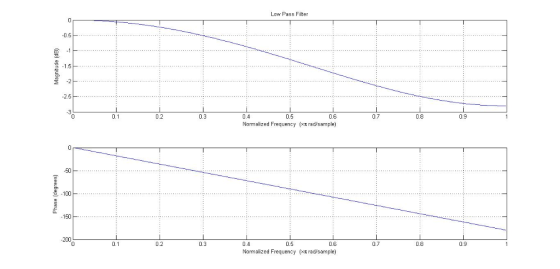
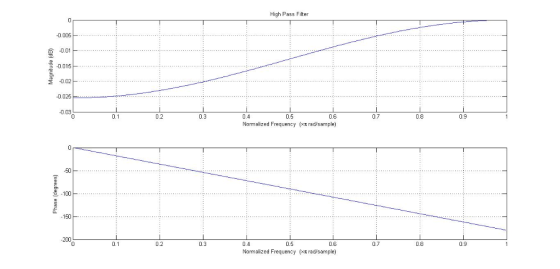
Low Boost Filter means Low Pass Filter and Low cut Filter means High Pass Filter.
Therefore, we need to design low pass and high pass filter.
Fc is the cut off frequency in each case.
Below is the matlab code:
%%%%%%%%%%%%%%%%%%%%%%%%%%%%%%%%%%%%%%%%%%%%%%%%%%%%%%%
%LOW PASS FILTER
close all,
clear all,
clc,
ProjectPath = pwd;
MusicSignal_ = strcat(ProjectPath,'\Tone.wav');
Fc=20; %Cut off Freq in Hz
Order=2; %Filter Order
[x, Fs, nbits] = wavread(MusicSignal_);
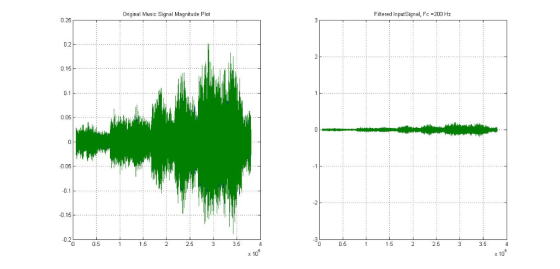
subplot(1,2,1); plot(x);
title('Original Music Signal Magnitude Plot');
%soundsc(x,Fs);
grid on,
Wn = Fc/(Fs/2);
b = fir1(Order,Wn,'low');
hd = dfilt.dffir(b);
y = filter(hd,x);
subplot(1,2,2); plot(y); grid on, ylim([-3,3]);
str = strcat('Filtered InputSignal, Fc = ',num2str(Fc),' Hz');
title(str);
figure,
freqz(b,1,512);
title('Low Pass Filter');
%HIGH PASS FILTER
figure,
close all,
clear all,
clc,
ProjectPath = pwd;
MusicSignal_ = strcat(ProjectPath,'\Tone.wav');
Fc=200; %Cut off Freq in Hz
Order=2; %Filter Order
[x, Fs, nbits] = wavread(MusicSignal_);
subplot(1,2,1); plot(x);
title('Original Music Signal Magnitude Plot');
%soundsc(x,Fs);
grid on,
Wn = Fc/(Fs/2);
b = fir1(Order,Wn,'high');
hd = dfilt.dffir(b);
y = filter(hd,x);
subplot(1,2,2); plot(y); grid on, ylim([-3,3]);
str = strcat('Filtered InputSignal, Fc = ',num2str(Fc),' Hz');
title(str);
figure,
freqz(b,1,512);
title('High Pass Filter');
%%%%%%%%%%%%%%%%%%%%%%%%%%%%%%%%%%%%%%%%%%%%%%%%%%%%%%%

Add Answer to:
Below is the MATLAB code of low-cut shelving filter which can cut the low frequency of given music signal and low-boost...
MATLAB. Design your own low-pass shelving filter which can boost the low frequency of given music signal. After designin...
MATLAB. Design your own low-pass shelving filter which can boost the low frequency of given music signal. After designing filter, apply the filter to the original music signal and observe the result. Include following plots. A. Magnitude and phase plot of your filter. B. Magnitude plot of original signal C. Magnitude plot of filtered signal
MATLAB. Design your own low-pass shelving filter which can boost the low frequency of given music signal. After designin...
MATLAB. Design your own low-pass shelving filter which can boost the low frequency of given music signal. After designing filter, apply the filter to the original music signal and observe the result. Include following plots. A. Magnitude and phase plot of your filter. B. Magnitude plot of original signal C. Magnitude plot of filtered signal
MATLAB. Design your own low-cut shelving filter which can cut the low frequency of given music signal. Include magnitude...
MATLAB. Design your own low-cut shelving filter which can cut the low frequency of given music signal. Include magnitude and phase plot of your filter.
ON MATLAB: ii. Using FIR low-pass filter, remove signal S2, considering fc = 20 Hz as a...
ON MATLAB: ii. Using FIR low-pass filter, remove signal S2, considering fc = 20 Hz as a cut-off frequency and consider two sets of filter coefficients: 11 and 301. Plot the time and frequency domain of the filtered signal, and comment. the process x(n) is sum of two signals S1 and S2; mathematically be described as: ?(?) = ?1 + ?2 where ?1 = ?1cos(2??1??? ) and ?2 = ?2cos(2??2??? ), A1 = A2 = 1; f1 = 10Hz; f2 =...
Using filterDesigner in MATLAB, design a second order low pass IIR Butterworth filter whose sampling frequency...
Using filterDesigner in MATLAB, design a second order low pass IIR Butterworth filter whose sampling frequency (Fs) is 1 kHz and cutoff frequency (Fc) is 10 Hz. Find the numerator and denominator coefficients. Write its transfer function H(z) = Y(z) / X(z). Write its difference function y(k). Draw (copy from Filter Designer) the magnitude response plot. Draw (copy from Filter Designer) the phase response plot. Draw (copy from Filter Designer) the impulse response plot.
Using filterDesigner in MATLAB, design a second order low pass IIR Butterworth filter whose sampling frequency (Fs) is 1...
Using filterDesigner in MATLAB, design a second order low pass IIR Butterworth filter whose sampling frequency (Fs) is 1 kHz and cutoff frequency (Fc) is 10 Hz. Find the numerator and denominator coefficients. Write its transfer function H(z) = Y(z) / X(z). Write its difference function y(k). Draw (copy from Filter Designer) the magnitude response plot. Draw (copy from Filter Designer) the phase response plot. Draw (copy from Filter Designer) the impulse response plot.
NB! This task is required to be solved in matlab. this task also requires the use...
 NB! This task is required to be solved in matlab. this task also requires the use of the function displayDualSpectrum();
which i have pasted in the bottom. the tasks that i need help with are A), B) and C). this is a multi-part question.
Task - Frequency mixing
We use a basic signal that can be described mathematically as follows:
with this We shall then make an amplitude modulated signal: where fc is the carrier frequency. the code below specifies...
NB! This task is required to be solved in matlab. this task also requires the use of the function displayDualSpectrum();
which i have pasted in the bottom. the tasks that i need help with are A), B) and C). this is a multi-part question.
Task - Frequency mixing
We use a basic signal that can be described mathematically as follows:
with this We shall then make an amplitude modulated signal: where fc is the carrier frequency. the code below specifies...
[MATLAB Scriptfile task] Design N-band tone vocoder with a given figure (below) in MATLAB implementing the...
 [MATLAB Scriptfile task]
Design N-band tone vocoder with a given figure (below) in MATLAB
implementing the given script file(bands_cutoff). This program
should be able to process any sound(.wav) file. Then, graph the
band-passed signals and amplitude envelopes extracted(after
rectification and low-pass filtering) and waveforms of the original
sound and vocoded sound. Additionally, using the output of the
script file, make spectrograms of the original sound and the
synthesized sound.
Bandpass filter Modulation Band-limiting Envelope detection BPF RECT LPF BPF sine...
[MATLAB Scriptfile task]
Design N-band tone vocoder with a given figure (below) in MATLAB
implementing the given script file(bands_cutoff). This program
should be able to process any sound(.wav) file. Then, graph the
band-passed signals and amplitude envelopes extracted(after
rectification and low-pass filtering) and waveforms of the original
sound and vocoded sound. Additionally, using the output of the
script file, make spectrograms of the original sound and the
synthesized sound.
Bandpass filter Modulation Band-limiting Envelope detection BPF RECT LPF BPF sine...
[MATLAB Scriptfile task] Design N-band tone vocoder with a given figure (below) in MATLAB implementing the...
 [MATLAB Scriptfile task]
Design N-band tone vocoder with a given figure (below) in MATLAB
implementing the given script file(bands_cutoff). This program
should be able to process any sound(.wav) file. Then, graph the
band-passed signals and amplitude envelopes extracted(after
rectification and low-pass filtering) and waveforms of the original
sound and vocoded sound. Additionally, using the output of the
script file, make spectrograms of the original sound and the
synthesized sound.
Bandpass filter Modulation Band-limiting Envelope detection BPF RECT LPF BPF sine...
[MATLAB Scriptfile task]
Design N-band tone vocoder with a given figure (below) in MATLAB
implementing the given script file(bands_cutoff). This program
should be able to process any sound(.wav) file. Then, graph the
band-passed signals and amplitude envelopes extracted(after
rectification and low-pass filtering) and waveforms of the original
sound and vocoded sound. Additionally, using the output of the
script file, make spectrograms of the original sound and the
synthesized sound.
Bandpass filter Modulation Band-limiting Envelope detection BPF RECT LPF BPF sine...
 NB! This task is required to be solved in matlab. this task also requires the use of the function displayDualSpectrum();
which i have pasted in the bottom. the tasks that i need help with are A), B) and C). this is a multi-part question.
Task - Frequency mixing
We use a basic signal that can be described mathematically as follows:
with this We shall then make an amplitude modulated signal: where fc is the carrier frequency. the code below specifies...
NB! This task is required to be solved in matlab. this task also requires the use of the function displayDualSpectrum();
which i have pasted in the bottom. the tasks that i need help with are A), B) and C). this is a multi-part question.
Task - Frequency mixing
We use a basic signal that can be described mathematically as follows:
with this We shall then make an amplitude modulated signal: where fc is the carrier frequency. the code below specifies...
 [MATLAB Scriptfile task]
Design N-band tone vocoder with a given figure (below) in MATLAB
implementing the given script file(bands_cutoff). This program
should be able to process any sound(.wav) file. Then, graph the
band-passed signals and amplitude envelopes extracted(after
rectification and low-pass filtering) and waveforms of the original
sound and vocoded sound. Additionally, using the output of the
script file, make spectrograms of the original sound and the
synthesized sound.
Bandpass filter Modulation Band-limiting Envelope detection BPF RECT LPF BPF sine...
[MATLAB Scriptfile task]
Design N-band tone vocoder with a given figure (below) in MATLAB
implementing the given script file(bands_cutoff). This program
should be able to process any sound(.wav) file. Then, graph the
band-passed signals and amplitude envelopes extracted(after
rectification and low-pass filtering) and waveforms of the original
sound and vocoded sound. Additionally, using the output of the
script file, make spectrograms of the original sound and the
synthesized sound.
Bandpass filter Modulation Band-limiting Envelope detection BPF RECT LPF BPF sine...
 [MATLAB Scriptfile task]
Design N-band tone vocoder with a given figure (below) in MATLAB
implementing the given script file(bands_cutoff). This program
should be able to process any sound(.wav) file. Then, graph the
band-passed signals and amplitude envelopes extracted(after
rectification and low-pass filtering) and waveforms of the original
sound and vocoded sound. Additionally, using the output of the
script file, make spectrograms of the original sound and the
synthesized sound.
Bandpass filter Modulation Band-limiting Envelope detection BPF RECT LPF BPF sine...
[MATLAB Scriptfile task]
Design N-band tone vocoder with a given figure (below) in MATLAB
implementing the given script file(bands_cutoff). This program
should be able to process any sound(.wav) file. Then, graph the
band-passed signals and amplitude envelopes extracted(after
rectification and low-pass filtering) and waveforms of the original
sound and vocoded sound. Additionally, using the output of the
script file, make spectrograms of the original sound and the
synthesized sound.
Bandpass filter Modulation Band-limiting Envelope detection BPF RECT LPF BPF sine...
Most questions answered within 3 hours.
-
Where is the error in this code sequence?
String s1 = "Hello";
String s2 = "ello";...
asked 11 months ago -
Financial data for Joel de Paris, Inc., for last year
follow:
Joel de Paris, Inc.
Balance...
asked 11 months ago -
Consider this reaction:
Al2(SO4)3 (aq)+ BaCl3
(aq) Al2Cl6 (aq)- +
3BaSO4(s) . What is the...
asked 11 months ago -
Suppose that Savneet is considering increasing her
recent random sample from 20 car rentals to 40...
asked 11 months ago -
Trucks arrive at an unloading terminal at an average rate of 120
per hour.
Trucks arrive...
asked 11 months ago -
Why are methanol and ethanol completely soluble in water while
octanol is not very little soluble....
asked 11 months ago -
A facilities manager at a university reads in a research report
that the mean amount of...
asked 11 months ago -
When the CuSO4 is rehydrated by adding water to the anhydrous
compound, is this an endothermic...
asked 11 months ago -
A ray of sunlight is passing from diamond into crown glass; the
angle of incidence is...
asked 11 months ago -
A block of mass 0.249 kg is placed on top of a light, vertical
spring of...
asked 11 months ago -
how do the kidneys compensate in the presences of acidosis
a) trigger hyperventilate
b) reserve acid...
asked 11 months ago -
Question 501 pts
The rental rate of capital to the firm increases. Which of the
following...
asked 11 months ago